
Thermalright Trofeo Vision LCD AIO Display 9.16" PC Monitor
4.3Editor score
Compact slim design
USB C plug and play
Real time hardware monitor
Adding an LCD screen for PC Case to your custom build transforms how you monitor system health and showcase your style. These displays sit inside or outside your chassis to show real-time stats like CPU temperature GPU usage and fan speeds while letting you play animations or custom images.
We evaluated ten top-rated screens based on resolution size connectivity options software features and mounting flexibility. Our comparison covers everything from compact six-inch units to wide twelve inch panels so you can find the perfect fit for your specific case build or setup needs.
Each pick in this list highlights unique strengths like touch support magnetic mounts or dedicated cooling software. Keep in mind that availability and pricing fluctuate frequently so always check current stock and details before making your final decision on which display suits your rig.
4.3Editor score

4.4Editor score

4.2Editor score
As an Amazon Associate we earn from qualifying purchases.
The following table provides a side by side look at key specs for every product featured in this guide so you can quickly compare resolutions sizes connection types and mounting styles to find the best match for your system.




The Lian Li SM088X stands out as the top overall choice with its 8.8 inch screen and versatile mounting. It earns a 4.4 rating for combining easy setup with rich software features via L Connect 3.
We may earn a commission when you buy through this link, at no additional cost to you.
Its USB powered design means it runs independently without needing GPU ports which is a huge plus for clean cable management. You can upload your own videos and photos to personalize the display fully.
The diffused ARGB lighting adds a cohesive look to your build while the flexible bracket allows height and tilt adjustments for optimal viewing angles inside your case panel.
If you want a reliable and stylish display that grows with your system this screen is the ideal add-on. Just follow the screw guide carefully to ensure secure installation.
L Connect 3 software makes it simple to adjust themes and upload custom assets so your screen always looks fresh.
Versatile brackets let you mount this screen on fan frames or case panels for a clean and integrated look.
We may earn a commission when you buy through this link, at no additional cost to you.
The darkFlash V92 offers an affordable 9.2 inch IPS panel that delivers sharp visuals and wide viewing angles for monitoring. It holds a 4.1 rating and is perfect for those on a budget.
We may earn a commission when you buy through this link, at no additional cost to you.
It connects via USB C or internal 9 pin headers freeing up your GPU ports for main displays. The Station Space software provides free themes and widgets without needing extra paid apps like AIDA64.
This screen shows detailed system data such as fan speeds and usage plus fun extras like weather updates. The slim aluminum body ensures it looks sleek and modern inside any glass panel case.
Choose this if you want big screen real estate without breaking the bank. Just ensure you can run Station Space in the background on Windows to keep stats live.
The IPS sensor panel ensures bright and sharp visuals are visible from any angle through your tempered glass side panel.
Station Space software includes various widgets and themes so you do not need to buy extra programs to display data.
We may earn a commission when you buy through this link, at no additional cost to you.
The wisecoco 12.6 inch bar screen delivers premium visuals and audio for high end builds especially with Hyte Y60 cases. It earns a 4.2 rating for its impressive size and quality.
We may earn a commission when you buy through this link, at no additional cost to you.
This unit includes dual built-in speakers and supports HDMI input so it can act as a true secondary monitor for stats or media. The 1920×515 resolution offers crisp wide detail for reading temps.
Designed specifically for the Y60 panel it installs easily with included tools for a clean OEM look. Its landscape orientation makes it ideal for horizontal case mounting and wide viewing.
Invest in this if you want a top tier all in one display solution with audio and sharp graphics. Note you will need HDMI and DC power for full functionality.
The 1920×515 IPS panel provides sharp detail that makes hardware monitoring and video playback look great on this wide bar screen.
Dual built-in speakers add sound output so you do not need external speakers for music or system alerts inside your case.
We may earn a commission when you buy through this link, at no additional cost to you.
The WOWNOVA 8 Inch offers a high 4.5 rating and unique desktop mode that lets you use it as an extended screen. It is perfect for those wanting simple setup and versatile usage.
We may earn a commission when you buy through this link, at no additional cost to you.
You can switch to extended screen mode to display apps or monitor data on it like a secondary monitor. The single USB-C or 9 pin cable connection makes it very easy to install inside your PC.
Features like auto-start and auto-off save energy and ensure the screen is ready when you boot up. The aluminum housing provides good viewing angles and protection for the internal components.
Choose this if you want a simple high rated screen that can double as a desktop display. It balances functionality and ease of use very well for home setups.
The new desktop mode lets you use this panel as a second monitor which adds real utility beyond just hardware stats.
Automatic start and stop functions save energy and ensure your display is ready whenever your computer boots up.
We may earn a commission when you buy through this link, at no additional cost to you.
The Hosyond 8.8 inch screen brings unique touchscreen capabilities to your PC build which is rare in this category. It scores a 4.0 rating for its versatility across systems like Raspberry Pi and Windows.
We may earn a commission when you buy through this link, at no additional cost to you.
It features a responsive capacitive touchscreen and HDMI input making it compatible with many devices beyond just PC case stats. The FHD IPS panel offers sharp visuals and smooth dynamic picture quality.
You can use it with AIDA64 by installing it yourself or use it as a general display for games or coding. Its low power consumption and multi system support make it highly adaptable.
This is a great pick if you need a screen for multiple projects or just want touch interaction in your build. Note you will handle AIDA64 setup manually.
Capacitive touchscreen support allows for direct interaction which is perfect for navigating menus or controlling stats on the fly.
Supports many systems including Raspberry Pi and Windows so you can reuse this display for various projects easily.
We may earn a commission when you buy through this link, at no additional cost to you.
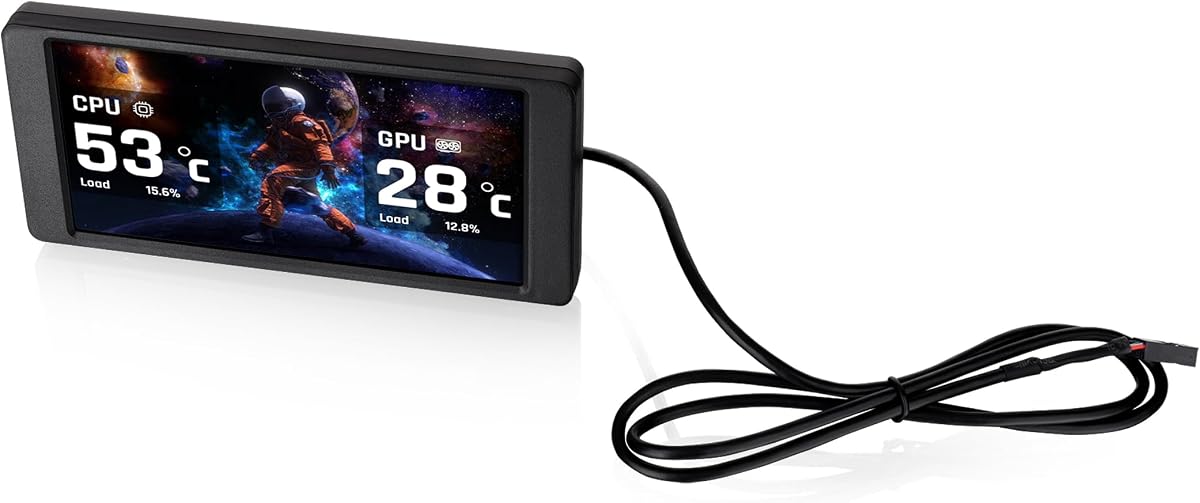
The Thermalright Trofeo Vision is a slim 9.16 inch display designed to fit seamlessly inside or outside your case. It achieves a 4.3 rating for its reliable performance and clean aesthetic.
We may earn a commission when you buy through this link, at no additional cost to you.
It tracks CPU GPU temps and fan speed using TRCC software which lets you create custom DIY interfaces easily. The plug and play USB-C connection ensures quick setup without driver headaches.
Its compact dimensions make it ideal for smaller cases where space is tight. The 1920×480 resolution provides crisp clarity for your system data and personalized visuals.
Pick this if you want a no fuss reliable screen that blends into your build well. It offers good value with essential monitoring features included.
With a slim profile this monitor fits easily in tight spaces without obstructing airflow or cables inside your chassis.
USB C connection ensures quick setup and compatibility with most systems without the need for complex drivers.
We may earn a commission when you buy through this link, at no additional cost to you.
The Thermaltake 6.0 Inch kit is designed to work with View 370 and 390 series chassis. It holds a 3.8 rating and is best for Thermaltake owners wanting an integrated look.
We may earn a commission when you buy through this link, at no additional cost to you.
It supports TT RGB PLUS 3.0 which allows rich customization of backgrounds and system monitoring data. You can upload up to 20 custom graphics for personalization.
This screen shows real-time data for CPU GPU and RAM easily. The larger viewing surface compared to older models provides better visibility.
Choose this if you own a compatible Thermaltake case and want a branded upgrade. Be aware it is less versatile than universal options.
The upgraded TT RGB PLUS 3.0 suite gives better system monitoring and control for compatible Thermaltake builds.
You can upload 20 custom images to personalize your screen to match your exact theme and color scheme.
We may earn a commission when you buy through this link, at no additional cost to you.
The GeeekPi 12.6 Inch screen is made for Hyte Y60 cases with up to 10-point touch support. It scores a 4.0 rating and includes dual speakers for audio inside the case.
We may earn a commission when you buy through this link, at no additional cost to you.
Its 1920×515 resolution delivers crisp detailed images while the IPS panel maintains brightness from any angle. The plug and play design makes setup simple with no extra software needed.
The included screwdriver ensures a clean install fitting the case panel perfectly. You can adjust settings for vertical or horizontal display easily.
If you own a Y60 and want touch audio this is a great specific option. Just remember to remove the protective film before using the screen.
Up to 10 points of multi-touch support makes navigating and interacting with the screen smooth and accurate.
Designed to fit the Hyte Y60 panel perfectly ensuring a clean integrated look with minimal effort.
We may earn a commission when you buy through this link, at no additional cost to you.
The Thermalright TV 9.16 LCD offers a magnetic suction design that makes installation and removal fast and easy. It earns a 4.3 rating for its smart engineering and TRCC software support.
We may earn a commission when you buy through this link, at no additional cost to you.
This screen connects via USB Type-C and 9-pin interface for reliable data and power. The software lets you switch static or dynamic images and set up themes freely.
The magnetic design means you do not need screws to hold it in place on compatible surfaces. This adds flexibility if you want to move or remove the display later.
Pick this if you value easy install and clean mounting without drilling or screws. It is a reliable choice for modders who change their setups often.
Magnetic suction allows for tool-free installation which makes moving the screen between cases much simpler.
TRCC software supports switching images and videos so you can customize the look with ease.
We may earn a commission when you buy through this link, at no additional cost to you.
The Thermalright Trofeo Vision 6.86 is the smallest option here making it perfect for tight spots or cooler tops. It scores a 3.4 rating and supports magnetic chassis or cooler mounting.
We may earn a commission when you buy through this link, at no additional cost to you.
You can view system parameters via TRCC software and switch between dynamic and static images freely. The magnetic panel moves around the chassis to find the best spot without screws.
This is a great mini display if you have space constraints and still want stats visible. The 1280×480 resolution is clear enough for key data.
Choose this for compact builds needing a quick glance at temps. Just be aware of its small size when deciding what data to show.
The small 6.86 inch size lets you mount this screen on cooler tops where space is very limited.
Magnetic support allows you to move the display freely on your chassis or cooler for optimal viewing angles.
We may earn a commission when you buy through this link, at no additional cost to you.
Picking the right screen depends on your case size case connectivity and desired features. This guide breaks down key factors to help you find the perfect fit.
Screen sizes range from 6 inch to 12.6 inch. Smaller screens fit tight spaces but may not show data clearly from afar. Wider bar shapes suit modern horizontal setups but need precise case dimensions.
Always measure your panel area before buying to ensure the screen fits perfectly. Check if it is designed for your specific case model or if it is universal.
Look for IPS panels for better viewing angles and color accuracy. Higher resolutions like 1920×480 make text readable. Avoid low resolutions if you plan to show detailed widgets or animations.
IPS technology ensures colors stay consistent when viewed from different angles inside glass side panels. This is critical for readability in varied lighting.
Common options are USB 9 pin internal headers USB-C or HDMI. Internal headers keep external cables hidden but need motherboard support. HDMI allows dual use as a standard monitor but uses more ports.
Check your motherboard and PSU for available connections. If you have limited headers choose screens with USB-C plug and play support for easier setup.
Some screens use brackets screws magnetic mounts or adhesive pads. Magnetic mounts allow easy removal. Brackets ensure stability but need space. Check if screws are included in the package.
Verify your case clearance depth so the screen does not block RAM or fans. Flexible mounting gives you freedom to place it at the best angle.
Each brand has unique software for themes and data. Some need background apps like Station Space others are standalone. Check OS compatibility especially if you use Linux.
Software that supports custom videos or GIFs adds value. Look for features like auto-start and brightness control for a better user experience.
Touchscreen models let you interact directly but cost more and need HDMI. Standard screens are simpler and cheaper for stats only. Decide if you need control or just display.
If you use it as a secondary screen touch is useful. For pure stats inside a glass panel standard screens are more practical and easier to set up.
Most draw power from USB or 9-pin headers but some need external DC. Check wattage and ensure your PSU can handle extra loads. Integrated power is cleaner but needs available ports.
Low power models save energy. If you plan to keep the screen on always ensure your PSU supports constant draw without overheating.
Reputable brands offer better support and firmware updates. Read reviews on software stability and build quality. Warranty terms vary by seller so check for replacements or returns.
A good warranty protects your investment. Prioritize brands with active developer communities for better long-term software support and community themes.
Install your screen carefully by connecting the USB or 9-pin cable before mounting. Secure it using the provided brackets or magnetic mounts to prevent shifting. If there is a protective film remove it to avoid scratches.
Set up the manufacturer software to display your desired stats or themes. Adjust brightness and contrast for your case lighting. Most apps allow auto-start so it runs on boot without manual setup.
Clean the screen with a soft dry cloth to avoid damaging the panel. Do not use harsh chemicals that could harm the coating. Regularly update software to keep features working smoothly and safely.
Most require brand-specific software like L Connect 3 or Station Space to display stats. This software runs in the background and updates temps. Some screens also work with AIDA64 if installed manually.
These displays use minimal system resources. They run independently via USB or headers. Your CPU load increase is negligible unless you choose heavy animated widgets or high resolution videos.
Most software is Windows only but hardware often works. Some supports like Hosyond claim Linux support. Always verify OS compatibility before buying to avoid driver issues.
Many connect via USB-C or internal 9 pin headers which do not use GPU. This frees your main ports. Some HDMI versions need video output so check connection type first.
Yes most models are removable. Magnetic or screw brackets allow easy uninstall. If mounted with adhesive pads you may need to cut carefully to avoid damage.
Power usually comes from USB or internal headers. Some need external DC adapters. Check your PSU and motherboard for compatible ports before installation.
You can show temps fan speeds usage and widgets. Some support videos GIFs custom images. Check if they support dynamic content before buying.
We covered ten great screens from compact magnetic options to wide bars with audio. Pick based on size software support and case fit to get the best experience.
Prioritize IPS quality and flexible mounting for a build that looks good and lasts. If budget matters look at the darkFlash V92 or Thermalright Trofeo for value.
Prices and stock can change quickly. Always check the latest details before finalizing your build to ensure the best screen for your PC.