
ASRock Intel Arc A380 Challenger ITX 6GB OC
4.3Editor score
Compact 2-slot design
0dB Silent operation
AV1 hardware encode
This guide compares the top GPUs for Small Form Factor Sff PC builds, reviewing performance, size, power, and features to help you choose the right graphics
Building a compact computer requires careful component selection to ensure performance without sacrificing desk space. A suitable GPU for Small Form Factor Sff PC must balance power, thermal design, and physical dimensions to fit snugly inside limited chassis volumes while delivering smooth visual experiences.
We evaluated ten real graphics cards based on architecture, memory, interface standards, and physical footprint. Our analysis focuses on how each model handles gaming, creative work, and multi-monitor setups within the tight constraints of mini-ITX or low-profile cases available on the market today.
Each pick highlights specific strengths like low-profile readiness, high clock speeds, or professional compute capabilities. Prices and availability fluctuate frequently, so check current listings before purchasing to ensure you secure the best deal for your specific build requirements and budget constraints.
4.3Editor score

4.7Editor score

4.8Editor score
The following table provides a side-by-side comparison of all ten graphics cards evaluated in this guide. You can quickly compare key specifications such as memory type, interface version, slot design, and primary use cases to find the model that fits your specific Small Form Factor Sff PC build.




This ASUS card stands out as a premier choice for enthusiasts building powerful compact systems. With a 4.7 rating from users, it offers a rare combination of next-gen architecture and physical compatibility for smaller chassis.
We may earn a commission when you buy through this link, at no additional cost to you.
The NVIDIA Blackwell architecture enables advanced DLSS 4 features, ensuring smooth frame rates in demanding titles. Its 12GB of GDDR7 memory provides ample headroom for 4K textures and complex creative workloads without bottlenecks.
While the 2.5-slot design offers great cooling, it requires a case with sufficient internal clearance. The Axial-tech fans effectively manage heat but may produce some audible noise under heavy load compared to larger chassis options.
This GPU is ideal for builders who want top-tier performance without sacrificing the compact form factor. It is the definitive choice for those prioritizing future-proofing and high-fidelity visual experiences in small spaces.
The Blackwell architecture improves efficiency and ray tracing performance significantly compared to previous generations.
The SFF-Ready label ensures it fits common small-form-factor cases without modification or risk of obstruction.
We may earn a commission when you buy through this link, at no additional cost to you.
ASRock offers a budget-friendly entry point for small PC builders. With a 4.3 rating, it delivers reliable performance for casual gaming and multimedia tasks at a very accessible price.
We may earn a commission when you buy through this link, at no additional cost to you.
The 6GB GDDR6 memory handles modern game textures well. Its single-fan design and 0dB silent mode ensure the system remains quiet during low-load activities like web browsing or video playback.
Intel Arc drivers are improving rapidly but may still lag behind NVIDIA or AMD in some titles. However, for HTPC builds or light esports, this card provides excellent value per dollar spent.
Buy this if you need a silent, compact card for media consumption or entry-level gaming. It is perfect for users prioritizing budget and silence over maximum graphical fidelity.
AV1 hardware encoding accelerates video creation workflows significantly compared to CPU-only encoding.
The fan stops completely at low temperatures, making it ideal for quiet living room setups.
We may earn a commission when you buy through this link, at no additional cost to you.
GIGABYTE leads the pack with this high-end option. Boasting a 4.8 rating, it combines superior build quality with top-tier specs for those who demand the best performance in a small chassis.
We may earn a commission when you buy through this link, at no additional cost to you.
The 12GB GDDR7 memory ensures longevity. The WINDFORCE cooling system effectively manages thermal output, allowing sustained high-performance operation without throttling even in tight cases.
Premium pricing is expected for such power. Users must ensure their power supply can handle the increased draw. It is strictly for serious gamers or professionals who need every available frame.
Choose this if budget is secondary to performance and reliability. It is the ultimate choice for enthusiasts building a powerful, compact workstation or gaming rig.
The WINDFORCE system uses specialized airflow to cool the GPU efficiently within limited space.
12GB of GDDR7 ensures the card remains relevant for years as game textures become more detailed.
We may earn a commission when you buy through this link, at no additional cost to you.
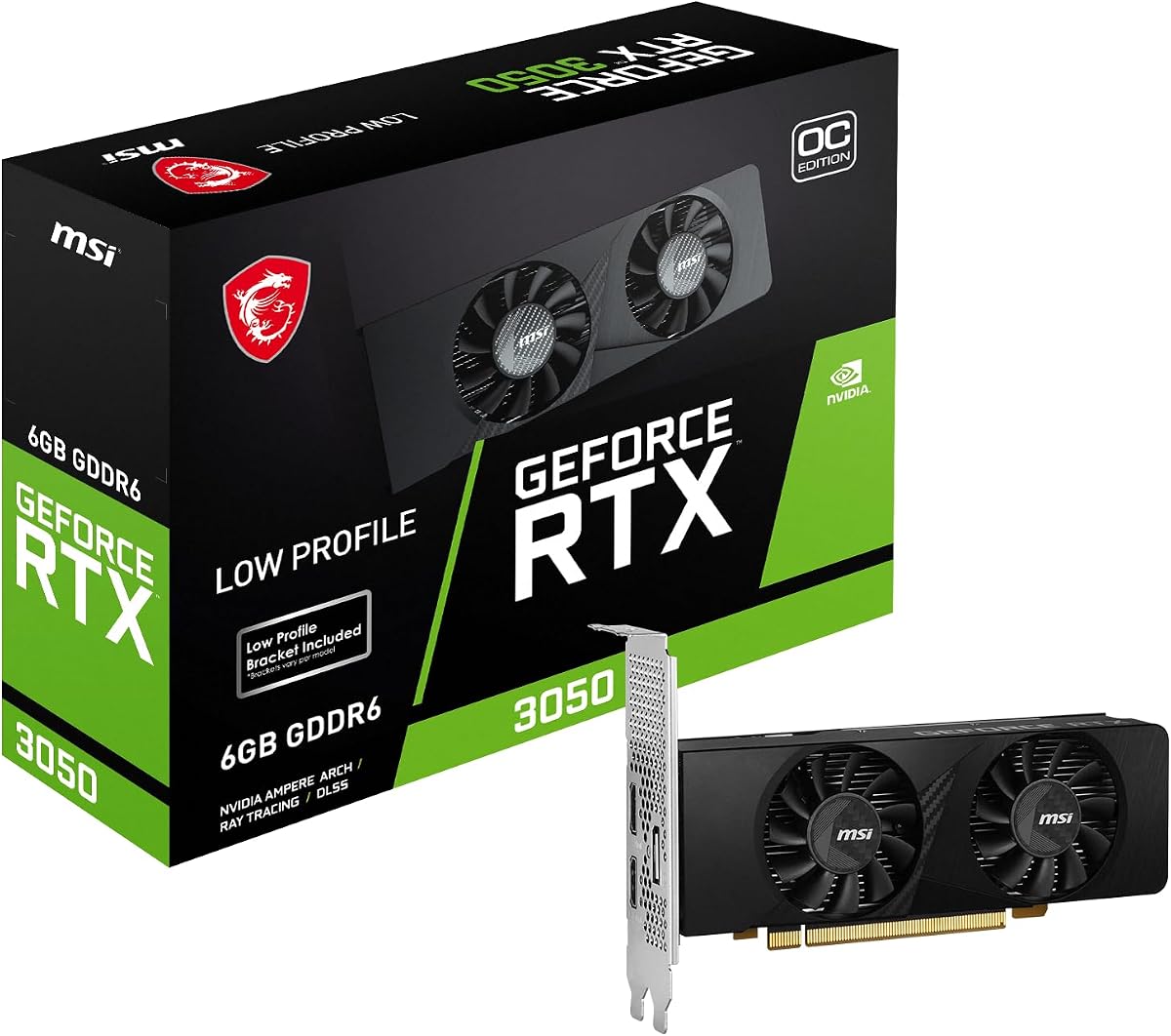
This maxsun model offers an easy entry into RTX gaming for small PCs. With a 4.3 rating, it balances performance and size effectively for budget-conscious builders needing basic 3D acceleration.
We may earn a commission when you buy through this link, at no additional cost to you.
The slim low profile design fits even the smallest cases easily. It supports modern HDMI 2.1, allowing for high refresh rates on compatible monitors without requiring complex adapters.
However, the 6GB VRAM limits long-term utility for demanding AAA games. It excels at esports and older titles where memory usage is moderate and frame rates matter more than ray tracing.
Buy this if you need a simple, functional upgrade for a compact office or gaming setup. It is ideal for users with limited physical space who still want reliable performance.
The low profile bracket ensures compatibility with tiny ITX cases that reject standard height cards.
HDMI 2.1 support ensures you can utilize modern monitors with high refresh rates.
We may earn a commission when you buy through this link, at no additional cost to you.
MSI brings reliable quality to the low-profile market. With a 4.5 rating, this card offers consistent performance for casual gaming and productivity tasks in a slim package.
We may earn a commission when you buy through this link, at no additional cost to you.
The boost clock of 1492 MHz helps maintain smooth frame rates. Its dual HDMI outputs make it versatile for multi-monitor setups without needing DisplayPort cables.
It lacks advanced cooling features found in higher-end models. However, for low-power systems, the thermal output is manageable. It is a dependable option for budget builds.
Choose this if you trust MSI's build quality. It is suitable for small office PCs or entry-level gaming where stability is key.
Two HDMI outputs simplify connectivity for users with multiple monitors or TVs.
The Ampere architecture ensures efficient power usage without sacrificing everyday performance.
We may earn a commission when you buy through this link, at no additional cost to you.
This PNY card is designed specifically for professional workflows. With a 4.7 rating, it excels in CAD, modeling, and video editing tasks within compact business workstations.
We may earn a commission when you buy through this link, at no additional cost to you.
The 4x Mini DisplayPort configuration allows four independent displays. Its single-slot low profile design maximizes internal space for other components in thin clients or SFF servers.
Gaming performance is secondary here; it is built for stability and certified drivers. You may need adapters for standard HDMI or DisplayPort monitors depending on your setup.
Buy this for business environments needing reliable multi-display support. It is perfect for professionals working in tight physical spaces.
Four outputs enable complex visualization tasks without adding external dock adapters.
At 50W, this card runs cool and requires no extra power cables.
We may earn a commission when you buy through this link, at no additional cost to you.
MSI combines low-profile dimensions with effective dual-fan cooling. With a 4.6 rating, it offers a balanced experience for gaming enthusiasts who need to save space.
We may earn a commission when you buy through this link, at no additional cost to you.
The two-fan setup provides better thermal headroom than single-fan models. This helps maintain boost clocks during extended sessions without excessive noise or heat buildup.
It requires a case that accommodates the specific dimensions. The 6GB memory is sufficient for 1080p gaming but may struggle with high-resolution textures.
Choose this if you want cooling performance in a small case. It is ideal for gamers needing a reliable 1080p experience.
Two fans spread airflow across the heatsink, lowering temperatures significantly.
MSI Center allows easy monitoring and fan curve customization.
We may earn a commission when you buy through this link, at no additional cost to you.
This MSI model bridges the gap between budget and high-end. With a 4.5 rating, it delivers robust 1440p performance while fitting within reasonable case limits.
We may earn a commission when you buy through this link, at no additional cost to you.
The 8GB GDDR7 memory handles modern textures better than 6GB cards. Its TORX Fan 5.0 technology focuses airflow for improved thermal management in confined spaces.
It demands more power and space than low-profile options. Ensure your case supports two-slot GPUs and your PSU has sufficient wattage.
Buy this for a balanced performance upgrade. It suits gamers wanting high framerates without building a massive tower.
TORX Fan blades link to stabilize airflow and reduce noise levels.
DisplayPort 2.1a supports higher bandwidth for future monitors.
We may earn a commission when you buy through this link, at no additional cost to you.
AMD offers a stable option for specialized workstations. With a 4.4 rating, it delivers reliable multi-monitor support for legacy business environments needing compact hardware.
We may earn a commission when you buy through this link, at no additional cost to you.
The 5K support allows crisp output on high-density screens. Its low power consumption makes it safe for systems with weak power supplies.
Gaming capabilities are limited to basic tasks. It remains a strong choice for static visualization or CAD work where stability is paramount.
Buy this if you have an older case or limited PSU wattage. It is perfect for professional users needing visual fidelity.
Support for 5K resolution ensures sharp text and images for professionals.
At 50W, it runs silently and efficiently without extra power cables.
We may earn a commission when you buy through this link, at no additional cost to you.
ASUS brings massive memory to compact builds. With a 4.7 rating, it enables complex texture workloads that 6GB cards cannot handle in small PCs.
We may earn a commission when you buy through this link, at no additional cost to you.
The 16GB GDDR6 allows for high-resolution gaming and 3D modeling. The dual BIOS switch adds a layer of safety for overclocking or profile switching.
It needs significant internal space due to the 2.5-slot design. Verify your case measurements before purchasing to ensure a proper fit.
Choose this if memory capacity is your priority. It is ideal for power users who need maximum VRAM in a compact chassis.
16GB ensures future compatibility with heavy texture packs and open-world titles.
The physical BIOS switch lets you revert changes instantly without software tools.
We may earn a commission when you buy through this link, at no additional cost to you.
Selecting the right GPU for a Small Form Factor Sff PC involves more than just performance metrics. You must evaluate physical size, power requirements, thermal output, and feature sets to ensure a seamless integration into your compact chassis.
The most critical factor is the physical size of the card. Look for low-profile or specific length measurements to ensure it fits within your case's clearance limits.
Always measure your case's internal GPU space before purchasing a card to avoid compatibility issues.
Small cases often rely on low-wattage power supplies. Check the TDP of the GPU and ensure your PSU can handle the load without needing external connectors.
Lower power cards reduce heat and noise, which is beneficial in enclosed small systems.
Cards are typically single-slot, two-slot, or 2.5-slot. A single-slot design maximizes space but may compromise cooling performance compared to multi-slot options.
Balance the need for cooling against the internal space available in your build.
Modern GPUs use GDDR6 or GDDR7, while older or professional models may use GDDR5. Newer types offer higher speeds and better efficiency for gaming.
Choose memory that matches your intended use case, whether it is gaming or professional tasks.
Ensure the card has the necessary ports for your monitors. Some cards use Mini DisplayPort which may require adapters for standard displays.
Check for HDMI 2.1 or DisplayPort 2.1 support to utilize modern high-refresh-rate monitors.
Effective cooling is vital in small spaces. Look for models with axial-tech fans or optimized heatsinks to prevent thermal throttling.
Avoid passive cooling cards unless your case has excellent airflow.
Newer architectures like Blackwell or Ampere offer better features like DLSS and ray tracing. Older architectures may lack these modern capabilities.
Prioritize newer architectures for longevity and performance support in upcoming titles.
Established brands like ASUS, MSI, and GIGABYTE offer better driver support and warranties. This ensures long-term reliability for your build.
Always check warranty terms before finalizing your purchase for peace of mind.
Start by carefully measuring your case's internal space. Ensure the GPU's dimensions fit vertically and horizontally. Remove any obstructive brackets or cables that might block the installation path.
Once installed, secure the card properly. Check that the power cables are connected without strain. Use software to monitor temperatures and ensure the fans are spinning correctly.
Keep the vents clear of dust. Clean your case regularly to maintain airflow. If your case has limited intake fans, consider adding small silent fans to assist with cooling.
Check your case's specifications for maximum GPU length and height. Measure the internal space physically if possible. Low-profile cards usually fit better in very tight cases. Always refer to the manufacturer's compatibility list.
Not necessarily. Low-profile versions often maintain similar core speeds but may have slightly lower boost clocks due to thermal constraints. However, modern designs mitigate this gap effectively.
Options like the RTX 5070 or RTX 5060 Ti offer excellent performance. Ensure your case can handle their physical size. Budget models like the RTX 3050 work well for 1080p gaming.
Only if the case is large enough to accept it. Many small cases have hard limits on length and height. Always check dimensions before purchasing standard height cards.
Professional cards often feature lower power consumption and multiple display outputs. They are great for workstations but may lack gaming features. Choose based on your workload.
Very important. Small cases often use SFX or lower-wattage PSUs. Ensure the PSU can support the GPU's total draw including the rest of the system components.
We have reviewed ten excellent graphics cards that cater to various needs within the small form factor market. Whether you need budget-friendly performance or high-end power, there is a model that fits your chassis.
Prioritize physical dimensions and power requirements before selecting performance specs. A great GPU is useless if it cannot fit or power safely. Always verify compatibility with your case and PSU.
Prices change frequently, so check current listings to find the best deal. Build your system with confidence knowing you have chosen a component tailored for compact efficiency and power.