
Digital Calendar 10.1 Inch Wall Plan Touch Screen WiFi picture esay to use
4.2Editor score
Syncs with Google iCloud Outlook
Built-in chore tracker for kids
Meal prep and grocery lists
Smart auto-sleep mode
Transform your home organization with a digital meal planning calendar that brings schedules, chores, and recipes together. These smart devices replace cluttered paper planners with vibrant touchscreens that keep everyone aligned. They offer real-time syncing, interactive charts, and photo displays to make daily life smoother and more connected for modern families.
We evaluated ten leading models based on screen quality, syncing capabilities, meal planning features, and ease of use. Our analysis covers everything from compact ten-inch displays to large command centers with AI fridge management. Each product was reviewed for its ability to reduce decision fatigue and streamline household coordination without hidden monthly fees.
Every pick below highlights specific strengths like budget value, premium features, or family-friendly gamification. We include detailed pros, cons, and specs to help you match a device to your home needs. Prices change frequently on Amazon, so check current listings before buying to ensure you get the best deal available today.
4.2Editor score

4.7Editor score

4.6Editor score
As an Amazon Associate we earn from qualifying purchases.
This comparison table breaks down the key specifications of all ten models so you can quickly identify which device offers the right screen size, syncing options, and smart features for your household needs.




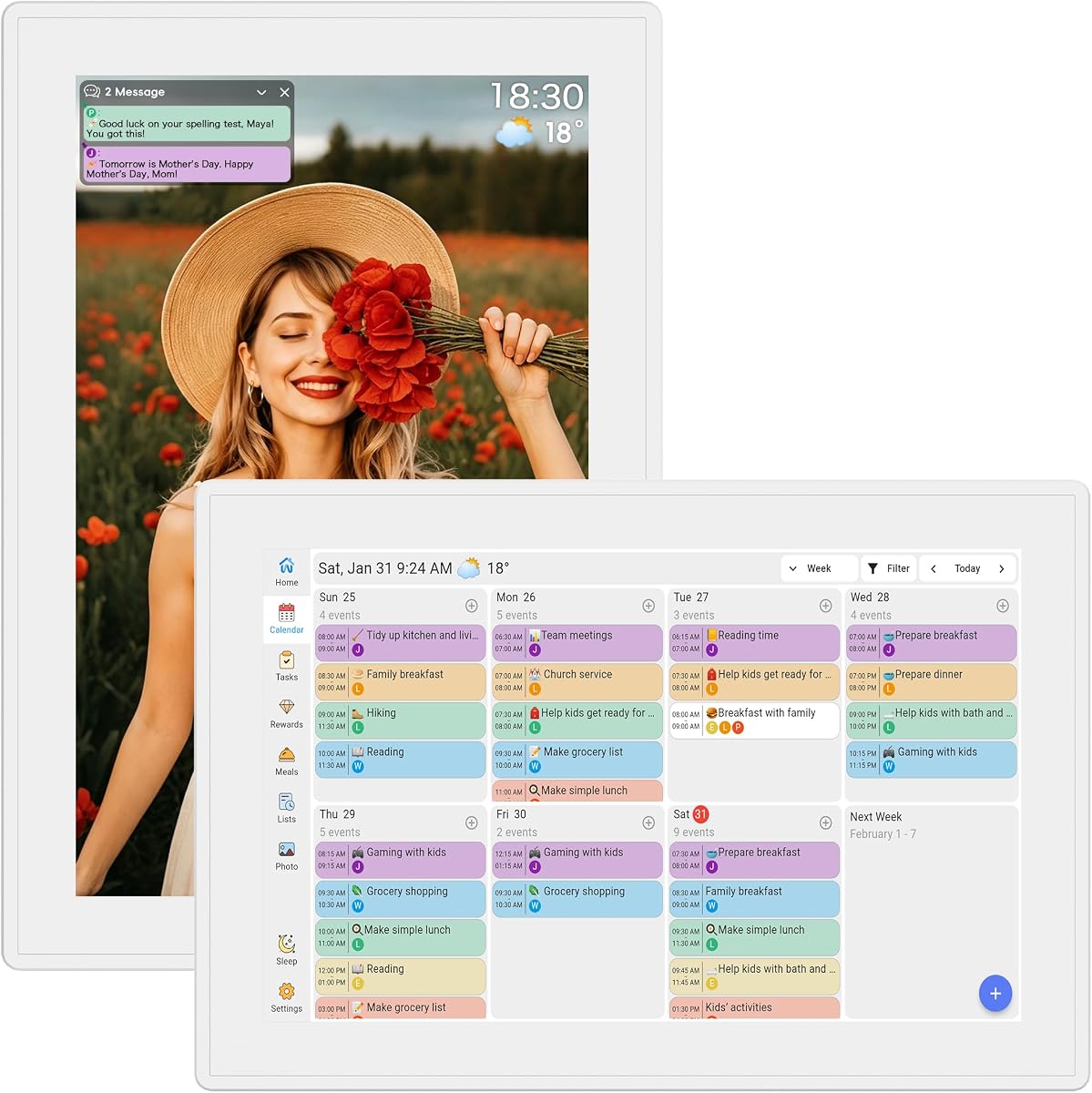

This 15.6-inch digital calendar wall touch screen stands out for its expansive viewing area that makes schedules easy to read from across the room. With a 4.4 rating, users appreciate how it transforms into a family command center without monthly costs. The built-in chore chart encourages kids to stay engaged with daily routines.
We may earn a commission when you buy through this link, at no additional cost to you.
The device supports real-time syncing with Google, Outlook, and iCloud so every family member stays updated instantly. Its AI photo restoration feature cycles through memories beautifully when not in use. The HD glare-free screen ensures clarity even in bright kitchen environments.
While it requires careful mounting and batteries for the stand are not included, the flexibility to place it on a desk or wall makes it versatile. The subscription-free model is a strong advantage over competing brands that charge for basic syncing features.
Best suited for large households needing a central hub for meal plans, chores, and appointments. If you want a visually impactful device that doubles as a photo frame, this is a solid choice for busy family dynamics.
Integrates calendars, meal planning, and chores into one sleek unit to reduce digital clutter.
Enjoy full syncing and planning tools without monthly fees keeping total cost of ownership low.
We may earn a commission when you buy through this link, at no additional cost to you.
Rated 4.2 stars this compact 10.1-inch digital calendar delivers essential organization tools without breaking the bank. It supports real-time syncing with Google iCloud and Outlook so everyone sees the latest updates instantly. The integrated chore tracker makes household duties interactive for children.
We may earn a commission when you buy through this link, at no additional cost to you.
Users love the visual weekly meal manager that lets you jot down grocery lists directly on the screen. This eliminates guesswork during shopping trips. Auto-sleep mode saves energy while timely reminders ensure you never miss important events.
The screen is smaller than premium models which can make viewing complex schedules slightly challenging. However, its straightforward interface and quick setup make it accessible for non-tech savvy users looking for basic family organization.
Ideal for small families or those new to smart calendars who want core features like syncing and meal lists without high costs. Its affordability and ease of use make it a practical starting point.
Displays menus beautifully while syncing grocery lists automatically with the whole family.
Packed with necessary syncing and planning tools at an entry-level price point.
We may earn a commission when you buy through this link, at no additional cost to you.
With a 4.4 rating this 10.1-inch smart digital calendar offers instant updates through dual-band Wi-Fi syncing. Users can assign custom colors to each family member ensuring no overlapping plans occur. The interactive chore chart empowers kids to take charge of responsibilities.
We may earn a commission when you buy through this link, at no additional cost to you.
The integrated meal planner and to-do list allow you to map out weekly menus in one central spot. Its sleek design fits perfectly on any kitchen counter or desk making it easy to reach. The device transforms into a digital photo frame when idle.
Uploading photos requires using the companion app which might be a minor hurdle for some users. However, the clutter-free paperless management of household duties keeps everyone motivated and engaged without physical papers.
Best for families who want a stylish countertop hub that manages tasks and chores effectively. Its space-saving design and dual-band syncing make it reliable for busy daily routines.
Dual-band connection ensures schedules sync instantly across devices without lag or delays.
Assign custom colors to each family member to instantly identify who has what plans.
We may earn a commission when you buy through this link, at no additional cost to you.
Rated 4.7 stars this 15.6-inch Full HD touchscreen calendar provides a crisp clear view of family schedules. The free Whale Framely App allows you to add or edit events instantly from your smartphone. Individual color profiles keep everyone's schedule clear and easy to follow.
We may earn a commission when you buy through this link, at no additional cost to you.
It simplifies everyday routines with built-in meal planning grocery lists and to-do lists. Visual and audible reminders ensure you never miss important moments like birthdays or school events. The large display is visible from across the room making it practical for shared spaces.
While mounting hardware is included and you need to manage power cord placement. The high resolution screen ensures readability from any angle. The balance of features and clarity makes it a top choice.
Ideal for households needing a reliable central hub with large display benefits. Its free app and high resolution make it the best overall value for coordinated family life.
Crystal clear 1920×1080 screen makes text easy to read from any angle or distance.
Whale Framely App offers full management features without any subscription or extra costs.
We may earn a commission when you buy through this link, at no additional cost to you.
This 15.4-inch touchscreen wall planner combines shared schedules with an interactive digital chore chart to keep everyone in sync. Its 4.4 rating highlights its ability to reduce frantic routines through seamless syncing with major platforms like Google and iCloud.
We may earn a commission when you buy through this link, at no additional cost to you.
The device displays weekly meal plans to reduce the daily stress of deciding what is for dinner. Customizable design fits naturally into your layout whether mounted on a wall or placed on a countertop. Optional premium Plus Plans unlock fun Disney mode for animations.
Premium features like Disney mode require a subscription which might limit its appeal for budget-conscious users. However the standard free tools already offer powerful organization and connection capabilities for the whole household.
Best for families who want a stylish hub that encourages positive behavior through rewards. Its clean design and shared schedules make it a perfect centerpiece for organized homes.
Connects to Wi-Fi quickly to sync daily schedules and events perfectly for everyone.
Build habits with personalized chores and rewards to encourage independence in kids.
We may earn a commission when you buy through this link, at no additional cost to you.
Rated 4.4 stars this 10.1-inch smart electronic wall organizer provides all core features without hidden fees. It syncs Google Calendar iCloud and Outlook in real time so your schedule is always up to date. The visual weekly meal manager displays menus beautifully.
We may earn a commission when you buy through this link, at no additional cost to you.
Recipe upload and automatic grocery list generation make shopping effortless. One screen holds everyone plans chores and deadlines so you never miss updates. When idle the screen becomes a beautiful slideshow of cherished memories.
The interface is functional but basic compared to larger Android-based tablets. Still the auto-update capability ensures your planner runs smoothly without constant manual tweaks. The smart sleep mode saves energy effectively.
Ideal for busy moms and women who want a straightforward hub that manages everything automatically. Its automatic list generation and clear visual menus make weekly planning simple.
Never wonder what is for dinner with visual weekly menus and automatic grocery lists.
All schedule chore and meal features are fully unlocked with zero hidden monthly fees.
We may earn a commission when you buy through this link, at no additional cost to you.
With a 4.6 rating this 21.5-inch FHD touchscreen brings all family life data together in one massive view. It syncs Google Apple Outlook Yahoo and Cozi into one shared calendar with real-time updates. The large display keeps schedules easy to read at a glance.
We may earn a commission when you buy through this link, at no additional cost to you.
AI fridge management lets you track food inventory before it gets forgotten. Select ingredients and AI can generate recipes with instructions. You can watch cooking videos on the big screen while making dinner. The device includes built-in apps like Netflix and YouTube.
The price is higher than basic models and it requires significant wall space. However its entertainment features and smart home tools turn it into a living room command center. It truly exceeds basic planning needs.
Best for large households wanting a premium device that doubles as an entertainment and cooking hub. Its AI tools and massive screen provide unmatched convenience for modern living.
Keep track of food in your fridge and pantry before it gets forgotten with AI tools.
Select ingredients and AI can generate recipes with ingredients and instructions.
We may earn a commission when you buy through this link, at no additional cost to you.
This 10.1-inch smart family planner keeps schedules meals and chores together in one calendar. It syncs Google iCloud Outlook Yahoo and Cozi into one shared family calendar with real-time updates. The Magic Import feature lets you speak or snap a photo to import events quickly.
We may earn a commission when you buy through this link, at no additional cost to you.
Plan weekly meals ahead and organize grocery lists so everyone knows what is planned. A built-in to-do list keeps work tasks neatly in sight. When idle the screen becomes a beautiful digital photo frame that brings memories to life.
It lacks advanced voice assistants found in premium models but remains highly functional for daily organization. The warm wood-grain design fits naturally on counters. The included stand allows for flexible placement.
Ideal for families wanting a warm traditional looking hub that works efficiently. Its Magic Import feature and clear sync make scheduling effortless for busy moms.
Speak or snap a photo to import events instantly using smart Magic Import technology.
Organize grocery lists and keep family to-dos together in one shared place easily.
We may earn a commission when you buy through this link, at no additional cost to you.
Rated a perfect 5.0 stars this 10.1-inch HD touchscreen combines shared calendars task management and chore tracking in one place. It syncs Google iCloud Outlook Cozi and Yahoo Calendar in real time so everyone stays updated. Assign personalized colors to every family member.
We may earn a commission when you buy through this link, at no additional cost to you.
Create a fun engaging routine with customizable reward charts that encourage kids to complete daily tasks. Plan weekly meals in advance to eliminate the what is for dinner question. Smart weather updates help you plan your day effectively.
The small screen might limit visibility for detailed maps but it excels at daily task management. Its high rating reflects reliable performance for basic needs. The setup is simple and fast.
Best for households prioritizing task rewards and simple meal planning. Its perfect rating suggests high satisfaction with its reliability and ease of use.
Customizable reward charts encourage kids to complete tasks and earn stars.
Plan your day with real-time weather forecasts tailored to your location.
We may earn a commission when you buy through this link, at no additional cost to you.
Rated 4.4 stars this 15.6-inch smart wall planner offers both calendar and Android modes for flexibility. Sync schedules Google iCloud and Outlook without monthly subscription fees. One touch lets you personalize your screen with apps and widgets.
We may earn a commission when you buy through this link, at no additional cost to you.
Use the built-in Google Gemini voice assistant to check schedules and control smart home devices. Download apps from Google Play to expand functionality. The smart photo frame mode supports Google Photos for beautiful slideshow screensavers.
Android Mode adds complexity but allows full customization for tech-savvy users. The anti-glare HD touchscreen clarity ensures comfortable viewing. Voice assistant support makes it a smart home hub.
Ideal for users wanting a highly customizable dashboard that manages both work and home. Its Android features and voice assistant make it a powerful tool for connected living.
Switch to Android Mode for customizable dashboard with widgets and apps.
Use Google Gemini assistant to set reminders and control smart home devices.
We may earn a commission when you buy through this link, at no additional cost to you.
Selecting the right digital meal planning calendar requires balancing screen size, syncing capabilities, and smart features like chore tracking and meal tools.
Screen size determines visibility across a room. Larger screens like 21.5 inches offer detailed views but cost more. High resolution ensures text remains clear from a distance.
Choose a size that fits your wall space and viewing distance. 15 inches is ideal for most kitchens while 10 inches works for desks or small areas.
Look for devices that sync with Google Calendar iCloud Outlook and Cozi. Real-time updates ensure everyone sees changes instantly without manual refreshes. Dual-band Wi-Fi improves connection stability.
Verify compatibility with your existing apps before purchasing. Seamless syncing prevents scheduling conflicts and keeps everyone aligned on plans.
Interactive chore charts encourage kids to take responsibility. Look for features like rewards points and progress monitoring via app or device. Gamification helps build lasting habits.
Prioritize models with clear task tracking if you have children. These tools reduce nagging and help kids develop self-discipline naturally.
Digital meal managers should support weekly planning and grocery list generation. Some models even offer recipe suggestions based on ingredients. Visual menus make shopping and cooking simpler.
Check if the device supports recipe uploads or AI suggestions. Automated grocery lists save time and prevent last-minute shopping trips.
Many digital calendars offer free syncing but charge for advanced features. Ensure you understand which functions require a premium plan. Some models are fully functional without any monthly fees.
Avoid unexpected costs by reading the terms carefully. A subscription-free model saves money long term while offering essential organization tools.
Design affects placement flexibility. Some models mount on walls while others sit on desks. Look for anti-glare screens and adjustable stands for optimal viewing angles.
Consider your home decor style. Wood-grain finishes offer a classic look while white screens blend seamlessly into modern spaces.
Advanced models include voice assistants and Android apps. These turn your calendar into a smart home hub capable of playing music or controlling lights.
Prioritize voice control if you want hands-free operation. Customizable dashboards offer greater flexibility for tech-savvy families.
Setup should take minutes without technical expertise. Plug-and-play designs with simple apps ensure quick onboarding. Clear instructions help you start using features immediately.
Look for user-friendly companion apps. A smooth setup process ensures the whole family can adopt the new device without frustration.
Connect your device to Wi-Fi immediately after setup and download the companion app. Create your family accounts and invite members to sync schedules. This initial step ensures everyone sees real-time updates.
Enter your recurring events like school practices and appointments into the shared calendar. Assign colors to each member to distinguish schedules quickly. Use the meal planner to map out weekly menus.
Keep the screen clean with a soft microfiber cloth to avoid scratches. Adjust brightness settings based on room lighting to reduce eye strain. Regularly update firmware to maintain security and performance.
Many models offer full syncing and planning tools without monthly fees. Check product details to confirm if premium features like advanced animations or voice commands require a subscription. Basic functionality usually remains free forever.
Yes you can manually enter custom meal plans on most devices. The touchscreen interface allows easy typing of meals and ingredients. Some models also support photo uploads of recipes for visual reference.
Open the companion app and navigate to the sync settings. Log into your Google account to grant permission for calendar access. Once connected updates appear instantly on the main display without delay.
Yes interactive chore charts and simple interfaces encourage independent use. Kids can check off tasks and earn rewards without adult help. Parental controls let you assign chores remotely.
Most calendars store local copies of schedules so you can view them offline. However real-time syncing stops until connectivity is restored. Always check for updates once internet is available again.
Digital calendars use low-emission screens safe for children. The touch interfaces are durable and resist accidental drops. Parental controls allow you to restrict access to certain apps.
Most models automatically switch to photo frame mode when idle. Upload photos via the app to display them in slideshows. Some even include AI restoration to enhance older images.
Navigate to system settings in the companion app or on the device. Select factory reset to clear data and restore defaults. Ensure you back up important schedules before resetting.
We have explored ten top digital meal planning calendars ranging from budget-friendly 10-inch displays to premium 21.5-inch command centers. Our top picks highlight the best value, overall performance, and premium features available in November 2026.
Prioritize screen size and syncing capabilities to match your family's needs. Look for models with built-in chore tools to engage kids and reduce daily friction. A subscription-free model ensures long-term value.
Prices on Amazon fluctuate so check current listings before purchasing. Compare specifications to find the right balance between features and cost. Investing in the right device can transform your home organization forever.