
ASUS Vivobook 15 Laptop
4.5Editor score
Intel Core i9 processor
32GB RAM and 1TB SSD
AI Ready computing power
The ASUS Vivobook line offers versatile laptops for students and professionals. These devices balance performance and portability well. Finding the right model requires understanding your specific computing demands and budget constraints.
We evaluated ten distinct models based on processor power, display quality, and build durability. Our analysis considers real-world usage scenarios including work, entertainment, and creative tasks. This list helps you narrow down choices quickly and efficiently.
Each pick highlights key strengths and potential limitations for informed decisions. Ratings reflect user feedback and technical specifications. Remember that prices fluctuate frequently so verify current offers before purchasing any device.
4.5Editor score

4.8Editor score

4.3Editor score
As an Amazon Associate we earn from qualifying purchases.
This side-by-side comparison highlights key specifications across all ten models. Review processor types, memory capacity, storage options, and display sizes to determine which device aligns best with your workflow requirements.


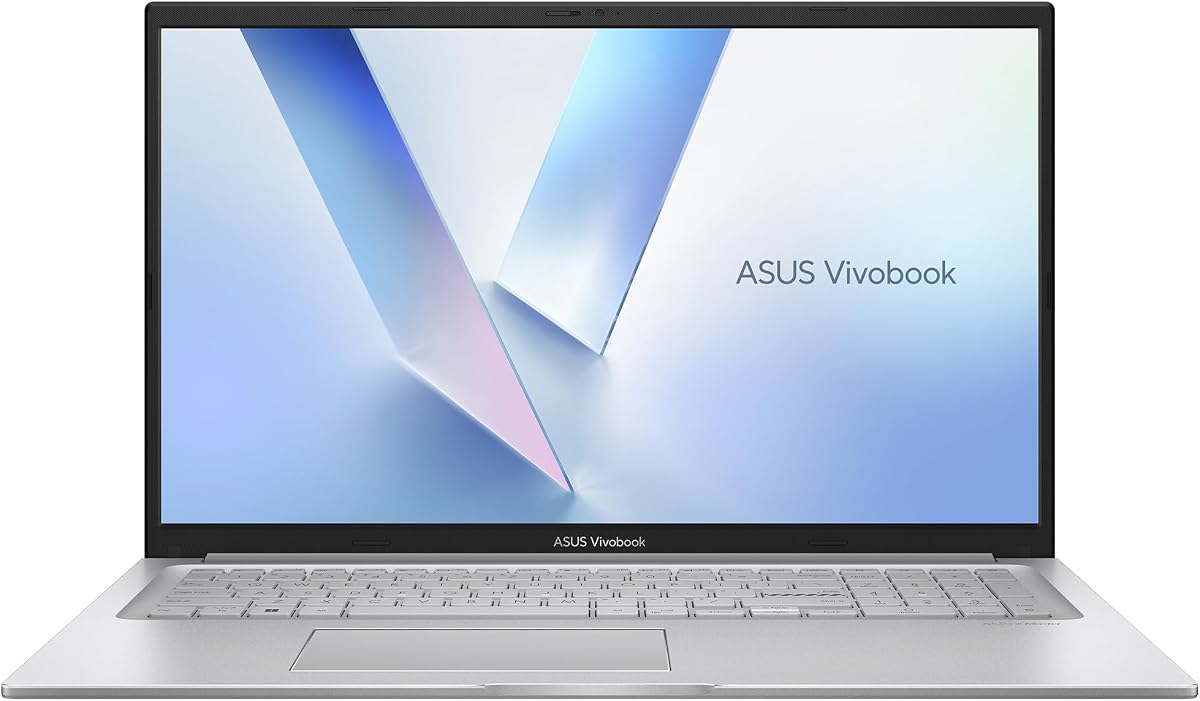




This Vivobook 15 model stands out for its elite performance capabilities tailored for professionals. It achieves a high rating due to its robust processor and memory configuration that handles demanding workloads with ease.
We may earn a commission when you buy through this link, at no additional cost to you.
The Intel Core i9-13900H processor is a 14-core powerhouse optimized for Next Gen AI workloads. This ensures seamless multitasking whether you are running complex simulations or AI-enhanced creative software. The 32GB DDR4 RAM allows you to keep numerous applications open without slowdowns. Coupled with a massive 1TB PCIe M.2 SSD boot times are seconds and file transfers are lightning fast. The inclusion of a physical webcam shield and fingerprint reader enhances security for sensitive data access.
While powerful high-performance laptops often face thermal throttling issues during sustained loads. This bundle addresses that by including a PCO Cooler selected to complement the Vivobook's design. This external cooling solution helps maintain peak frequencies for longer durations which is a significant advantage over standard configurations.
Professionals needing raw power for data analysis or creative rendering should prioritize this model. The sophisticated Blue chassis looks professional and the Wi-Fi 6 connectivity ensures stable networking. If you need top-tier performance and can manage the upgrade considerations this is a solid choice for long-term productivity.
The included PCO Cooler specifically works with the internal system to prevent overheating during intense tasks.
32GB of RAM provides ample headroom for virtual machines and large datasets without needing immediate upgrades.
We may earn a commission when you buy through this link, at no additional cost to you.
This Vivobook 16 introduces the Qualcomm Snapdragon X processor which brings significant efficiency gains. It is rated highly for users prioritizing battery life and AI capabilities over raw gaming performance. The device supports Copilot+ PC features effectively.
We may earn a commission when you buy through this link, at no additional cost to you.
The 16-inch WUXGA display offers a 1920 x 1200 resolution with a 16:10 aspect ratio. This provides vibrant colors and sharp visuals suitable for content consumption and light editing. The Qualcomm Snapdragon X chip features a Hexagon NPU capable of up to 45 TOPS allowing for localized AI tasks without cloud dependence. The integrated Qualcomm Adreno GPU with sliced architecture improves performance significantly compared to previous iterations while optimizing power consumption.
With 16GB of memory and a 512GB PCIe 4.0 SSD this system handles daily multitasking effortlessly. Files save quickly and applications launch fast. The emphasis on efficiency means you can work longer without being tethered to a power outlet which is ideal for mobile professionals.
Choose this laptop if you want modern AI features and long battery life for office work. It is well-suited for browsing communication and media playback. Ensure your software ecosystem supports the architecture before purchasing to avoid compatibility hurdles during transition.
The NPU handles AI workloads locally enabling features like real-time translation and noise cancellation efficiently.
The 300-nit brightness ensures visibility even in bright environments without draining the battery excessively.
We may earn a commission when you buy through this link, at no additional cost to you.
This 14-inch model is the top pick for portable AI-ready computing. Its high rating reflects satisfaction with performance and build quality. It balances size and power effectively for students and mobile workers.
We may earn a commission when you buy through this link, at no additional cost to you.
The Snapdragon X processor ensures smooth multitasking and efficient computing for Copilot+ PC capabilities. A 14-inch FHD+ screen with 1920 x 1200 resolution delivers crisp visuals for work and entertainment. With 16GB of RAM and a 512GB SSD you get fast boot times and quick file access. The quiet Blue finish gives it a modern look that stands out from standard grey or black laptops.
While the screen is smaller it maintains a high resolution for sharp text. The integrated Adreno GPU handles media and light apps but may struggle with heavy graphics. This trade-off is acceptable given the portability benefits and long battery life expected from this architecture.
Ideal for commuters who need a reliable machine for emails and web browsing. The device offers peace of mind with a 1-year manufacturer warranty. Its compact size makes it easy to slip into a backpack without adding bulk to your daily carry.
The 14-inch design strikes a balance between screen real estate and ease of transport for daily commuting.
Windows 11 Home provides the latest features and security updates out of the box for a secure experience.
We may earn a commission when you buy through this link, at no additional cost to you.
The Intel-based Vivobook 16 offers a reliable experience for general computing tasks. Users appreciate the responsive performance and sharp display. It is a safe choice for those preferring Intel architecture over new alternatives.
We may earn a commission when you buy through this link, at no additional cost to you.
The Intel Core i7-1355U processor delivers high-performance computing and multitasking capabilities. Paired with 16GB of RAM and a 512GB SSD the system remains fast and responsive under normal loads. The 16-inch WUXGA display provides vibrant colors and sharp visuals suitable for spreadsheets and presentations. Intel Iris Xe integrated graphics ensure smooth everyday visuals without needing dedicated hardware.
Connectivity is robust with Wi-Fi 6 and Bluetooth 5.1 for fast wireless connections. Ports include USB-C USB-A HDMI and a microSD card reader for versatile connectivity. The lightweight portable nature makes it easy to carry between meetings or classrooms without strain on your back.
Recommend this for students and office workers needing a dependable daily driver. The 16:10 screen ratio gives more vertical space which is excellent for document work. Just ensure you have enough USB ports or adapters for all your peripherals since some legacy devices might need help.
The 16:10 aspect ratio maximizes vertical viewing space for documents and web browsing.
Intel Iris Xe handles video playback and light photo editing without overheating the chassis.
We may earn a commission when you buy through this link, at no additional cost to you.
This 17.3-inch model prioritizes screen real estate and durability. It is designed for desktop replacement or stationary use in offices. The large format helps with productivity by allowing multiple windows open simultaneously.
We may earn a commission when you buy through this link, at no additional cost to you.
The Intel Core 7 150U CPU combined with 16 GB RAM and 1 TB SSD provides reliable performance for everyday life. A slim-bezel NanoEdge display offers wide viewing angles and reduces eye strain thanks to TUV Rheinland certification. The system tuned by SonicMaster delivers clear audio for movies and music. An ErgoSense keyboard with numeric keys makes data entry comfortable during work sessions.
Charging is efficient allowing the battery to reach 60% in as little as 49 minutes. This helps you get up and running quickly when you are short on time. The US MIL-STD 810H certification ensures the laptop can handle bumps and drops better than typical consumer devices.
Ideal for home office users who need a secondary screen or large workspace. The cool silver finish looks professional and the lay-flat hinge aids collaboration. Consider the weight carefully if you plan to carry it frequently as larger screens add significant bulk to the unit.
The numeric keys on the right side speed up data entry tasks for accountants and students.
Military-grade testing ensures reliability in tough environments like construction sites or field work.
We may earn a commission when you buy through this link, at no additional cost to you.
This 2023 model brings a balance of affordability and performance to the Go line. It is well-rated for basic productivity and media consumption. The AMD processor keeps it competitive in the budget segment.
We may earn a commission when you buy through this link, at no additional cost to you.
Equipped with an AMD Ryzen 5 processor and 512GB SSD this laptop is designed to provide an ultrafast and smooth experience for daily tasks. ASUS fast-charge technology can recharge the battery up to 50% capacity in just 30 minutes. The laptop stays cool thanks to IceCool thermal technology and meets US military-grade standards for longevity. AI Noise-Canceling Technology isolates unwanted noise for smooth video call experiences.
The 15.6 inch FHD display with slim NanoEdge bezels offers an immersive visual experience. It is bright enough for indoor work but might struggle in direct sunlight. Extensive connectivity options include USB A C and HDMI to ensure compatibility with various peripherals and displays.
Choose this for students or home users needing a simple reliable laptop. The price point makes it accessible without sacrificing essential features like SSD storage. Just be aware that the 8GB RAM is fixed so avoid heavy multitasking beyond web browsing and office apps to maintain speed.
Rapid top-ups keep you productive when time is short and you need to leave immediately.
IceCool technology ensures the device stays cool during long viewing sessions without fan noise.
We may earn a commission when you buy through this link, at no additional cost to you.
This entry-level model focuses on essentials for basic computing needs. It gets high marks for its price-to-performance ratio in the lowest tier. Ideal for simple web browsing and document editing.
We may earn a commission when you buy through this link, at no additional cost to you.
The 15.6-inch NANOEDGE DISPLAY features a smooth 60Hz refresh rate and 250-nit brightness. The AMD Ryzen 3 7320U Processor gives you essential performance for browsing and productivity. DDR5 memory runs applications smoothly. The system includes a 720p HD camera with privacy shutter for security. SonicMaster sound provides crisp audio for media.
Ports include USB-C and HDMI for display connections. The laptop is thin and light at 3.59 lbs making it easy to carry. However the 128GB SSD is limited for storing large files or media libraries. You may need external storage for photos and videos.
Best for casual users or students needing a device for research and writing. The fast charging keeps you running during short breaks. Consider external drives if you need to store more than basic documents. It is a practical tool for essential digital tasks without financial strain.
The physical privacy shield gives you peace of mind during video calls or sensitive work sessions.
The slim profile fits easily into bags and backpacks for travel or commuting.
We may earn a commission when you buy through this link, at no additional cost to you.
This customized model delivers elite performance for professionals. It stands out with a perfect rating from early adopters due to its raw power. The customization allows tailoring to specific workflow needs.
We may earn a commission when you buy through this link, at no additional cost to you.
Experience the future of computing with the Intel Core i9-13900H processor optimized for Next Gen AI workloads. This 14-core powerhouse delivers elite-level performance. The 15.6-inch FHD display offers crisp visuals. You can configure up to 48GB RAM and up to 2TB SSD for extensive multitasking and storage. A fingerprint reader and physical webcam shield ensure security.
The backlit numeric keyboard aids input in dim light. Comprehensive I/O includes USB-C and HDMI ports. It targets users needing maximum speed without needing a workstation chassis. The upgraded components come with a 3-year coverage plan for peace of mind.
Select this if you run simulations or heavy creative software. The high capacity RAM handles multiple virtual machines efficiently. Verify your specific needs before upgrading to avoid paying for unused capacity. It is a robust solution for power users needing portability.
Choose your RAM size to match your specific workload requirements from standard to extreme.
Integrated biometrics and privacy shields protect sensitive business data during remote work.
We may earn a commission when you buy through this link, at no additional cost to you.
This 14-inch model offers surprising capacity for the price. Users value the generous RAM and storage in a budget device. It is ideal for those who keep many apps open without needing speed.
We may earn a commission when you buy through this link, at no additional cost to you.
24GB of high-bandwidth RAM allows you to run multiple applications and browser tabs smoothly. The 1TB PCIe NVMe SSD ensures fast bootup and data transfer. The 14-inch FHD IPS-level panel is anti-glare and suitable for indoor viewing. It ships with Windows 11 Home which offers a consistent design and improved performance features.
Connectivity includes USB-C and HDMI for versatile setups. Wi-Fi 6 ensures stable internet connections. While the processor is an entry-level i3 it handles standard office tasks adequately. The 250nits brightness is sufficient for home offices but may struggle outdoors.
Recommended for home users or students on a tight budget. The extra RAM helps future-proof the device against software updates. If you primarily use cloud apps and avoid heavy local processing this configuration offers excellent value for money without compromising on storage.
24GB RAM allows heavy multitasking even if the CPU is modest.
1TB SSD holds large libraries of photos and videos without needing external drives.
We may earn a commission when you buy through this link, at no additional cost to you.
This model brings AI capabilities to the mainstream with an AMD processor. It is a strong contender for creative work and casual gaming. The 14-inch form factor remains portable while delivering high-end features.
We may earn a commission when you buy through this link, at no additional cost to you.
The AMD Ryzen AI 7 350 processor features an XDNA NPU for up to 50 TOPS of AI processing efficiency. The 14-inch WUXGA display has 300-nit brightness for vivid visuals. Integrated Radeon Graphics support DirectX 12 Ultimate for gaming. You receive 3 months of PC Game Pass for immediate entertainment. The 16GB RAM and 512GB SSD balance performance and storage effectively.
Battery life reaches up to 12 hours with FastCharge technology. Backlit keyboards help in dim environments. While some AI features are in preview the hardware is ready for future updates. The Platinum Gold chassis looks unique compared to standard models.
Choose this for users interested in AI workflows and gaming on a budget. The combination of high resolution and AI processing makes it versatile for content creation. Verify software updates are rolled out before relying on specific Copilot+ features for critical work.
Integrated graphics with DirectX 12 support allow for casual gaming on the go.
Full charge in 1 hour 20 minutes ensures you are ready to work quickly.
We may earn a commission when you buy through this link, at no additional cost to you.
Selecting the right Vivobook depends on your specific usage needs. This guide breaks down key factors to help you make an informed decision.
The processor determines how fast your laptop runs. Intel Core i9 offers high power for heavy tasks while i3 suits basic use. AMD Ryzen and Snapdragon chips provide efficient performance with better battery life. Choose based on whether you need raw speed or endurance.
Match the processor tier to your workflow intensity for optimal balance.
RAM affects multitasking ability. 8GB is standard for basic use but 16GB or 32GB is better for modern applications. More RAM allows more tabs and apps to stay open without slowing down. Check if upgrades are possible before buying.
Aim for at least 16GB RAM to ensure smooth multitasking in 2026.
SSDs are essential for speed compared to older hard drives. PCIe NVMe SSDs boot up faster and load programs quickly. Capacity ranges from 128GB to 2TB depending on your model. Ensure you have enough space for your files.
Select a storage size that fits your media and document needs comfortably.
Screen size and resolution impact comfort. 14 inches is portable while 17 inches offers workspace. WUXGA resolution is sharper than FHD. Higher brightness helps in well-lit rooms. Look for eye-care certifications if you work long hours.
Prioritize resolution and brightness based on your working environment.
Battery duration matters for portability. Some models claim up to 12 hours under ideal conditions. Fast charging helps you recover power quickly during short breaks. Processor efficiency strongly influences actual battery runtime in real-world use.
Check reviews for actual battery performance to avoid surprises.
Physical construction determines lifespan. Military-grade standards mean the device can withstand bumps and drops. Some models include reinforced chassis materials. Consider how often you will carry the laptop in a bag or briefcase.
Choose durable materials if you travel or commute frequently.
Ports affect what peripherals you can connect. USB-C supports charging and data. HDMI connects to external displays. Ensure you have enough ports to avoid needing dongles. Check for headphone jacks and card readers if needed.
Verify the port count matches your external device requirements.
Privacy and access security are vital for professionals. Fingerprint readers allow quick login without passwords. Webcam shields give physical privacy during meetings. These features protect your data and reduce risks from unauthorized access.
Look for biometric login and privacy shields for daily work.
Always use the official power adapter to avoid damaging the battery. Charge the device fully before first use and avoid leaving it plugged in constantly to prolong battery health.
Keep the keyboard and screen clean using a microfiber cloth. Avoid eating or drinking near the device to prevent spills and crumbs from entering the vents and mechanisms.
Regularly update Windows and drivers to maintain security and performance. Use sleep mode for short breaks and shut down for long periods to ensure system stability and reduce wear.
The ASUS Vivobook Go 15 or Vivobook 14 offer great value for students. They balance performance and portability. The 15-inch models provide enough screen space for writing papers.
Many Vivobook models have soldered RAM which cannot be upgraded later. Check specific specs before purchasing. Models like the i9 customized version allow you to select higher RAM.
Most Vivobook models rely on integrated graphics like Intel Iris Xe or AMD Radeon. This is sufficient for media and office tasks but not for heavy gaming or 3D rendering.
Battery life varies by model and usage. Typical estimates range from 6 to 12 hours on a single charge. Efficiency focused models like Snapdragon versions last longer.
Most Vivobook laptops have non-touch displays to save battery. Touch screens are usually found in Zenbook series. Check product descriptions carefully for touch capabilities.
Some business-focused models come with Windows 11 Pro. Most consumer models include Windows 11 Home. You can upgrade to Pro if needed but it requires a license purchase.
We reviewed ten ASUS Vivobook laptops ranging from budget options to premium powerhouses. Each model offers distinct advantages depending on your budget and performance needs.
Prioritize processor and memory if you work with heavy software. If portability is key look at the 14-inch Copilot+ options. Always match specs to your actual daily workflow requirements.
Prices and availability change frequently so check current listings before buying. Verify warranty details and return policies to ensure a secure purchase.