
SABRENT USB 3.0 4-Bay Docking Station
4.2Editor score
Whisper quiet cooling fan
Tool-free magnetic access
USB 3.0 5Gbps
Finding the right storage solution is critical for modern data needs. A 4 Bay Hard Drive Enclosure with Cooling Fans offers expandable capacity while keeping drives safe from overheating during heavy use.
We evaluated ten top models based on build quality, transfer speeds, fan noise levels, and compatibility. Each unit was analyzed for its ability to handle large HDDs and SSDs efficiently.
Each pick highlights unique strengths like USB speeds, hot swap features, or hybrid support. Prices change frequently so verify current listings before purchasing your ideal storage dock.
4.2Editor score

4.3Editor score
4.1Editor score
As an Amazon Associate we earn from qualifying purchases.
Below is a detailed side-by-side comparison of the ten leading 4 bay hard drive enclosure models with active cooling fans evaluated for this comprehensive guide.



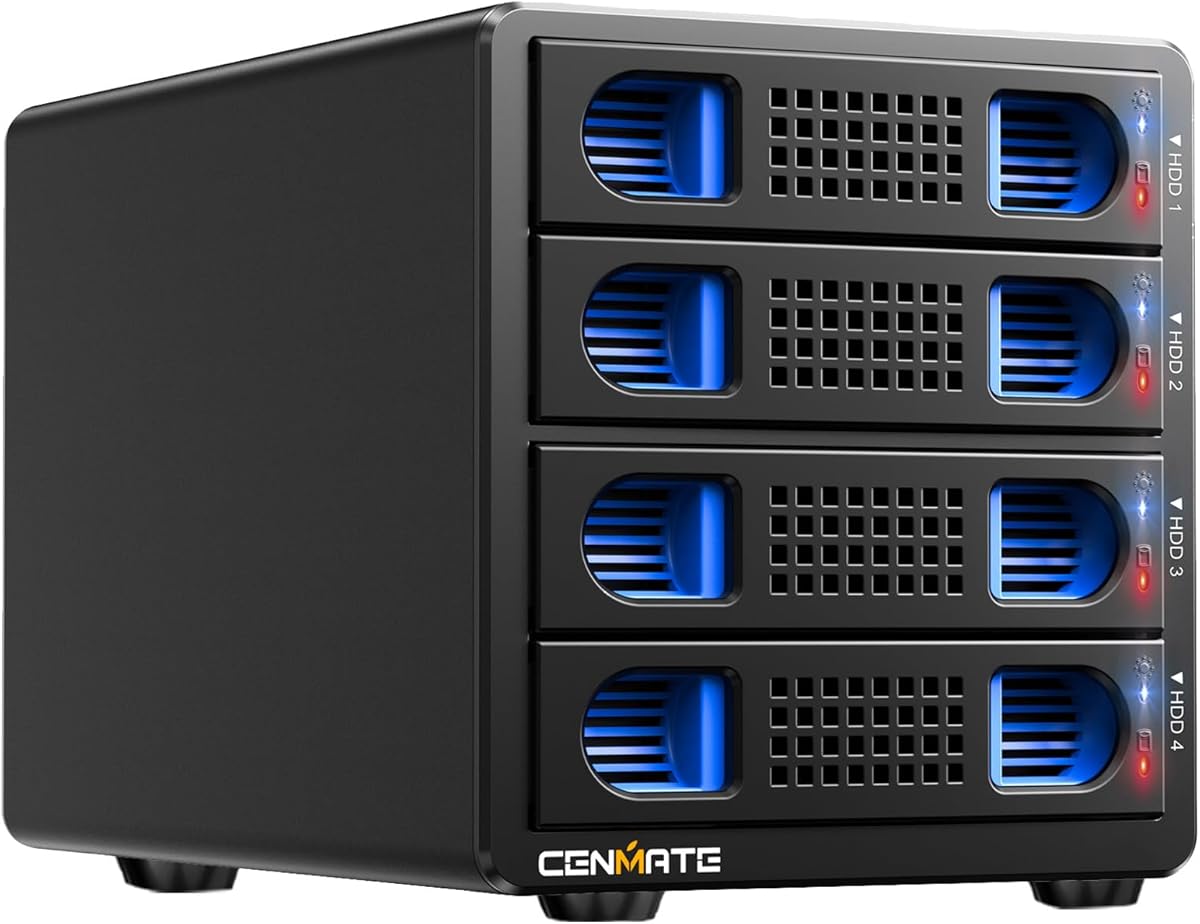
This CENMATE enclosure stands out as a reliable external storage system for both individuals and businesses. It supports 2.5 and 3.5 inch HDDs and SSDs with a max capacity up to 80TB. Its aluminum-alloy materials and built-in fan maximize security by reducing heat effectively.
We may earn a commission when you buy through this link, at no additional cost to you.
The enclosure equips with an advanced chip and USB 3.0 output interface allowing max 5Gbps under UASP control. You can transfer a 1G movie in 3-5 seconds which is 10 times faster than USB 2.0. The included USB A/C 3.0 cables ensure wide compatibility with Windows and Mac systems.
While the fan noise is around 40-50 decibels making it less ideal for noise-sensitive environments, the trade-off is better thermal performance. The DC 12V power adapter provides stability for high-speed transmission. Cenmate offers technical support solving problems within 24 hours.
This drive is perfect for users needing a tool-free hot swappable enclosure without RAID complexity. It saves space on your desktop or laptop while handling large data transfers efficiently. Check current specs before buying to ensure it meets your specific capacity needs.
The built-in 2 inch fan and aluminum construction work together to dissipate heat quickly keeping your drives cool during heavy workloads.
With USB 3.0 speeds and UASP control you get significantly faster file transfers compared to older USB 2.0 interfaces standard in older docks.
We may earn a commission when you buy through this link, at no additional cost to you.
This model upgrades the speed to up to 10Gbps with USB 3.2 Gen 2 interface. It handles 2.5 and 3.5 inch drives with a max capacity of 80TB. The aluminum-alloy materials and fan help maximize security by keeping temperatures low during intensive data operations.
We may earn a commission when you buy through this link, at no additional cost to you.
Transferring files becomes significantly faster with USB 3.2 Ports moving 1G files in 3-5 seconds. This is 20 times faster than USB 2.0. The USB Type-C interface supports various computer connections including Thunderbolt 3 and 4 making it versatile for modern laptops and desktops.
Hot swapping allows users to replace drives without powering off the device enhancing convenience. However fan noise remains around 40-50 decibels which may bother those sensitive to sound. Cenmate provides technical support to resolve any issues within 24 hours of contact.
Ideal for professionals needing faster throughput than standard USB 3.0 offers this enclosure saves desktop space effectively. It supports both personal and enterprise uses. Always verify the computer version compatibility for optimal read write speeds before purchase.
The move to USB 3.2 Gen 2 doubles the speed of USB 3.0 providing smoother workflows for large file transfers and media editing.
Support for Thunderbolt 3 and 4 ensures this dock works seamlessly with high performance ultrabooks and workstations needing fast data links.
We may earn a commission when you buy through this link, at no additional cost to you.
The MAIWO enclosure features an aluminum alloy design with 2 cooling fans for optimal heat dissipation. These fans activate when drives exceed 48°C ensuring protection while maintaining energy efficiency. It supports 3.5 SATA HDDs with a total capacity up to 96TB across all bays.
We may earn a commission when you buy through this link, at no additional cost to you.
Designed to handle large data amounts this enclosure supports daisy chaining for extensive storage expansion. You can easily create cost-effective storage solutions for all your data needs. It is compatible with MAC OS Windows and Linux meeting diverse system requirements for various devices.
An HD-TV port allows you to connect to TVs supporting 4K HD video output enhancing multimedia experience. The 84W external power supply ensures sufficient power for larger capacity drives promoting stability. Independent power switches give complete control over your drives.
This unit is versatile for users needing TV connection or daisy chain expansion. While ratings are lower than top picks the feature set remains strong. Ensure your system supports the specific USB and HDMI protocols for full functionality before ordering.
Fans only turn on when needed saving energy and reducing noise when drives are cool but ready when temps rise during heavy use.
The HD-TV port adds unique value allowing direct video output from drives connected to the enclosure for media playback on larger screens.
We may earn a commission when you buy through this link, at no additional cost to you.
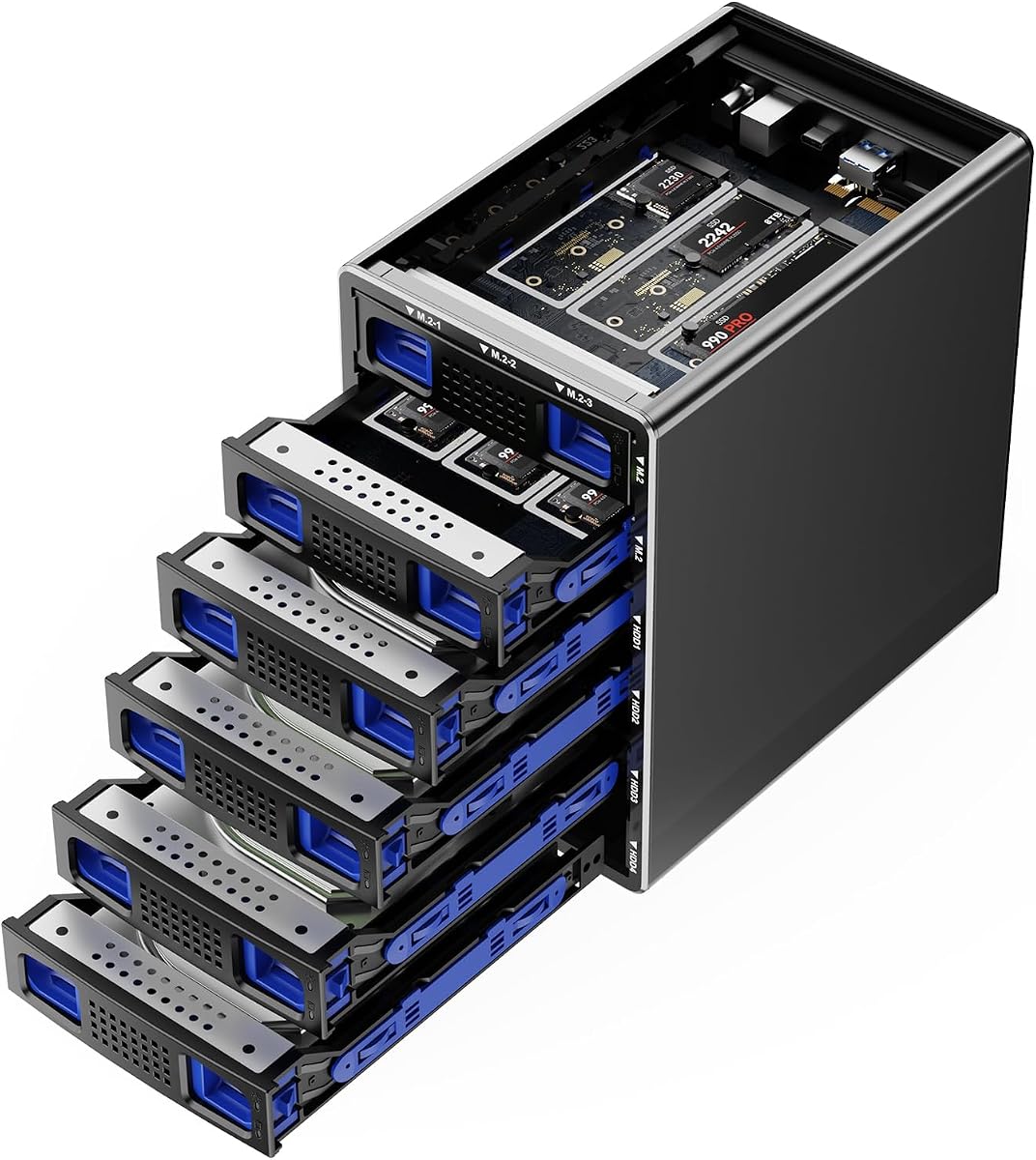
This is CENMATE's first Hybrid HDD plus NVMe SSD Enclosure holding 4 SATA HDDs and 6 M.2 NVMe SSDs. Maximum capacity reaches 136TB combining massive storage with high-speed performance. It uses an advanced chip solution set and USB 3.2 Gen 2 protocols for full load read rates.
We may earn a commission when you buy through this link, at no additional cost to you.
The aluminum-alloy materials and silent fans protect data security by continuously cooling drives without sleeping. Tool-free hard drive tray design enables easy installation and removal without additional tools. It connects via USB A/C 3.2 Gen 2 supporting Windows and Mac systems.
While the fan runs continuously which may generate some noise the benefit is consistent cooling. The enclosure is designed to expand capacity efficiently for power users needing both speed and volume. Cenmate provides lifetime technical support for product questions within 24 hours.
Perfect for users who want to mix fast SSDs with large HDDs in one device. This hybrid approach maximizes utility without needing multiple enclosures. Check physical dimensions to ensure all M.2 drives fit your specific model before purchase.
Supporting both SATA and M.2 formats means you can use existing HDDs and newer SSDs together in a single unified enclosure for maximum utility.
Fans that do not sleep ensure steady thermal management even during idle periods protecting your drives from heat spikes unexpectedly.
We may earn a commission when you buy through this link, at no additional cost to you.
This WAVLINK enclosure features four SATA bays supporting 3.5 and 2.5 hard drives and SSDs up to 4x22TB. It uses USB 3.2 Type-C port for up to 10Gbps speeds. Dual built-in fans activate at 48°C keeping drives cool and perform optimally during intensive tasks.
We may earn a commission when you buy through this link, at no additional cost to you.
Beyond storage it features an HDMI interface supporting up to 4K@60Hz resolution under DP1.4. Create a seamless workspace with high-speed connectivity and stunning display capabilities. Independent ON/OFF power switches allow hot-swapping drives without powering down the entire system.
Note that for 2.5 hard drives additional mounting brackets are not included. Ensure your host USB-C port supports video output for the HDMI port to work correctly. WAVLINK provides phone and email support within 8 hours with a 12-month warranty.
Ideal for creative professionals needing display output directly from storage devices. The aluminum shell offers superior heat dissipation and structural integrity. Verify your drive sizes match the enclosure requirements to avoid mounting issues upon arrival.
The HDMI port turns your dock into a media hub allowing you to stream directly to a TV without needing a separate computer screen.
Each bay has its own switch giving you granular control over which drives are active helping to save power and reduce noise.
We may earn a commission when you buy through this link, at no additional cost to you.
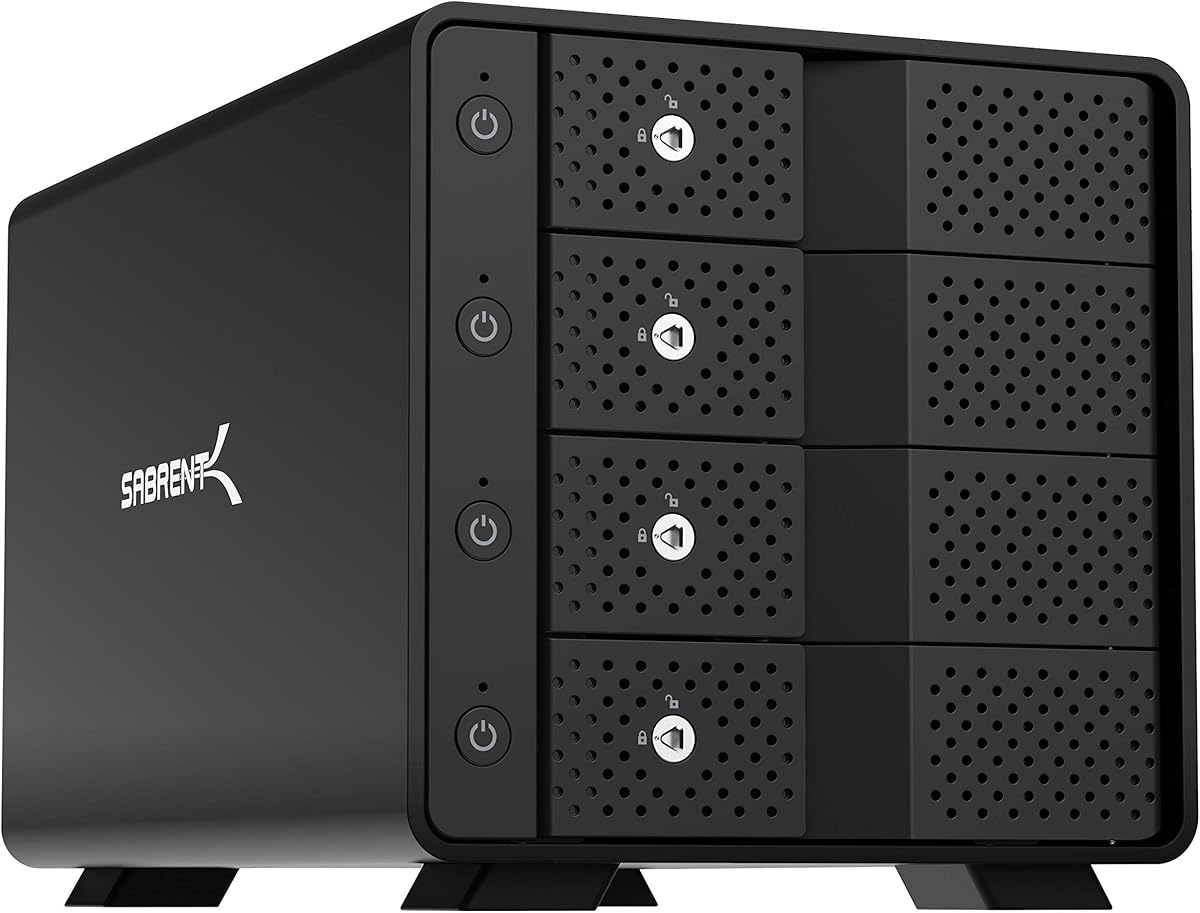
This SABRENT station supports up to 4x 16TB 2.5 inch SATA SSDs or HDDs with a max of 64TB. USB 3.0 interface delivers up to 5Gbps transfer speeds backward compatible with USB 2.0. Quick and easy drive swaps are enabled by a magnetic cover design needing no screws.
We may earn a commission when you buy through this link, at no additional cost to you.
A built-in whisper-quiet fan keeps drives cool and healthy with an optional on/off switch for noise control. It is engineered for continuous 24/7 operation ensuring long-term reliability. Works right out of the box with Windows macOS and Linux with no drivers required.
While it does not support RAID or 15mm drives its simplicity makes it excellent for quick access. The high capacity allows broad compatibility for most standard portable drives. SABRENT ensures it works seamlessly with major OS platforms for plug and play ease.
Best for users needing a simple reliable way to access multiple portable drives quickly. The magnetic cover adds convenience for frequent swapping. Verify your drive thickness meets the 12.5mm limit before purchasing to ensure proper fit in the bays.
The magnetic cover lets you access drives without tools making it perfect for users who swap drives often or need quick data retrieval.
Whisper-quiet cooling means this dock won't distract you during work or media playback even when drives are spinning intensely.
We may earn a commission when you buy through this link, at no additional cost to you.
This model includes USB A/C 3.0 plus eSATA cable for broader legacy support. It supports 2.5 and 3.5 inch drives with max capacity up to 80TB. Aluminum-alloy materials and a built-in fan maximize security by keeping drives cool and safe during extended use sessions.
We may earn a commission when you buy through this link, at no additional cost to you.
Equipped with JMS567+JMB575 chip it offers transfer speeds up to 5Gbps with USB 3.0. Transfer 1G files in 3-5 seconds which is 10 times faster than USB 2.0. The DC 12V power adapter ensures stability for high-speed transmission without drops or disconnects.
Note that eSATA port does not support computer SATA-to-eSATA adapters and hot-swapping is not supported. You must ensure eSATA port supports RAID to access multiple bays or only one bay is accessible. Cenmate provides technical support within 24 hours.
Ideal for users needing both modern USB and legacy eSATA connectivity. It saves space on desktops efficiently. Always check your motherboard ports to confirm eSATA compatibility before buying to ensure full functionality of all bays.
Supporting both USB and eSATA makes this a versatile choice for older computers that may still have native eSATA ports available.
The included 12V adapter provides the stable current needed for four large drives running simultaneously without risk of power loss.
We may earn a commission when you buy through this link, at no additional cost to you.
This WAVLINK variant supports up to 4x32TB drives totaling 128TB capacity for extensive storage needs. It features USB 3.2 Type-C for up to 10Gbps speeds. Dual built-in fans activate at 48°C ensuring drives remain cool and perform optimally even during intensive tasks.
We may earn a commission when you buy through this link, at no additional cost to you.
Beyond storage it includes an HDMI interface supporting 4K@60Hz resolution for stunning display capabilities. An extra USB-C port allows connecting peripherals or daisy-chaining devices. Independent power switches make hot-swapping drives easier without powering down the entire system.
Ensure your host USB-C port supports video output for the HDMI port to function. For 2.5 drives mounting brackets are not included. WAVLINK provides phone and email support within 8 hours with a 12-month warranty and lifetime technical support available.
Perfect for power users needing massive storage capacity for media libraries or archives. The aluminum shell offers superior durability and heat dissipation. Check drive dimensions and host port capabilities to ensure compatibility before placing your order.
With support for 32TB drives you can store years worth of media and data in one compact device reducing clutter on your desk.
10Gbps speeds ensure that even with massive capacities you don't wait hours to transfer files keeping your workflow efficient.
We may earn a commission when you buy through this link, at no additional cost to you.
This enclosure supports 2.5 and 3.5 inch drives with 8 RAID modes including 0 1 3 5 and 10. Max capacity is 80TB. Aluminum-alloy materials and built-in fans maximize security by keeping drives cool during intensive data operations and protection.
We may earn a commission when you buy through this link, at no additional cost to you.
Equipped with JMS567+JMB393 chip it offers USB 3.0 and eSATA output interfaces. Transfer 1G files in 3-5 seconds with USB 3.0 Ports. It is compatible with Windows and Mac systems and includes cables for wide compatibility and easy plug and play setup.
Switching RAID modes requires using a screwdriver to toggle the paddle and holding the reset button for ten seconds. Note that eSATA port does not support adapters and hot-swapping is not supported. Cenmate provides technical support within 24 hours.
Best for users needing basic RAID redundancy without a full NAS system. It is a cost effective solution for protecting data. Always back up data before switching modes to prevent accidental data loss during configuration changes.
Supporting multiple RAID modes allows you to protect data from drive failures without needing complex networked storage solutions.
Both USB and eSATA give you flexible connection options for different computer setups whether modern or legacy configurations.
We may earn a commission when you buy through this link, at no additional cost to you.
This enclosure features a dedicated ASMedia ASM1351 controller for each of the four bays giving every drive stable independent connection. It supports up to four 3.5in SATA HDDs/SSDs over one USB 3.1 Gen 2 Type-C port. Tool-free drive insertion with locking key and Kensington slot included.
We may earn a commission when you buy through this link, at no additional cost to you.
Aluminum-and-metal housing with a 92mm fan provides safe 24/7 operation powered by an auto-switching adapter. Each drive mounts individually in JBOD-style. Works with Windows macOS and Linux. It is backward compatible with USB 3.0 and 2.0 for broad connectivity.
While the price is higher than basic docks the dedicated controllers provide superior stability for heavy workloads. The active cooling ensures drives stay safe during continuous use. This model offers excellent reliability for critical data management tasks.
Ideal for professional users requiring maximum stability for large data transfers. The locking key and Kensington slot add security for shared spaces. Ensure you use a USB-C to USB-C connection for best performance as noted by the manufacturer.
Each bay having its own controller means performance on one drive does not throttle others during multi-drive access operations.
The built-in locking key and Kensington slot protect your hardware from theft making it suitable for office environments.
We may earn a commission when you buy through this link, at no additional cost to you.
Selecting the right enclosure requires looking at interface speeds build materials cooling methods and capacity limits to match your specific workflow needs.
Look for USB 3.2 Gen 2 (10Gbps) or USB 3.0 (5Gbps) depending on your data transfer needs. USB-C ports offer better durability and modern compatibility compared to USB-A alone. If you need legacy support check for eSATA or older USB-A options included in the package.
Faster interfaces ensure large video files move quickly. Prioritize USB-C for future-proofing your setup.
Active cooling fans are essential for 4 bay enclosures to prevent overheating during continuous writes. Aluminum casings help passively dissipate heat. Check if fans are silent or have temperature sensors that activate only when needed to reduce noise.
Always choose a model with adequate fan size and thermal management to maintain drive health.
Ensure the enclosure supports both 2.5 and 3.5 drives if you mix laptop and desktop sizes. Verify max drive capacity limits such as 20TB or 22TB per bay. Some units require adapters for smaller drives so confirm what is included.
Check for tool-free designs to simplify installing your existing drives.
Hot swapping lets you replace drives without unplugging power increasing convenience for backup workflows. Not all models support this so verify if independent power switches are available. This feature is vital for frequent data rotation.
Prioritize independent switches for easy hot swapping and drive safety.
Some enclosures offer hardware RAID modes for data redundancy while others are DAS only. RAID requires specific setups and may limit compatibility with Mac systems. Ensure you understand the difference before buying to avoid data loss risks.
Decide if you need mirrored data protection or simple expansion.
Aluminum alloy builds resist heat and physical damage better than plastic. A sturdy shell ensures the internal components last longer under daily use. Check for ventilation holes that allow airflow without letting dust enter.
Invest in metal shells for long term reliability and performance.
High capacity drives need reliable power. Look for units with external AC adapters and avoid those relying only on bus power. Stable voltage prevents unexpected disconnections that could corrupt files.
Ensure the adapter matches your region for worldwide usability.
Features like HDMI ports allow direct video output for media centers. Daisy chaining helps expand storage further if needed. Warranty terms also matter; longer support indicates manufacturer confidence in product quality.
Consider extras that fit your specific use case beyond basic storage.
First insert your drives into the bays ensuring they click securely. If using 2.5 drives check for mounting brackets. Plug the power adapter into the unit before connecting to your computer to ensure stable voltage delivery.
Wait for the system to recognize the drives via Disk Management or Finder. Create file systems if needed. Do not power off while transferring data to avoid corruption. Use the hot swap switches if your model supports it.
Keep the enclosure in a well ventilated area to help the fans work effectively. Clean dust from vents periodically to maintain airflow. Regularly check drive health via software to prevent data loss from overheating.
Yes almost all 4 bay models require external power to run multiple drives simultaneously without voltage drops. Do not rely on USB power for four active drives to prevent data loss or hardware failure.
Yes these enclosures support both 2.5 3.5 SATA SSDs and HDDs. Just verify the physical dimensions match the drive size. SSDs generate less heat but still benefit from the cooling fans.
Hot swapping is safe only if the enclosure explicitly supports it and you use the proper switches. Always safely eject the drive from OS software before physically removing it to avoid file system corruption.
Fans run to keep drives cool during heavy usage. Noise varies by model; some use silent fans or sensors. If noise bothers you ensure airflow isn't blocked or choose a model with passive cooling options if supported.
Yes most enclosures allow you to add or replace drives easily. Just ensure you back up your data first. Tool-free designs make upgrades faster without needing screws or extra tools.
Yes enabling or switching RAID modes usually formats the drives. Always back up important data before configuring RAID. Not all systems support RAID on Mac so verify compatibility before setup.
Most come with USB-C or USB-A cables and power adapters. Some include eSATA cables for older ports. Check product descriptions to confirm what cables you receive to avoid buying extra ones.
Some models include HDMI ports for direct 4K video output. Check if your host supports video over USB-C or if you need a specific cable for HDMI connection.
We reviewed ten top models offering various speeds and cooling options for 2026. The CENMATE Aluminum 4 Bay remains a top choice for overall balance while SABRENT offers solid budget options with silent fans.
Prioritize cooling and interface speed based on how large your files are. For heavy media work pick 10Gbps units with aluminum shells to ensure stability during long transfer sessions.
Always check current product listings for warranty and stock status before buying. Prices and specs change so verify details match your specific needs at the time of purchase.