
SANSUI 24.5 Inch 300hz 240hz
4.5Editor score
Up to 300Hz refresh rate
1ms MPRT response time
Fast IPS panel technology
Competitive gaming demands precision and speed, making the right display crucial for success. A high refresh rate monitor ensures smooth motion and reduced input lag, giving you a distinct edge in fast-paced shooters like Valorant.
We evaluated ten top-rated 240Hz monitors based on panel technology, response times, and gaming features. Our analysis considers real-world performance metrics and user feedback to highlight models that excel in tactical shooter environments.
Each selection showcases specific strengths such as color accuracy or adaptive sync support. Keep in mind that availability and pricing fluctuate frequently, so check current listings before making your final purchase decision.
4.5Editor score
4.5Editor score

4.7Editor score
As an Amazon Associate we earn from qualifying purchases.
The following table provides a side-by-side overview of all ten monitors included in this guide, highlighting key specifications that matter most for competitive play.



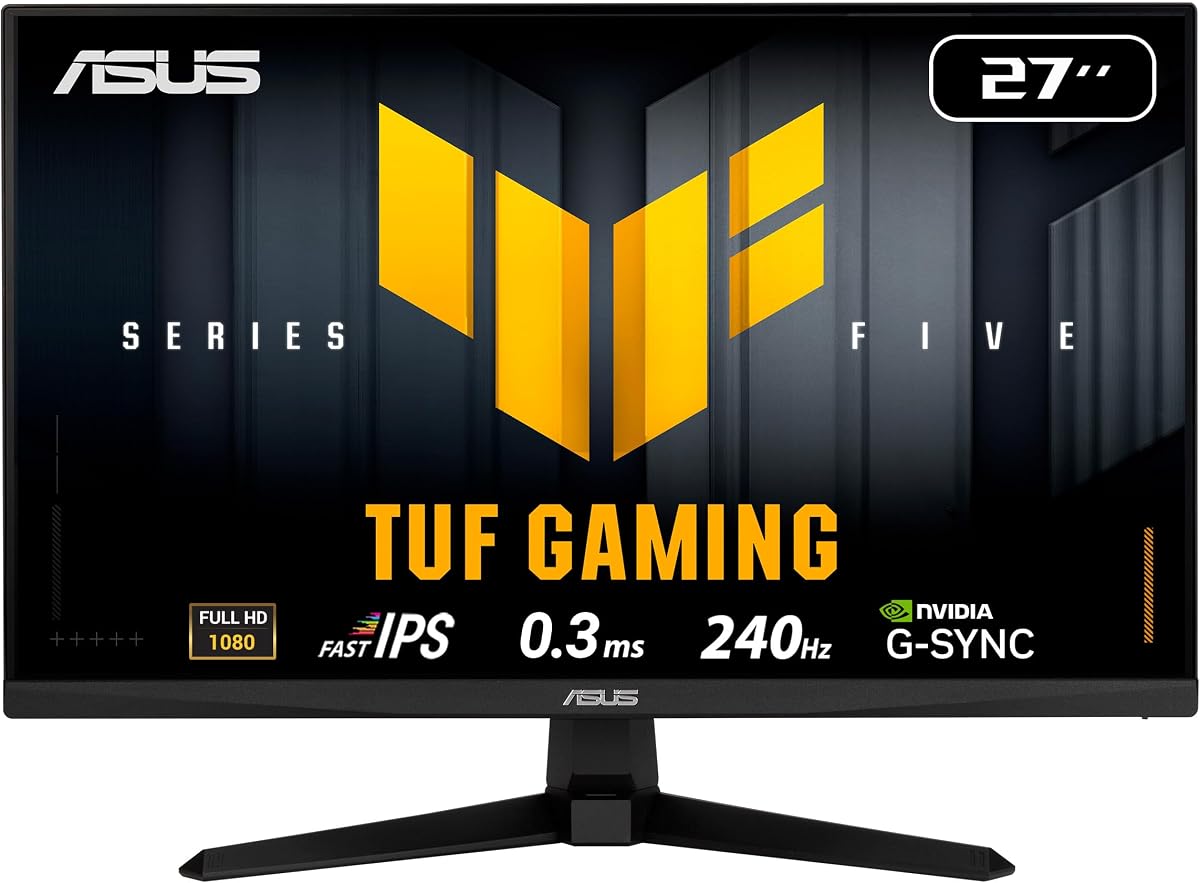
This monitor delivers top-tier performance for competitive shooters with its 240Hz refresh rate and Fast IPS panel. It holds a strong rating from users who appreciate its speed and clarity in fast-paced scenarios.
We may earn a commission when you buy through this link, at no additional cost to you.
The 0.3ms response time minimizes motion blur, ensuring targets remain crisp during quick movements. Adaptive Sync technologies like G-Sync and FreeSync Premium provide a tear-free experience across different hardware configurations.
While the price is higher than budget options, the build quality and advanced features justify the investment. Some users may find the stand limiting if they require significant height adjustments for ergonomic setups.
For serious Valorant players seeking reliable performance, this model stands out as a premier choice. Its balance of speed, color accuracy, and gaming-specific tools makes it highly recommended for competitive use.
ELMB SYNC reduces ghosting without sacrificing refresh rate benefits.
TUF Gaming AI helps optimize settings automatically for better gameplay.
We may earn a commission when you buy through this link, at no additional cost to you.
Offering an impressive refresh rate at a budget-friendly price, this monitor is ideal for cost-conscious gamers. It features a Fast IPS panel that delivers decent color performance alongside smooth motion handling.
We may earn a commission when you buy through this link, at no additional cost to you.
Users can enjoy up to 300Hz refresh rates via DisplayPort, providing fluid visuals essential for competitive play. The included game assistant features help optimize visibility for FPS titles specifically.
Build quality is functional but may lack the refinement of premium brands. The stand offers limited adjustability, which could affect ergonomics for some users over long gaming sessions.
If you need a high-performance monitor without breaking the bank, this is a strong contender. It provides excellent value for entry-level competitive setups aiming for high frame rates.
Delivers high refresh rates typically found in more expensive models.
Built-in tools assist with crosshair visibility and target acquisition.
We may earn a commission when you buy through this link, at no additional cost to you.
This Dell model combines premium build quality with competitive performance specs. It is highly rated for its visual fidelity and eye comfort features, making it suitable for extended gaming sessions.
We may earn a commission when you buy through this link, at no additional cost to you.
The Fast IPS technology ensures wide viewing angles and accurate colors, while the 240Hz rate keeps motion fluid. TUV certification indicates strong efforts to reduce blue light and flicker.
Ergonomics are restricted to tilt adjustments, which may not suit all desk configurations. The compact 23.8-inch size is ideal for smaller setups but offers less immersion than larger screens.
For players prioritizing display quality and eye comfort alongside speed, this is an excellent choice. Its reliability and color performance make it a top pick for disciplined gamers.
TUV 3-star certification reduces blue light without color shifting.
99% sRGB coverage ensures vibrant and accurate image reproduction.
We may earn a commission when you buy through this link, at no additional cost to you.
For those seeking sharper visuals, this monitor offers Quad HD resolution alongside a high refresh rate. It supports overclocking to 260Hz for users with capable hardware setups.
We may earn a commission when you buy through this link, at no additional cost to you.
The 0.3ms MPRT response time ensures minimal blur, crucial for tracking moving targets. Adaptive Sync technology works with both AMD and NVIDIA GPUs to maintain smooth gameplay.
Driving QHD at high refresh rates demands a powerful graphics card. The stand is tilt-only, which might limit ergonomic optimization for taller or shorter players.
This model is best for players who value image detail over pure size. It balances resolution and speed well for competitive titles that benefit from clearer visuals.
Quad HD pixels provide sharper text and enemy outlines.
User-friendly OSD menu allows quick tuning of visual settings.
We may earn a commission when you buy through this link, at no additional cost to you.
This monitor features a curved screen that can enhance immersion in gaming environments. It includes specific game modes and a joystick for quick setting adjustments during matches.
We may earn a commission when you buy through this link, at no additional cost to you.
The ultra-slim base helps save desk space, allowing more room for peripherals. Wide color gamut coverage supports vivid visuals, while eye protection features reduce strain over time.
Lower ratings suggest inconsistent quality or customer support experiences. The curved screen might not suit everyone, particularly those who prefer flat panels for competitive FPS accuracy.
Consider this if you prefer curved displays and need a space-saving base. It offers decent specs at a competitive price for casual or intermediate competitive play.
Ultra-slim design maximizes desk area for keyboard and mouse.
One joystick provides instant access to critical gaming settings.
We may earn a commission when you buy through this link, at no additional cost to you.
This monitor stands out with one of the highest user ratings in the category. It utilizes a VA panel which typically offers deeper blacks and higher contrast than IPS.
We may earn a commission when you buy through this link, at no additional cost to you.
AI Vision technology helps reveal details in darker areas, potentially aiding visibility in shadowy game scenarios. The 240Hz refresh rate ensures fluid motion for competitive advantages.
VA panels can sometimes exhibit more motion blur than IPS. The lack of listed adaptive sync might limit smoothness for some GPU configurations compared to other options.
Ideal for players valuing contrast and ratings, this is a strong option. It delivers reliable performance for FPS titles where dark scene clarity is essential.
Enhances brightness and saturation to reveal hidden details.
VA technology provides deeper blacks for better image depth.
We may earn a commission when you buy through this link, at no additional cost to you.
This model provides a balance of refresh rate and color accuracy at an accessible price. The IPS panel ensures wide viewing angles and consistent color performance during gameplay.
We may earn a commission when you buy through this link, at no additional cost to you.
It supports overclocking to 260Hz, offering extra fluidity for those with capable systems. Tilt functionality allows for better ergonomic positioning compared to fixed stands.
Overclocked rates may not be stable on all systems. The design is simple and functional, focusing on performance rather than aesthetic flair or premium materials.
Great for budget-focused gamers needing high refresh rates, this monitor delivers well. It suits Valorant players who prioritize responsiveness without overspending on extra features.
Eco Mode keeps power usage low during long sessions.
Consistent colors across angles ensure clear visibility.
We may earn a commission when you buy through this link, at no additional cost to you.
Another curved option from SANSUI, this model focuses on affordability and basic gaming needs. The 1500R curvature wraps the display for a slightly more immersive experience.
We may earn a commission when you buy through this link, at no additional cost to you.
It supports 240Hz refresh rate and includes multiple ports for flexible connectivity. Color gamut coverage remains strong, helping maintain visual appeal in games and media.
Build quality reflects the budget positioning with fewer premium features. Ergonomic options are minimal, mostly limited to tilt adjustments and VESA mounting capabilities.
Suitable for those seeking a curved display on a tight budget, this works well. It delivers the core speed needed for competitive play without extra costs.
1500R radius enhances peripheral vision during matches.
Multiple ports support various peripheral and PC connections.
We may earn a commission when you buy through this link, at no additional cost to you.
This ASUS model offers a compact form factor without sacrificing performance. The Fast IPS panel ensures rapid response times and vibrant colors essential for competitive gaming.
We may earn a commission when you buy through this link, at no additional cost to you.
It features a height-adjustable stand, providing better ergonomics than many competitors. ELMB SYNC technology helps reduce motion blur while maintaining high refresh rates.
The smaller screen size may feel limiting for some users accustomed to larger displays. Price reflects the premium features, which may exceed budgets for entry-level setups.
For gamers prioritizing ergonomics and speed in a smaller package, this is excellent. It balances build quality with competitive specs effectively for serious players.
Height adjustable stand helps reduce neck strain during sessions.
High sRGB coverage ensures accurate and vivid color display.
We may earn a commission when you buy through this link, at no additional cost to you.
This model offers a middle ground in screen size while maintaining top-tier performance. It uses Fast IPS technology for quick transitions and color consistency during play.
We may earn a commission when you buy through this link, at no additional cost to you.
Adaptive Sync ensures tear-free gaming, and ELMB SYNC minimizes ghosting. The 25-inch format can be more immersive than smaller 24-inch panels while retaining sharpness.
Adjustability options may be less flexible than higher-end TUF models. The price point positions it between budget and premium categories, requiring budget consideration.
Ideal for players wanting slightly larger views without losing speed, this is a strong pick. It delivers reliable competitive features for those seeking a balanced setup.
25-inch provides a balance of immersion and pixel density.
High color gamut ensures visuals remain vivid during play.
We may earn a commission when you buy through this link, at no additional cost to you.
Selecting the right monitor requires balancing several technical factors. This guide covers the most critical aspects to consider before purchasing a high refresh rate display.
Refresh rate determines how many frames per second the display can show. For Valorant, 240Hz provides smoother motion and lower input lag compared to 144Hz options.
Aim for monitors that consistently hit 240Hz to maximize competitive advantage in fast-paced matches.
Response time measures how quickly pixels change color, impacting motion blur. Faster times like 0.5ms or 1ms keep images sharp during rapid movements.
Prioritize low response times to reduce ghosting and improve target tracking accuracy.
Panel types include IPS, VA, and TN. IPS offers better color and viewing angles, VA has higher contrast, and TN is fastest but has poor colors.
IPS panels are generally recommended for Valorant due to balanced color and speed performance.
Resolution impacts image clarity and system demands. 1080p is standard for competitive play as it eases GPU load for higher frame rates.
Stick to 1080p unless your graphics card can handle higher resolutions at 240Hz effectively.
Adaptive Sync prevents screen tearing by matching the monitor rate to GPU output. This results in smoother gameplay without visual artifacts.
Ensure the monitor supports FreeSync or G-Sync compatible technology for seamless performance.
Physical adjustments like height and tilt help maintain comfort during long sessions. Proper positioning reduces strain and keeps focus on gameplay.
Look for stands with height adjustment or VESA mounting compatibility if ergonomics are a priority.
Correct ports are essential for high refresh rates. DisplayPort is usually required for 240Hz on many models, while HDMI might be limited.
Verify available ports match your system cables to achieve maximum performance levels.
Reliable warranty coverage ensures protection against defects. Reputable brands often offer longer terms and better customer service.
Check warranty duration and support options to safeguard your investment over time.
Set your operating system refresh rate to match the monitor capabilities. This ensures you benefit from the full 240Hz performance available on the device.
Adjust brightness and contrast settings to match room lighting conditions. Proper calibration reduces eye strain and improves visual clarity during gameplay.
Clean the screen regularly with a microfiber cloth to maintain optimal image quality. Avoid harsh chemicals that could damage the protective coatings.
Yes, 240Hz offers smoother motion and lower input lag compared to 144Hz. While the difference is subtle, competitive players often notice improved tracking and reaction times at higher refresh rates.
The monitor does not affect frames per second generated by your PC. However, a faster monitor displays those frames more smoothly, giving you a visual advantage during gameplay.
1080p is recommended for Valorant as it prioritizes frame rate over detail. Higher resolutions require more GPU power and can reduce frame rates which are crucial in competitive play.
Adaptive Sync eliminates screen tearing by syncing the monitor refresh with the graphics card output. This results in smoother visuals which helps track moving targets more accurately.
Response time is critical for minimizing motion blur. Lower response times like 1ms or less keep moving images sharp, helping you spot enemies clearly during fast action.
Most monitors require DisplayPort for 240Hz. HDMI often supports lower refresh rates. Check your monitor specifications to confirm which port is needed for maximum performance.
Curved monitors provide immersion but offer no real competitive advantage. Some players prefer flat panels for consistent focus. Choose based on personal comfort preference.
The ASUS TUF VG279QM5A and SANSUI 24.5 inch models stand out as top performers for different reasons. One offers premium features and the other delivers exceptional budget value.
Prioritize refresh rate and response time when selecting your next monitor for competitive play. These factors directly impact your ability to react quickly and accurately in matches.
Prices and availability change regularly, so check current listings before purchasing. Ensuring your system matches the monitor requirements will help you achieve the best experience.