
Noctua NA-FC1
4.8Editor score
Compact PWM speed reducer
No stop mode for BIOS
Includes 3-way splitter
This guide compares the top 10 Front Panel Fan Controller models for PC cooling, reviewing features like LCD displays, PWM control, and temperature monitoring
Keeping your PC cool is essential for performance and longevity. A Front Panel Fan Controller gives you precise control over fan speeds and temperatures directly from your case. These devices help reduce noise and prevent overheating by managing airflow efficiently across multiple zones.
We compared ten real products based on their channel count, display quality, safety features, and ease of installation. Each option offers unique benefits like LCD screens, PWM support, or simple voltage control. Our analysis focuses on reliability, user feedback, and practical functionality for various builds.
Each pick highlights key strengths, pros, cons, and ideal use cases to simplify your decision. Prices and availability change frequently so verify details before purchasing. Use this guide to find the perfect controller for your specific cooling needs and budget constraints today.
4.8Editor score

5.0Editor score

4.2Editor score
The following table provides a side-by-side overview of the ten selected controllers. We highlight key specifications like channel count, display type, and control modes to help you quickly identify the best fit for your system configuration and cooling requirements.
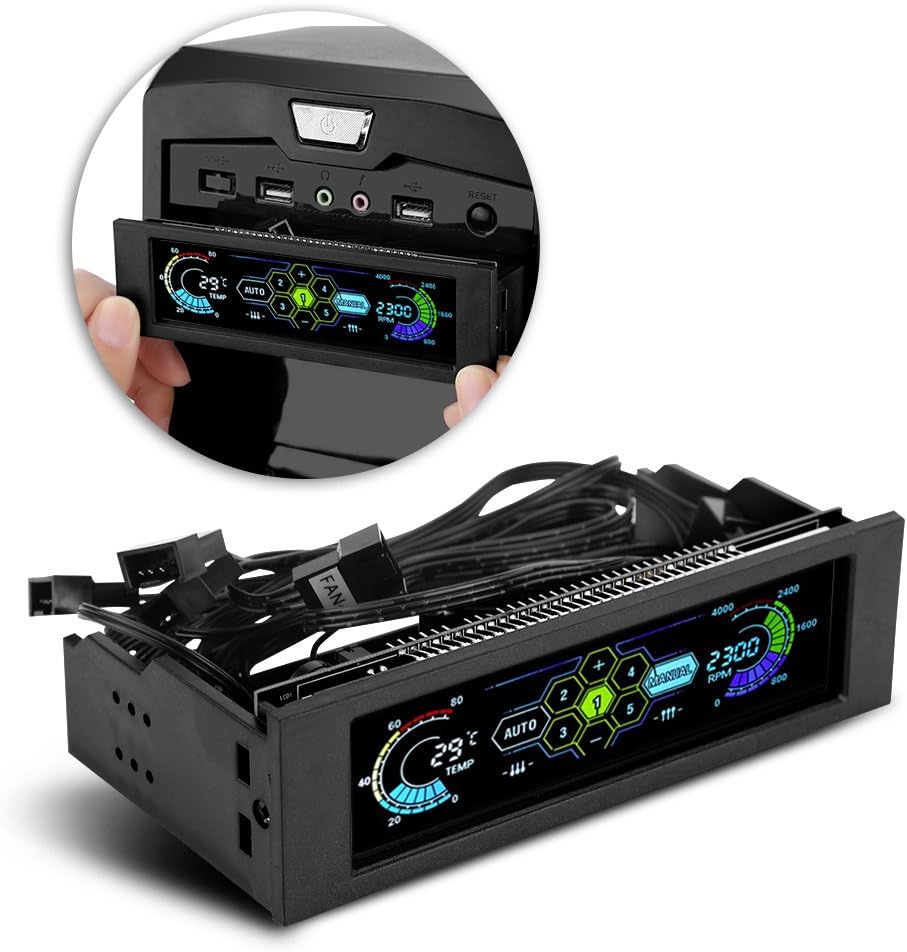


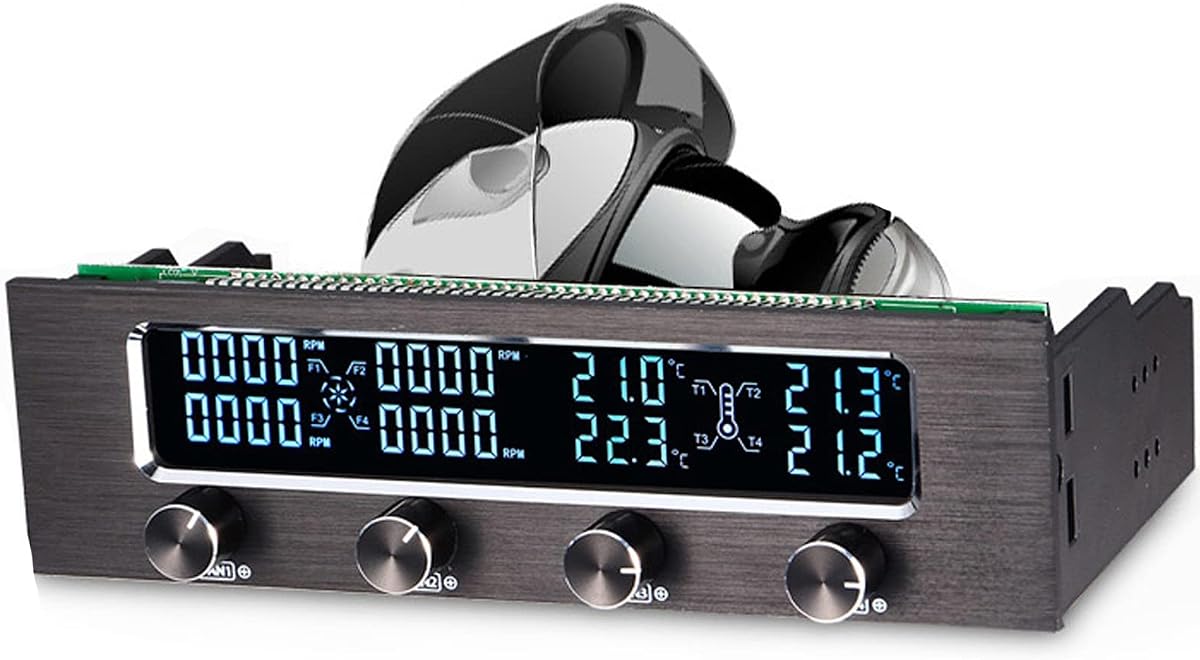
The STW‑6041 stands out as the top pick for users needing a robust and informative cooling solution. With a perfect rating from users, it delivers exceptional performance and reliability in managing your system fans.
We may earn a commission when you buy through this link, at no additional cost to you.
Its wide LCD screen clearly displays four sets of fan speeds and temperatures, allowing you to monitor your system at a glance. The aluminum alloy panel undergoes multiple matt treatments for a premium look that fits any chassis design.
Safety is a priority with this model, as it features a high temperature alarm and fan anti-seize system. When temperatures exceed 60 degrees, the screen flashes and sounds an alarm, preventing potential hardware damage from overheating.
This controller is ideal for enthusiasts who want precise control without relying solely on software. Its PWM circuit reduces noise effectively while high-spec capacitors ensure longevity and stability in demanding environments.
The wide LCD screen allows you to see all four fan speeds and temperatures simultaneously for quick system checks.
Built-in over temperature warnings and fan anti-seize mechanisms protect your hardware from critical overheating events.
We may earn a commission when you buy through this link, at no additional cost to you.
The V BESTLIFE controller offers a great balance of features and affordability for mid-range PC builds. It allows manual and automatic control modes to suit different user preferences and cooling scenarios.
We may earn a commission when you buy through this link, at no additional cost to you.
Its large LCD screen provides a clear view of temperature, fan speed, and hard disk state. You can manually set alarm temperature ranges from 40 to 90 degrees to ensure your system stays within safe limits.
If a fan breaks down and fails to cool the computer, the unit alerts you immediately. This rapid response helps prevent overheating and extends the life of your components during critical workloads.
Consider this option if you need to manage multiple fans and want reliable alerts. Its straightforward design and useful features make it a solid choice for many system integrators.
Switch easily between auto and manual modes to adapt cooling to your current workload needs.
View hard disk state and temperatures simultaneously to get a full picture of system health.
We may earn a commission when you buy through this link, at no additional cost to you.
The SaiDian controller is a budget-friendly option for users who need basic fan management. It features an LCD screen that displays date, time, and key operational metrics like fan speed and temperature.
We may earn a commission when you buy through this link, at no additional cost to you.
You can control up to three groups of fans with this unit, adjusting speed manually or using automatic settings. The alarm temperature range is adjustable from 50 to 90 degrees to protect against overheating.
If a fan jams or fails, an alarm sounds immediately to alert you of the issue. The power supply uses a standard 4P interface and fans connect via 3pin connections for easy setup.
This model works well for simple builds where complex features are not required. Its basic functionality and lower price point make it accessible for many casual PC users.
The screen displays date and time alongside essential fan metrics for a convenient all-in-one view.
Get essential temperature monitoring and fan control at a price that fits tight budgets easily.
We may earn a commission when you buy through this link, at no additional cost to you.
The Thermaltake Commander F6 brings high-end features to your cooling setup with its RGB LCD screen and extensive channel options. It is designed for enthusiasts who want both performance and aesthetics.
We may earn a commission when you buy through this link, at no additional cost to you.
You get six voltage control knobs and six temperature sensors to monitor and adjust different zones independently. This level of control ensures optimal cooling across complex setups with many components.
Safety is built-in with warning alarms and short circuit protection. The unit also supports up to two Lumi LED strips for additional visual integration into your case design.
Choose this premium option if you want to maximize airflow control and visual appeal. It is a strong choice for large builds needing detailed fan management and lighting sync.
The RGB LCD screen and LED strip support let you match your cooling with your system lighting.
Six dedicated knobs and sensors provide granular control for multi-fan high-performance configurations.
We may earn a commission when you buy through this link, at no additional cost to you.
The Ejoyous controller offers independent control for up to four case fans with a clear LCD overview. It is designed to keep operating status visible at all times for reliable system management.
We may earn a commission when you buy through this link, at no additional cost to you.
Automatic and manual regulation support demand-oriented cooling to match your current workload needs. The PWM circuitry reduces annoying high-frequency noises so your system operates comfortably even under load.
A double safety function alerts you if measured temperatures exceed 60 degrees with blinking symbols and acoustic alarms. The aluminum alloy panel with multiple matte finishes ensures a robust and durable execution.
This unit is a great choice for those seeking modern features at a competitive price. Its focus on quiet operation and visibility makes it suitable for home and office builds.
Adjust each fan independently using four separate controllers for precise cooling management.
PWM circuitry minimizes high-frequency noise so your PC stays quiet during daily use.
We may earn a commission when you buy through this link, at no additional cost to you.
The ARCTIC Fan Controller optimizes airflow with ten ports and individual PWM control to simplify multi-fan setups. It centralizes cable management and improves performance by ensuring each fan gets the power it needs.
We may earn a commission when you buy through this link, at no additional cost to you.
Native driver support for Windows and Linux enables compatibility with wide fan-control software. This plug-and-play approach eliminates the need for extra splitter cables and keeps your build cleaner.
Each port supplies up to 2 A with a total maximum current of 4.5 A for stable operation. Magnetic or adhesive mounting options offer flexibility for placement where space is limited.
Select this unit if you want software-driven control and minimal cable clutter. It is an excellent fit for compact builds needing high fan counts without complex wiring.
Centralized management eliminates Y-splitters and extensions for a cleaner and safer build.
Driver support ensures compatibility with popular monitoring tools on multiple operating systems.
We may earn a commission when you buy through this link, at no additional cost to you.
The Noctua NA-FC1 is a compact and highly flexible controller for 4-pin PWM fans. It works as a manual speed reducer or in tandem with motherboard auto control for truly quiet operation.
We may earn a commission when you buy through this link, at no additional cost to you.
A unique No stop mode prevents fans from dropping below 300 rpm to avoid BIOS errors during startup. The included 3-way splitter cable allows you to control up to three fans simultaneously from one channel.
Its tiny footprint makes it easy to install inside the case where space is limited. With a six-year manufacturer warranty, this unit offers long-term reliability and peace of mind.
This controller is perfect for users who want simple manual control without complex displays. It is an ideal choice for small builds using high-speed Noctua fans.
Prevents BIOS fan errors by ensuring fans never drop below 300 rpm regardless of settings.
Small size allows installation inside cases where larger panel controllers will not fit.
We may earn a commission when you buy through this link, at no additional cost to you.
The Delinx 12V controller offers versatile control modes for fans and is ideal for NAS or server cabinets. It works with standard USB-C chargers and provides safe over-voltage protection for stable long-term use.
We may earn a commission when you buy through this link, at no additional cost to you.
A digital display can switch between real-time temperature and fan speed values with precise adjustment options. It automatically switches to manual mode when the temperature probe is disconnected for direct control.
Power-off memory saves all settings so you do not need to reconfigure after every power loss. The compact size allows for easy integration into various projects like audio or aquarium setups.
This model is perfect for diverse cooling applications needing reliable voltage support. Its dual modes and safety features make it a robust choice for advanced DIYers.
Wide voltage range supports 5V up to 24V fans with safe over-voltage and reverse protection.
Power-off memory retains your settings automatically so you do not lose configuration.
We may earn a commission when you buy through this link, at no additional cost to you.
The 4 Fans Controller is a straightforward unit for basic fan management in standard PC cases. It features an LCD screen that displays temperature and time for convenient monitoring of system health.
We may earn a commission when you buy through this link, at no additional cost to you.
With a safety system that includes high temperature alarms and fan anti-seize features, it offers some protection against overheating. PWM circuits help reduce noise while maintaining necessary cooling performance.
The alloy panel undergoes multiple matt treatments for a durable finish suitable for many chassis. High-specification capacitors aim to support a long service life during daily operations.
Choose this controller if you want a basic solution without advanced features. It provides essential monitoring and control functions at an affordable price point for standard builds.
High temp alarms and fan anti-seize help prevent damage from overheating or fan failure.
Designed for optical drive bays to match existing panel slots in most computer cases.
We may earn a commission when you buy through this link, at no additional cost to you.
The 5-Fans Speed controller manages five groups of fans to offer detailed thermal control for larger systems. It displays temperature, fan speed, and hard disk state on a large LCD for clear visibility.
We may earn a commission when you buy through this link, at no additional cost to you.
Users can set alarm temperature ranges manually from 40 to 90 degrees to protect hardware from heat stress. Switching between auto and manual modes gives flexibility for different operating conditions.
When a fan breaks down and fails to cool, the system alerts you immediately to prevent critical issues. This monitoring helps ensure continuous airflow and system stability during demanding tasks.
Consider this unit for multi-fan builds requiring detailed group control. It is a practical option for those needing basic visibility and alerts without high-end features.
Manage five distinct fan groups for precise thermal regulation across different system zones.
Immediate alerts notify you when fan failures occur to maintain continuous cooling performance.
We may earn a commission when you buy through this link, at no additional cost to you.
Selecting the right controller depends on your cooling needs and system layout. This guide covers essential factors to ensure you choose a reliable and functional unit.
Check how many fans you need to control and choose a model with enough channels. Most units offer 3 to 6 channels but some allow more for complex setups.
Ensure the controller supports your total fan count to avoid needing extra hubs or splitters.
Decide between manual knobs for direct control or auto modes that adjust based on temperature. Hybrid models offer flexibility for different workload requirements.
Auto modes are great for passive cooling while manual knobs allow precise tuning for overclocking.
LCD displays show real-time data like temperature and RPM while simple models use LED indicators. A clear display helps you monitor system health without opening the case.
Look for wide screens that show multiple metrics simultaneously for better visibility.
Safety alarms alert you when temperatures exceed safe limits or when a fan fails. Overheat warnings prevent hardware damage during critical situations.
Choose units with clear alarms to respond quickly to cooling failures.
Verify that the controller fits your drive bay or case layout before buying. Some units require 5.25 inch bays while others use adhesive mounts.
Proper fit ensures installation is secure and aesthetically clean.
PWM support allows precise speed control and reduces noise compared to voltage-only models. This is essential for modern fans that require 4-pin connections.
Prioritize PWM controllers to maximize fan efficiency and noise reduction.
Check that the controller can handle the total power draw of your fans. Units specify max amperage per port to prevent electrical issues.
Ensure total load stays within rated limits to avoid power failure.
Look for aluminum panels and high-quality capacitors to ensure longevity. Better materials resist heat and physical wear over time.
Durable builds provide reliable operation throughout your system's lifespan.
Install the unit in an empty 5.25 inch drive bay using provided mounting screws. Ensure the panel sits flush for a clean look.
Connect each fan to the controller ports following the wiring guide. Set auto modes to match your preferred cooling balance.
Periodically dust the LCD screen and vents to prevent overheating. Reset settings if you notice errors or glitches in operation.
Most panel controllers require a 5.25 inch drive bay slot. If your case lacks one, check if adhesive or magnetic options are available for placement.
Yes, many models support 4-pin PWM fans for precise speed control. Always verify compatibility in the product specs before purchasing.
Use the front panel buttons to adjust alarm thresholds in degrees. Typical ranges allow you to set limits from 40 to 90 degrees.
The controller triggers an alarm sound and flashes the display to alert you. This ensures you can address issues before overheating occurs.
They work with most cases that have drive bays or mounting options. Verify physical dimensions before installation to ensure a proper fit.
Yes, you can switch to manual mode for fixed speed control. This is useful when auto adjustments do not meet your preferences.
Most units support 3 to 5 fans directly. Check port counts on specific models to ensure they match your needs.
No, most controllers operate via physical knobs and front panel buttons. Some newer models may support basic driver features on PC.
This guide highlights the STW‑6041, Noctua NA-FC1, and Thermaltake Commander F6 as top picks for their reliability and features. These models offer the best balance of control visibility and value.
Prioritize channel count and alarm features based on your system complexity. Ensure the unit fits your case and supports your fan types.
Prices and availability change so verify current details before finalizing your purchase. Use the comparisons and reviews here to find the perfect match.