
4K AI-Powered Conference Webcam with Microphones Speakers
4.1Editor score
Zoom certified
120 degree wide angle
Physical lens cover
This guide compares the top ten auto tracking conference camera models for seamless video meetings with AI framing and professional audio visual clarity for
Modern businesses rely heavily on seamless video communication to connect remote teams and engage clients effectively. An auto tracking conference camera ensures every speaker is framed perfectly without manual adjustments. This technology transforms ordinary meeting spaces into professional studios that adapt to dynamic conversations effortlessly.
We evaluated ten leading models based on resolution quality, tracking accuracy, audio performance, and ease of integration. Each product was analyzed for its ability to handle small h large rooms while maintaining crystal clear video and sound. Our goal is to help you find the perfect fit for your specific conference environment.
Each pick highlights key strengths ideal weaknesses to guide your purchase decision confidently. Remember that availability and pricing fluctuate frequently so verify current details before ordering. You will find detailed breakdowns of specifications and real world use cases throughout this comprehensive resource.
4.1Editor score

4.8Editor score

4.6Editor score
This side-by-side comparison outlines the core specifications and capabilities of each model to help you make an informed decision quickly.




This system delivers professional grade video quality with its 4K output and precise AI tracking capabilities. Users praise its ability to frame speakers accurately during dynamic meetings without manual input. It stands out for combining high resolution video with a complete audio solution.
We may earn a commission when you buy through this link, at no additional cost to you.
The 3x optical zoom and 93 degree wide angle lens capture details clearly even in larger rooms. Its AI tracking focuses on faces and bodies seamlessly ensuring remote attendees feel engaged throughout the call. The included Bluetooth speakerphone adds significant value for small to medium spaces.
While the speakerphone operates wirelessly it does require its own power source which adds minor cable complexity. Some users may find the initial camera calibration slightly tricky compared to simpler webcams. However once set up the performance remains consistently reliable for daily use.
Organizations seeking a complete video conferencing package will find this kit highly effective for meetings and presentations. It balances premium features with user friendly operation making it ideal for diverse environments from offices to worship spaces. We recommend it for teams prioritizing clarity and automation.
The combination of 4K video and omnidirectional microphones ensures both visuals and voices are captured with exceptional fidelity for remote participants.
Users can mount the camera on desks walls or ceilings providing versatility to adapt to any room layout or existing infrastructure easily.
We may earn a commission when you buy through this link, at no additional cost to you.
This webcam offers an affordable entry point into AI driven conference solutions without sacrificing core video quality. It is particularly suited for small team rooms where budget constraints exist but professional visuals are still required. Its certification with Zoom guarantees compatibility and smooth operation.
We may earn a commission when you buy through this link, at no additional cost to you.
The 120 degree field of view covers entire tables ensuring everyone remains visible during group discussions. Auto framing technology adjusts the shot dynamically which reduces the need for manual camera adjustments during calls. This makes it a practical choice for collaborative environments.
Audio performance is decent but may struggle in noisier environments beyond five meters from the device. The build quality is functional but does not offer the robust feel of higher end models. Users should consider room acoustics before placing it in larger spaces.
Small businesses looking to upgrade their meeting setup quickly will appreciate the plug and play nature of this device. It provides essential AI features at a fraction of the cost of full PTZ systems. We suggest it for teams prioritizing value and ease of use.
Being Zoom certified ensures that users can leverage full functionality within the platform without needing extra configuration or software downloads.
The included physical lens cover allows users to block the camera when not in use providing peace of mind against potential unauthorized access.
We may earn a commission when you buy through this link, at no additional cost to you.
This system stands out for its ability to deliver smooth 60fps video which enhances the fluidity of movement during presentations. It combines a PTZ camera with a Bluetooth speakerphone to create a complete meeting solution for small to medium rooms. Users appreciate the crisp audio and video sync.
We may earn a commission when you buy through this link, at no additional cost to you.
The 1080p resolution ensures clarity even if native 4K is not strictly required for your needs. AI tracking focuses on presenters accurately making it ideal for training sessions or webinars. The dual output options provide flexibility for different connection setups.
Some users might miss native 4K support especially if connecting to large displays. The separate power requirements for the speakerphone add minor clutter compared to single cable solutions. These drawbacks are minor considering the performance and price balance it offers.
Teams needing smooth motion capture for detailed presentations will find this system highly effective. It provides robust performance without the premium price tag of higher resolution models. We recommend it for organizations prioritizing fluid video over maximum pixel density.
The 60fps frame rate ensures that fast hand gestures or movement across the room appear natural and uninterrupted on remote screens.
Having both HDMI and USB 3.0 outputs allows connection to TVs or computers simultaneously for diverse meeting hardware configurations.
We may earn a commission when you buy through this link, at no additional cost to you.
This model introduces gesture controls that allow presenters to manage camera settings hands free during meetings. It provides a modern and interactive experience for teams who want dynamic control without reaching for a remote. The 4K resolution ensures sharp visuals for detailed content sharing.
We may earn a commission when you buy through this link, at no additional cost to you.
Users can perform specific hand signs to toggle tracking or zoom features which adds convenience for active sessions. The wide angle lens captures entire groups effectively reducing blind spots. Remote control options add another layer of usability for diverse workflows.
Digital zoom lacks the clarity of optical zoom which may affect detail when enlarging distant subjects. Initial setup requires attention to calibrate gestures correctly to avoid accidental triggers. These issues are manageable for users willing to learn the new interface.
Tech savvy teams looking for innovation will find these gesture features engaging and useful for dynamic presentations. It bridges the gap between standard webcams and advanced broadcast systems. We suggest it for users wanting interactive capabilities in their meeting space.
Gesture commands like OK or V allow presenters to adjust framing or focus without interrupting their flow during live sessions.
USB 3.0 plug and play ensures quick connectivity with most modern laptops reducing setup time for daily video calls.
We may earn a commission when you buy through this link, at no additional cost to you.
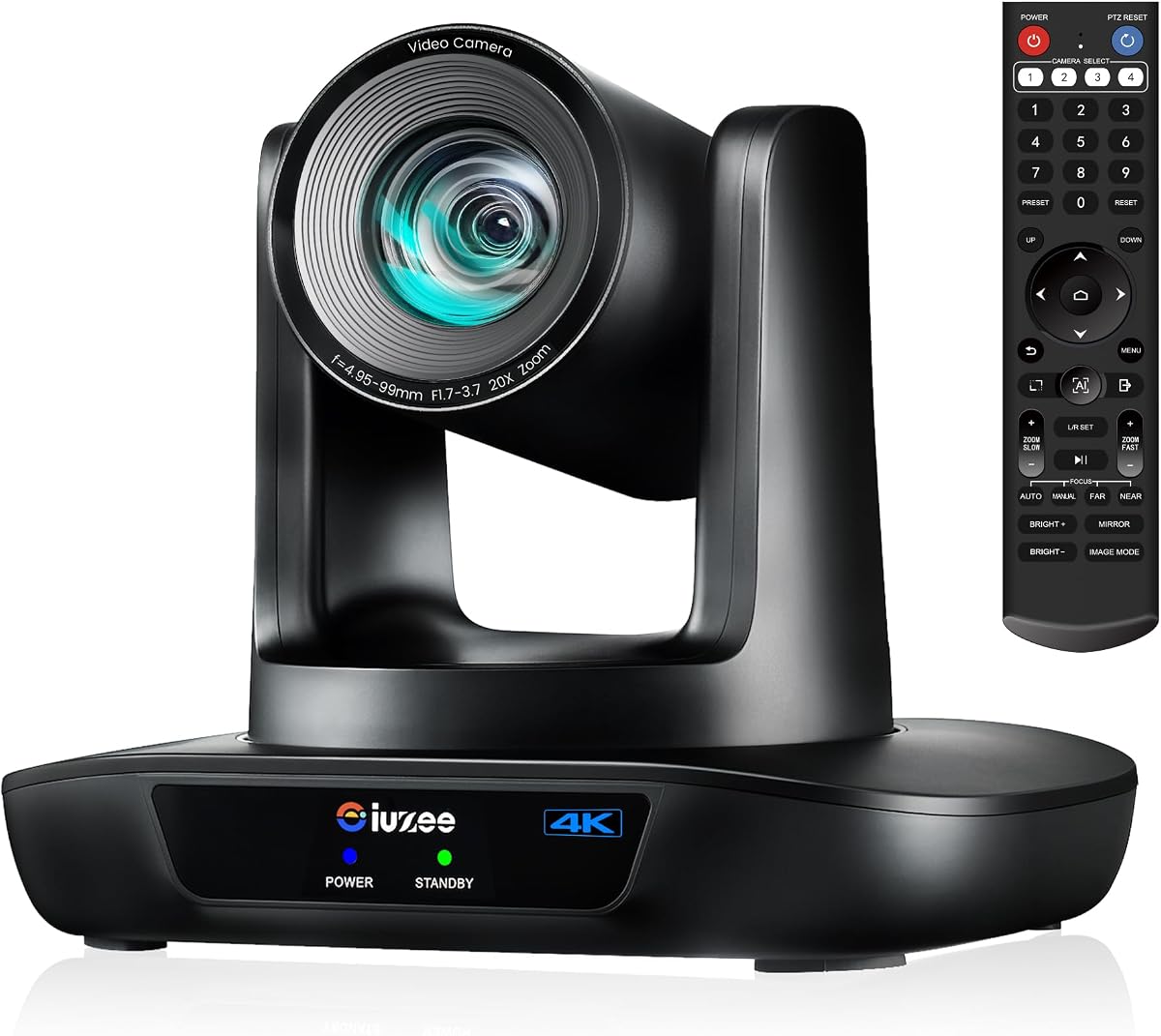
With a massive 20x optical zoom this system is designed for large spaces where speakers may be far from the camera. It maintains clarity even when zoomed in making it perfect for auditoriums or big conference halls. The AI tracking ensures presenters remain centered regardless of movement.
We may earn a commission when you buy through this link, at no additional cost to you.
The integration of 4K resolution provides sharp visuals suitable for detailed presentations or worship services. PoE support simplifies cabling by allowing power and data over a single network cable. This reduces clutter significantly in professional environments.
The physical size and weight might require secure mounting which adds to the initial installation effort. The speakerphone being wireless still needs its own power source. However the zoom capabilities often outweigh these minor logistical considerations for large rooms.
Worship centers and large corporate halls will find this camera essential for capturing distant subjects clearly. It offers broadcast quality optics at a reasonable price point. We highly recommend it for venues needing significant reach without sacrificing quality.
The 20x optical zoom allows clear close-ups of speakers at the front of large rooms without pixelation or blurring.
Power over Ethernet support means you can run just one cable to the camera reducing installation time and visual clutter.
We may earn a commission when you buy through this link, at no additional cost to you.
This camera specializes in live streaming and network-based video distribution for professional broadcasts. It offers extensive support for protocols like RTMP and RTSP allowing seamless integration into streaming workflows. The 20x zoom ensures distant subjects are captured clearly during large events.
We may earn a commission when you buy through this link, at no additional cost to you.
Users can control settings directly from a web browser which simplifies remote management without needing extra software. PoE support enhances flexibility for installations where power outlets are scarce. The image quality is robust for both conferencing and public broadcasts.
It does not include a built-in microphone or speaker so external audio equipment is required for two-way communication. This limitation makes it less ideal for standard meeting calls without additional investment. However for one-way broadcasting it is highly capable.
Broadcasters and schools looking to stream live content to public platforms will find this unit extremely versatile. It brings studio level connectivity to conference rooms affordably. We recommend it for projects prioritizing live streaming over direct conferencing.
Built-in support for RTMP and RTSP lets you push video feeds directly to platforms like YouTube or Twitch without extra capture cards.
Web browser access allows administrators to configure and control the camera from any device on the network effortlessly.
We may earn a commission when you buy through this link, at no additional cost to you.
This camera is a powerhouse for professional production environments requiring SDI and NDI connectivity. It delivers unmatched versatility for complex setups involving multiple cameras or live switching. The 4K resolution ensures every detail is crisp during high stakes broadcasts or presentations.
We may earn a commission when you buy through this link, at no additional cost to you.
Users can utilize official NDI licenses to integrate seamlessly with popular broadcasting software like OBS or vMix. The tracking algorithm is refined to handle active speakers smoothly even in crowded rooms. PoE support adds to its flexibility in professional installations.
The cost is higher than standard conference cameras and setup may require networking knowledge for NDI streams. However the capabilities offered justify the investment for broadcast grade needs. It is a significant upgrade for facilities needing top tier video.
Production studios and large event centers will appreciate the professional interfaces and high fidelity video. It bridges the gap between simple conferencing and full broadcast production. We recommend it for organizations demanding premium broadcast capabilities.
SDI outputs allow long distance cable runs without signal loss making it ideal for large venues or complex studio layouts.
NDI support enables direct video feed sharing across a local network for easy use with live streaming software.
We may earn a commission when you buy through this link, at no additional cost to you.
This PTZ camera offers extensive connectivity options including HDMI USB and LAN to fit diverse infrastructure needs. It is designed for versatility across educational and corporate settings with robust tracking and zoom capabilities. Users value its ability to adapt to different meeting room layouts.
We may earn a commission when you buy through this link, at no additional cost to you.
The 20x optical zoom provides impressive reach allowing clear views of speakers from the back of a room. Its 4K output ensures crisp details during presentations. Connection flexibility reduces the need for adapters and converters in complex setups.
Some users may need to adjust the default output resolution to match their display capabilities effectively. External audio is also required since no speakerphone is included. These are minor adjustments for a device offering such broad hardware compatibility.
Educational institutions and offices seeking a versatile camera for various applications will find it highly practical. It delivers solid performance without unnecessary limitations on connection types. We recommend it for flexible hybrid meeting environments.
Support for HDMI USB and PoE allows the camera to integrate seamlessly into almost any existing network or AV setup.
The 20x optical zoom lets presenters move freely while maintaining clear visibility for remote attendees across the room.
We may earn a commission when you buy through this link, at no additional cost to you.
This unit simplifies setup by combining camera microphones and speakers into a single device. It is tailored for medium to large conference rooms where audio clarity across the table is critical. The all-in-one design reduces cable clutter and hardware management overhead.
We may earn a commission when you buy through this link, at no additional cost to you.
The four microphone array ensures voices are picked up clearly from any seat at the table. AI auto framing adjusts to keep all participants visible without manual intervention. This creates a professional and inclusive atmosphere for hybrid meetings.
Digital zoom limits the detail available when focusing on distant speakers compared to optical options. The unit size may require more space on a mount or desk. However the integrated audio components often outweigh these trade-offs for meeting rooms.
Organizations wanting a streamlined audio video solution will find this system incredibly convenient. It minimizes hardware requirements while delivering high quality results. We recommend it for teams needing robust audio in a single device.
Built-in microphones and speakers eliminate the need for separate conference phones simplifying the meeting space significantly.
The AI detects all participants and frames them automatically ensuring everyone is included in the view without effort.
We may earn a commission when you buy through this link, at no additional cost to you.
This webcam is perfect for personal desks or small huddle spaces where space is limited. It combines high resolution video with built-in audio components to reduce cable clutter. Users appreciate the ability to adjust the field of view to fit their specific setup.
We may earn a commission when you buy through this link, at no additional cost to you.
The remote control allows easy management of settings like volume and zoom without touching the computer. It supports various platforms ensuring compatibility with different meeting software. The 4K resolution provides sharp visuals for one-on-one calls.
Digital zoom cannot match the clarity of optical lenses for distant views. Speaker volume is adequate for personal use but may not fill larger rooms. These limitations are acceptable for individual workstation use.
Professionals working from home or small offices will find this device convenient and effective. It offers essential AI features without taking up much space. We recommend it for users needing a compact complete solution.
Users can switch between wide medium and narrow field of view settings to frame their background perfectly for any call.
The compact build and privacy cover make it ideal for personal desks maintaining professionalism and security.
We may earn a commission when you buy through this link, at no additional cost to you.
Selecting the right camera depends on room size, budget, and technical requirements. Here are key factors to consider.
Video resolution determines the sharpness and clarity of your meeting visuals. Higher resolutions like 4K ensure remote attendees see details clearly even when zoomed in. This is crucial for presentations with small text or visual aids.
Look for cameras offering 4K or high 1080p with 60fps for smooth motion during active sessions.
Optical zoom preserves image quality when magnifying distant subjects compared to digital zoom which crops and degrades pixels. This feature is essential for large rooms where the camera is placed far from speakers.
Prioritize models with optical zoom if you frequently present from the front of a large conference space.
AI tracking algorithms vary in their ability to follow speakers smoothly without jitter. Some use facial recognition while others track body movements to maintain a perfect frame. Reliable tracking ensures you never lose focus on the active presenter.
Test or read reviews about how the camera handles multiple people or temporary obstructions.
Built-in microphones and speakers simplify setups but dedicated speakerphones often offer better range. Consider whether you need a complete audio solution or if your existing devices suffice.
Ensure the microphone array has noise cancellation to filter out ambient office sounds effectively.
Different models support HDMI USB or LAN depending on your infrastructure. USB is easiest for laptops while PoE allows single cable power for network connected setups.
Choose a camera that matches your existing cabling and device ports to avoid extra adapters.
A wider field of view captures more people in the frame which is vital for group meetings. However if your room is deep you might need a narrower view with more zoom.
Check the specified degree of coverage to ensure it fits your room dimensions correctly.
Most modern cameras work with major software but some offer specific certifications like Zoom Certified for optimized features. Ensuring compatibility prevents glitches during live meetings.
Verify that the driver requirements fit your operating system and IT policies.
Cameras can be mounted on desks walls or ceilings depending on room layout. Consider weight and size when choosing a mount to ensure stability.
Ensure the packaging includes necessary brackets or purchase compatible ones separately for secure installation.
Connect your camera via the appropriate port such as USB or HDMI ensuring your computer recognizes it immediately. Download any specific drivers if required though most modern models support plug and play functionality for immediate use.
Configure the AI tracking settings through the companion software or on screen menus to suit your room. Adjust zoom levels and framing modes to ensure the camera captures the intended area accurately.
Clean the lens regularly with a soft cloth to prevent smudges affecting video quality. Avoid touching the sensor directly and store the device in a dry place when not in use to extend its lifespan.
Optical zoom uses physical lens movement to magnify images without losing quality while digital zoom crops the image which reduces resolution. Optical zoom is essential for high clarity when capturing distant subjects in large rooms.
Most modern models use facial recognition or body tracking to identify speakers. Some advanced units combine both to ensure smoother tracking even if a face is partially hidden during movement.
Yes most are compatible with Zoom Microsoft Teams Google Meet and others. Always check the product specifications for official certifications to guarantee full feature support.
You will need a PoE switch to deliver power and data over one Ethernet cable. Connect the camera to the switch using a standard cable and it will power on automatically.
Not always as some systems include built-in speakers and microphones. However dedicated speakerphones often provide better range and clarity for larger spaces.
Ensure the AI tracking sensitivity is set correctly in the menu. Avoid rapid movements that the camera cannot process and keep the subject well lit for best results.
We reviewed ten top models offering diverse features from optical zoom to AI framing. The Editor's Choice model balances 4K resolution with reliable tracking for general use.
Prioritize optical zoom if you need to capture distant speakers clearly. Consider audio integration if you want to reduce hardware clutter in your meeting space.
Prices and availability change often so verify current details before ordering. Select the unit that best fits your room size and technical requirements.