
NZXT H5 Flow
4.6Editor score
Perforated PSU shroud intake
Ultra-fine mesh panels
Two quiet airflow fans included
This guide compares the top cooling computer case options for 2026, evaluating airflow design, fan count, radiator support, and build quality to help you
Finding the right cooling computer case is essential for maintaining optimal system performance during intense gaming or creative workloads. A well-designed chassis ensures that heat generated by powerful components like CPUs and GPUs is efficiently expelled, preventing thermal throttling and extending hardware lifespan. Without adequate airflow, even the most expensive hardware can suffer from reduced speeds and instability over time.
We compared ten leading models based on critical factors including pre-installed fan configurations, mesh panel designs, and radiator compatibility. Each product was evaluated for its ability to handle high heat loads while maintaining quiet operation and offering flexible build options for modern motherboards and graphics cards. This analysis helps you identify which cases prioritize thermal efficiency without sacrificing aesthetics or ease of assembly.
Each pick below highlights specific strengths such as unique airflow paths, modular components, or premium materials that enhance cooling potential. Note that specifications and availability can change, so verify details before purchasing to ensure compatibility with your specific parts list. These selections represent the current top performers in balancing thermal management with contemporary design standards.
4.6Editor score

4.8Editor score

4.6Editor score
The following table provides a side-by-side comparison of all ten selected cases, highlighting key specifications that directly impact thermal performance and build flexibility. Use this overview to quickly identify which model aligns with your specific cooling needs and hardware requirements.


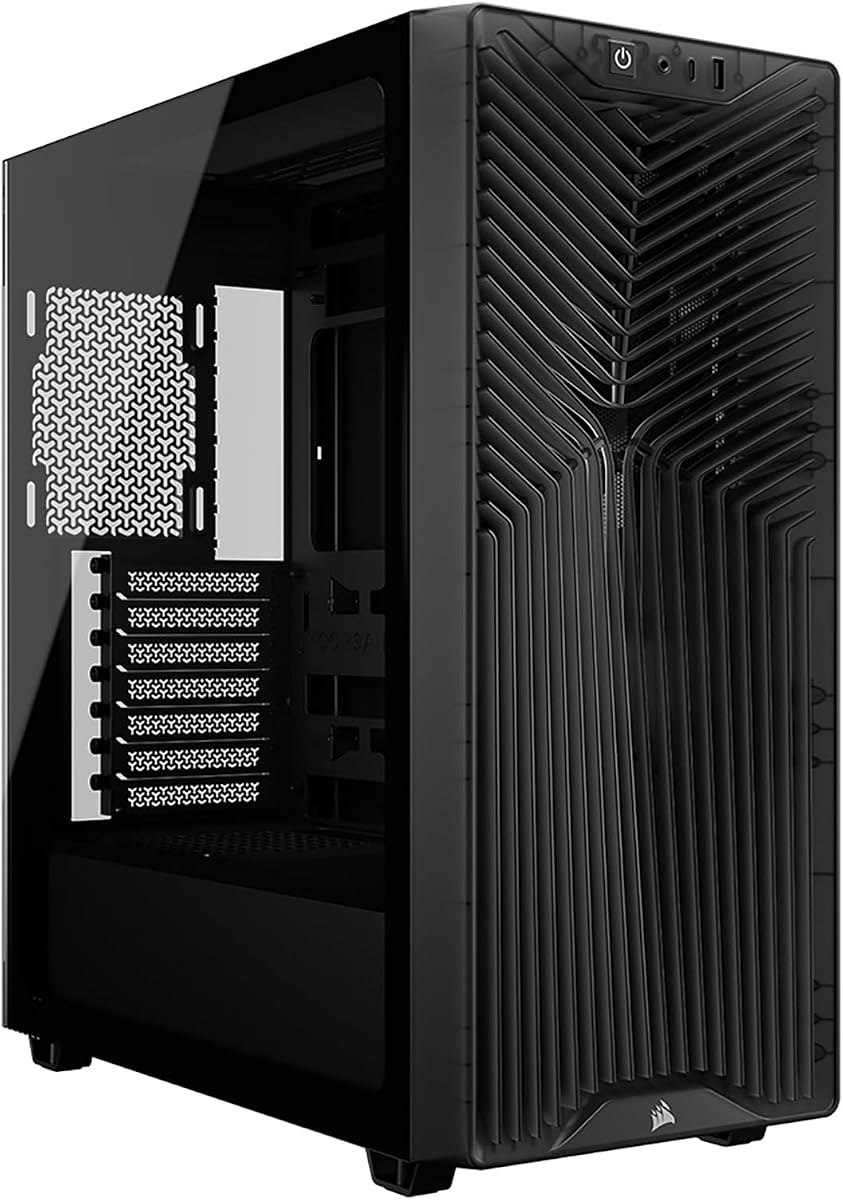


The Lian Li V100 stands out as a top performer in thermal management for its price range, earning a 4.8 rating from users. It features four pre-installed PWM-controlled fans that ensure adaptable airflow while maintaining vibrant lighting through daisy-chain connectivity. This case is designed to balance aesthetics with practical cooling needs for modern gaming systems.
We may earn a commission when you buy through this link, at no additional cost to you.
Its integrated 26-LED ARGB strip provides full spectrum color control that synchronizes with motherboard software for a unified look. The tool-less mounting mechanism on each side panel allows for easy and fast access to internal components, streamlining your build process significantly. This design choice reduces installation time and makes future upgrades or maintenance much simpler.
While the case supports up to 360mm radiators and large GPUs, some users note limitations on top radiator configurations compared to full tower options. Additionally, the lack of a bottom dust filter means regular cleaning of the intake area is necessary to maintain optimal airflow over time. These are minor trade-offs given the overall build quality and cooling performance provided.
This case is ideal for builders who value ease of assembly and strong airflow without breaking the bank. Whether you are upgrading an old system or building a new high-end rig, the V100 offers reliable performance and flexible hardware support. Its combination of pre-installed fans and thoughtful design makes it a highly recommended choice for most users.
The pre-installed PWM fans allow for dynamic speed control based on system load, ensuring quiet operation when idle and powerful cooling under stress.
Support for ATX, Micro-ATX, and Mini-ITX motherboards provides versatility for different build sizes without compromising on cooling capabilities.
We may earn a commission when you buy through this link, at no additional cost to you.
The NZXT H5 Flow is designed to deliver exceptional GPU cooling in a compact mid-tower form factor. Its perforated PSU shroud enables optimal air intake from fans, helping to maintain lower temperatures for high-performance graphics cards. With a 4.6 rating, it appeals to users seeking efficient thermal management without excessive bulk.
We may earn a commission when you buy through this link, at no additional cost to you.
Ultra-fine mesh on the top, front, and side panels creates maximum airflow while filtering dust effectively to protect internal components. The case supports up to a 360mm radiator in front and a 240mm radiator up top for powerful liquid cooling potential if desired. Seamless cable management tools help route and conceal cables using wide channels, hooks, and straps for a clean look.
Some buyers may find that fans are not included in certain bundles, requiring additional purchases for optimal airflow. The mesh design is effective but can collect dust more quickly than solid panels, necessitating more frequent cleaning. These factors are manageable and do not detract from the case's strong performance in its class.
Ideal for budget-conscious builders who do not want to sacrifice cooling quality, this case offers great value. Its focus on GPU cooling makes it particularly suitable for gaming PCs where graphics performance is paramount. The combination of design and affordability makes it a top contender in the budget category.
The perforated PSU shroud design directs air specifically towards the graphics card, addressing one of the most heat-intensive components in a PC.
Despite its compact size, the interior is spacious enough to accommodate large components and provide room for future upgrades.
We may earn a commission when you buy through this link, at no additional cost to you.
The CORSAIR AIR 5400 RS represents the pinnacle of thermal engineering with its triple-chamber design for maximum cooling performance. It features an isolated CPU cooling chamber that holds a 360mm radiator, ensuring none of the heat generated affects other components. This level of isolation is unmatched in the market and justifies its premium positioning.
We may earn a commission when you buy through this link, at no additional cost to you.
The central chamber is designed to offer massive vertical airflow to cool all components thoroughly and then exhaust hot air out of the chassis. A third chamber houses the power supply, storage, and cables, and it has its own dedicated intake and exhaust locations. Airflow ducts accelerate airflow as it is forced into a narrow channel, increasing velocity without increasing fan speed.
While the performance is exceptional, the high price point makes it a significant investment for builders. Additionally, the case has a large footprint that may not fit on every desk or in every room. However, for those prioritizing maximum thermal efficiency, these trade-offs are well worth the cost.
This case is perfect for enthusiasts building top-tier workstations or gaming rigs where heat management is critical. Its design ensures that every component has dedicated airflow and cooling options. For premium builds, the AIR 5400 RS offers superior performance and innovative features that lead the industry.
By isolating the CPU chamber, the case prevents heat soak from affecting GPU and motherboard temperatures, ensuring stable performance.
Airflow ducts increase velocity without requiring increased fan speed, improving cooling power without adding unwanted noise to the system.
We may earn a commission when you buy through this link, at no additional cost to you.
The CORSAIR 4000D RS introduces the revolutionary FRAME system that redefines customization possibilities for mid-tower cases. It comes with three high-performance RS ARGB PWM fans that support daisy-chainable connections and Zero RPM mode for near-silent operation at low loads. This case allows you to swap components like the motherboard tray or front I/O panel as needed.
We may earn a commission when you buy through this link, at no additional cost to you.
The InfiniRail Fan Mounting System offers unmatched flexibility in front and roof fan configuration, allowing you to slide the rail to mount fans wherever you like. The internal side panel can be used as a cable cover for clean management or removed to mount fans for increased cooling potential. A 3D Y-Pattern Airflow Panel provides a low-obstruction path for cool air into the system.
Upgrading the frame components may add to the overall cost, and the chassis weight is significant due to the steel construction. These aspects are acceptable given the unique modularity and thermal performance offered. The system ensures that the case can change and grow with your needs over time.
Ideal for users who want a case that evolves with their hardware upgrades, this model stands out for flexibility. The combination of modular design and pre-installed high-quality fans makes it a robust choice. Whether you prioritize customization or performance, the 4000D RS delivers on both fronts.
The FRAME system lets you upgrade the motherboard tray or swap the front I/O panel for more ports as your needs change.
The InfiniRail system allows you to place fans exactly where they are needed for maximum cooling efficiency in specific areas.
We may earn a commission when you buy through this link, at no additional cost to you.
The Antec Flux Pro is a full-tower case designed for those needing maximum cooling capacity and space for high-end hardware. It includes six PWM fans and features a multi-directional vent design that supports up to 12 fans simultaneously. The combination of metal, glass, and wood creates a high-quality texture that elevates the look of the build.
We may earn a commission when you buy through this link, at no additional cost to you.
An innovative iShift PSU 90-degree mount and the CPU/GPU dual temperature display add practical value to the case. Removable cooling brackets on the top, front, and PSU shroud allow for flexible configuration of cooling components. It supports simultaneous installation of a 420mm radiator and 360mm radiator for extreme liquid cooling setups.
Due to its full-tower size, it takes up significant space and is heavier than standard mid-towers. These factors are expected for the level of capability provided and should not deter those needing the extra room. The build quality and included components make it a strong investment for serious enthusiasts.
This case is perfect for workstations or gaming rigs that require extensive cooling and storage options. The ability to install multiple large radiators makes it suitable for overclocking and multi-component builds. For those seeking top-tier thermal performance in a premium package, this is an excellent choice.
Support for a 420mm radiator plus a 360mm radiator allows for extreme liquid cooling setups that handle the most demanding workloads.
Removable cooling brackets provide flexibility in placing fans and radiators to suit different hardware configurations and airflow needs.
We may earn a commission when you buy through this link, at no additional cost to you.
The MSI MAG Forge 321R offers an optimized airflow design that supports up to 11 system fans for exceptional ventilation and stability. It features built-in ARGB fans with striking lighting effects that can be controlled via Mystic Light Sync for complete control in one software. A magnetic dust filter on top makes un-installing and cleaning easy for users.
We may earn a commission when you buy through this link, at no additional cost to you.
The case is designed as a premium mid-tower with a tempered glass side panel that showcases internal components beautifully. Bundle with 1 to 6 ARGB LED control board allows for more ways to decorate your gaming rig beyond the default setup. The vented front panel ensures that air can flow freely into the system for better cooling.
Managing the RGB can be complex for users unfamiliar with motherboard software, and the glass side panel requires careful handling. However, these are minor issues compared to the robust cooling capabilities and aesthetic options. The value proposition remains strong for those wanting a gaming-focused case.
Ideal for gamers who want to showcase their build and have high ventilation, this model fits well. The combination of premium materials and practical cooling features makes it a great choice for mid-tower setups. It balances style and function effectively for most gaming rigs.
Mystic Light Sync allows you to integrate the case fans with other components for a unified lighting experience across your entire system.
The magnetic dust filter design allows you to remove and clean the filter quickly without needing tools or struggling with clips.
We may earn a commission when you buy through this link, at no additional cost to you.
The CORSAIR 3200D RS delivers great cooling potential with room for nine 120mm fans and three RS120 ARGB fans included for easy control. It was designed for an easy build with generous cable tie down locations and a built-in shroud to hide cables for a clean look. The case fully supports the latest reverse-connector motherboards and includes a USB Type-C port on the front I/O panel.
We may earn a commission when you buy through this link, at no additional cost to you.
A built-in GPU Anti-sag Stabilization Arm supports super-heavy GPUs ensuring they remain secure without adding extra accessories. Ample room in the top of the case allows you to mount liquid cooling hardware like a 360mm, 280mm, or 240mm radiators. This flexibility ensures you have plenty of options for cooling even the most powerful CPUs.
Some users might wish for a dust filter on the bottom to catch intake debris from that direction. Additionally, it is a mid-tower and may not fit as many large drive bays as full towers. These limitations are minor when considering the overall value and feature set of the case.
This case is ideal for mid-range to high-end builders who want reliable airflow and modern connectivity. The inclusion of ARGB fans and support for new motherboard standards make it future-proof. It stands out as a strong choice for users wanting balance and performance in a mid-tower.
USB Type-C and USB Type-A ports on the front I/O panel provide easy access to high-speed peripherals without reaching for the back.
A built-in shroud hides cables effectively, resulting in a cleaner build that is easier to maintain and visually appealing.
We may earn a commission when you buy through this link, at no additional cost to you.
The CORSAIR AIR 5400 LX offers a panoramic view with its triple-chamber design that delivers superior cooling performance. It features an isolated CPU cooling chamber that holds a 360mm radiator, ensuring none of the heat generated affects other components. A central chamber provides massive vertical airflow to cool components thoroughly and exhaust hot air out of the chassis.
We may earn a commission when you buy through this link, at no additional cost to you.
The third chamber houses the power supply, storage, and cables, and it has its own dedicated intake and exhaust locations. Airflow ducts accelerate airflow as it is forced into a narrow channel, increasing velocity without increasing fan speed to improve cooling power without added noise. The design ensures high-end hardware stays cool even during heavy loads.
This case commands a premium price point and has a large footprint that may require more desk space. However, the thermal performance and aesthetic appeal justify the investment for many users. The panoramic glass ensures your build looks great while staying cool.
Ideal for users wanting both performance and style in a single chassis, this case excels. It provides the cooling capability of a full tower in a mid-tower footprint. If you need top-tier thermal performance and a panoramic look, this is a strong option to consider.
The panoramic glass design allows you to see your GPU and cooling components clearly, showcasing your build from multiple angles.
Airflow ducts increase velocity without needing high fan speeds, which reduces noise while still delivering powerful cooling performance.
We may earn a commission when you buy through this link, at no additional cost to you.
The CORSAIR AIR 5400 RS ARGB variant mirrors the thermal performance of the LX but includes enhanced RGB features for customization. It features a triple-chamber design that isolates the CPU cooling chamber to prevent heat transfer to other components. The central chamber provides massive vertical airflow to cool all components thoroughly and then exhaust the hot air out of the chassis.
We may earn a commission when you buy through this link, at no additional cost to you.
A third chamber houses the power supply, storage, and cables, and it has its own dedicated intake and exhaust locations. Airflow ducts accelerate airflow as it is forced into a narrow channel, increasing velocity without requiring increased fan speed. This design improves cooling power without adding noise to your system.
The larger physical size and higher price may be considerations depending on your budget and space. However, for those who need top-tier cooling without compromises, these costs are justified. The case is built for high-end builds that demand performance.
This case is perfect for users who want the best cooling in a mid-tower format with ARGB options. Its design ensures efficient separation of heat sources for optimal stability. If you are looking for premium thermal performance and aesthetics, this model is highly recommended.
The isolated CPU chamber ensures that the heat from your processor does not mix with other components, maintaining stable temperatures.
Innovative airflow ducts maximize air velocity without needing to spin fans faster, keeping noise levels low during operation.
We may earn a commission when you buy through this link, at no additional cost to you.
The MONTECH XR turns your gaming rig into a showcase with panoramic front and side tempered-glass panels that keep the GPU and lighting in view. It includes three ARGB PWM fans and supports up to nine fans or a top 360mm radiator for flexible scaling. The wood-grain I/O area adds a warm accent to the black chassis that looks distinct.
We may earn a commission when you buy through this link, at no additional cost to you.
Two side-mounted reverse-blade ARGB PWM fans present their illuminated faces toward the interior for a cleaner look. USB-C and two USB 3.0 ports keep gaming peripherals within reach while removable magnetic filters simplify routine cleaning. With 420mm GPU clearance and 175mm CPU-cooler clearance, you can fit high-end hardware with confidence.
Glass panels are delicate and need careful handling during installation to avoid breaks. Also, airflow performance depends on how you mount additional fans within the design limits. These are manageable considerations for a case that offers such a premium look.
This case is ideal for gamers who want their build to look great without sacrificing functionality. The panoramic design and reverse-blade fans ensure your build shines. If you value aesthetics and solid hardware support, the XR is a strong choice.
Side-mounted reverse-blade fans show their illuminated faces toward the interior, giving your build a cleaner look with less visible wiring.
With clearance for 420mm GPUs and 175mm CPU coolers, the case fits high-end hardware comfortably without fit uncertainties.
We may earn a commission when you buy through this link, at no additional cost to you.
Choosing the right cooling computer case requires understanding airflow, cooling capabilities, and build quality. This guide breaks down key factors to help you make an informed decision.
Airflow design determines how effectively cool air enters and hot air exits your case. Look for cases with large perforated panels, mesh fronts, and minimal obstructions to ensure consistent air movement throughout the chassis. High-quality cases often feature pre-installed fans designed to create positive pressure and reduce dust buildup inside.
Prioritize cases with mesh panels on the front and top for maximum intake and exhaust efficiency. A well-designed airflow system prevents hot spots and ensures that all components receive adequate cooling regardless of the season or workload.
The number and quality of fans included impact your system's thermal performance immediately. Cases with multiple pre-installed PWM fans allow for dynamic speed adjustments based on temperature needs. Ensure the case supports enough fan positions to accommodate your cooling preferences without requiring extensive aftermarket modifications.
Check for support for standard fan sizes like 120mm and 140mm as well as larger options for high airflow. Multiple fan mounts provide flexibility for custom cooling loops and ensure you can optimize intake and exhaust balance for better performance.
If you plan to use liquid cooling, verifying radiator support is essential for choosing the right case. Look for cases that support large radiators on the front and top to maintain low component temperatures. Compatibility with 360mm or larger radiators ensures your CPU and GPU stay cool under heavy workloads.
Consider the dimensions of your motherboard and GPU before selecting radiator positions to avoid clearance issues. Adequate support for cooling hardware ensures you can install high-performance liquid cooling systems without compromising airflow or space.
Proper cable management keeps your build clean and improves airflow by reducing obstructions inside the chassis. Look for cases with dedicated routing channels, tie-down points, and wide spaces behind the motherboard tray. Good cable management also makes upgrades and maintenance easier over time.
Choose cases with integrated shrouds and multiple attachment points for cables to ensure everything stays secure. A tidy interior not only looks better but also allows air to flow more freely around components for better cooling.
High-quality materials ensure your case provides protection for components and remains durable over years of use. Look for steel or aluminum frames with reinforced edges to prevent damage during shipping and handling. Solid construction also helps dampen fan noise and vibration for a quieter system.
Investing in a sturdy case means better longevity and consistent thermal performance without warping or structural issues. Check reviews for feedback on panel fitment and overall rigidity to ensure you get a reliable chassis.
Modular cases allow you to adjust components like I/O panels and drives based on your specific needs. This flexibility means you can upgrade or swap parts without replacing the entire case. Modularity also simplifies building and future upgrades since parts can be removed easily.
Look for features like tool-less side panels and removable brackets that make installation straightforward. A modular design ensures your case can adapt to new hardware standards and cooling solutions as technology evolves.
Ensuring your case fits all your components is critical to avoid installation issues. Check supported motherboard sizes, GPU lengths, and CPU cooler heights before purchasing to guarantee everything fits. This step prevents the need to return or replace parts after purchase.
Measure your planned components and compare them with case specifications for clearance. Compatibility ensures your build comes together smoothly and functions correctly without spatial conflicts.
The visual appearance of your case reflects your style and preferences. Look for cases with tempered glass panels, RGB lighting options, or unique design elements that match your setup. Aesthetics should complement your build without compromising cooling or functionality.
Consider cases with panoramic glass or minimalist designs that showcase your components while maintaining airflow. A well-designed case not only looks great but also supports good thermal performance for a balanced build.
Always place your case on a clean, hard surface to ensure proper airflow and prevent dust accumulation. Avoid carpeted areas where debris can be drawn into intake fans and clog filters. This simple step helps maintain optimal cooling efficiency from day one.
Regularly check and clean dust filters to prevent airflow restrictions. Use compressed air to remove dust from fans and radiators every few months. Keeping components free of dust ensures your cooling system remains effective and quiet over time.
Monitor temperatures using software tools to identify any cooling issues early. Adjust fan curves in your BIOS or software to balance noise and cooling performance as needed. Proper monitoring helps you maintain system stability and prevent thermal throttling during intensive tasks.
A good cooling case features mesh panels for airflow, includes multiple fans for intake and exhaust, and supports large radiators. These elements ensure heat is removed efficiently. Additionally, clean cable management prevents obstructions that could trap heat inside the chassis.
Many cases come with pre-installed fans, but you may need extra ones depending on your cooling goals. If you plan to install large radiators or add more fans for positive pressure, check the case's mounting options. Most modern cases provide ample fan positions to customize airflow as needed.
Check the maximum GPU length specified in the case's documentation. Compare this with your graphics card's dimensions including any cooling shrouds. Always add a small buffer to account for clearance requirements.
Tempered glass is strong but can shatter under direct impact or stress. Handle panels carefully during installation to avoid drops. Using rubber gaskets and proper mounting screws helps prevent damage.
A dust filter is a mesh screen located at air intake points to trap debris before it enters the case. Magnetic filters are easier to remove and clean. Regularly cleaning these filters maintains optimal airflow and cooling performance.
Larger cases generally allow for more fan mounts and larger radiators which improves cooling potential. Mid-towers provide a balance between compact size and cooling features. Choose a size that fits your components and cooling needs.
Many mid-tower cases support 360mm radiators on the top or front. Always check the dimensions of the radiator and your GPU before installing. Some layouts may require specific configurations to fit both cooling and graphics components.
Clean filters and fans every three to six months depending on your environment. Heavy dust areas may require more frequent cleaning. Using compressed air helps remove dust without disassembling the case too often.
The ten cases reviewed here represent the best in cooling performance and design for 2026. From budget-friendly options to premium panoramic models, there is a choice for every build need. Prioritize airflow and modularity for reliable thermal management.
When selecting a case, consider your specific hardware and cooling preferences. Look for features that match your motherboard size, GPU length, and cooling goals. A well-chosen case ensures your components stay cool and perform well over time.
Remember to verify current specifications and prices before purchasing to ensure compatibility. Specifications may change and prices can fluctuate. Use this guide as a starting point to find the perfect cooling computer case for your next build.