
Hard Drive Reader USB 3.0 & Type C
4.1Editor score
Affordable price point
USB C and USB A support
Universal drive compatibility
This guide compares the best laptop hard drive adapter kits for data recovery transfer and backup offering detailed reviews and specs to help you choose the
Finding the right laptop hard drive adapter kit is essential for anyone looking to recover data or upgrade storage. These tools allow you to connect internal drives externally without opening the device. A good adapter ensures stable power and fast transfer speeds for reliable performance during critical tasks.
We compared ten top-rated kits based on compatibility speed and ease of use. Each product was evaluated for its ability to handle different drive types including SATA and IDE. Our goal is to help you find a solution that fits your specific hardware and workflow requirements effectively.
Each pick highlights key strengths and limitations to guide your decision. You will find detailed breakdowns of features pros and cons for every model. Please note that availability and pricing can change over time so verify details before purchasing your final choice today.
4.1Editor score

4.4Editor score

4.6Editor score
Here is a side-by-side comparison of all ten products reviewed in this guide. Each entry includes key specifications to help you quickly identify the right adapter for your laptop or desktop storage needs.


The Unitek USB 3.0 IDE/SATA Adapter stands out as a reliable tool for data recovery and migration. With a strong rating, it offers robust compatibility for both IDE and SATA drives of various sizes. Its dual-drive support makes it ideal for professionals needing quick access to multiple storage devices.
We may earn a commission when you buy through this link, at no additional cost to you.
Key strengths include high-speed transfer rates up to 6Gbps via the SATA III interface. The included 12V power adapter ensures stable operation especially when using 3.5 drives. Users appreciate the hot-swap feature which allows drive changes without rebooting systems.
Trade-offs involve the reliance on USB-A ports which may require adapters for newer laptops. The power adapter is somewhat bulky for travel. However these are acceptable given the stable performance and comprehensive connectivity options provided for complex data tasks.
This adapter is best suited for IT professionals and enthusiasts who handle diverse drive types. It excels in office environments where reliability and speed are critical. For those needing a versatile solution for recovery or backup this remains a top recommendation today.
Supports connecting one IDE drive and one SATA drive simultaneously for maximum flexibility in data tasks.
Includes a dedicated power adapter to ensure stable operation for power-hungry 3.5 inch drives.
We may earn a commission when you buy through this link, at no additional cost to you.
This Hard Drive Reader offers an accessible entry point for users needing basic data transfer capabilities. It supports both USB 3.0 and USB C interfaces making it versatile for modern and older devices. Despite the lower price it handles a wide range of drive sizes effectively.
We may earn a commission when you buy through this link, at no additional cost to you.
Strengths include its broad compatibility with SATA and IDE drives up to 20TB capacity. The kit includes a USB-C adapter which adds convenience for newer laptops. Technical support is available for users needing help with setup or recognition issues.
The main trade-off is slower transfer speeds compared to premium models which may matter for large backups. Some users report inconsistency in technical support response times. These factors are manageable for casual users prioritizing cost over maximum performance.
Ideal for home users or students needing occasional data access from old drives. It provides essential functionality without breaking the budget. For simple file retrieval or backup tasks this adapter delivers solid value for the price.
Includes a USB-C adapter to ensure compatibility with modern laptops alongside traditional USB-A ports.
Supports drives with capacities up to 20TB for handling large storage devices without issues.
We may earn a commission when you buy through this link, at no additional cost to you.
This adapter from YINNCEEN provides a balanced mix of speed and compatibility for recovery tasks. It supports USB 3.0 for fast transfers and includes the necessary power adapter for larger drives. The ability to handle up to 6TB drives covers most common use cases.
We may earn a commission when you buy through this link, at no additional cost to you.
Key strengths include support for Windows Mac and Linux operating systems. The on/off power switch protects drives during operation which extends their lifespan. LED indicators provide clear visual feedback on power and activity status for users.
Trade-offs include the need for jumper settings on some older IDE drives which can be tricky. The lack of a USB-C port limits use with newer laptops without adapters. These are minor issues given the overall functionality and reliability provided.
Recommended for users recovering data from older systems or migrating to new storage. It offers the essential features needed for stable connections. For general data recovery needs this model provides a solid performance at a reasonable price.
Compatible with Windows Mac and Linux ensuring broad accessibility across different computing environments.
Features an on/off power switch to prevent electrical damage and extend drive longevity during use.
We may earn a commission when you buy through this link, at no additional cost to you.
This Hard Drive Reader stands out for its robust construction and comprehensive accessory kit. It includes a USB-C adapter and flexible cables designed for ease of use. The high rating reflects consistent performance across various data recovery and transfer scenarios.
We may earn a commission when you buy through this link, at no additional cost to you.
Key strengths include the extended body design which makes connecting 3.5 IDE ports easier. The included USB-C adapter ensures compatibility with modern laptops. Strong after-sales support provides peace of mind for professional users who need reliability.
Trade-offs involve a higher price point compared to basic adapters. The physical size is slightly larger which might be less ideal for travel. However the improved usability and support justify the cost for those needing consistent high performance.
Ideal for IT professionals and businesses requiring dependable data access tools. It handles diverse drive types well without compromising on speed. For users prioritizing quality and support this model offers a premium experience worth the investment.
Extended body and flexible cables make it easier to connect drives without strain or obstruction.
Offers dedicated after-sales support to assist with setup and troubleshooting for complex scenarios.
We may earn a commission when you buy through this link, at no additional cost to you.
This docking station simplifies the process of connecting SATA drives with its lay-flat bay design. It supports hot swapping and includes a reliable power adapter for 3.5 drives. The UASP support enhances transfer speeds on compatible systems for better performance.
We may earn a commission when you buy through this link, at no additional cost to you.
Strengths include tool-free installation which speeds up the process for frequent drive changes. The LED indicator provides clear status updates during operation. Compatibility with Windows Mac and Linux ensures wide usability across different environments.
Trade-offs include the exclusion of IDE drives which limits use for older hardware. The reliance on USB-A ports may require adapters for newer machines. These factors are acceptable for users focused on modern SATA drives and convenience.
Best for users managing multiple SATA drives for backups or upgrades. It offers a stable and efficient solution for data access. For those who value ease of use and speed this docking station is a top choice.
UASP support optimizes data transfer speeds on compatible hosts for faster processing of large files.
Lay-flat bay allows for easy installation and removal of drives without tools or rebooting.
We may earn a commission when you buy through this link, at no additional cost to you.
This adapter cable is perfect for users needing a lightweight solution for laptop drives. It is bus-powered so no external adapter is required for most drives. The UASP support ensures fast transfer rates for SSDs and HDDs alike.
We may earn a commission when you buy through this link, at no additional cost to you.
Strengths include its small size making it easy to carry in a laptop bag. It supports hot swapping which is convenient for quick file access. The lack of drivers needed makes setup simple for all users.
Trade-offs include support for 2.5 drives only excluding larger desktop options. Newer laptops may need a separate adapter since USB-C is not included. These limitations are minimal for those primarily working with laptop storage devices.
Recommended for travelers and professionals accessing laptop drives frequently. It offers a balance of speed and portability. For quick data transfers from 2.5 drives this adapter is a reliable and compact choice.
Compact design and bus-powered operation make it easy to carry and use anywhere without extra power sources.
UASP support enables faster data transfer speeds compared to standard USB 3.0 connections.
We may earn a commission when you buy through this link, at no additional cost to you.
This enclosure provides a permanent and protected solution for converting internal drives into external storage. It features tool-free installation which simplifies the setup process. With both USB-C and USB-A support it ensures compatibility across different laptop models.
We may earn a commission when you buy through this link, at no additional cost to you.
Strengths include the enclosure design which protects the drive from physical damage. The support for UASP speeds up file transfers for SSDs. It supports up to 6TB capacity which covers most high-capacity needs.
Trade-offs include support for 2.5 drives only excluding larger desktop options. It does not include a power adapter as it relies on bus power. These are acceptable for users focusing on laptop drives and portable storage.
Ideal for users converting old laptop drives into external backup solutions. It offers durability and speed in a compact form factor. For those needing a reliable enclosure this model delivers excellent performance and convenience.
Enclosed design protects the drive from physical damage and dust ensuring longer lifespan.
Optimized for SSDs with UASP support to maximize data transfer speeds for modern storage.
We may earn a commission when you buy through this link, at no additional cost to you.
This reader offers a dual interface design with USB 3.0 and Type-C support for broader compatibility. It can work with two drives simultaneously which speeds up migration tasks. The included power adapter ensures stable performance for larger drives.
We may earn a commission when you buy through this link, at no additional cost to you.
Strengths include hot swap capability and LED indicators for monitoring status. The design is suitable for various computers and laptops making it versatile. It supports up to 6TB which covers most high-capacity needs effectively.
Trade-offs include the limitation of not being able to use two IDE drives at once. Some older drives may require jumper settings which can be confusing. These are minor issues given the overall versatility and functionality of the kit.
Recommended for users needing a mix of USB-C and USB-A connections. It works well for both IDE and SATA drives. For those with diverse drive needs this adapter provides a flexible and convenient solution.
Features both USB 3.0 and Type-C ports to ensure compatibility with a wide range of devices.
Allows connection of one IDE and one SATA drive at the same time for efficient data transfer.
We may earn a commission when you buy through this link, at no additional cost to you.
This reader stands out for its support of optical drives in addition to standard hard drives. It allows you to read data from old CDs and DVDs which is a unique feature. The dual USB port support ensures connectivity for modern and older laptops.
We may earn a commission when you buy through this link, at no additional cost to you.
Strengths include the 12V power adapter which ensures stable operation for larger drives. The LED indicator and hot swap feature add to the user convenience. It supports up to 6TB capacity for comprehensive data needs.
Trade-offs include the bulky power adapter which adds weight for travel. Support for large optical drives is becoming less common but still useful. These factors are acceptable for those needing a comprehensive solution for various media types.
Ideal for users needing access to both hard drives and optical media. It provides a versatile solution for data recovery. For those with older systems and mixed storage needs this adapter is a strong choice.
Supports 5.25 inch DVD-ROM and CD-ROM drives for retrieving data from older media.
Features both USB 3.0 and USB-C ports to fit a wide range of laptop connection options.
We may earn a commission when you buy through this link, at no additional cost to you.
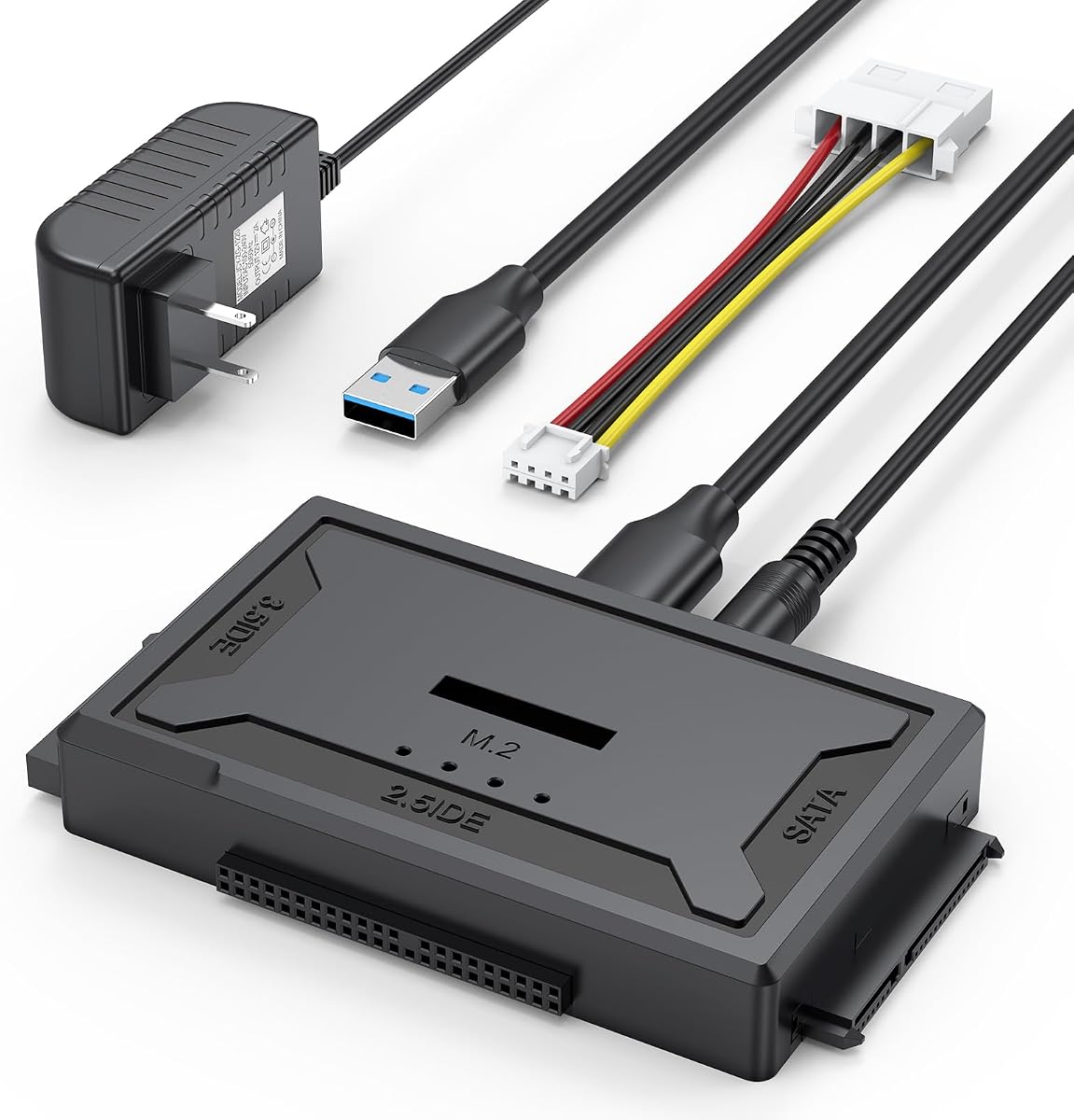
This reader is unique for its support of modern M.2 drives alongside traditional SATA and IDE options. It offers high-speed transfer up to 10Gbps which is excellent for fast SSDs. The open design accommodates various M.2 sizes without restrictions.
We may earn a commission when you buy through this link, at no additional cost to you.
Strengths include the inclusion of a dedicated power cable for older IDE drives. The wide OS compatibility ensures it works with Windows Mac and Linux. The upgraded design improves connection quality for older hardware.
Trade-offs include a higher price point and complexity for new users. The multiple connection options may be overwhelming for simple tasks. However these are acceptable for users needing support for modern and legacy drive types.
Best for tech enthusiasts dealing with a mix of old and new drives. It offers a comprehensive solution for various storage needs. For those needing M.2 support alongside traditional drives this dock is a top choice.
Supports M.2 SATA and NVMe drives for compatibility with the latest SSD standards.
Offers up to 10Gbps transfer speeds for rapid data access and backup tasks.
We may earn a commission when you buy through this link, at no additional cost to you.
Choosing the right adapter involves considering drive type interface speed and power needs.
Ensure the adapter supports your specific drive type such as SATA IDE or M.2. Some models are limited to SATA while others offer broader support.
Always verify connector types before purchasing to avoid incompatibility issues.
Look for USB 3.0 or higher for fast data transfer rates. Some kits support USB-C which is essential for modern laptops.
Prioritize kits with USB 3.0 or USB-C for efficient file transfers and backups.
Larger 3.5 drives often require an external power adapter for stable operation. Check if the kit includes this component.
Always confirm the inclusion of a power adapter for 3.5 inch drives to ensure reliable use.
If you need to carry the adapter regularly choose a compact bus-powered model. Docking stations are bulkier but offer more features.
Choose based on whether you need portability or a stationary solution for office use.
Reliable technical support helps resolve connection issues quickly. Check for warranty options and customer service ratings.
Prioritize brands with strong after-sales support for peace of mind during troubleshooting.
Adapter kits that require no drivers are easier to use across different operating systems. Look for hot-swap capability for convenience.
Ensure the kit supports plug and play to avoid installation hassles on multiple devices.
Connect the adapter to your computer using the appropriate USB port. Ensure you are using a high-speed USB 3.0 or higher port for best performance.
Attach the drive connector securely and turn on the power if an external adapter is provided. Allow the system to detect the drive before accessing files.
Always eject the drive safely through the operating system before disconnecting. Store the adapter in a dry place to prevent damage to connectors.
Yes most of these kits are compatible with Mac computers running modern operating systems. Ensure you have the right ports such as USB-C or USB-A on your device.
Most adapters are designed to be plug and play requiring no additional drivers. They work instantly on Windows Mac and Linux systems upon connection.
3.5 inch drives typically require an external power supply to spin up correctly. Always use the included adapter when connecting these larger drives.
Some kits support dual drives simultaneously while others do not. Check the product specifications to confirm if it supports multiple connections at once.
Yes these adapters are safe for data recovery when used properly. Ensure you connect the drive securely and avoid disconnecting while files are being accessed.
Only specific kits with dedicated slots support M.2 NVMe drives. Most standard adapters are for SATA and IDE drives only.
SATA drives have a smaller L-shaped connector while IDE drives use a wide ribbon cable. Check the physical connector on your drive to identify the type.
It is recommended to connect directly to the computer for stable power. USB hubs may cause intermittent disconnections especially with larger drives.
The top picks offer versatile solutions for data recovery and storage expansion. Whether you need speed compatibility or ease of use these kits cover a wide range of needs.
Prioritize features like power support and portability based on your specific use case. Ensure the adapter matches your drive types for reliable performance.
Remember that availability and pricing can vary over time. Always check current details before purchasing your ideal adapter today.