
Upgraded Watt Power Meter Plug
4.6Editor score
7 display modes
Backlit LCD screen
Overload protection included
This guide compares the top energy consumption monitors for PC and home use, evaluating accuracy, features, and ease of installation for smart savings.
Energy consumption monitors for PC help you track exactly how much electricity your devices use. These tools are essential for gamers, workstation users, and anyone looking to reduce their carbon footprint while saving money on monthly utility bills through precise data.
We compared ten real products based on accuracy, ease of use, and feature sets. Our selection includes plug-in meters for individual devices and whole-home monitors for comprehensive tracking. Each option was evaluated on build quality, data retention, and smart home integration capabilities.
Every pick shows specific strengths like wireless connectivity, detailed reporting, or budget-friendly pricing. Prices can change frequently on Amazon, so always check the current listing before buying. Our goal is to help you find the right monitor for your specific power monitoring needs today.
4.6Editor score

4.6Editor score

4.3Editor score
This side-by-side comparison shows how each energy monitor stacks up against the others in key areas like accuracy, connectivity, and display features to help you choose the right model for your setup.


The Emporia Vue 3 stands out as the top choice for comprehensive home energy monitoring. It is UL certified for safety and offers real-time tracking through an intuitive app. This system monitors your entire electrical panel with sixteen branch sensors for detailed insights.
We may earn a commission when you buy through this link, at no additional cost to you.
It excels in providing actionable data to help you lower electric bills. The app lets you automate settings for time-of-use and peak demand. You can track solar production and net metering easily. Data is stored securely with minute and hour retention in the cloud.
Installation involves clamping sensors onto circuit breakers which may require an electrician for some users. The system needs a stable 2.4GHz WiFi connection to function fully. These minor hurdles are outweighed by the depth of energy insights it provides.
Buy this if you want to see exactly how much power each appliance uses. It is ideal for homeowners aiming to reduce costs and improve efficiency. The Vue 3 offers peace of mind with its safety ratings and robust feature set.
UL certification ensures every component is tested to prevent hazards like overheating or fire risks.
Track your solar energy production and usage to maximize savings and understand your home's energy footprint.
We may earn a commission when you buy through this link, at no additional cost to you.
This watt meter plug offers excellent value for those needing to track individual device usage. It monitors power, energy, volts, and more with a clear backlight display. You can toggle through seven modes to see all the data you need at a glance.
We may earn a commission when you buy through this link, at no additional cost to you.
The backlight time is adjustable to save energy or keep it always on. Overload protection warns you if the appliance draws too much power. Data is saved even when unplugged so you do not lose your usage history between checks.
It does not connect to WiFi so you must read the numbers directly from the screen. This means it cannot send alerts or integrate with smart home systems. However for it works perfectly for simple cost tracking on your PC or peripherals.
Choose this plug if you want an easy way to monitor PC power consumption without complex setup. It is great for checking how much your gaming rig uses during different tasks. The low cost makes it a smart pick for budget-conscious buyers.
Set the backlight to stay on for 10 minutes, 1 hour, 4 hours, 8 hours, or always based on your preference.
The device warns you with an OVERLOAD message if power exceeds the set threshold to keep your appliance safe.
We may earn a commission when you buy through this link, at no additional cost to you.
The Meross monitor brings premium features with a focus on privacy and smart home control. It stores energy data locally without relying on the cloud for full functionality. You get real-time tracking of power usage and costs with precise accuracy within one percent.
We may earn a commission when you buy through this link, at no additional cost to you.
It integrates seamlessly with Home Assistant to automate appliances based on energy surplus. This means you can power high-use devices when solar is active to cut bills. The system supports two main circuits and sixteen branch circuits for detailed monitoring.
Local data handling ensures your privacy but may limit access when not on your local network. The initial setup involves clamping sensors to your panel which might need technical skill. Still the lack of subscriptions makes it a great long-term solution.
Buy this if you value privacy and want deep integration with your smart home ecosystem. It is perfect for homeowners with solar panels who want to optimize usage automatically. The Meross monitor offers advanced control without hidden fees.
All energy data stays local with no cloud dependency to protect your privacy and reduce delays.
Detect solar surplus and automatically power high-use appliances to stop wasting energy and lower bills.
We may earn a commission when you buy through this link, at no additional cost to you.
This monitor is designed to track multiple circuits making it ideal for rental homes or shared apartments. It comes with sixteen sensors to monitor individual rooms or major appliances. You can see real-time usage and costs through a mobile app or local network.
We may earn a commission when you buy through this link, at no additional cost to you.
It supports customizable electricity rate templates including peak and off-peak pricing. This helps landlords or property managers allocate costs fairly among tenants. The system can run without cloud connectivity if you prefer a private setup using your own server.
Installation requires access to the circuit panel which might be a barrier for some users. The setup process involves matching sensors to phases which takes time. However the detailed allocation tools make it worth the effort for multi-room properties.
Choose this for shared living spaces where you need to bill tenants accurately. It works great for tracking EV chargers or common area usage. The privacy features ensure sensitive data stays under your control.
Track power usage for each room or circuit to enable transparent electricity allocation without installing multiple meters.
Run the device without cloud access using only your own MQTT server for maximum data security.
We may earn a commission when you buy through this link, at no additional cost to you.
The SURAIELEC watt meter measures voltage from 90 to 250 volts making it versatile for different regions. It adheres to Class 1.0 accuracy standards for precise readings of power and energy. A wide-angle LCD display makes it easy to read data from any angle.
We may earn a commission when you buy through this link, at no additional cost to you.
Data is stored for up to 90 days thanks to a built-in battery backup. This ensures you can track usage even during power outages or when unplugged. The reset button allows you to clear data easily for new measurements.
It lacks smart connectivity so you must input cost rates manually to calculate bills. The plug design is compact which leaves the lower outlet accessible. This is convenient for devices that block the socket behind the meter.
Buy this if you need a reliable standalone meter for international or variable voltage appliances. It is a great choice for tracking energy use without needing internet access. The long memory retention makes it useful for periodic monitoring.
Stored data stays for 90 days during power outages so you never lose your usage history.
The compact design leaves the lower wall outlet accessible when plugged into the upper outlet.
We may earn a commission when you buy through this link, at no additional cost to you.
This HBN meter offers nine display modes to show a wide range of electrical parameters. You can view power, energy, voltage, current, and more with a simple button press. The backlit LCD ensures you can read data clearly day or night.
We may earn a commission when you buy through this link, at no additional cost to you.
Data is stored even if the power fails so you do not lose cumulative usage records. The backlight conserves energy by turning off after fifteen seconds of no use. Safety ratings indicate it is rated for standard household voltage and current.
The backlight auto-off helps save power but might be annoying in dark rooms. It does not connect to apps or smart assistants for remote viewing. However it provides accurate on-device data for managing your PC or home appliances.
Select this plug if you want detailed stats without complexity. It is good for checking the energy use of your computer setup or other gear. The variety of display modes gives you flexibility to see exactly what you need.
Toggle through nine types of data including apparent power and power factor to understand full energy usage.
Non-real-time data is stored to prevent loss during outages and reset cumulative data easily.
We may earn a commission when you buy through this link, at no additional cost to you.
The KETOTEK plug uses one-click buttons to switch between different data displays quickly. It offers multiple protection alarms for overload kWh limit and cost limit to keep your devices safe. The built-in chip stores data reliably even if power is lost.
We may earn a commission when you buy through this link, at no additional cost to you.
Wide viewing angles mean you can read the screen without standing directly in front of it. The overload setting is adjustable so you can set thresholds based on your appliance needs. This flexibility helps prevent damage from overcurrent events.
It lacks smart connectivity so you must track usage manually. Cost calculation requires you to enter rates on the device itself. These minor inconveniences are acceptable for the safety and convenience features it provides.
Buy this for easy protection monitoring of your PC or home electronics. It is ideal if you want visual alarms to warn you of potential issues. The KETOTEK plug balances safety and simplicity well.
Warnings for overload KWh and cost limits flash LED lights to alert you instantly.
Press different buttons to access KWH Watt Vrms Hz and other parameters instantly.
We may earn a commission when you buy through this link, at no additional cost to you.
This two-pack offers great value for monitoring multiple devices at once. Each plug has eight display modes to track power cost voltage and more. The body is made of premium ABS material which is fireproof and anti-drop for safety.
We may earn a commission when you buy through this link, at no additional cost to you.
Backlight displays show data clearly at night. You can turn the backlight on or off manually as needed. Data memory saves cumulative records so you do not lose tracking when unplugging the meter.
The reset button is easy to press for clearing data without extra tools. It does not connect to smart apps so remote viewing is not possible. This makes it a simple physical meter for immediate readings.
Choose this set to monitor both your PC and peripherals like monitors simultaneously. The two-pack saves money compared to buying single units. It is a practical solution for tracking energy use across multiple outlets.
Get two monitors to track multiple devices at once and reduce overall cost.
High-quality ABS body makes the monitor fireproof and anti-drop for long-lasting use.
We may earn a commission when you buy through this link, at no additional cost to you.
The Kill A Watt is a classic monitor that provides basic energy tracking without smart features. It connects to appliances to assess efficiency and count consumption by the kilowatt-hour. The large LCD display shows clear readings for day week month or year usage.
We may earn a commission when you buy through this link, at no additional cost to you.
It calculates electricity expenses based on your set rates to help you budget. The unit is compatible with inverters and designed for standard AC 115-volt appliances. This makes it reliable for older setups or simple monitoring needs.
Lack of modern connectivity means no app access or remote alerts. It is a standalone device that requires manual interaction to view data. However it remains a trusted option for basic usage checks.
Buy this for simple plug-and-play energy monitoring without complexity. It works well for checking the efficiency of older electronics or household items. The classic design ensures it remains a steady tool for basic tracking.
The large LCD screen counts consumption by the kilowatt-hour for clear visibility.
Works with inverters and standard 115-volt AC appliances for broad compatibility.
We may earn a commission when you buy through this link, at no additional cost to you.
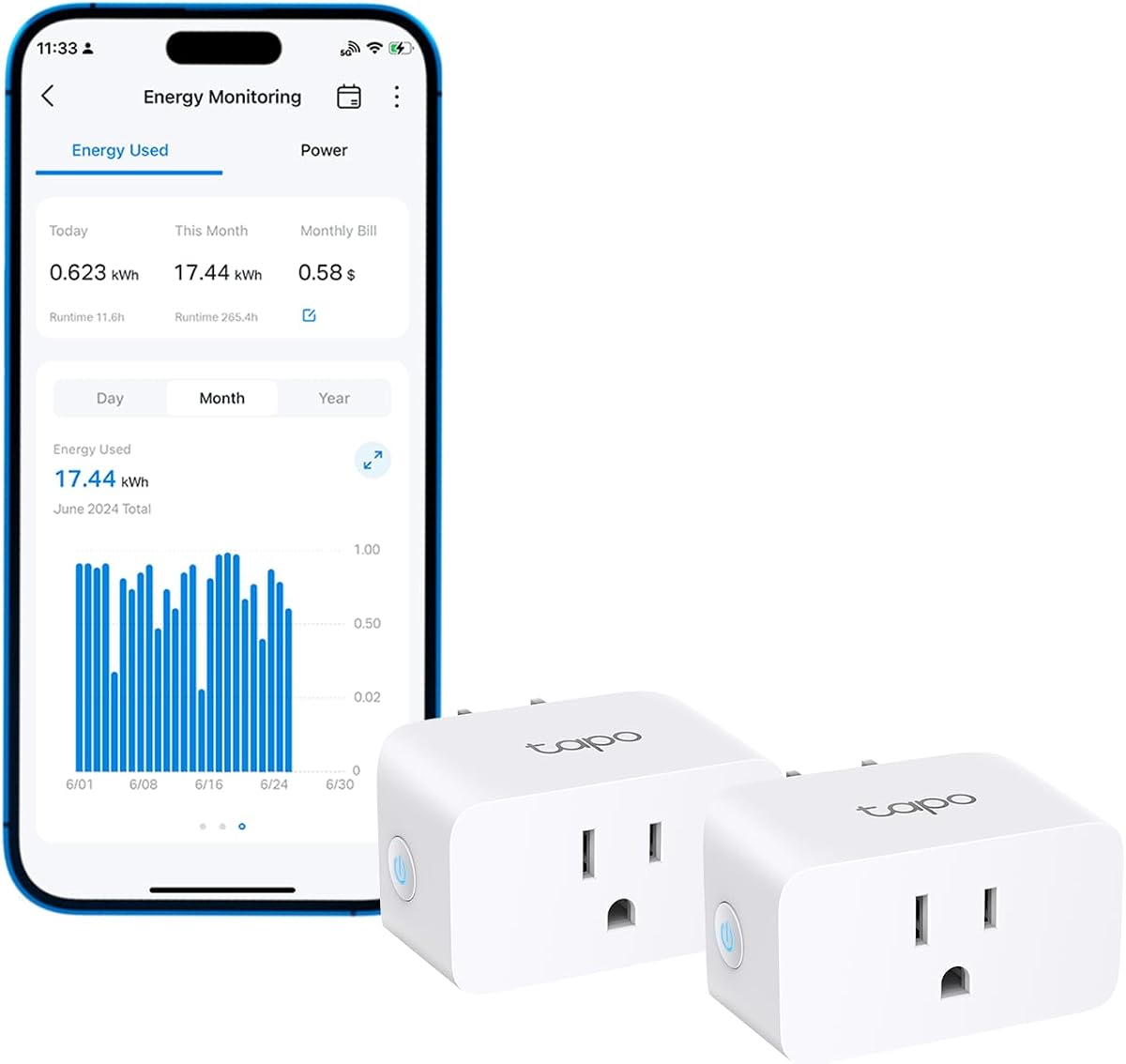
The Tapo smart plug integrates energy tracking with smart home control. It tracks energy use with clear statistics and charts in the Tapo app. You can automate devices to turn off when low battery or schedule them for off-peak hours.
We may earn a commission when you buy through this link, at no additional cost to you.
Voice assistants like Alexa and Google Assistant support let you control devices easily. Auto-shutoff prevents electrical overload by shutting off devices using too much power. Remote access allows you to manage appliances from anywhere.
It requires WiFi and the app to function which limits offline use. If internet is down you cannot access real-time data. However for most users the convenience of smart features outweighs this drawback.
Buy this if you want energy monitoring with remote control convenience. It is perfect for managing PC peripherals without being near the socket. The smart scheduling helps save money by running devices at cheaper times.
Use simple voice commands to adjust settings or turn devices on and off with ease.
Automatically cuts power once your device reaches a low-battery limit to prevent overcharging.
We may earn a commission when you buy through this link, at no additional cost to you.
Choosing the right monitor depends on whether you need to track one device or your whole home and how much detail you require.
Look for monitors with high accuracy ratings like ±1% or ±2% to trust the data you collect. UL or ETL certification ensures the device meets safety standards for electrical use in your home or office.
Certified devices reduce risk of fire or electrical hazards when plugged into outlets or installed in panels.
Decide if you want WiFi connectivity for app access and remote alerts or a simple display-only meter. Smart plugs and home monitors connect to apps while basic plugs show data on their screen.
Smart features allow remote control and automation but require stable internet access to function fully.
Plug-in monitors are the easiest to install as they just sit in a socket. Whole-home monitors require installing sensors in your electrical panel which may need an electrician for some setups.
Choose plug-in models for simplicity or panel monitors for full home energy insights without hiring help.
Check how long data is stored on the device or in the cloud. Some plug meters have internal memory that saves data even when unplugged while others lose history if disconnected.
Long retention periods help track usage trends over weeks without needing constant monitoring.
A clear LCD display with backlight helps you read data in any lighting condition. Look for models with wide viewing angles and adjustable backlight settings to suit your space.
Bright easy-to-read screens make it simple to check usage at a glance.
Prices vary from ten dollars for basic plugs to hundreds for whole-home monitors. Decide how much detail you need before buying to avoid overspending on features you will not use.
Plug-in monitors offer affordable entry points for basic PC usage tracking.
Ensure the monitor supports the voltage and wattage of your PC and other devices. Some plugs have overload protection that triggers if power exceeds a set limit to prevent damage.
Capacity limits protect your equipment from power spikes that could damage sensitive hardware.
If you prefer keeping data private choose monitors that store data locally or support offline modes. Cloud-based apps may send data to external servers which could raise privacy concerns.
Local data storage ensures your usage patterns remain on your device.
Plug the monitor directly into the wall outlet and connect your PC power supply to the monitor socket. For whole-home units install sensors according to manufacturer instructions inside your electrical panel.
Set the cost per kilowatt-hour in the app or on the display so you can see real dollar savings. Use display modes to cycle through power usage time and energy consumption figures.
Keep the monitor in a well-ventilated area to avoid overheating. Clean the display with a dry cloth and check connections regularly to ensure accurate data readings.
Yes most monitors are designed with overload protection and safety certifications. They handle standard household voltages and currents without risking damage to your PC components.
Yes plug-in monitors support high-wattage devices like gaming rigs. Check the wattage limit before buying to ensure your power supply is within the rated capacity.
Most models offer accuracy within one to two percent. This level of precision is sufficient for tracking usage trends and comparing device efficiency.
Smart plugs and whole-home monitors with apps allow remote access. Plug-only meters require you to check the display directly for readings.
No these monitors consume negligible power. They help reduce bills by identifying energy-hogging devices and promoting efficient usage habits.
Plug-in monitors do not need special wiring. Whole-home monitors require wiring in your panel which may need a professional electrician.
Most units have a reset button to clear cumulative data. Follow the device manual to reset without affecting settings.
Some whole-home monitors track solar net metering. Check the product features to ensure solar support is included.
The Emporia Vue 3 offers the most complete home energy picture with solar support and app control. For simple PC monitoring the Upgraded Watt Power Meter Plug provides excellent value and detailed readings on a small display.
Consider your budget and how much control you need before buying. Smart plugs like Tapo add automation features while basic meters focus on direct data tracking.
Check current prices on Amazon before purchase as deals change frequently. The right monitor can help you reduce power costs and manage your home energy use effectively.