
LeapFrog 2-in-1 LeapTop Touch
4.7Editor score
2-in-1 flip design
Five distinct learning modes
Personalized name spelling feature
This guide compares the top 10 laptops for 5 year olds, evaluating educational features, durability, and battery life to help you choose the best option.
Finding the right laptop for a five year old can be challenging. You need something engaging yet educational that grows with them. These devices often mimic real computers while keeping safety and simplicity in mind for young users.
We compared ten popular models based on activity variety, screen quality, and durability. Our analysis focused on how well each device supports early learning skills like math, reading, and basic computer operation without overwhelming a child.
Each pick highlights unique strengths to help you decide quickly. Remember that prices fluctuate frequently, so check current offers before purchasing. This list aims to save you time and ensure you find a lasting tool for your child.
4.7Editor score

4.5Editor score

4.2Editor score
This side-by-side comparison highlights key specifications and unique features across all ten models to help you identify which device best fits your child's learning style and your budget constraints.





The VTech Genio Bilingual JuniorBook stands out as a top choice for children aged five and up. With a strong rating of 4.5 stars, it is widely appreciated by parents for its ability to mimic a real computer while keeping lessons safe and structured.
We may earn a commission when you buy through this link, at no additional cost to you.
This device offers over eighty activities that cover math, science, language arts, and music. The full-size QWERTY keyboard helps children develop typing skills early. The bilingual mode allows kids to switch between English and Spanish, providing immersive language exposure without needing an internet connection.
While it is not a full-fledged operating system, the limitation ensures safety. The only minor trade-off is the battery requirement, which is common for toy laptops. These small inconveniences are outweighed by the educational value and the engaging design that keeps children interested.
If you want a laptop that teaches real computer skills in a fun way, this is the pick. It is ideal for kids who are curious about how adults use computers. The offline nature makes it perfect for travel or quiet time at home.
The keyboard and cursor controller mimic real computers to build familiarity.
Children can switch between English and Spanish to learn a new language easily.
We may earn a commission when you buy through this link, at no additional cost to you.
The Lexibook Unicorn Educational Laptop is a great budget-friendly option for families. It holds a solid 4.3-star rating and offers a sleek design that appeals to kids. It covers essential topics like math, logic, and music in a simple package.
We may earn a commission when you buy through this link, at no additional cost to you.
Its standout feature is the musical activities that let children learn notes and compose melodies. This helps with creativity and listening skills. The ergonomic design makes it easy for small hands to hold, and the realistic mouse encourages exploration.
The main trade-off is the smaller screen and basic layout compared to more advanced models. However, for the price, the educational value is high. It is perfect for kids who need a simple intro to computer-style learning without complexity.
This laptop is best for parents looking for a low-cost gift that still teaches valuable skills. It is especially good for music lovers or those who want a lightweight device for short learning sessions.
Kids can compose and play melodies to boost musical interest and skills.
The slim design fits easily in bags for travel or school use.
We may earn a commission when you buy through this link, at no additional cost to you.
This Kids Laptop model focuses heavily on visual engagement with its TFT color screen. The display is clearer than many budget options, which helps keep attention spans high. It comes with 48 different learning modes to cover a broad curriculum.
We may earn a commission when you buy through this link, at no additional cost to you.
The screen offers lifelike visuals for animals, colors, and shapes. This visual clarity makes learning more fun and less abstract for young children. The ergonomic design ensures comfortable use, and there are logic games to test memory and speed.
One small detail is the protective film that needs to be torn off before use. It is a minor step but easy to overlook. Otherwise, the device is straightforward and effective for home learning sessions.
Buy this if you want a laptop that looks modern and offers strong visual feedback. It is a good middle-ground option for parents who want a bit more tech feel than a simple toy.
The color screen provides clear visuals that help kids stay focused.
Forty-eight modes ensure no topic is missed during play.
We may earn a commission when you buy through this link, at no additional cost to you.
The LeapFrog 2-in-1 LeapTop Touch offers unique versatility with its flip design. It functions as a laptop but can be swiveled into a tablet. This dual form factor encourages role-play and offers flexibility in how children interact with the content.
We may earn a commission when you buy through this link, at no additional cost to you.
Kids can pretend to email friends or learn to spell their own name. The five learning modes cover ABCs, numbers, games, music, and messages. This variety ensures that boredom is less likely to set in during playtime.
The main consideration is the battery usage, as it requires three AA cells. However, the educational value and the 4.7-star rating show that parents find it worth the cost. It is particularly good for younger kids transitioning from simple toys.
This model is best for households that want a device that evolves as the child grows. It is a trusted brand choice that balances fun and learning effectively.
The device transforms from laptop to tablet to suit different activities.
Features like pretend email help kids understand adult computer use.
We may earn a commission when you buy through this link, at no additional cost to you.
The VTech Play Smart Preschool Laptop brings personalization to the forefront with its avatar feature. With a 4.6-star rating, it offers a sleek look that appeals to kids who want a modern device. The activities are leveled to support gradual learning.
We may earn a commission when you buy through this link, at no additional cost to you.
Children can personalize the laptop with their own name and age. This creates a stronger connection to the device. The content includes letters, numbers, and food categorization games. Music games also let them explore instrument sounds.
The only drawback is the total activity count compared to larger models. However, the focus on quality and personalization makes up for this. It is a safe choice for younger children needing a gentle intro to computers.
This laptop is best for parents who want a device that feels special to their child. The personalization helps build confidence and ownership over the learning process.
Kids can set their own name and avatar to feel connected to the device.
Activities adjust in difficulty to keep kids challenged but not frustrated.
We may earn a commission when you buy through this link, at no additional cost to you.
The LEXiBOOK LAPTAB 10 inch version is a premium option that bridges the gap between toy and real laptop. It features a large HD touchscreen and powerful processor. This allows for smoother performance and access to more complex applications.
We may earn a commission when you buy through this link, at no additional cost to you.
Parents will appreciate the storage capacity and Google Play access, which opens up thousands of apps. The parental controls are robust, allowing for safe browsing and time management. This makes it a long-term investment for growing kids.
The trade-off is the price and the need for supervision during internet use. However, for families who want a device that can last into the early school years, the features are justified. It is a true computing experience.
This is the pick for parents who want high-end tech but with toy safety standards. It is ideal for older 5 year olds who are ready for more interactive and advanced digital tools.
Google Play Store access allows for a wider range of educational apps.
Robust controls let parents manage time and app access safely.
We may earn a commission when you buy through this link, at no additional cost to you.
This model adds a creative twist with a built-in camera for capturing moments. It holds a strong 4.6-star rating and offers 64 learning modes to cover math, animals, and logic. The camera allows kids to take photos with cute frames.
We may earn a commission when you buy through this link, at no additional cost to you.
The creative aspect is the standout feature. It encourages kids to explore their surroundings and document memories. This adds a layer of real-world engagement to the learning activities. The ergonomic design remains comfortable for small hands.
The camera is not a high-end tool but perfect for fun. It is a good addition to the mix of educational games. The main trade-off is ensuring you have fresh batteries for long play sessions.
If your child enjoys photography or creative hobbies, this is an excellent choice. It blends learning with creative expression in a safe and fun way.
The built-in camera lets kids take photos with fun filters and frames.
Sixty-four modes ensure plenty of educational activities for long use.
We may earn a commission when you buy through this link, at no additional cost to you.
The LeapFrog LeapPad Academy is a tablet-focused option that emphasizes school readiness. It includes over twenty educator-approved apps covering math, reading, and coding. The stylus helps kids practice writing skills which is crucial for school.
We may earn a commission when you buy through this link, at no additional cost to you.
The rechargeable battery reduces the need for disposable batteries. The screen is shatter-safe to handle drops and bumps. Parental controls allow you to set time limits and manage apps effectively for daily use.
The trade-off is the subscription needed for full content access. It is an ongoing cost to consider. However, the curriculum quality makes it a valuable tool for structured learning and skill building.
This is best for parents focused on formal learning skills like writing and coding. It is a strong option for kids nearing school age who need to practice specific academic tasks.
The included stylus helps children develop essential writing skills early.
Shatter-safe screen ensures the device survives accidental drops.
We may earn a commission when you buy through this link, at no additional cost to you.
The Lexibook Barbie Educational Laptop combines a popular theme with strong educational content. It offers over one hundred activities covering math, logic, and music. The bilingual feature supports language development alongside standard learning tasks.
We may earn a commission when you buy through this link, at no additional cost to you.
The design is slim and elegant, appealing to kids who want a stylish toy. It is easy to carry around the house or on trips. The games add fun variety to the educational activities to keep playtime exciting.
The screen size is small but functional for basic activities. The main trade-off is the theme focus, which might limit appeal if the child is not into this style. Still, it delivers solid value.
This is best for children who love the theme and want a portable learning tool. It is a great gift option for birthday parties or special occasions.
Kids can learn in both English and Spanish with the included exercises.
The compact design makes it easy to carry for on-the-go learning.
We may earn a commission when you buy through this link, at no additional cost to you.
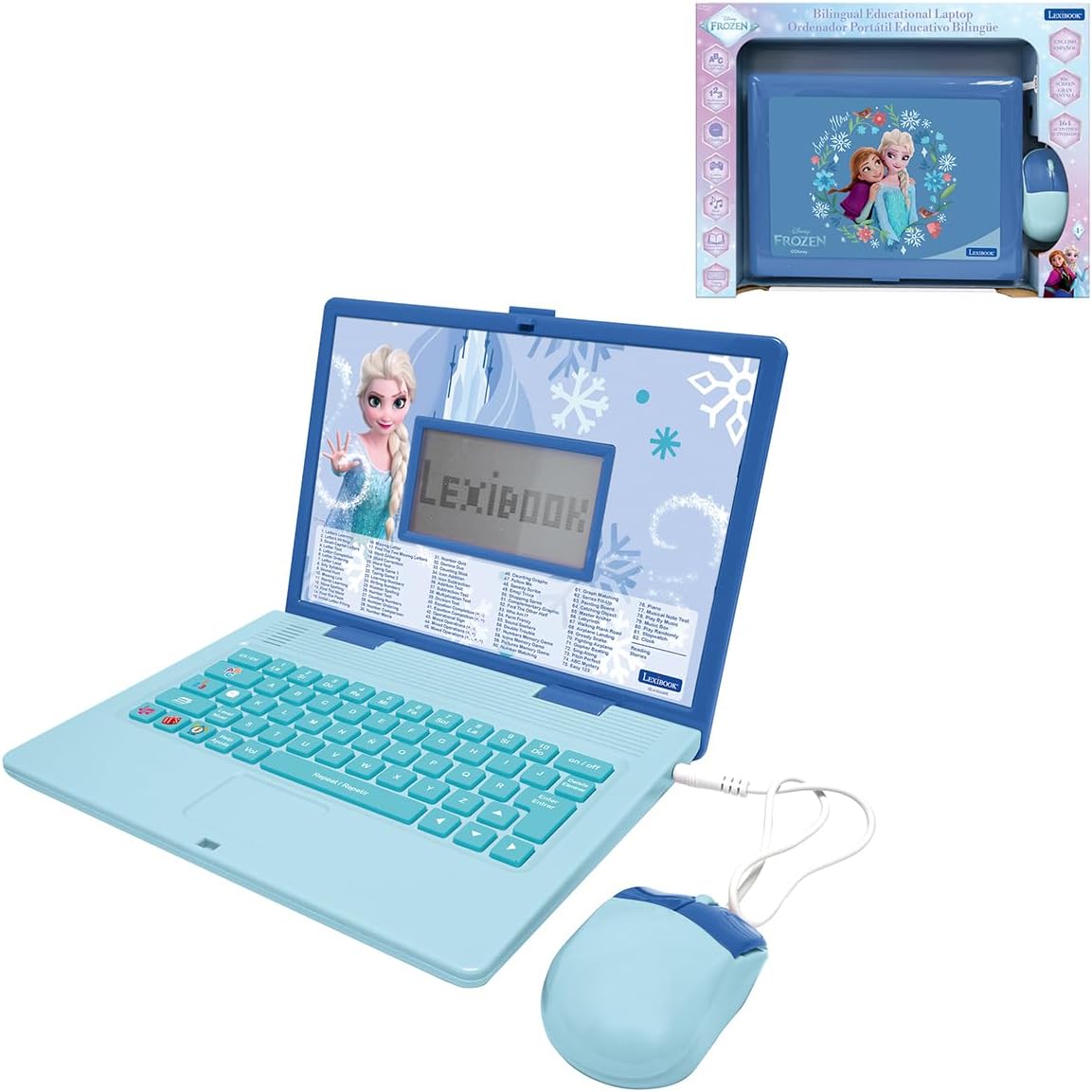
The LEXiBOOK Frozen Educational Laptop offers over one hundred sixty activities with a beloved theme. It supports bilingual learning and includes voice guidance for navigation. This makes it easy for younger children to use without constant help from parents.
We may earn a commission when you buy through this link, at no additional cost to you.
The lightweight design makes it simple to carry around. The music and quiz modes keep kids engaged with interactive challenges. The layout is straightforward, ensuring that learning is the primary focus of the device.
As a newer model, it lacks a review rating, but the specs are solid. The theme is a major draw for fans. It is a good choice if you want a device that is both fun and educational.
This is best for fans of the theme who want a reliable learning tool. It is a strong option for home use or short trips with family.
Kids can switch between English and Spanish to practice languages.
Voice guidance helps children navigate the device independently.
We may earn a commission when you buy through this link, at no additional cost to you.
Choosing the right device requires looking at several key factors beyond just the price. This guide breaks down what to consider to ensure the laptop will be useful and enjoyable for your child.
The most important factor is the quality and quantity of learning activities. Look for models that cover math, reading, and logic. Ensure the content matches your child's current level.
Choose a device with enough activities to keep them interested for a long time.
Children can be rough with toys so the build quality matters. Look for reinforced corners or sturdy hinges. The materials should be safe and non-toxic.
Prioritize models that are built to survive drops and daily play.
A clear screen helps prevent eye strain and keeps attention focused. Color screens are often more engaging than black and white ones. Check the screen size for comfort.
Select a model with a bright and clear display for better visuals.
Consider whether the device uses disposable or rechargeable batteries. Rechargeable options save money in the long run. Also check the expected play time per charge.
Opt for a model with long battery life to avoid interruptions.
Realistic keyboards help children learn typing skills early. Ensure the keys are easy to press and responsive. The mouse should be simple to control.
Pick a device with a keyboard layout that mimics real computers.
If you want to introduce a second language, look for bilingual options. These allow kids to switch between English and Spanish. This supports language development.
Choose a model that offers multiple languages if that is a goal.
Decide if you want a Wi-Fi enabled device or one that is offline. Offline devices are safer and simpler to use. Wi-Fi allows for more content downloads.
Select offline models for safety or Wi-Fi models for extra content.
Designs that match your child's interests are more engaging. Look for colors and themes they like. The device should feel comfortable to hold.
Choose a design that resonates with your child to encourage use.
Start by removing any protective films on the screen to ensure clear visibility. Insert fresh batteries or charge the device fully before the first use.
Show your child how to turn on the device and navigate the menu. Encourage them to try different modes and activities to explore all features.
Keep the laptop clean by wiping it with a dry cloth. Store it in a safe place when not in use to avoid damage.
Yes, most toy laptops are designed specifically for safety. They do not have harmful materials and use safe software. Always supervise screen time to ensure healthy habits.
Most models require batteries which are often included for demo only. You should buy new AA batteries for regular use. Some rechargeable models include their own battery pack.
Most toy laptops are offline only to ensure safety. Some premium models have Wi-Fi but use parental controls. Always check the specs before buying if internet access is needed.
These devices are designed for children aged three to eight years. They are best suited for kids starting to learn letters and numbers. Younger kids may need help to navigate the menus.
Use a soft dry cloth to wipe the surface. Do not use harsh chemicals or submerge the device in water. Keep it away from liquids to prevent damage to the electronics.
Yes, many models offer activities that build math and reading skills. They help children learn to use a keyboard which is useful for school. Check the curriculum to ensure it matches school needs.
We have explored ten top-rated laptops for five year olds covering various needs. From budget-friendly toys to premium tablets, each offers unique educational value. The VTech Genio is a standout for its realistic design.
When buying prioritize educational content and durability. Make sure the device is easy for your child to use. Consider the battery needs and any features like bilingual modes.
Prices change often so check current deals before buying. Use this guide to find the perfect tool for your child's learning journey.