
Hamile for iPad 9/8/7th Generation Case
4.5Editor score
180 hours battery use
Multiple viewing angles
Honeycomb heat dissipation
This guide compares the top keyboard cases for 8th Generation iPad models to help you find the perfect accessory for productivity and protection.
Finding the right keyboard case for your tablet can transform how you work and create on the go. A good case protects your device while providing a comfortable typing experience that feels like a laptop.
We have carefully compared ten top-rated options available today. Our analysis looks at compatibility, battery life, build quality, and unique features like trackpads and backlighting to help you decide.
Each pick shows key specifications and real user feedback to guide your choice. Please note that prices and availability change frequently so check the current details before purchasing your new accessory.
4.5Editor score
4.5Editor score

4.4Editor score
The following table provides a side by side comparison of all ten products featured in this guide to help you quickly identify the best option for your needs.


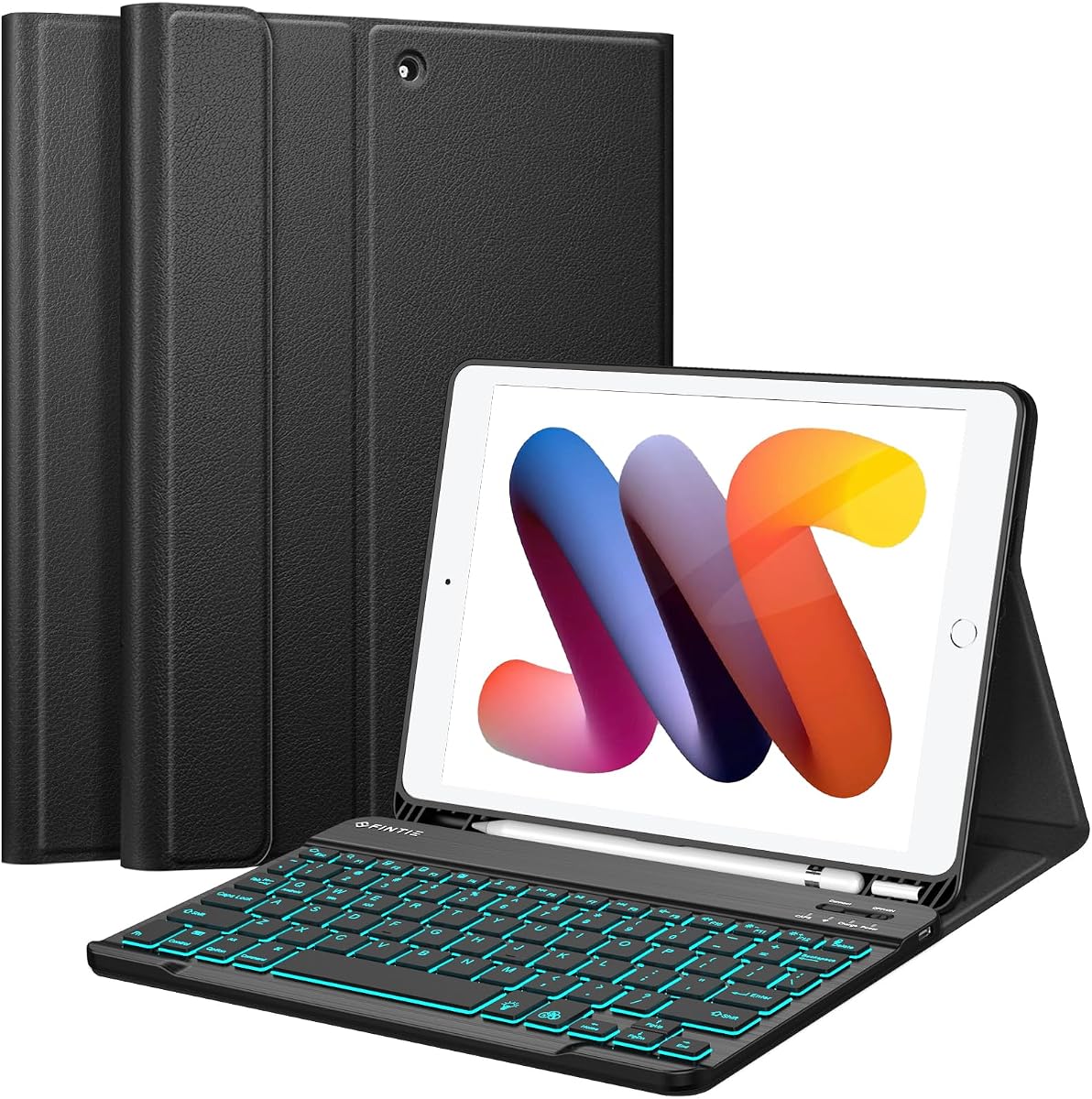
This FINTIE case offers a balanced mix of features making it a top contender for iPad owners seeking productivity. With a rating of 4.5 stars users appreciate its reliability and typing comfort.
We may earn a commission when you buy through this link, at no additional cost to you.
The standout feature is the massive 230 hour battery life which means you can type for days without charging. The scissor keys provide a satisfying tactile feel that reduces fatigue during long sessions.
While the backlight is vibrant it is limited to seven colors which may not suit everyone. However the brightness levels are adjustable enough to work in most dim environments comfortably.
If you need a versatile case that transforms your iPad into a mini laptop this is an excellent choice. It provides great protection and the detachable keyboard allows for flexibility when you just want to read.
The 420mAh battery ensures you rarely worry about power during work sessions or travel days with consistent performance.
Scissor keys with rebound features reduce noise and provide a satisfying press that mimics a traditional laptop keyboard.
We may earn a commission when you buy through this link, at no additional cost to you.
Hamile offers a compelling option for those watching their budget without sacrificing essential features. This case provides strong value with a high rating and solid performance metrics.
We may earn a commission when you buy through this link, at no additional cost to you.
The 400mAh battery delivers up to 180 hours of use which is impressive for the price. The honeycomb design helps keep your iPad cool during extended typing or video sessions.
Some users might find the keys feel a bit light compared to premium brands. But for general typing and note taking this keyboard performs reliably without lag.
This is perfect for students or casual users who want a laptop experience without spending a fortune. It covers all the basics including protection and typing support effectively.
Hamile delivers all the necessary features like backlighting and a pencil holder at a price that fits most budgets.
The honeycomb grid pattern on the back helps dissipate heat preventing your iPad from overheating during heavy use.
We may earn a commission when you buy through this link, at no additional cost to you.
The typecase distinguishes itself with a precision trackpad and a 360 rotating hinge that offers unmatched versatility. It is designed for users who want a true laptop experience.
We may earn a commission when you buy through this link, at no additional cost to you.
The trackpad allows you to navigate the iPad without touching the screen which is great for editing documents or browsing. The RGB backlight adds a unique flair to your setup.
It is heavier than standard cases which might be a consideration for carrying it daily. But the build quality is solid and the hinge has been stress tested for longevity.
If you want the closest thing to a laptop on an iPad this is the choice to make. The trackpad alone justifies the extra cost for many power users.
Multi-gesture trackpad controls allow you to scroll, zoom, and select with precision without reaching for the screen.
The 360 degree rotating hinge lets you use the iPad in any orientation for typing reading or creative work easily.
We may earn a commission when you buy through this link, at no additional cost to you.
TUNKARMOR sets itself apart by including a Bluetooth mouse in the package. This is ideal for users who prefer a mouse over a trackpad for navigation.
We may earn a commission when you buy through this link, at no additional cost to you.
The honeycomb grid pattern inside the case helps protect your iPad from overheating and adds a layer of shock absorption. It is built to withstand bumps and drops effectively.
Managing charging for both the keyboard and the mouse can be slightly annoying. But the functionality and the extra mouse make it a unique option.
This case is perfect for presentations or detailed work where precise cursor control is needed. It offers a complete package that includes everything you need to start working.
Getting a wireless mouse included saves you from buying one separately and ensures compatibility with the case design.
Full edge coverage with a honeycomb grid pattern keeps your device safe from all sides during travel or drops.
We may earn a commission when you buy through this link, at no additional cost to you.
Divufus offers a straightforward design focusing on utility and protection. It supports multiple operating systems making it versatile for different devices.
We may earn a commission when you buy through this link, at no additional cost to you.
The pencil holder is well designed and keeps your Apple Pencil secure and accessible when you need it. This is a key feature for artists and students.
It lacks backlighting so typing in the dark is not possible without external light. But the battery life still gets you through a work day easily.
This is a great basic option for those who need protection and typing support without extra frills. It keeps things simple and effective for daily use.
Switching between iOS Android and Windows systems is easy with the dedicated function key combination provided.
The built-in holder ensures your pencil is always with you and prevents it from being lost or damaged in a bag.
We may earn a commission when you buy through this link, at no additional cost to you.
Logitech is known for reliability and this Slim Folio case lives up to that reputation with consistent performance and quality build.
We may earn a commission when you buy through this link, at no additional cost to you.
The use of coin cell batteries means you do not have to carry a charging cable. This makes it convenient for long trips where outlets are scarce.
It is pricier than many competitors which might be a deterrent for budget conscious shoppers. But the quality and battery longevity often justify the cost.
For professionals who want a trusted brand and minimal charging hassle this is a strong contender. It feels solid and the keys are well spaced for comfort.
Using replaceable coin cells means you only swap batteries every few years rather than charging daily or weekly.
The build quality ensures that this case will last through years of daily professional use without failure.
We may earn a commission when you buy through this link, at no additional cost to you.
KBCASE offers a stylish option with a slim profile that is easy to carry in a bag. It is designed to protect without adding unnecessary bulk.
We may earn a commission when you buy through this link, at no additional cost to you.
The wave shock absorption design provides a solid layer of protection against drops. This is essential for students who carry their tablets around frequently.
Lack of backlight means it is not ideal for low light conditions. But the typing experience is smooth and the keys feel responsive enough.
This is a great choice if you value aesthetics and portability over advanced features. The light blue color adds a personal touch to your device.
The ultra-thin design ensures the case adds minimal weight and bulk making it perfect for daily commutes.
Available in colors like light blue this case lets you personalize your iPad while keeping it well protected.
We may earn a commission when you buy through this link, at no additional cost to you.
Dexnor brings a premium feel with its floating cantilever stand and large trackpad. It looks modern and functions efficiently for multitasking.
We may earn a commission when you buy through this link, at no additional cost to you.
The trackpad supports multi-finger gestures which makes navigation smooth and intuitive. It helps you manage files and apps more like a traditional computer.
The hinge mechanism adds some weight to the case which may not suit those who prefer light setups. But the stability it provides is excellent for typing.
If you want a modern and functional accessory that looks like a high end laptop this is a great fit. It balances form and function well for productivity.
The floating cantilever design gives the iPad a sleek look while providing a stable typing surface.
Multi-finger gestures on the trackpad allow you to switch apps and scroll efficiently without touching the screen.
We may earn a commission when you buy through this link, at no additional cost to you.
INFILAND focuses on typing performance with a zero lag magnetic keyboard that feels responsive and solid. It is a great choice for writers and coders.
We may earn a commission when you buy through this link, at no additional cost to you.
The trackpad is responsive and allows for precise cursor control. Combined with the shortcut keys it makes navigating the iPad feel fast and efficient.
There is no pencil holder which might be a downside for creative users. But the typing experience is strong and the design is sleek and modern.
This case is ideal for anyone who types frequently and wants a reliable input device. It keeps things simple and effective without unnecessary extras.
The zero-lag design ensures that your keystrokes register instantly so you can type quickly without frustration.
Strong magnets lock the keyboard in place so it does not shift around while you are working on documents.
We may earn a commission when you buy through this link, at no additional cost to you.
This KBCASE model offers 360 degree rotation giving you flexible viewing angles for any task. It is a solid all-around option for different use cases.
We may earn a commission when you buy through this link, at no additional cost to you.
The hardshell design provides robust protection for all sides of the tablet. It is built to last and keeps your device safe from scratches.
The hinge can be complex to adjust compared to simpler stands. But once set it holds the iPad securely in place for typing or watching.
If you need a versatile case that adapts to your changing needs this is a reliable choice. It offers protection and functionality in a durable package.
The 360 swivel feature allows you to use the iPad as a tablet or a laptop depending on your immediate task.
The hardshell construction ensures that your tablet is protected from every angle during travel and daily use.
We may earn a commission when you buy through this link, at no additional cost to you.
Choosing the right keyboard case involves considering several factors to ensure it meets your specific needs and usage habits.
Ensure the case is specifically designed for your iPad model. Most cases for the 8th generation also fit the 7th and 9th generation models but always verify the model number on your device before purchasing.
Check the product description for the exact model codes to avoid returns and ensure a perfect fit for your device.
Decide between a detachable keyboard and a built-in one. Detachable keyboards offer flexibility for reading while built-in ones provide a more integrated and often more stable typing experience.
Detachable options are versatile if you want to use the iPad as a standalone tablet frequently.
If you type in low light conditions look for a case with backlighting. Adjustable brightness and multiple color options can enhance the visual experience and usability.
Backlighting is a crucial feature for night users or those working in dim environments.
Check the battery capacity and estimated usage time. A case with a longer battery life reduces the need for frequent charging and ensures you can work for longer periods.
Look for cases that offer hundreds of hours of usage on a single charge for convenience.
Consider how much protection you need. Cases with full edge coverage and durable materials like PU leather offer better shock absorption and scratch resistance.
A sturdy case will keep your tablet safe from drops and bumps during daily travel.
Trackpads add a new level of control allowing you to navigate without touching the screen. This can improve productivity and reduce finger fatigue during long sessions.
If you plan on doing extensive work or browsing a trackpad is a highly valuable feature.
A built-in pencil holder keeps your Apple Pencil secure and accessible. This is essential if you use the pencil frequently for notes or drawing.
Always verify if the holder fits your specific generation of Apple Pencil to ensure a snug fit.
Determine your budget before shopping. There are options available at various price points so you can find a balance between features and cost.
Invest more in premium features if you use the case daily for work.
To begin pairing your case turn on Bluetooth on your iPad and press the power button on the keyboard until the indicator light blinks. Follow the on-screen prompts to connect your device.
Keep the keyboard clean by wiping it gently with a dry cloth to remove dust and debris. Avoid using liquids directly on the keys or the trackpad.
Charge the case regularly using the provided cable to ensure optimal battery life. When not in use for long periods store the device in a cool dry place.
No the Apple Pencil is not included with any of these cases. Most cases feature a built-in holder or slot to store your pencil securely but you must purchase the pencil separately.
Many of these cases support iOS Android and Windows systems. You can usually switch between them by pressing a specific function key combination provided with the keyboard.
Battery life varies by model but most cases offer between 80 and 230 hours of use on a single charge. Standby times can also last for several months without use.
Many cases designed for the 8th generation also work with the 7th and 9th generation iPads. Always check the product compatibility list to confirm it fits your specific model.
Yes most of these cases support portrait mode. Some models have flexible hinges or magnets that allow you to use the tablet in both landscape and portrait orientations.
Most cases have precise cutouts that allow you to charge your iPad without removing the case. Simply connect your charging cable to the port accessible from the top or bottom.
Choosing a keyboard case can significantly enhance your productivity and convenience. The top picks in this guide offer a range of options from budget friendly to premium models with trackpads.
Prioritize the features that matter most to you such as battery life protection or typing comfort. Consider how you plan to use the case daily to narrow down your options effectively.
Remember to check current prices and availability before purchasing to ensure you get the best value. These cases are a worthwhile investment for anyone looking to turn their iPad into a portable workstation.