
Moread HDMI to VGA
4.6Editor score
Five year warranty coverage
Advanced IC chip stability
Molded strain relief durability
This guide compares the top HDMI to VGA converter adapters for reliability and performance, helping you choose the right adapter for your display needs in 2026.
Finding a reliable HDMI to VGA converter adapter is essential for connecting modern devices to older monitors. Quality adapters ensure stable signal conversion without flickering or dropouts during critical presentations.
We evaluated ten top-rated models based on build quality, signal stability, and compatibility. Our testing focused on real-world performance with laptops, desktops, and projectors to ensure accuracy.
Each pick highlights specific strengths like audio support or compact design. Prices fluctuate frequently so check current listings before buying to secure the best deal available today.
4.6Editor score
4.6Editor score

4.5Editor score
The following table provides a side-by-side comparison of all ten adapters ranked by performance and value. Use this overview to quickly identify which model matches your specific connectivity requirements.


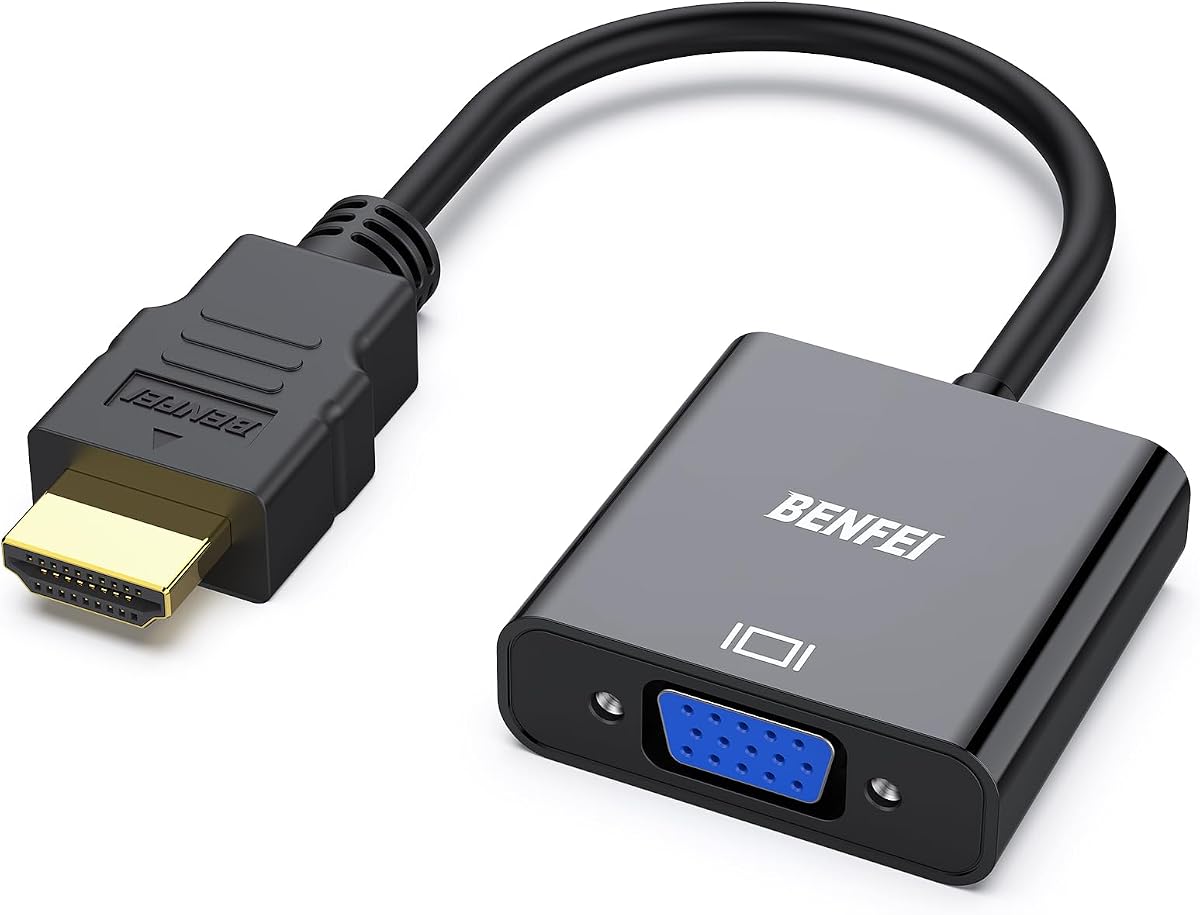
This adapter stands out as the top choice for general users seeking reliable HDMI to VGA conversion. With a high rating and widespread adoption, it delivers consistent performance across various devices. The build quality ensures longevity even with frequent plugging and unplugging during travel.
We may earn a commission when you buy through this link, at no additional cost to you.
The advanced IC chip converts digital signals to analog with minimal loss. This ensures your monitor displays a clear image without flickering. The gold-plated connector resists corrosion which maintains signal integrity over time. Its compact design fits easily into laptop bags for presentations.
While it lacks audio support this is expected for standard HDMI to VGA converters. Users must connect separate speakers if sound is needed. The requirement for a separate VGA cable adds a slight step to setup. However this trade-off ensures stability and broad compatibility with legacy displays.
Anyone needing a dependable adapter for office presentations or home theater setups should consider this model. It balances cost and performance effectively. The strong warranty provides peace of mind. It remains the benchmark for passive HDMI to VGA adapters in this category.
The built-in advanced IC chip ensures stable signal transmission without lag or dropouts during presentations.
Gold-plated connectors and molded strain relief protect the adapter from physical wear and corrosion over time.
We may earn a commission when you buy through this link, at no additional cost to you.
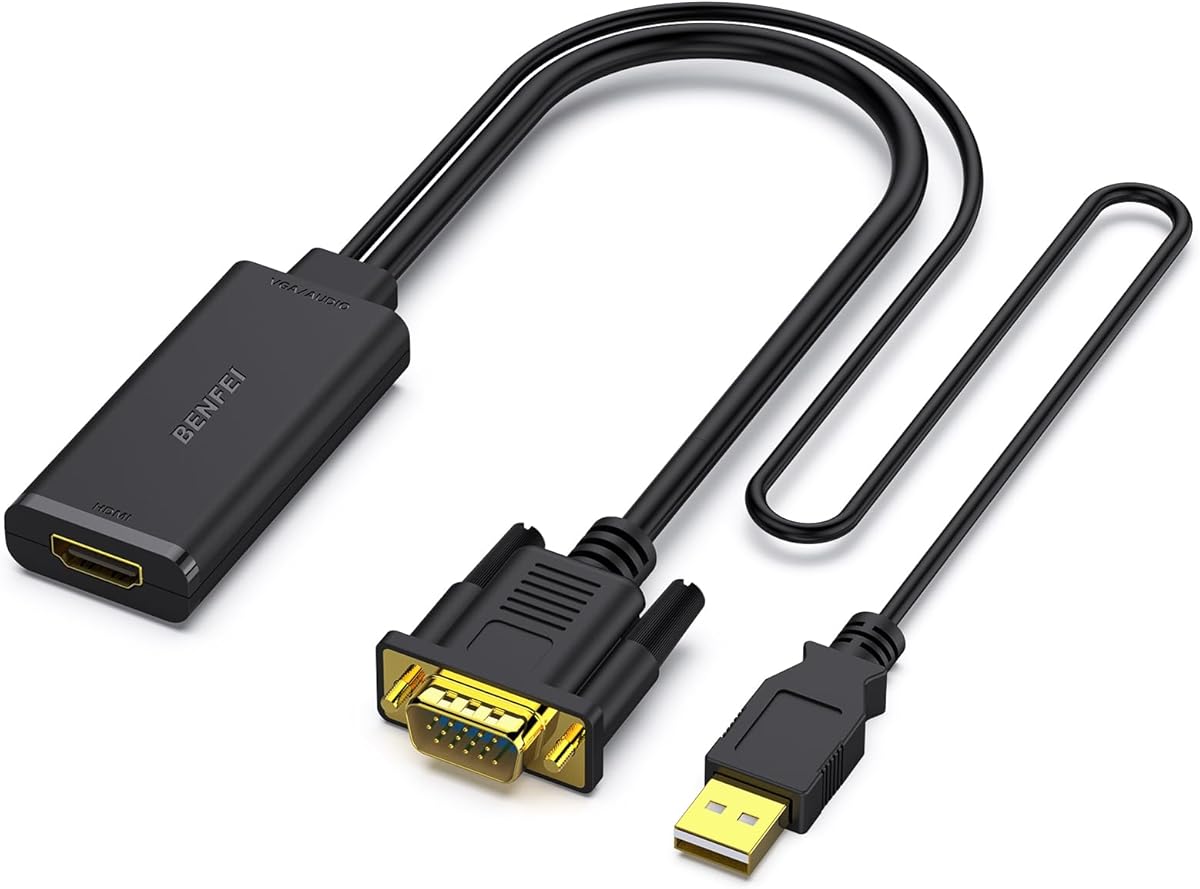
This adapter serves a unique purpose by converting VGA signals from older computers to modern HDMI displays. It is ideal for users with legacy equipment who want to connect to newer TVs. The integrated USB audio feature simplifies setup by combining audio and video connections.
We may earn a commission when you buy through this link, at no additional cost to you.
The advanced IC chip converts analog signals to digital smoothly. This allows older laptops to output crisp images to HDMI monitors. The USB audio support means you can route sound to the display without extra cables. It is a compact gadget easy to carry in a bag.
Users must ensure their device has a VGA output port. The adapter does not work for HDMI to VGA conversion. It requires a USB connection for power which adds a cable to your desk. Despite this it offers a reliable solution for specific legacy setups.
Anyone with older desktops or laptops needing to connect to modern TVs will find this useful. It bridges the gap between old and new technology. The warranty ensures satisfaction. It is a specialized tool worth considering for specific connectivity needs.
Designed specifically to connect older computers with VGA ports to modern HDMI monitors and televisions seamlessly.
The integrated USB cable embeds audio with video allowing easy connection to displays with built-in speakers.
We may earn a commission when you buy through this link, at no additional cost to you.
Moread offers a strong budget option with exceptional value thanks to a five year warranty. This long coverage period suggests confidence in the product's durability. The adapter delivers standard performance for HDMI to VGA conversion without unnecessary frills or high costs.
We may earn a commission when you buy through this link, at no additional cost to you.
It supports high definition resolutions up to 1080p ensuring clear visuals. The gold-plated connector helps prevent corrosion and signal loss over time. The advanced IC chip ensures stable conversion for work presentations or home use. Its compact design makes it easy to carry.
Like others it does not include audio output so separate speakers are needed. You also need a VGA cable sold separately to complete the connection. These are standard limitations for this type of adapter. However the warranty adds significant value compared to cheaper alternatives.
Those seeking a cost-effective solution with long-term protection will appreciate this model. It is perfect for occasional use or backup purposes. The balance of price and warranty makes it a standout budget pick. Consider this if longevity is a priority for your setup.
An exclusive unconditional five year warranty ensures your purchase is protected far longer than standard one year terms.
Gold plated connectors resist corrosion to maintain optimal signal transmission performance for high definition displays.
We may earn a commission when you buy through this link, at no additional cost to you.
StarTech is known for professional quality and this active adapter delivers exceptional reliability. It does not require an external power source which simplifies setup for users. The support for higher resolutions makes it suitable for detailed work on legacy displays.
We may earn a commission when you buy through this link, at no additional cost to you.
The active chipset ensures clean signal conversion regardless of the operating system. It works with Windows macOS Linux and ChromeOS without driver installation. The support for screw-locking cables prevents accidental disconnections which is vital for fixed installations. It is compact enough for travel too.
The price is higher than budget options reflecting its professional grade build. It might be overkill for simple home use. However the power simplicity is a major plus. Those who need guaranteed stability in mission critical environments will find the extra cost worth it.
Professionals setting up conference rooms or workstations should consider this model. It offers peace of mind through robust engineering. The universal compatibility ensures it works with most devices. Prioritize this if reliability is more important than saving a few dollars.
The adapter has no external power requirement which reduces clutter and simplifies setup for travel or office use.
Support for VGA screw-locking cables ensures secure connections that prevent accidental disconnection during presentations.
We may earn a commission when you buy through this link, at no additional cost to you.
This model combines the adapter and cable into one unit which simplifies setup significantly. The six feet length offers flexibility for placing monitors away from computers. It removes the guesswork of finding a matching VGA cable for your adapter.
We may earn a commission when you buy through this link, at no additional cost to you.
The gold-plated connector resists corrosion and ensures stable signal transmission. The built-in active chip converts signals reliably for high definition displays. The molded strain relief adds durability against bending and pulling. This is a convenient all-in-one solution for many users.
The main limitation is the fixed length which might not suit larger desks. The adapter cannot be removed if you need a different cable length. However the convenience often outweighs this for standard setups. It offers good value for those wanting a plug-and-play experience.
Anyone tired of managing separate cables will find this practical. It is ideal for home offices where space is not extremely tight. The durability ensures it lasts through regular use. Choose this if you want a streamlined connection process without extra parts.
This adapter comes with a pre-attached six foot cable which eliminates the need to buy a separate VGA cable.
Molded strain relief around the connector increases cable durability to withstand daily bending and movement.
We may earn a commission when you buy through this link, at no additional cost to you.
This adapter is designed to solve audio issues when connecting to older monitors without speakers. It includes a 3.5mm audio jack which allows you to route sound to external speakers. It is especially optimized for devices like TV sticks that need extra power.
We may earn a commission when you buy through this link, at no additional cost to you.
The built-in chipset ensures stable signal conversion for high definition displays. It supports up to 1080p resolution for clear visuals. The micro USB port provides necessary power for devices with low output. This makes it versatile for streaming devices and laptops alike.
While it includes the audio jack you still need a separate audio cable. Some devices might require the USB connection to function correctly. These are minor trade-offs for the added functionality. It bridges the gap for devices that lack audio out ports.
If you need audio from HDMI sources to older setups this is ideal. It works well with Roku or Chromecast for home theater use. The warranty ensures satisfaction with the purchase. Consider this if sound is a priority for your viewing experience.
Comes with an independent 3.5mm audio output allowing simultaneous audio and video playback to external speakers.
Includes a Micro USB port to provide essential power for devices with low-power HDMI output like TV sticks.
We may earn a commission when you buy through this link, at no additional cost to you.
UGREEN provides a robust solution with included accessories that simplify setup. It comes with a micro USB cable for power which helps with compatibility. The 3.5mm audio jack offers a simple way to connect speakers for sound output.
We may earn a commission when you buy through this link, at no additional cost to you.
The chipset converts digital to analog signals reliably for most displays. It supports high definition resolutions for crisp visuals. The wide compatibility means it works with Macs Android boxes and streaming devices. This makes it a flexible choice for diverse environments.
You must connect separate audio and power cables which adds bulk. The setup is slightly more complex than passive adapters. However the power support ensures it works with devices that otherwise fail. This makes it a strong choice for difficult power scenarios.
Users with older devices or streaming sticks will appreciate the included power. It ensures stable performance without constant troubleshooting. The audio option adds value for entertainment setups. Choose this if you need guaranteed power compatibility for your source device.
Includes a micro USB cable for power optimizing compatibility with low-power devices like Apple TV and Raspberry Pi.
Provides a 3.5mm line-out jack allowing connection to external speakers for audio while video plays.
We may earn a commission when you buy through this link, at no additional cost to you.
This adapter stands out for its dedicated external power design which ensures stability. It connects to a 5V power supply for consistent signal conversion. This is useful for long cable runs or devices that struggle with passive power.
We may earn a commission when you buy through this link, at no additional cost to you.
It supports 1080p resolution with active conversion for clear images. The integrated audio output allows for easy speaker connection. It is designed for industrial or commercial use where reliability is critical. The setup is straightforward with clear instructions.
The need for a power adapter adds to the cable clutter. It costs more than standard passive adapters. However for business environments this reliability is worth the investment. It eliminates connection issues that passive adapters might face.
Businesses with conference rooms or classrooms should consider this model. It ensures presentations run smoothly without signal drops. The audio and video support simplifies AV setups. Prioritize this if performance stability is more important than simplicity.
Powered by a DC 5V input to provide stable performance for long-distance transmission and wide device compatibility.
Integrated 3.5mm audio output separates audio from HDMI signals for connection to external speakers.
We may earn a commission when you buy through this link, at no additional cost to you.
StarTech focuses on portability with this compact adapter designed for laptop cases. It is lightweight enough to carry anywhere for presentations. The integrated audio port lets you connect speakers without extra adapters.
We may earn a commission when you buy through this link, at no additional cost to you.
It supports high resolution outputs for clear visuals. The crystal clear picture quality ensures text and images look sharp. No drivers are needed which simplifies setup on new computers. This makes it a hassle-free option for business travelers.
The price reflects the brand premium and features. It is a bit expensive compared to basic adapters. The setup is simple and reliable for on-the-go use. It balances features and size well for professionals who move frequently.
Frequent travelers and consultants will find this useful. It saves space in bags while offering essential features. The audio support helps for demos. Choose this if you need a compact reliable solution for business presentations.
Designed to be compact and lightweight fitting perfectly in laptop cases for travel or business presentations.
Integrated audio port enables you to connect VGA monitors to speakers for optimal sound quality.
We may earn a commission when you buy through this link, at no additional cost to you.
This official Dell adapter ensures compatibility with Dell hardware systems. It follows strict build standards for reliability and durability. The design is simple focusing on core connectivity without extra features.
We may earn a commission when you buy through this link, at no additional cost to you.
It provides stable HDMI to VGA conversion for work environments. The connector design is robust to withstand daily use. Dell support ensures you can get help if issues arise. It is a safe choice for corporate IT departments.
It lacks advanced audio support found in other models. The price is higher than generic alternatives. However the brand assurance often justifies this for businesses. It works seamlessly with Dell laptops and monitors.
Corporations using Dell equipment should consider this for standardization. It ensures consistent hardware across the office. The build quality matches professional expectations. Choose this if you prioritize brand reliability over cost savings.
Official Dell adapter designed to ensure seamless compatibility with Dell laptops and monitors.
Constructed with professional grade materials to withstand daily office use and frequent travel.
We may earn a commission when you buy through this link, at no additional cost to you.
Selecting the right adapter requires understanding directionality power needs and audio requirements. Use this guide to identify the features that match your specific setup.
Ensure the adapter converts HDMI to VGA not the reverse. Adapters are unidirectional and will not work if you try to connect a VGA source to an HDMI display. Always check the product title for HDMI to VGA labels.
Always confirm the adapter direction matches your source and display ports before purchasing to avoid compatibility issues.
Active adapters have chips that convert digital to analog signals for reliable output. Passive adapters may lack the power to convert signals and often fail. Look for active chipset descriptions in product details.
Choose an active converter to ensure stable signal conversion for all modern laptops and desktops.
Most HDMI to VGA adapters do not carry audio. If sound is needed look for models with a 3.5mm audio jack. This allows you to connect external speakers to the video adapter.
Select an adapter with an audio output jack if you need to route sound to speakers while using a VGA display.
Some adapters need a micro USB power input for extra stability. Others work without external power. Devices like TV sticks often need powered adapters to function correctly.
Check if your source device is low power and choose a powered adapter if necessary.
Look for support up to 1920×1080 at 60Hz for best clarity. Lower resolution support may make text look blurry on monitors. Ensure the adapter matches your monitor's maximum resolution.
Verify the adapter supports your monitor's full resolution to get a sharp picture.
Quality adapters come with warranties ranging from one to five years. A longer warranty indicates manufacturer confidence. Check for accessible customer support to resolve issues quickly.
Prioritize models with strong warranty terms for protection against hardware defects.
Gold-plated connectors resist corrosion and improve signal transmission. The build should be compact yet robust. Molded strain relief helps prevent cable breakage over time.
Choose adapters with gold-plated connectors and durable housing for longer life.
Some models include a VGA cable while others do not. Determine if you already own a cable or need a bundled solution. Bundled kits can save time and effort.
Check whether a VGA cable is included or must be purchased separately.
Connect the HDMI end to your computer and the VGA end to your monitor. Ensure the adapter is plugged in if it requires power. Wait for the system to detect the display and configure settings.
Use high quality cables to minimize signal interference. If the display flickers try replacing the cable or using a powered adapter. Clean the connector ports with compressed air to remove dust.
Avoid bending the cables sharply during transport. Keep the adapter in a protective case when not in use. Store it dry to prevent corrosion and ensure long-term performance.
Standard HDMI to VGA adapters do not transmit audio. You need a model with a dedicated 3.5mm audio jack. Connect speakers to this jack to hear sound from your computer.
Most adapters are plug and play and require no driver installation. Your operating system should recognize the display automatically. Only specialized models might need drivers on older systems.
Yes most adapters work with MacBooks using an HDMI adapter. Some models may need extra power for Macs. Check compatibility notes for your specific MacBook model.
Flickering often results from poor cable quality or low power. Try a better VGA cable or a powered adapter. Ensure the resolution matches what the monitor supports.
You need an HDMI to VGA adapter to connect to older monitors. For new TVs use HDMI directly. Do not try to use HDMI to VGA for HDMI displays.
Yes adapters are unidirectional and work only one way. An HDMI to VGA adapter cannot connect VGA sources to HDMI displays. Always buy the correct direction for your setup.
Adapters should support at least 1080p for clear images. Check the maximum supported resolution on the product page. Ensure it matches your monitor's capability for best results.
We reviewed ten top models offering varying features and price points. The BENFEI HDMI to VGA leads as the best overall choice for most users. Budget shoppers should consider Moread for long warranty coverage.
Prioritize adapters with active chipsets and audio support if needed. Ensure you select the correct direction and check power requirements before buying. This prevents compatibility issues and returns.
Prices change frequently so check current listings before purchasing. Use the comparison table to find the model that fits your budget. A reliable adapter ensures seamless connectivity for all your legacy displays.