
4 Pack HDMI Dummy Plug 4K HDR, Virtual Monitor EDID Emulator
4.8Editor score
True 4K@60Hz HDR Virtual Display
Headless Server and PC Optimization
Plug-and-Play Simplicity
This guide compares the top HDMI dummy plugs for headless PCs, remote desktop, and mining to help you choose the best virtual display adapter for your setup.
An HDMI dummy plug is a small device that tricks your graphics card into thinking a monitor is connected. This keeps your GPU active for tasks like remote desktop, gaming, or mining even when no physical screen is attached to your system.
We analyzed ten top-rated models based on resolution support, build quality, and compatibility. Our list covers options ranging from basic headless adapters to advanced HDMI 2.1 emulators that support high refresh rates and HDR for demanding workflows.
Each pick highlights key features, pros, and cons to help you decide quickly. Prices and availability change frequently so please check the current listings on Amazon before making your final purchase decision for your specific needs.
4.8Editor score
4.6Editor score

This side-by-side comparison highlights the key specifications and capabilities of each model to help you find the perfect virtual display adapter for your specific hardware and workflow needs.


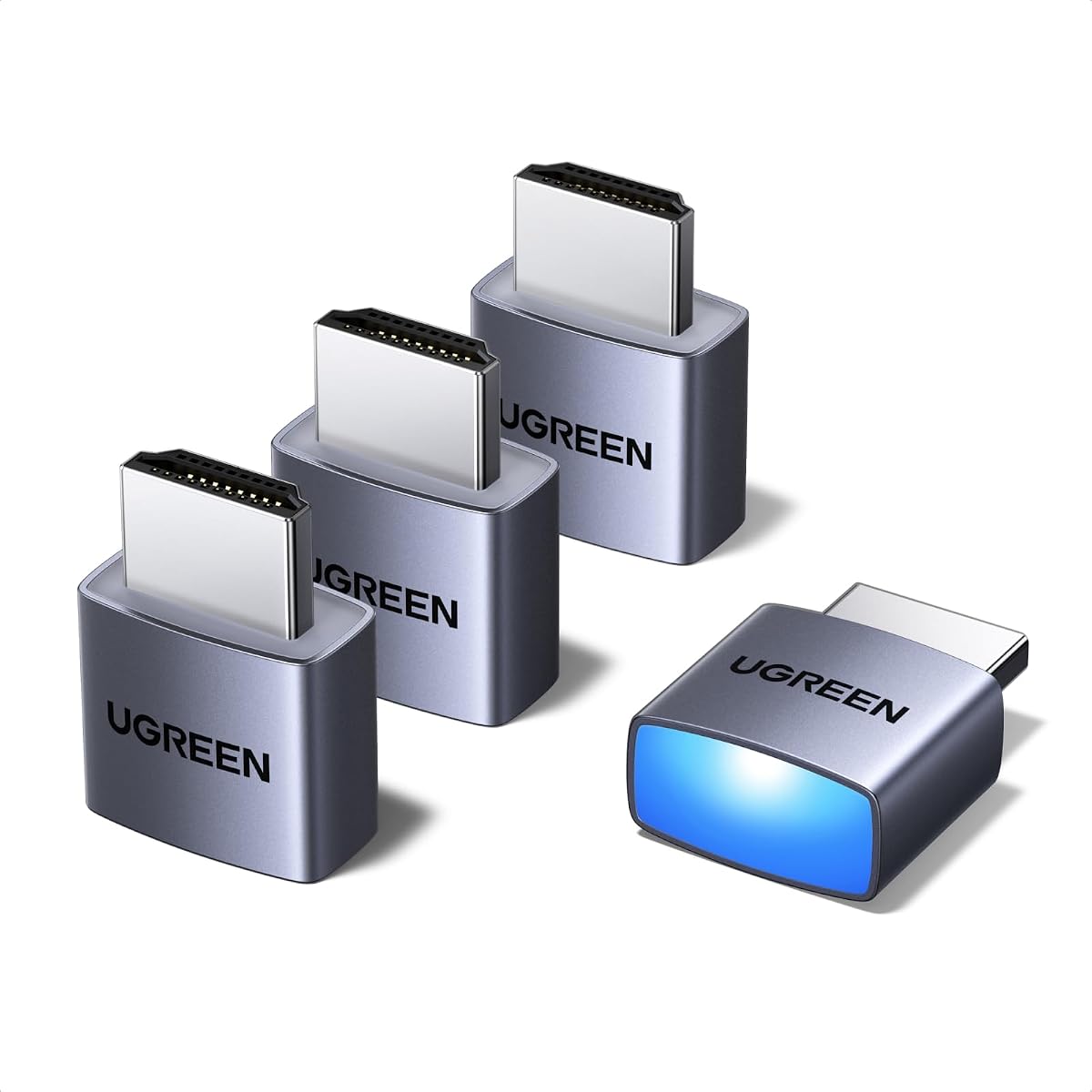
The UGREEN 4 Pack HDMI Dummy Plug is a highly rated solution for anyone needing a reliable virtual display. With a strong 4.6 star rating, it stands out for its ability to support 4K Ultra HD resolution at 60Hz which is essential for modern workflows.
We may earn a commission when you buy through this link, at no additional cost to you.
This product is designed to keep your GPU active without a physical monitor attached. It works seamlessly with Windows, Mac, and Linux systems making it perfect for remote desktop operations, video editing, and even cryptocurrency mining where consistent performance matters.
While the build quality is robust with an aluminum shell to prevent overheating, users should note that it requires a discrete graphics card or compatible laptop HDMI port. The LED indicator is a nice touch but can be bright in dark server rooms.
If you are setting up headless PCs or need multiple dongles for different machines this pack offers great value. It ensures system stability and eliminates the need for physical displays making it a top choice for IT professionals and enthusiasts alike.
Supports true 4K resolution ensuring smooth remote desktop and gaming streaming without lag.
Aluminum shell enhances heat dissipation which prevents overheating during intensive 24/7 tasks.
We may earn a commission when you buy through this link, at no additional cost to you.
This 4 Pack HDMI Dummy Plug has earned an impressive 4.8 star rating from users who value reliability and performance. It delivers crisp visuals with support for 4K Ultra HD at 60Hz and 1080P at 120Hz making it versatile for various needs.
We may earn a commission when you buy through this link, at no additional cost to you.
The industrial grade durability is evident in its heat dissipation aluminum armor which keeps the device cool even during intensive tasks like gaming or mining. Its plug and play simplicity means you can get operational in seconds without technical hassle.
While it offers excellent value the LED status light might be bothersome in very dark environments. Additionally ensuring your graphics card supports the desired resolution is key before purchasing this specific model for high refresh rate needs.
For users managing server farms or home labs this pack is an ideal choice. It eliminates display power costs while maintaining 24/7 system stability which is crucial for automated trading stations and cryptocurrency mining rigs.
Activates GPU to create a lag free virtual monitor for fluid video editing and game development.
Military grade resilience blending with user feedback visual feedback for critical setups.
We may earn a commission when you buy through this link, at no additional cost to you.
The DTech HDMI Dummy Plug is a proven choice for users needing to emulate a high resolution display on Mac or Windows systems. With a solid 4.6 rating it is known for solving the common OSX headless display issue effectively.
We may earn a commission when you buy through this link, at no additional cost to you.
Its gold plated dongle ensures a stable connection which is critical for tasks like rendering and simulations. The compact design makes it easy to integrate into existing hardware setups without adding bulk or requiring extra power cables.
While it offers great compatibility users should note it comes in a 3 pack which might be limiting for large enterprise deployments. However for small offices or home servers it provides the necessary virtual screen functionality efficiently.
This product is particularly useful for game streaming and VR applications where a physical monitor is not feasible. It unlocks the full potential of graphics cards allowing systems to run headless without performance degradation or signal loss.
Solves Apple OSX display issues allowing remote control without a physical monitor attached.
Gold plated interface guarantees complete signal transmission for reliable remote desktop sessions.
We may earn a commission when you buy through this link, at no additional cost to you.
This Headless Ghost Display Emulator is a straightforward solution for users who need basic 1080P virtual display capabilities. With a 4.6 rating it is praised for its simplicity and ability to work with any graphics card that has an HDMI output.
We may earn a commission when you buy through this link, at no additional cost to you.
Its ultra compact design is perfect for tight spaces or remote deployments where physical size matters. The device requires no configuration or power cable making it truly set and forget for long term server or mining operations.
While it lacks 4K support it is highly effective for standard remote desktop tasks and crypto mining. Users should be aware it is a single unit which might mean higher cost per unit if scaling up later compared to packs.
Ideal for virtual desktop setups this plug ensures your system remains active and accessible without a monitor. It acts exactly like a real LCD monitor so compatibility is rarely an issue across different hardware configurations.
Works with any graphics card ensuring no incompatibility problems with standard outputs.
No drivers or software needed for instant plug and play setup and operation.
We may earn a commission when you buy through this link, at no additional cost to you.
This 3 Pack HDMI Dummy Plug offers a balanced combination of performance and warranty support. With a 4.5 rating it delivers 4K@60Hz HDR performance which is sufficient for most remote desktop and mining applications without breaking the budget.
We may earn a commission when you buy through this link, at no additional cost to you.
The inclusion of a 2 year unconditional warranty sets it apart from many competitors. Users appreciate the hot swap feature which allows changing connections quickly without rebooting the system saving valuable time during maintenance.
While some users report minor inconsistencies the energy saving design makes it ideal for 24/7 operations. It replaces expensive real displays with a low cost virtual solution reducing overall power consumption and environmental impact significantly.
Best for users who need multiple units for different machines this pack ensures system stability. It is particularly suitable for colocation farms and home servers where reliability and cost efficiency are paramount concerns.
Includes 2 years unconditional warranty providing long term security for your investment.
Allows quick connection changes without rebooting for smoother workflow management.
We may earn a commission when you buy through this link, at no additional cost to you.
This HDMI Dummy Plug 5Pack introduces high refresh rate support making it ideal for gaming and streaming workflows. Although it is a new product without a rating yet its specs promise up to 1080P@240Hz which is rare in this category.
We may earn a commission when you buy through this link, at no additional cost to you.
The construction quality is highlighted by gold plated connectors and full board copper pouring to reduce interference. This ensures signal stability which is critical for maintaining connection without drops during long remote sessions.
While the default resolution is 1080P users can enable higher resolutions depending on their GPU. The HDR simulation is a great feature for color work ensuring vivid output without needing a physical monitor for testing.
For developers and gamers needing virtual screens this pack offers extensive capabilities. It is energy efficient and eco friendly perfect for mini PCs and remote deployed workstations needing reliable 24/7 operation.
Supports up to 240Hz refresh rates for smooth virtual gaming and streaming setups.
Enhanced electromagnetic shielding reduces interference for stable connection maintenance.
We may earn a commission when you buy through this link, at no additional cost to you.
This HDMI 2.1 Dummy Plug is built for gamers and streamers needing high frame rates. It supports 4K@120Hz which is essential for high fidelity virtual displays. Users note it works well with Moonlight for streaming to handhelds.
We may earn a commission when you buy through this link, at no additional cost to you.
The device tricks the GPU into thinking a monitor is attached keeping HBCC active which prevents performance drops. This is crucial for mining rigs where SSH sessions might otherwise disable certain features causing operational issues.
Compatibility can vary between OS versions with Win11 currently limiting HDR resolution compared to Win10. Users should verify their system capabilities before purchase to ensure they get the 120Hz performance advertised.
Best for those streaming to Steam Deck or ROG Ally this adapter ensures full resolution. It is easier than software solutions and provides stable VNC display for headless Raspberry Pi and similar projects.
Optimized for 4K 120Hz HDR Moonlight streaming to handheld devices like ROG Ally.
Keeps GPU active without physical monitor improving stability for mining and rendering.
We may earn a commission when you buy through this link, at no additional cost to you.
This 8 Pack HDMI Dummy Plug is designed for large scale deployments where quantity matters. With a default 1440P resolution it offers higher fidelity out of the box compared to standard 1080P models available in other bundles.
We may earn a commission when you buy through this link, at no additional cost to you.
The HDR simulation provides vivid output suitable for color sensitive applications like video preview. It is built with copper pouring to reduce interference ensuring stability during mining or video rendering tasks.
While there are no reviews yet the construction details suggest high quality. The eco friendly design reduces power usage making it ideal for colocation centers needing to save on energy costs continuously.
Perfect for multi-monitor simulations this pack works with small form factor computers and boards. It eliminates the need for real displays allowing systems to run headlessly for improved efficiency and space saving.
Default 1440P resolution offers higher fidelity for remote desktop and simulation tasks.
Reduces power usage and eliminates need for real display in large setups.
We may earn a commission when you buy through this link, at no additional cost to you.
This 5 Pack HDMI Dummy Plug stands out for its default 2160P resolution which is true 4K without configuration. It supports up to 1440P@144Hz making it versatile for high refresh rate remote desktop sessions.
We may earn a commission when you buy through this link, at no additional cost to you.
The aluminum shell ensures durability and shielding to keep signal clean. HDR simulation with peak brightness up to 1015 nits makes it suitable for professional video preview where color accuracy is critical.
While it is a new model without reviews the specs promise high performance. Users should ensure their system supports HDMI 2.1 to leverage the full potential of this plug for high refresh rates.
Best for professionals needing reliable 4K virtual screens this pack offers efficiency. It reduces power usage and space while maintaining system stability for remote control and screen sharing.
Default 2160P resolution ensures high fidelity visuals without manual setup.
HDR simulation with peak brightness suitable for color sensitive applications.
We may earn a commission when you buy through this link, at no additional cost to you.
This premium HDMI Dummy Plug supports 8K 30Hz which is rare for virtual adapters. It is designed for users needing maximum resolution fidelity including high refresh rate gaming on handheld devices like Steam Deck.
We may earn a commission when you buy through this link, at no additional cost to you.
The gold plated dongle ensures stable digital signal for critical remote tasks. It tricks VNC to show full resolution making remote work smoother and more responsive even without a physical monitor attached.
While expensive it is a great choice for future proof setups. Users note it is perfect for tweak settings on Moonlight streaming ensuring 4K120Hz performance without hardware limitations or performance drops.
Ideal for high end gaming rigs this adapter allows headless operations at maximum quality. It is easier than software solutions and works with standard discrete graphics cards for versatile use cases.
Supports 8K 30Hz ensuring compatibility with future high resolution hardware needs.
Tricks VNC for full resolution remote access improving workflow efficiency.
We may earn a commission when you buy through this link, at no additional cost to you.
Choosing the right HDMI dummy plug depends on your specific needs and hardware capabilities. This guide covers key factors to consider to ensure compatibility and performance.
Check if the plug supports your required resolution such as 4K@60Hz or 1080P@120Hz. High refresh rates are essential for gaming and smooth video playback on virtual screens.
Prioritize models that support the exact resolution your GPU can output to avoid bottlenecks or display issues.
Ensure the dummy plug works with your OS whether it is Windows, macOS, or Linux. Some models have specific optimizations for Apple OSX headless setups.
Look for universal compatibility claims to avoid driver issues on your specific system.
Aluminum shells and gold plated connectors improve heat dissipation and signal stability. This is crucial for 24/7 operations like mining or servers.
Invest in models with durable construction to prevent overheating and connection drops over time.
Most dummy plugs work without drivers but verify this before buying. Plug and play options save time and technical hassle during setup.
Choose models that require no external power to keep your setup clean and simple.
An LED light helps confirm connection status at a glance. This is helpful for troubleshooting in server rooms or dark environments.
Note that brightness levels vary so consider if the light might interfere with your setup.
Single units are good for one machine while 3 to 8 packs offer better value for multiple setups. Decide based on your current and future needs.
Buying in bulk can save money if you plan to deploy headless PCs across several locations.
Look for manufacturers offering warranties to protect your investment. A 2 year warranty indicates confidence in product longevity.
Check if customer support is responsive in case you face compatibility issues.
For gaming look for HDMI 2.1 models that support 4K120Hz. For mining prioritize stability and low power consumption models.
Match the plug to your primary workflow such as remote desktop, streaming, or development.
To use the dummy plug simply insert it into the HDMI output of your computer or laptop. Your system should detect it as a monitor within seconds allowing you to configure display settings as needed.
For best results ensure your graphics card is updated with the latest drivers. If your system does not recognize the plug try restarting your computer to refresh the hardware detection.
Avoid bending the plug excessively or exposing it to dust and moisture to maintain connection quality. Store unused plugs in a safe place to prevent damage to the connector pins.
An HDMI dummy plug tricks your computer into thinking a monitor is connected. This keeps your GPU active for tasks like remote desktop, mining, or gaming without needing a physical screen.
Most models work plug and play without installing drivers. Simply plug them in and your system will recognize them as active displays automatically.
Yes many models support Mac OSX and solve common headless issues. Look for specific Mac compatibility if you plan to use it with a MacBook or Mac Mini.
It helps by keeping the GPU active which can prevent performance drops. While it does not boost raw power it ensures stable 24/7 mining operations.
Usually no configuration is needed. Your OS should detect it as a second monitor and you can enable or configure it in display settings.
Many models support 4K@60Hz or higher depending on the specific product. Always check the specs to ensure it matches your GPU capabilities.
Most systems handle hot swapping but it is safer to configure display settings before unplugging. Unplugging may switch your display to another monitor if one is connected.
Yes they are designed for 24/7 operation with minimal power draw. High quality models include heat dissipation features to prevent overheating during long use.
We explored ten top HDMI dummy plugs ranging from budget packs to premium 8K ready adapters. Each model offers unique benefits for remote desktop gaming or mining workflows.
Prioritize resolution support and build quality to ensure your system stays stable. Choosing the right pack size can also save money if you manage multiple devices.
Prices and stock levels change regularly so verify the current details on Amazon. Check your system specs before buying to ensure compatibility with your GPU and OS.