
Bisofice POS Receipt Printer
4.0Editor score
Android 8.1 OS
58mm thermal printing
Long battery life
Handheld POS systems have revolutionized how businesses process transactions on the go. These portable devices allow merchants to accept payments, manage inventory, and print receipts anywhere. Whether you run a food truck, retail store, or service business, finding the right terminal is crucial for efficiency.
We evaluated ten leading models based on performance, connectivity, and ease of use. Each product was assessed for its hardware capabilities, software compatibility, and overall value. Our analysis covers everything from Android terminals to dedicated payment processors to ensure you make an informed decision.
Each pick highlights specific strengths suited for different business needs and budgets. You will find options ranging from budget-friendly scanners to premium all-in-one solutions. Please note that product availability and pricing may change over time so verify details before purchasing.
4.0Editor score

4.7Editor score

5.0Editor score
As an Amazon Associate we earn from qualifying purchases.
This table provides a side-by-side comparison of all ten reviewed products. You can quickly assess key specifications like operating system, screen size, and connectivity options to find the best fit for your business requirements.




The Square Handheld stands out as a top choice for businesses needing mobility. It holds a strong rating due to its reliable payment processing and compact form factor. This device allows you to move freely while accepting transactions anywhere on your floor.
We may earn a commission when you buy through this link, at no additional cost to you.
Its slim design fits easily in your pocket or palm making it ideal for tableside orders. The built-in barcode scanner helps with inventory checks without needing extra tools. Offline payments ensure you keep selling even if internet connectivity drops unexpectedly.
While it is highly capable you must use Square for payment processing which limits flexibility. The battery life is good but can vary based on usage intensity throughout the day. These trade-offs are acceptable for most small businesses prioritizing simplicity.
If you run a restaurant or retail store this terminal is a perfect fit. It simplifies operations by combining payment acceptance with basic scanning in one device. We recommend it for anyone seeking a hassle-free mobile solution.
The lightweight build allows staff to carry it effortlessly during busy shifts. You can take payments directly to customers without walking them to a counter.
Offline capabilities mean sales never stop due to connection issues. This ensures consistent revenue flow even in areas with weak signals.
We may earn a commission when you buy through this link, at no additional cost to you.
The H10 terminal offers premium features with its latest Android 14 operating system. It delivers smooth performance for running complex business applications on the go. Users appreciate the high-resolution screen which makes navigation intuitive during daily tasks.
We may earn a commission when you buy through this link, at no additional cost to you.
With a 6000mAh battery it can last up to 14 hours on a single charge. The integrated NFC reader supports contactless payments streamlining checkout for modern customers. Fast charging ensures you spend less time plugged in and more time selling.
The price is higher than basic models but justified by the advanced specs and longevity. Custom developers can use the SDK to tailor software to specific needs. This makes it a versatile choice for businesses with unique operational demands.
Ideal for mobile retail or food trucks needing robust connectivity and printing. It balances high-end specs with practical mobile functionality effectively. Consider this if you need more than basic payment processing.
Running Android 14 ensures compatibility with the latest business apps and security updates. This future-proofs your investment against rapid software changes.
Dual-band Wi-Fi and 4G LTE keep you online everywhere. You are not tethered to a fixed location for sales.
We may earn a commission when you buy through this link, at no additional cost to you.
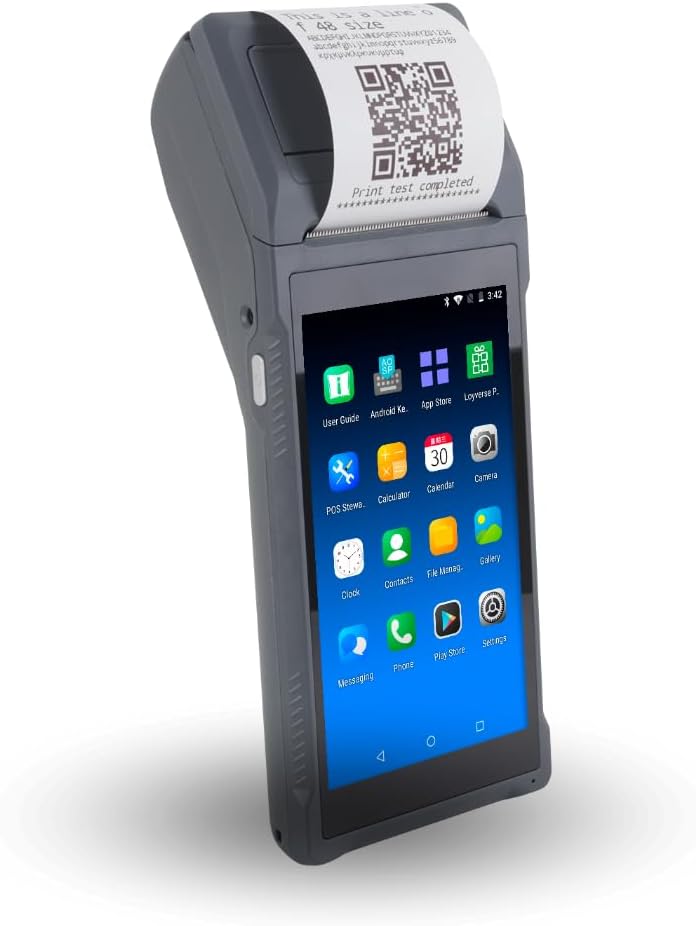
This Bisofice model provides essential functionality at a very competitive price point. It runs on Android 8.1 which is stable enough for standard point-of-sale apps. The integrated printer allows you to issue receipts immediately without extra hardware.
We may earn a commission when you buy through this link, at no additional cost to you.
The device supports multiple connectivity options including 3G and WiFi for flexible networking. A 5000mAh battery ensures it lasts through typical shifts without frequent recharging. Its compact design makes it easy to store in a drawer when not in use.
While it lacks the latest Android features it covers core needs effectively. The absence of NFC means you rely on manual card entry or external readers. For budget-conscious owners this trade-off is often acceptable to save costs.
Great for small boutiques or cafeterias needing simple printing capabilities. It offers a straightforward solution for managing sales and inventory. We recommend it for businesses prioritizing cost over cutting-edge features.
Priced lower than many competitors it saves upfront capital. You can allocate funds to marketing or inventory instead of expensive hardware.
The built-in thermal printer removes the need for separate machines. This reduces clutter on your counter or workspace significantly.
We may earn a commission when you buy through this link, at no additional cost to you.
The Bisofice 4G PDA brings modern OS features to a mid-range device. Running Android 13 ensures better app compatibility and security than older models. It is designed for environments where constant connectivity is vital for operations.
We may earn a commission when you buy through this link, at no additional cost to you.
Full 4G network support means you stay online regardless of location. The 5MP camera serves as a reliable barcode scanner for inventory tasks. This dual function saves you from carrying multiple tools around the warehouse.
Performance is smooth for daily tasks though heavy usage may drain the battery quickly. It fits well for logistics or manufacturing where tracking items is key. You get decent value for the price with solid hardware.
Choose this if you need GPS and network reliability without high costs. It balances connectivity and scanning effectively for field work. A good option for teams needing constant data access.
4G ensures you are not dependent on local WiFi signals. This is crucial for outdoor or remote work environments.
The camera handles both 1D and 2D barcodes efficiently. This speeds up inventory counts and sales processing significantly.
We may earn a commission when you buy through this link, at no additional cost to you.
The Square Terminal combines a POS system and payment processor in one unit. It streamlines operations by eliminating the need for separate devices. The interface is user-friendly allowing staff to ring up sales quickly.
We may earn a commission when you buy through this link, at no additional cost to you.
Processing chip cards takes just seconds ensuring customers do not wait long. Funds are available as soon as the next business day helping cash flow. The battery is robust enough to last through a full day of sales.
It is bulkier than handheld models which limits mobility slightly. You are tied to Square payment processing which may not suit everyone. For counter-based setups however it remains a top choice for reliability.
Best for stores wanting an all-in-one solution without complex setup. It minimizes hardware management and offers consistent performance. Recommended for businesses prioritizing simplicity and speed at the counter.
Having one device reduces clutter and setup time. You do not need to connect multiple peripherals for basic sales.
Chip processing is fast and secure for customer peace of mind. This reduces lines during busy peak hours effectively.
We may earn a commission when you buy through this link, at no additional cost to you.
This Q2i terminal is designed to work with various popular POS software. It runs Android 11 which allows access to Google Play for installations. The integrated printer supports standard thermal paper rolls making it ready to use.
We may earn a commission when you buy through this link, at no additional cost to you.
It supports 1D barcodes which covers most standard retail products. The battery is rechargeable via USB-C offering convenient charging options. The package includes a paper roll so you can start immediately upon delivery.
User feedback suggests some software compatibility challenges might arise. It does not support 2D QR codes which limits some modern use cases. For basic retail needs it offers a functional solution at a low cost.
Consider this if you need a simple mobile terminal for small shops. It provides essential features without the high price tag. Best for businesses with straightforward transaction requirements.
Compatibility with multiple POS apps gives you choice in management. You are not locked into a single ecosystem for software.
Thermal printing eliminates the need for ink cartridges. This reduces long-term operational expenses for your business.
We may earn a commission when you buy through this link, at no additional cost to you.
The P1 device is a robust terminal offering a secure payment experience. It features a vibrant HD display making transactions easy to read. The interface supports tap chip and mobile wallet payments for versatility.
We may earn a commission when you buy through this link, at no additional cost to you.
Hybrid connectivity ensures you rarely face dropped connection issues during sales. A physical keypad complements the touchscreen for efficient data entry. The built-in printer reduces counter clutter by eliminating external machines.
You must process payments through specific channels which may limit flexibility. It is designed for fixed locations rather than roaming mobile sales. This makes it ideal for salons or retail with stable workstations.
Choose this for reliability and speed in a fixed environment. It balances security with user-friendly features effectively. A strong choice for businesses needing consistent high-volume performance.
Transactions are handled with secure merchant account onboarding. This protects both you and your customers from data risks.
The touchscreen and keypad combo speeds up staff training. Employees can navigate the system easily without complex manuals.
We may earn a commission when you buy through this link, at no additional cost to you.
This Alacrity PDA is a high-performance tool for complex business tasks. It runs Android 14 ensuring access to the latest applications and security. The large 6.5-inch screen provides ample space for data entry and viewing.
We may earn a commission when you buy through this link, at no additional cost to you.
The 80mm printing capability allows for wider labels and receipts than standard. The advanced scanner handles both 1D and 2D codes efficiently. Connectivity options are comprehensive including 4G and Bluetooth for flexibility.
Battery life is excellent allowing continuous use throughout extended shifts. The price reflects its premium features and superior build quality. Setup might take time for custom integrations but pays off in reliability.
Ideal for logistics or warehouse management needing robust hardware. It offers superior speed and screen real estate for teams. A top pick for professionals demanding high efficiency.
The octa-core processor ensures smooth performance under heavy load. You can run multiple apps without significant slowdowns or lag.
Adjustable print width allows for labels and larger receipts. This flexibility supports diverse product and service requirements.
We may earn a commission when you buy through this link, at no additional cost to you.
This PDA is optimized for scanning and printing rather than payments directly. It runs Android 12 which offers stable performance for various tasks. The 10-core CPU ensures speed during busy periods without delays.
We may earn a commission when you buy through this link, at no additional cost to you.
The 2D scanner engine reads damaged codes easily for accurate data capture. Ticket printing is fast at 80mm/s to keep queues moving. However you will need a separate PCI-certified card reader for payments.
This distinction is critical as it is not a full payment processor itself. It works best when paired with external readers for financial security. The combination offers flexibility for custom operational needs.
Perfect for queue management or order collection in cafes. It handles data entry and tickets efficiently. Pair it with a reader to complete the payment flow.
The 2D engine reads codes with scratches or stains effectively. This reduces errors and speeds up inventory checks significantly.
Fast ticket printing ensures customers do not wait long. This improves the overall experience during peak service times.
We may earn a commission when you buy through this link, at no additional cost to you.
Clover GO acts as a compact reader for your existing smartphone. It connects via Bluetooth making it easy to use anywhere. The device supports end-to-end security to protect cardholder data effectively.
We may earn a commission when you buy through this link, at no additional cost to you.
You can send receipts via email or text reducing paper usage. Custom settings allow you to set tips and tax rates easily. This flexibility makes it great for service industries needing quick adjustments.
It relies on your phone for processing which saves hardware costs. You must use SwyftPAY for processing which limits options. For those comfortable with mobile apps it offers significant convenience.
Best for contractors or solo entrepreneurs needing a simple setup. It turns your phone into a full register instantly. Recommended for businesses valuing mobility and ease of use.
Using your smartphone reduces the need for extra hardware. You leverage tools you already carry daily effectively.
Sending receipts digitally helps the environment and saves space. Customers often prefer getting copies instantly on phones.
We may earn a commission when you buy through this link, at no additional cost to you.
Selecting the right handheld POS involves evaluating hardware, software, and business needs. Consider these factors to find a device that fits your workflow and budget.
The OS dictates which applications you can run and how secure your data is. Android offers flexibility and access to apps while proprietary systems offer stability. Ensure the version supports long-term updates to avoid obsolescence.
Check compatibility with your preferred accounting and inventory software.
You need reliable internet for processing payments. Look for Wi-Fi, cellular, and Bluetooth options to ensure you stay online. If you work outdoors, a model with built-in cellular data is essential.
Dual-band Wi-Fi and 4G support ensure you stay connected anywhere.
Some devices require a specific processor while others work with many. Ensure the fees and contract terms align with your business model. Avoid devices that lock you into expensive long-term agreements.
Verify if it accepts major credit cards and contactless payments.
Integrated printers streamline your workflow by reducing the need for external devices. Consider the paper width (58mm vs 80mm) based on your receipt needs. Thermal printing is preferred for its speed and lack of ink costs.
Built-in thermal printers reduce clutter and speed up transactions.
Since these devices are mobile, battery life is critical for all-day use. Look for models with 10+ hours of runtime to avoid mid-shift charging. Fast charging capabilities are a plus for quick top-ups.
A long-lasting battery ensures you can work through shifts easily.
Handheld devices face wear and tear in busy environments. Look for water and dust resistance to protect against spills and dust. A rugged build prevents damage from accidental drops.
Water-resistant models are ideal for restaurants or outdoor markets.
Built-in barcode scanners save you from carrying separate equipment. Ensure it supports both 1D and 2D codes for full inventory compatibility. High-speed scanning keeps checkout lines moving during peak hours.
Advanced scanning modules improve inventory management accuracy.
Consider not just the upfront price but also ongoing fees. Hardware might be affordable but processing fees could add up. A budget device might save upfront but limit software flexibility later.
Evaluate software fees alongside hardware costs for total value.
Start by charging the device fully before your first use to calibrate the battery. Download necessary apps and configure payment settings via the companion software. Keep your device in a dry place when not in use to protect electronics.
Perform regular software updates to maintain security and performance. Clean the screen and ports with a soft cloth to remove dust and debris. Avoid using harsh chemicals that might damage the casing or display.
Inspect the battery and connections periodically to prevent failures. If the battery degrades, replace it with a genuine part to ensure safety. Store the device in a protective case when transporting to prevent drops.
A handheld POS system is a portable device that allows businesses to process payments and manage sales anywhere. It often combines payment processing, inventory tracking, and receipt printing in one unit. These systems are ideal for mobile businesses like food trucks and pop-up shops.
Most require an internet connection for real-time processing, but some offer offline modes. In offline mode, transactions are stored locally and processed once connectivity returns. Ensure your device supports offline capabilities if you work in low-signal areas.
Android-based terminals usually allow you to install third-party apps from the Play Store. Proprietary systems might limit you to their specific software ecosystem. Check the compatibility list before purchasing to ensure your preferred tools work.
Reputable devices use encryption to protect cardholder data during transactions. Look for PCI compliance and end-to-end encryption to ensure safety. Always keep your software updated to patch security vulnerabilities.
Battery life typically ranges from 8 to 14 hours depending on usage intensity. High-performance models may drain faster if used heavily throughout the day. Choose a device with a capacity that matches your shift length.
Check that the paper roll is loaded correctly and not wrinkled. Clear any debris from the print head and replace worn paper. Regular maintenance prevents jams and ensures clear prints every time.
Many models include cellular data (4G/LTE) to function without local Wi-Fi. Ensure the SIM slot is unlocked if you use your own carrier. This feature is vital for businesses operating on the go.
Some models support label printing if they have the correct paper width and settings. Check if the device supports 80mm or adjustable width for labels. Not all receipt printers handle label media effectively.
We reviewed ten leading models ranging from budget-friendly terminals to premium solutions. Our top picks like Square Handheld and Alacrity offer robust features for various needs. Choose based on your specific connectivity and processing requirements.
Prioritize battery life and connectivity for businesses that move frequently. Ensure the payment processor fits your budget and avoids hidden fees. A well-chosen system streamlines operations and reduces operational friction.
Verify current pricing and availability as these can change frequently online. Investing in a reliable handheld POS now will save time and money long term. Your business deserves a smooth and efficient checkout experience.