
VOYEE Switch Controllers
4.4Editor score
RGB lighting effects
One-key pairing
Programmable buttons
This guide compares the top gaming controller for Apple TV options including budget picks and premium models to help you choose the perfect device for your
Finding the right gaming controller for Apple TV can transform your living room into a true gaming hub. With so many options available, it is essential to choose a device that offers seamless connectivity, responsive controls, and long-lasting battery life to ensure an immersive experience.
We have carefully evaluated the top models on the market based on compatibility, build quality, and user feedback. Our analysis covers various price points and features, ensuring that whether you are a casual player or a hardcore gamer, you will find a suitable option for your needs.
Each pick in this list highlights unique strengths and potential trade-offs to help you make an informed decision. Please note that prices and availability can change frequently, so always check the latest details before making your purchase to get the best value possible.
4.4Editor score

4.7Editor score

4.0Editor score
Here is a side-by-side comparison of all ten controllers to help you quickly identify the best match for your specific gaming needs and device compatibility.



This Bluetooth controller stands out as a versatile option for Apple TV and other platforms with a strong focus on customization. With a rating of 4.0, it offers a balance of features like programmable macros and a robust 650mAh battery that promises extended gaming sessions without frequent recharging.
We may earn a commission when you buy through this link, at no additional cost to you.
The controller allows users to program their own operations, including loop operations for up to 30 seconds, which is ideal for repetitive gaming tasks. It also features interchangeable functions for the joy-stick and D-PAD, providing flexibility for different play styles. The built-in 6-Axis gyro sensor ensures precise motion control for sports and action games.
While it offers extensive functionality, some users may find the initial setup and manual instructions a bit complex compared to simpler plug-and-play controllers. The wake-up feature is convenient but requires confirmation of the right connection method to work seamlessly across devices. These trade-offs are acceptable for those seeking advanced control options.
This controller is best suited for gamers who want a high level of customization and multi-platform support at a competitive price. If you prioritize battery life and macro capabilities for titles like Black Myth: Wukong, this device delivers excellent value. It is a solid recommendation for both casual and serious gamers on Apple TV.
Program your own operations with up to 30 seconds of loop operations for enhanced gaming efficiency.
Enjoy up to 15 hours of playtime on a single charge with the built-in 650mAh battery.
We may earn a commission when you buy through this link, at no additional cost to you.
The SteelSeries Nimbus+ is a premium choice designed specifically for Apple users, offering official licensing and seamless compatibility across iOS, iPadOS, and tvOS. Its 4.0 rating reflects reliable performance, with a standout 50+ hour battery life that ensures uninterrupted gaming sessions for days without recharging.
We may earn a commission when you buy through this link, at no additional cost to you.
Key strengths include tactile D-pad buttons that provide fast and responsive feedback, as well as clickable L3/R3 joysticks for expanded input options. The included iPhone mount enhances usability for mobile gaming, making it a versatile tool for various devices. Optimization through the SteelSeries Engine ensures maximum compatibility with all Apple products.
The main trade-off is the higher price compared to generic controllers, and the need to update the controller via software for optimal performance. However, the build quality and dedicated support for Apple ecosystems justify the investment for users seeking a polished and reliable gaming experience on Apple TV.
This controller is ideal for Apple enthusiasts who value official support and long battery life. It excels in tvOS environments and provides a premium feel that matches Apple's design philosophy. If you are willing to invest in quality, the Nimbus+ delivers a top-tier gaming experience.
Works with all Apple products including iOS, iPads and tvOS devices through official Apple licensing.
Rechargeable battery allows for 50 plus hours of play on a single charge for extended use.
We may earn a commission when you buy through this link, at no additional cost to you.
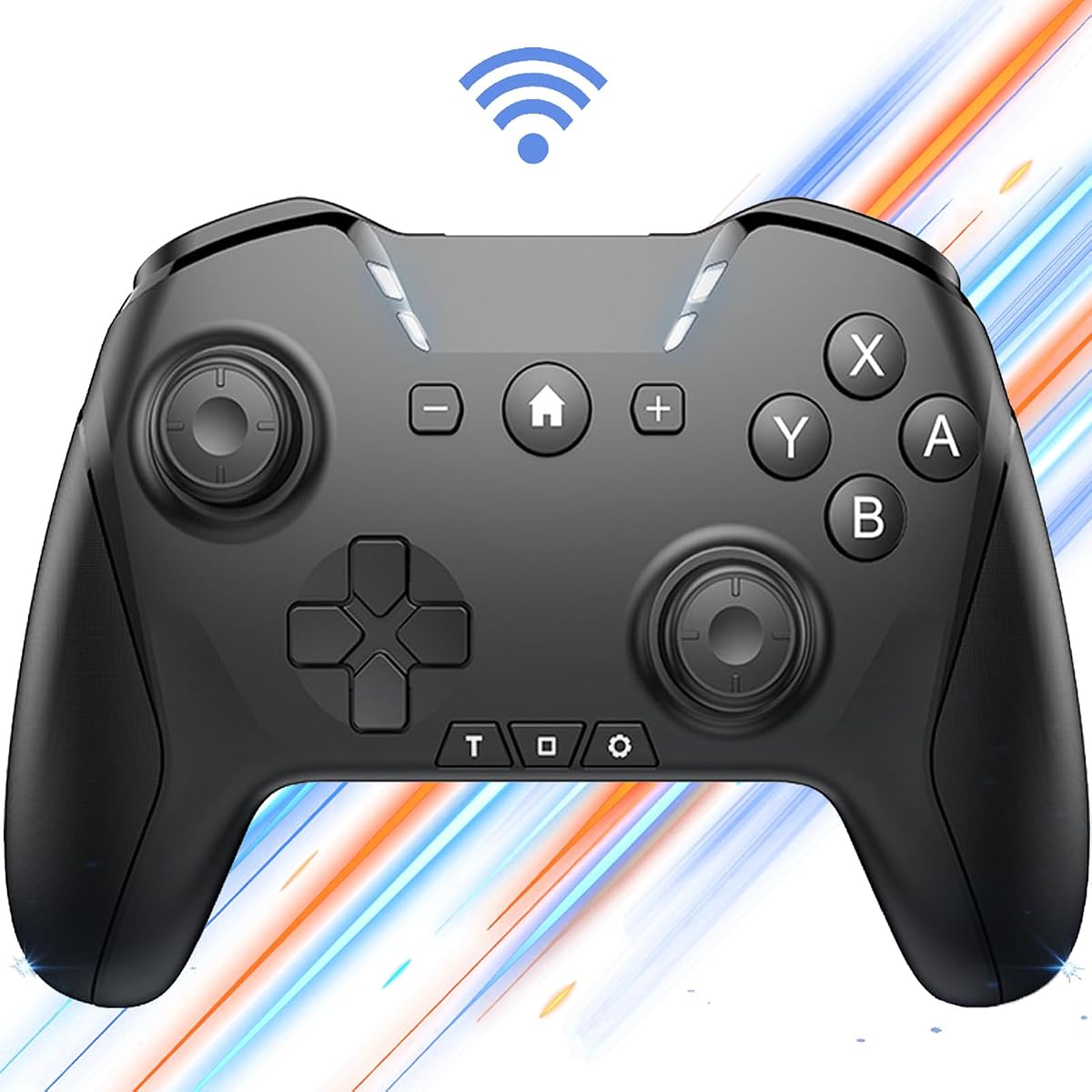
The VOYEE Switch Controllers offer an exceptional value with a high 4.4 rating, making them a top budget pick for Apple TV users. They feature a stylish RGB lighting bolt design with multiple modes and a battery life of 10-15 hours, ensuring enough playtime for daily gaming sessions.
We may earn a commission when you buy through this link, at no additional cost to you.
One-key pairing and wake-up functionality simplify connectivity, while programmable M1/M2 buttons and three adjustable turbo speeds enhance gameplay for competitive titles. The 6-axis gyro sensor and 4-level vibration provide responsive control and immersive feedback. These features are impressive for the price point.
A notable limitation is that PC compatibility requires a wired connection, which may restrict wireless use on computers. Additionally, the focus is primarily on Switch and Apple devices, so broader platform support is limited. However, for Apple TV gamers, these trade-offs do not significantly impact the core experience.
This controller is perfect for budget-conscious gamers who want style and performance without breaking the bank. The RGB lighting and responsive controls make it a fun choice for casual and competitive play alike. It is a highly recommended option for those seeking affordability and reliability on Apple TV.
Switch controller with lightening bolt style and 9-color LED looks really cool with 4 light modes.
Support one key to wake up your switch console for convenient and fast connectivity.
We may earn a commission when you buy through this link, at no additional cost to you.
The 8Bitdo SN30 Pro boasts a 4.7 rating, the highest in this list, due to its robust Hall Effect joysticks and fully featured retro design. It supports Apple TV officially, providing a seamless gaming experience with clickable joysticks, rumble vibration, and motion controls for an immersive play.
We may earn a commission when you buy through this link, at no additional cost to you.
Its compact size makes it easy to carry, fitting into your pocket for gaming on the go. The turbo function helps quickly defeat enemies, while the rechargeable 480mAh battery offers 18 hours of playtime. Firmware updates ensure long-term compatibility and performance improvements for various platforms.
The retro style may not appeal to everyone who prefers modern ergonomic designs, and it lacks a phone mount included in other models. However, the Hall Effect joysticks reduce drift and improve precision, which is a significant technical advantage. These minor cons are outweighed by the overall quality and functionality.
This controller is excellent for retro enthusiasts and gamers who value precision and portability. It is a top choice for Apple TV users looking for a stylish yet powerful device. The high rating reflects its reliability and performance across multiple systems including Apple TV.
Hall Effect Joysticks are upgraded, robust and long-lasting with higher precision and sensitivity.
144*63.5*32.5mm size allows you to put it in your pocket and go wherever you want.
We may earn a commission when you buy through this link, at no additional cost to you.
This Renewed version of the SteelSeries Nimbus+ provides a cost-effective way to access premium features with a focus on Apple compatibility. It maintains the core strengths of the original model, including a stable wireless connection and responsive buttons for precise control on Apple TV and other supported devices.
We may earn a commission when you buy through this link, at no additional cost to you.
The controller is professionally inspected, tested, and cleaned to meet Amazon Renewed quality standards, ensuring it functions well for gaming sessions. It offers a built-in rechargeable battery for extended use and analog sticks and triggers that deliver accurate feedback during gameplay. This makes it a reliable choice for budget shoppers.
The 3.6 rating indicates some variability in condition or performance compared to new units, which is typical for renewed products. Users may encounter minor cosmetic imperfections or shorter battery life depending on usage history. However, for those seeking a discounted premium experience, this risk is often acceptable.
Ideal for gamers looking to save money without sacrificing Apple TV compatibility, this controller offers a solid middle ground. It is a practical solution for those who want the Nimbus+ features at a lower price point. Check descriptions carefully to understand the specific condition of each unit.
Professionally inspected, tested, and cleaned to meet Amazon Renewed quality standards.
Provides a stable wireless connection for responsive gameplay without cables.
We may earn a commission when you buy through this link, at no additional cost to you.
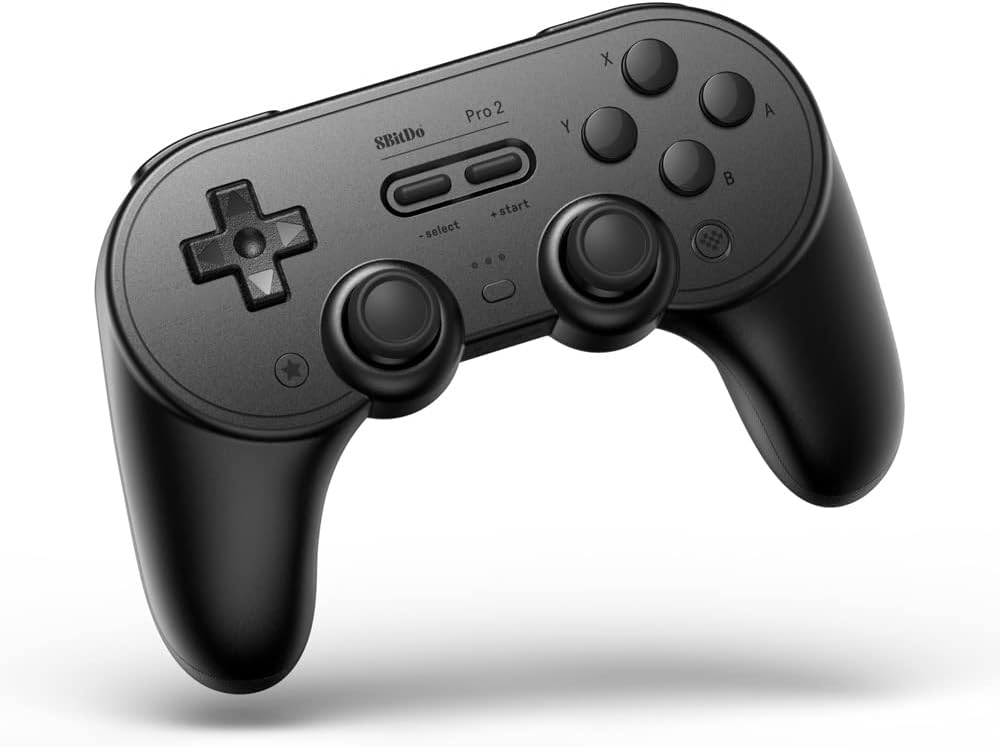
The 8BitDo Pro 2 is a feature-rich option with a 4.5 rating, offering two pro-level back buttons and custom profile switching for advanced gameplay. It officially supports Apple TV, making it a versatile choice for gamers who use multiple platforms like Switch, PC, and iOS devices.
We may earn a commission when you buy through this link, at no additional cost to you.
Enhanced grip and a 4-Way mode switching button allow for easy customization of controls. The ultimate software available on PC, Android, and iOS provides deep configuration options to tailor the controller to your needs. The 20-hour rechargeable battery ensures long sessions without interruptions.
The abundance of features may overwhelm casual users who prefer simplicity, and the price is higher than basic models. Software setup can be complex for those unfamiliar with mapping tools. However, for enthusiasts who want granular control and versatility, these are minor drawbacks.
This controller is perfect for multi-platform gamers who demand high customization and performance. It delivers a robust experience for Apple TV users who value precise controls and long battery life. If you want a controller that can grow with your gaming needs, this is an excellent choice.
Features 2 pro-level back Buttons for advanced input options and custom gaming combos.
Custom profile switching and ultimate software allow you to tailor controls to your play style.
We may earn a commission when you buy through this link, at no additional cost to you.
The standard SteelSeries Nimbus+ offers a 4.1 rating, confirming its reliability as a wireless gaming controller for Apple TV and iOS devices. It focuses on core performance with responsive controls and a wireless design that ensures a clutter-free gaming experience in your living room.
We may earn a commission when you buy through this link, at no additional cost to you.
With a rechargeable battery and optimized compatibility for Apple products, it delivers consistent performance for most games. The build quality is durable, and the controller is easy to pair and use across supported devices. It is a straightforward option without extra gimmicks.
Compared to the plus version, it may lack some advanced features like the extended battery life or phone mount. However, for pure tvOS gaming, these omissions do not significantly detract from the overall experience. Users may prefer simplicity over extra features.
This is a solid choice for Apple TV users who want a dependable and licensed controller without complications. It balances cost and performance well for casual and moderate gamers. If you prioritize seamless integration with Apple ecosystems, this model is highly suitable.
Features responsive buttons, analog sticks, and triggers for precise control without wires.
Built-in rechargeable battery delivers extended gaming sessions on a single charge.
We may earn a commission when you buy through this link, at no additional cost to you.
The AceGamer Aurora II features upgraded Hall Effect joysticks that reduce drift and improve accuracy significantly, earning it a 4.2 rating. It supports Apple iOS and offers both 2.4G wireless and Bluetooth connectivity, providing flexibility for Apple TV and other platforms with stable signal transmission.
We may earn a commission when you buy through this link, at no additional cost to you.
With a 1000mAh battery, it provides extra-long playtime to prevent game interruptions. The customizable back keys allow you to enhance gaming convenience with additional input options. Enhanced encryption dongle and receiver ensure strong connectivity and low latency during gameplay.
The pairing process for 2.4G requires holding specific buttons, which might be slightly complex for first-time users. It also does not support Xbox systems, which could limit versatility if you own an Xbox console. However, for Apple TV and PC gamers, it remains a strong contender.
This controller is best for gamers who prioritize precision and long battery life on a budget. The Hall Effect joysticks make it a technical standout in its price range. If accuracy and stability are your top concerns, this model is a worthy choice for Apple TV.
Hall Effect sensors provide precise and reliable input detection for smooth in-game movement.
Equipped with a 1000mAh upgraded battery for extra-long playtime on a single charge.
We may earn a commission when you buy through this link, at no additional cost to you.
The Official Luna Wireless Controller is designed for Amazon Luna cloud gaming with a 4.4 rating, offering a unique connectivity experience. It connects via WIFI using Cloud Direct technology for low-latency gameplay, which is ideal for cloud streaming on Apple TV and other devices.
We may earn a commission when you buy through this link, at no additional cost to you.
You can seamlessly switch screens, pausing on one device and picking up on another. It works across Windows, Mac, Fire TV, and iOS, making it a versatile tool for multi-device households. The offset thumbsticks and precise triggers ensure comfortable and responsive control.
Since it is optimized for Luna, its primary strength shines with cloud gaming, which requires a stable internet connection. Local Bluetooth use is possible but may not offer all features as seamlessly as on supported platforms. This is acceptable for those invested in cloud gaming.
Ideal for Luna subscribers and cloud gamers who want a dedicated controller for streaming services. It offers a premium experience tailored to specific services while maintaining broad compatibility. If cloud gaming is a priority for your setup, this controller is a strong fit.
Connects directly to Amazon's custom game servers using Cloud Direct technology for low-latency gameplay.
Pause your game on one screen then pick up right where you left off on another.
We may earn a commission when you buy through this link, at no additional cost to you.
The GMBACK Switch 2 Pro stands out with its loop macro function, allowing you to record and replay button sequences for repetitive tasks. With a 4.1 rating, it offers wide compatibility including Apple TV and iOS, supported by an 800mAh battery providing 15-20 hours of playtime.
We may earn a commission when you buy through this link, at no additional cost to you.
Customizable turbo and vibration settings let you personalize your experience for different games. The home wake up functionality simplifies turning on your console, and RGB lighting adds a stylish touch. Additional features like remappable ABXY buttons provide extra flexibility for various play styles.
The macro features require initial setup and may be unnecessary for casual players who do not need automation. Some users might find the extra buttons and lighting distracting. However, for those who enjoy customization, these features enhance the gaming experience significantly.
This controller is excellent for gamers who want advanced features like macros at an affordable price. It is a solid choice for Apple TV users seeking versatility and long battery life. If you value customization and extended play sessions, this model is worth considering.
First record your custom button sequence then hold Turbo + Macro to start or stop looping.
Enjoy up to 15-20 hours of gameplay on a single charge with only 2-3 hours charging time.
We may earn a commission when you buy through this link, at no additional cost to you.
Choosing the right controller involves considering compatibility, battery life, and specific features that match your gaming preferences. Here are key factors to evaluate before making your purchase.
Ensure the controller explicitly supports tvOS to avoid connectivity issues and ensure full feature access. Some controllers may work but lack specific buttons or pairing methods optimized for Apple TV.
Look for official Apple licensing or clear mentions of Apple TV support in the product description to guarantee seamless integration.
Check the rated battery life to ensure it meets your gaming sessions. Models with longer battery life reduce the need for frequent recharging.
Prefer controllers with USB-C or rechargeable batteries for convenience and cost savings over time compared to disposable AA options.
Decide between Bluetooth and 2.4G wireless. Bluetooth is common and convenient, while 2.4G may offer more stable connections with lower latency.
Verify that the pairing process is simple and does not require complex manual steps to ensure a hassle-free setup.
Comfort is key for extended play. Look for controllers with textured grips and balanced weight distribution to reduce hand fatigue.
Consider the size relative to your hands, especially if you plan to use the controller for long gaming sessions on the couch.
If you need macros or custom button mappings, choose a controller with programmable back buttons or turbo functions. This adds versatility for complex games.
Understand that these features may require additional setup time but can significantly enhance gameplay efficiency.
Balance the cost with the features offered. Budget controllers often lack advanced features but can still deliver solid performance for casual gaming.
Investing in a higher-end model may provide better build quality and long-term value through durability and software updates.
Motion controls and haptic feedback enhance immersion in sports and action games. Check if the controller includes these features if you enjoy them.
Not all controllers support advanced motion controls equally, so confirm compatibility with your specific games on Apple TV.
Read reviews to assess the longevity of buttons and sticks. High-quality materials prevent issues like stick drift or button failure.
Look for warranties or guarantees that protect your purchase in case of defects or performance issues over time.
To pair your controller, enable Bluetooth on your Apple TV and put the controller in pairing mode by holding the designated button until the LED blinks. Select the device from your TV settings and confirm the connection.
Keep your controller charged by connecting it via USB-C when the battery is low. Most controllers have an indicator light that shows charging status and full charge readiness.
Store the controller in a cool, dry place when not in use to preserve battery health. Clean the buttons and joysticks with a soft cloth regularly to avoid dust buildup.
Not all Bluetooth controllers are optimized for Apple TV. While many generic controllers can connect via Bluetooth, they may lack full functionality or compatibility with tvOS. It is best to choose controllers explicitly listed as compatible with Apple TV to ensure all buttons and features work correctly.
Some controllers require updates through companion software on iOS devices or PC. Check the manufacturer's website or app instructions to update the firmware. This ensures optimal performance and compatibility with the latest tvOS versions.
A good controller should offer at least 15 hours of playtime on a single charge. Models with over 30 hours like the SteelSeries Nimbus+ are excellent for extended gaming sessions. Always check the rated battery life to meet your needs.
Wired controllers can reduce latency, but they limit movement and convenience. For Apple TV, wireless controllers are preferred for freedom of movement. If you need wired connectivity, check if the controller supports USB-C wired mode as a backup.
Most controllers designed for iOS and Apple TV are compatible with Apple Arcade games and streaming apps. Ensure the product description mentions iOS or tvOS support to confirm compatibility with your specific apps and games.
Try resetting the controller by holding the pairing button longer, or restart Bluetooth on your Apple TV. Ensure the battery is charged and remove previous pairings from the TV settings. Refer to the user manual for model-specific troubleshooting steps.
Yes, many of these controllers are cross-platform compatible with Mac and Apple TV. This allows you to use the same controller across different Apple devices seamlessly. Check the product compatibility list to ensure support for both Mac and tvOS.
Our top picks include the 8Bitdo SN30 Pro for its high rating and precision, the SteelSeries Nimbus+ for premium Apple integration, and the VOYEE Switch Controllers for budget-friendly value.
Prioritize features like battery life, connectivity type, and compatibility with your specific games to find the best match. Understanding your needs will help you choose a controller that enhances your Apple TV gaming experience.
Prices and availability change frequently, so be sure to check the latest listings before making your final purchase decision. This guide serves as a comprehensive resource to streamline your choice process.