
Thrustmaster T-Flight Hotas One
4.4Editor score
Detachable throttle design
Plug and play setup
Adjustable stick resistance
This guide compares the top flight sticks for the Xbox Series X to help you find the best controller for immersive simulation gameplay today.
Finding the right flight stick for the Xbox Series X can transform your simulation experience from simple gaming to immersive aviation. These controllers offer precision input and realistic feedback that standard gamepads simply cannot match for serious pilots.
We evaluated ten leading flight sticks based on build quality, compatibility, and feature sets. Our analysis focuses on how each device performs across various flight sim titles available on the platform to ensure you get reliable performance.
Each pick highlights specific strengths like ergonomic design or modular components. Prices fluctuate often so verify current listings before purchasing. This guide ensures you select a controller that matches your cockpit setup and flying preferences effectively.
4.4Editor score
4.5Editor score

4.3Editor score
The following table provides a side-by-side comparison of all ten flight sticks. It highlights key specifications and features to help you quickly identify which model fits your specific simulation needs and budget constraints.


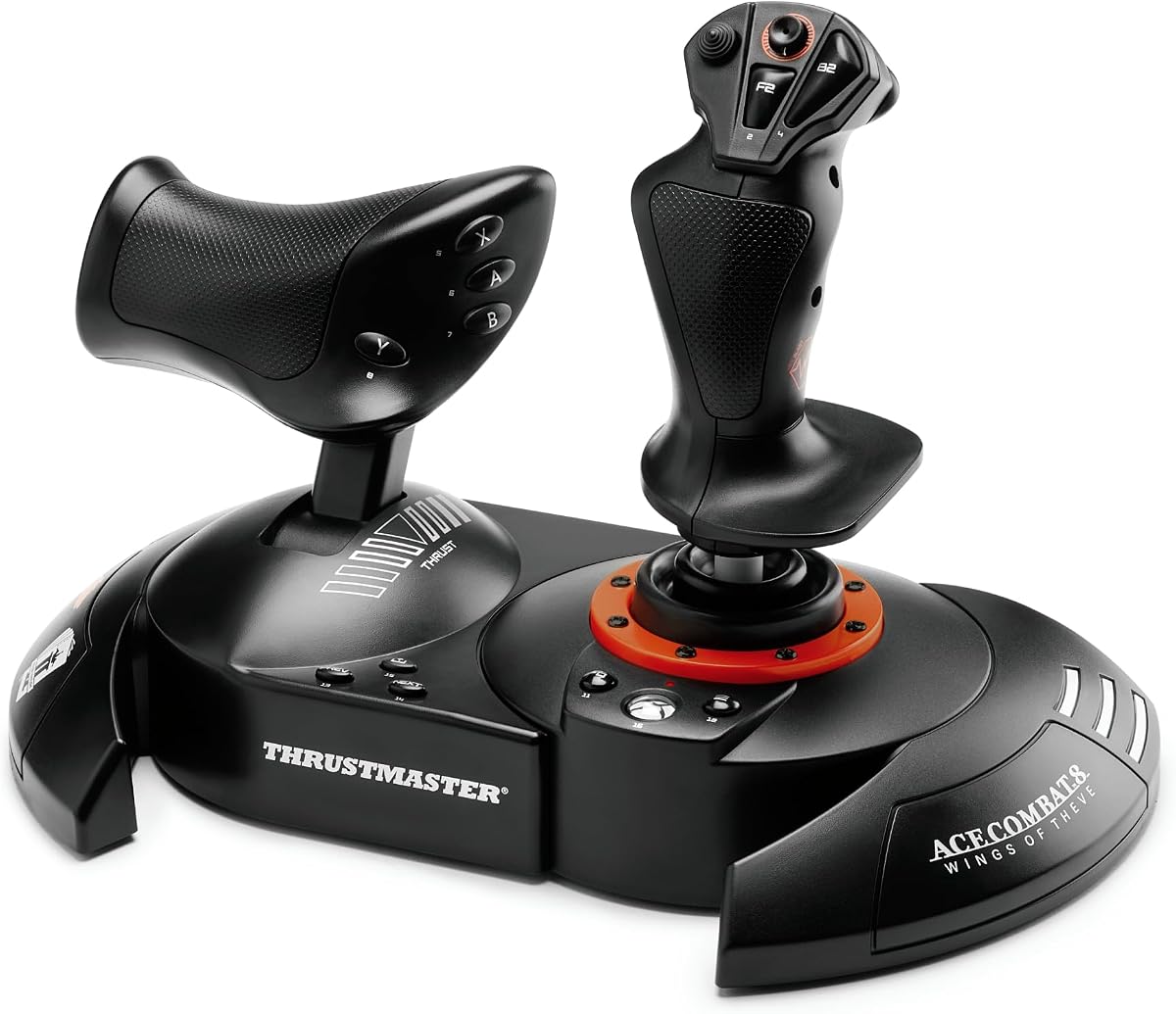
The Thrustmaster T-Flight Hotas One stands out as an affordable yet capable controller for simulation enthusiasts. It offers a realistic flight experience with a precise joystick and throttle system designed specifically for immersive gameplay on Xbox Series X and PC.
We may earn a commission when you buy through this link, at no additional cost to you.
Its ergonomic design ensures comfort during long sessions with adjustable resistance to match your preferences. The detachable throttle allows versatile setups whether you fly on a desk or lap. Multiple programmable buttons and a hat switch provide comprehensive control for various aircraft types.
While it lacks advanced features like vibration feedback, the core functionality remains robust for beginners. The plug and play USB connection simplifies installation significantly. Compatibility with Thrustmaster TFRP pedals further enhances its utility for serious setups.
This controller is ideal for those seeking a reliable entry point into flight simulation without breaking the bank. It balances cost and performance effectively. You should consider it if you value modularity and ease of use in your cockpit arrangement.
The detachable throttle enables flexible positioning to suit different play styles and desk arrangements effectively.
Users can tweak joystick resistance to match personal comfort levels and aircraft simulation requirements accurately.
We may earn a commission when you buy through this link, at no additional cost to you.
The Thrustmaster T.FLIGHT HOTAS NEO ACE delivers exceptional precision for combat flight simulations. Designed with official Ace Combat licensing it brings authentic controls to your Xbox Series X. The Hall Effect technology ensures long lasting accuracy without drift issues over time.
We may earn a commission when you buy through this link, at no additional cost to you.
Key strengths include the vibration feedback motor that enhances immersion during maneuvers and impacts. The rapid fire trigger and multidirectional hat switch allow quick responses in dogfights. Detachable throttle options provide flexibility for different cockpit configurations.
Trade offs involve a higher cost compared to basic models and some limitations for commercial aviation sims. However the combat focus justifies these choices for fans of action oriented flight games. The durability from years of sensor expertise adds reliability.
This controller is perfect for pilots who prioritize performance in high intensity scenarios. The precise controls and feedback make every maneuver feel authentic. It is a top choice if you plan to focus primarily on combat flight simulations on your console.
Proprietary sensors guarantee surgical precision that remains consistent even after hours of intense gaming sessions.
Built in motor lets you feel missile impacts and turbulence directly in your hand for realism.
We may earn a commission when you buy through this link, at no additional cost to you.
The Thrustmaster TCA Yoke & Quadrant Boeing Edition transforms your setup into a realistic cockpit. This officially licensed bundle brings the Dreamliner to life with a scale replica yoke and quadrant. It is built for enthusiasts seeking the highest level of immersion.
We may earn a commission when you buy through this link, at no additional cost to you.
Features like the pendulum mechanism replicate real airliner control movements smoothly. The metal internal structure ensures durability and a premium feel. With thirty five action buttons and additional axes you gain comprehensive control over all flight parameters in your sims.
The main drawbacks are the large footprint and high price tag which may not suit casual gamers. However for serious simmers the authenticity is unmatched. It works seamlessly with Microsoft Flight Simulator and other major titles on Xbox Series X.
This package is ideal if you want a complete airliner experience at home. The professional grade realism justifies the investment for dedicated pilots. You should choose this if space allows and you demand true-to-life controls for your simulation hobby.
Replicates the smooth responsive control movement of a real airliner for authentic flight handling.
Internal metal structure ensures balanced weight and long term durability for years of flying.
We may earn a commission when you buy through this link, at no additional cost to you.
The Turtle Beach VelocityOne Flightstick offers a modern approach to flight simulation controls. It features high precision non contact main axes that ensure longevity and accuracy. The integrated OLED display provides quick access to flight management data during gameplay.
We may earn a commission when you buy through this link, at no additional cost to you.
Its ambidextrous design suits both left and right handed users effectively. The configuration wheel allows intuitive setup changes on the fly. Twenty seven programmable buttons give extensive control options for complex flight scenarios across various aircraft.
Trade offs include reliance on software for full customization which may complicate initial setup. Some users find throttle levers less customizable than competitors. However the OLED display and robust button layout make it a versatile choice for many simmers.
This stick is best for those who value tech integration and display information at hand. It works well on Xbox and PC alike. You might prefer it if you enjoy tweaking settings quickly with the configuration wheel and visual aids.
Real time flight data appears on screen so you stay informed without switching menus.
Designed to fit either hand comfortably allowing flexible usage for any pilot preference.
We may earn a commission when you buy through this link, at no additional cost to you.
The Turtle Beach VelocityOne H.O.T.A.S. aims to provide a comprehensive flight control solution with extensive inputs. It features high resolution Hall Effect sensors for precision stick control. A full color display delivers real time flight data for quick performance tuning during missions.
We may earn a commission when you buy through this link, at no additional cost to you.
Key strengths include swappable dual throttle detents that offer tactile thrust reference points. Adjustable resistance settings let you tailor the feel to specific aircraft needs. The ecosystem supports pedals and mounts for a full cockpit setup over time.
However users report significant quality control issues and software complexities that can hinder performance. The high price does not always match reliability. Potential buyers should be aware of the technical hurdles before investing in this complete system.
This kit is only recommended if you are prepared to troubleshoot potential defects and setup hurdles. The hardware capabilities are strong when functioning properly. Choose this if you want maximum customization and do not mind a steep learning curve.
Tactile reference points on the throttle provide clear physical feedback for thrust adjustments.
Full color screen keeps you updated on flight metrics without switching to the main screen.
We may earn a commission when you buy through this link, at no additional cost to you.
The Thrustmaster T.Flight Full Kit X delivers a complete flight simulation experience in one package. It includes a joystick detachable throttle and rudder pedals for a full cockpit setup. This allows immediate take off without needing additional purchases or complex configurations.
We may earn a commission when you buy through this link, at no additional cost to you.
The joystick resistance can be easily adjusted to fit user preferences accurately. Slide rails on the pedals allow smooth precise steering movements. Compatibility spans Xbox Series X and PC making it versatile for different gaming platforms.
While the pedals are compact they may feel small for larger users or long sessions. The button layout is standard rather than advanced. However the value of getting all essential components together makes this a strong entry level complete solution.
This kit is ideal for beginners who want a ready to use setup quickly. The plug and play nature simplifies the entry into serious simulation. Consider this if you prefer a bundled solution to start flying immediately.
Rudder pedals provide extra control surfaces essential for realistic turning and landing maneuvers.
Plug and play design removes technical barriers so you can start flying right away.
We may earn a commission when you buy through this link, at no additional cost to you.
The Thrustmaster TCA Sidestick Airbus X Edition mimics the exact controls found on Airbus airliners. It is officially licensed by Airbus and Xbox Series X ensuring perfect compatibility. The ergonomic design allows comfortable operation for commercial aviation simulation enthusiasts.
We may earn a commission when you buy through this link, at no additional cost to you.
It features twenty one action buttons with tact switch technology for responsive input. You can swap joystick head button modules to customize your control scheme. Existing Thrustmaster Airbus users can expand their cockpit easily with the ecosystem hub.
This stick does not include a throttle module meaning separate purchases are needed. Rudder control is limited compared to full HOTAS kits. However for airliner specific sims the authentic feel and modularity are significant advantages for realism seekers.
This is best for those focused on commercial flight paths and airline operations. The replica build quality enhances the simulation experience significantly. Consider this if you want a precise Airbus cockpit feel on your Xbox console.
Authentic layout and design replicate the exact controls found on real Airbus aircraft.
Four head button modules allow you to tailor the stick to specific aircraft layouts.
We may earn a commission when you buy through this link, at no additional cost to you.
The Thrustmaster TCA Sidestick X Airbus offers an ergonomic replica of Airbus controls for Xbox Series X. It uses contactless magnetic sensors for an unlimited lifespan and optimal precision. The design integrates into Microsoft Flight Simulator directly for instant use.
We may earn a commission when you buy through this link, at no additional cost to you.
Key features include a built-in thrust reverser mechanism in the enhanced throttle handle. You can rotate the sidestick handle for rudder control which is lockable. This provides extra control flexibility without requiring separate pedals immediately.
The lack of a full throttle quadrant means you must buy separate components for a full setup. Locking rudder control requires practice to avoid accidental inputs. However the contactless sensors ensure durability that standard potentiometers cannot match over time.
This stick is ideal for commercial aviators who value precision and durability. The authentic design elevates the simulation feel significantly. It is a strong choice if you prioritize sensor accuracy and airline realism in your cockpit.
Magnetic technology ensures optimal precision and long life without wear from potentiometers.
Built-in mechanism on the handle adds realistic control for landing thrust management.
We may earn a commission when you buy through this link, at no additional cost to you.
The Thrustmaster T.Flight Hotas One MSFS Edition is optimized specifically for Microsoft Flight Simulator on Xbox. It carries the official license ensuring seamless integration and default profiles. The hardware matches standard T-Flight controls but focuses on airline simulation needs.
We may earn a commission when you buy through this link, at no additional cost to you.
It offers ten bit accuracy and dual rudder systems for flexible steering. The removable gas controller allows lap or desk use. Ergonomic buttons and resistance make it suitable for long flight sessions without fatigue.
Trade offs include its specific focus on MSFS which might limit appeal for combat pilots. The materials are basic but functional. However the high rating confirms strong performance and value for flight simulation fans on the Xbox platform.
This controller is perfect for those diving into Microsoft Flight Simulator seriously. The official integration removes setup hassles. Choose this if you want a reliable stick designed specifically for that simulation environment on console.
Official license ensures instant compatibility with flight simulator profiles for easy setup.
Operate controls sideways via joystick or throttle lever for flexible steering options.
We may earn a commission when you buy through this link, at no additional cost to you.
The HORI Fighting Stick alpha offers a unique layout option for Xbox Series X. While designed for fighting games it can be repurposed for flight control with customization. It is officially licensed by Microsoft ensuring reliable performance on the console.
We may earn a commission when you buy through this link, at no additional cost to you.
Its chassis opens for easy maintenance and customization of parts. You can swap top housing artwork to personalize the look. Assignable buttons and a profile button allow detailed configuration for various gaming needs.
This is not a standard flight stick and lacks dedicated flight axes. However for enthusiasts willing to remap controls it provides a solid build. The high build quality makes it durable for long term use across different titles.
This is best for users who want a customizable stick for multiple genres. It works well if you enjoy modifying hardware. Consider this if you need a robust controller for both flight and competitive gaming on Xbox.
Openable chassis lets you maintain and modify internal parts easily.
Profile button allows saving different button layouts for various games.
We may earn a commission when you buy through this link, at no additional cost to you.
Selecting the right flight stick requires understanding your simulation goals and hardware needs. The following factors help you evaluate options effectively.
Ensure the controller explicitly supports Xbox Series X and S. Many PC-only sticks require adapters which introduce latency. Always check product details for console certifications.
Choose sticks with native Xbox support for seamless plug and play performance.
Hall Effect sensors use magnetic fields instead of physical contact. This prevents wear and drift common in potentiometers. They offer longer lifespan and consistent accuracy over time.
Look for Hall Effect technology if you want precision without maintenance issues.
Long flights require comfortable grips to prevent strain. Adjustable resistance allows you to match stick tension to your strength. Consider weight and size for your desk or lap setup.
Prioritize adjustable features to ensure comfort during extended simulation sessions.
Detachability lets you use joystick and throttle independently. Some setups favor lap play while others use desk mounts. Modular kits save space and adapt to changing preferences.
Choose detachable components for flexible setup options across different rooms.
Realistic flight needs yaw control via rudders. Some sticks include pedals while others offer twist handles or levers. Pedals provide the most realistic input for landing and taxiing.
Decide if you need dedicated pedals or stick-integrated rudder for your flying style.
Programmable buttons let you map complex commands easily. Some units have configuration wheels or software profiles. Look for enough inputs for your aircraft types.
Select sticks with high button counts and remappable controls for maximum flexibility.
Metal frames and robust hinges ensure durability over years. Plastic models may feel cheap or break under stress. Check for reinforced joints and quality materials.
Opt for metal internal structures or reinforced components for longevity.
Expandable brands offer matching pedals and yokes. Ensure compatibility with existing accessories to avoid mismatches. Some hubs simplify connecting multiple devices.
Choose a brand with a clear ecosystem for future expansion.
Connect the USB cable directly to an Xbox Series X USB port without using adapters. Ensure the connection is secure to prevent signal drops during gameplay.
Calibrate your stick via the game settings menu to ensure accurate centering. Reset center points periodically to maintain consistent input responses.
Store the device in a dry place away from dust and sunlight. Regularly clean buttons and levers with a soft cloth to prevent grime buildup.
Yes many flight sticks work on Xbox Series X if they list console compatibility. Always verify the product page for Xbox Series X and S support. Avoid PC-only models without Xbox certification.
Hall Effect sensors are better because they use magnetic fields for contactless input. This reduces wear and prevents drift over time. They offer superior accuracy and longevity.
Pedals are highly recommended for realistic flight simulation. They provide dedicated yaw control for accurate turns and landings. Some sticks include rudder levers if you lack space.
Most Xbox flight sticks work on PC via USB. Check for PC compatibility drivers before purchasing. Many offer universal support across consoles and computers.
Quality flight sticks last several years with proper care. Hall Effect sensors can last indefinitely due to no physical wear. Regular cleaning and gentle handling extend lifespan.
Most Xbox flight sticks work plug and play without software. Some allow advanced mapping via companion apps. Console use typically requires no configuration software.
They support major sims like Microsoft Flight Simulator and Ace Combat. Some offer game-specific licenses for optimized profiles. Always check game support lists before buying.
We reviewed ten top flight sticks for the Xbox Series X highlighting budget and premium options. The Thrustmaster T-Flight Hotas One offers affordability while the TCA Yoke provides realism.
Prioritize sensor quality and ergonomics to ensure a smooth experience. Match the controller to your preferred aircraft types and available space effectively.
Verify current listings before purchase as stock varies quickly. Check ratings and compatibility notes for the best fit on your system.