
Logitech G F310
4.4Editor score
Familiar control layout
Six-foot cord included
Programmable buttons
This guide compares the top fightpads for PC including wired and wireless options to help you choose the best controller for competitive gaming.
Finding the right fightpad for PC can transform your competitive gaming experience. A quality controller offers precision inputs and durability essential for fighting games.
We evaluated ten top-rated models based on build quality, response time, and platform compatibility. Each option was selected for its specific strengths in PC gaming scenarios.
Our reviews highlight key features and potential trade-offs for every pick. Prices fluctuate so check current listings before making your final purchase decision today.
4.4Editor score

4.4Editor score

4.2Editor score
Below you will find a side-by-side comparison of all ten selected fightpads. This table highlights key specifications to help you narrow down your choices quickly.



The HORI Fighting Commander OCTA is a top-rated tournament grade fightpad designed for PC and console gaming. It holds a solid rating and is officially licensed by Sony ensuring quality hardware standards are met.
We may earn a commission when you buy through this link, at no additional cost to you.
Its standout feature is the use of Micro Switch buttons which provide crisp tactile feedback crucial for rapid inputs. The Short Throw Analog Stick with an 8-way gate increases accuracy and execution speed during complex combos.
While it lacks wireless connectivity this wired design ensures zero latency which is vital for competitive play. The headset input and onboard audio controls allow for convenient volume adjustments without interrupting gameplay sessions.
This controller is ideal for serious players seeking durability and precision. It delivers reliable performance for fighting games making it a strong choice for both home and tournament use.
The Micro Switch buttons ensure consistent registration even after thousands of presses during intense gaming sessions.
Users can adjust D-Pad sensitivity and use the companion app to customize settings for their preferred playstyle.
We may earn a commission when you buy through this link, at no additional cost to you.
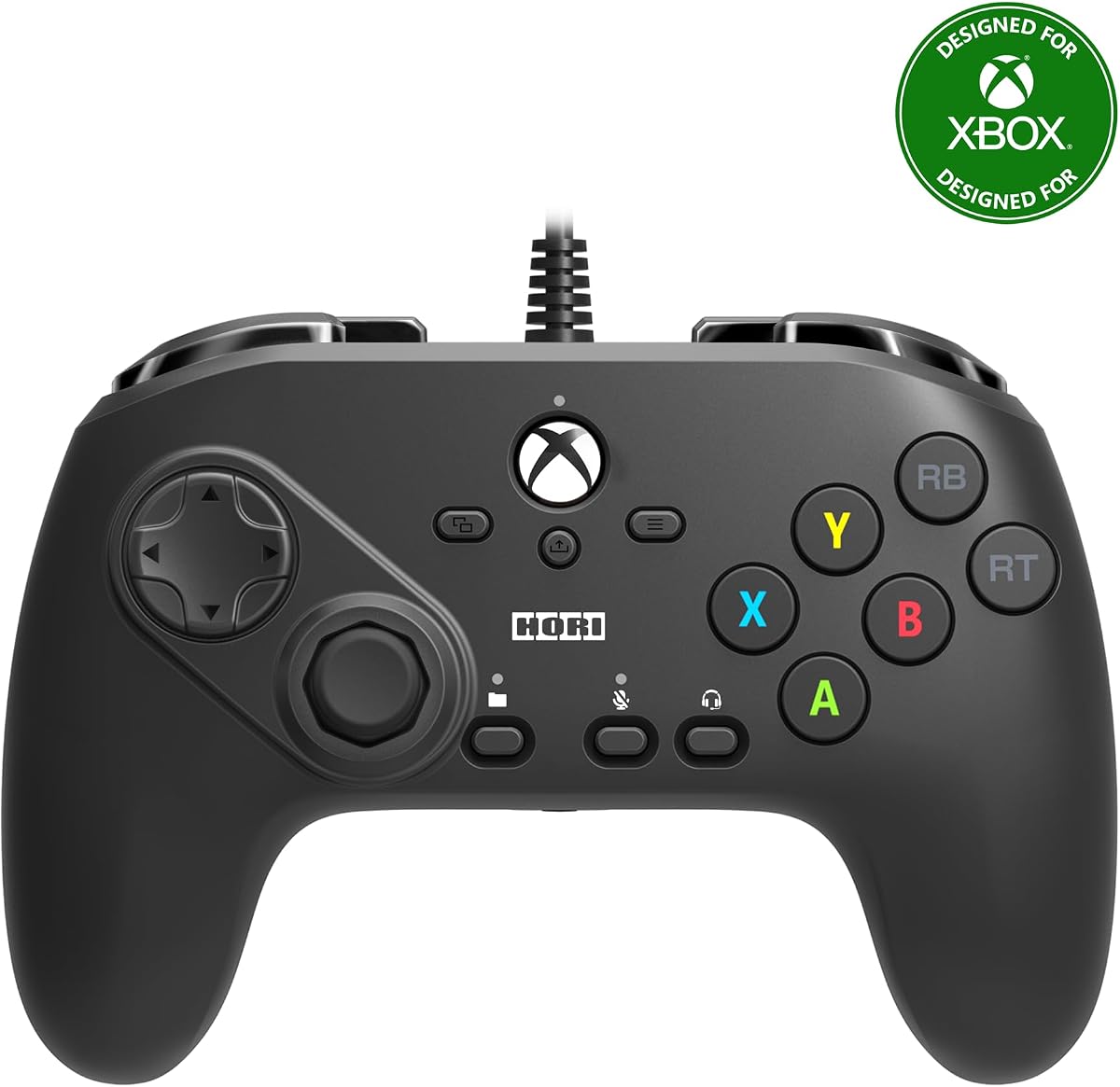
The HORI Fighting Commander Octa is designed primarily for Xbox Series X and S but also supports Windows 10 for PC gamers. It features a six-button layout tailored for fighting games and includes Micro Switch Buttons for quick response.
We may earn a commission when you buy through this link, at no additional cost to you.
Key strengths include the adjustable d-pad and short throw analog stick with an 8-way Gate for increased accuracy. The ability to save and switch between up to four profiles with the companion app adds flexibility for different games.
Some users report a lower rating compared to other models which may indicate ergonomic comfort issues. However for Microsoft officially licensed it ensuring compatibility and basic quality assurance for Xbox and PC users.
This pad is suitable for Xbox players looking to expand to PC gaming. Its profile saving feature is great for those who play multiple fighting titles and need quick setup changes.
You can customize and save up to four profiles to easily switch between different character setups during gameplay.
Features a six-button layout, Micro Switch Buttons, and adjustable d-pad for precise control inputs.
We may earn a commission when you buy through this link, at no additional cost to you.
The 8Bitdo M30 Wired Controller offers a classic six-button layout that appeals to retro enthusiasts and fighting game fans. It is officially licensed by Xbox and supports Windows for seamless PC integration via a virtually lag-free USB-C connection.
We may earn a commission when you buy through this link, at no additional cost to you.
This controller supports the 8BitDo Ultimate Software for advanced customization and includes a custom profile switch button to toggle between three profiles on the fly. A 3.5mm audio jack and volume control are conveniently placed for audio management.
While it lacks modern trigger bumpers found on standard controllers the 6-button layout switches provide a focused experience for fighting games. Its compact design might feel small to users with larger hands but remains precise.
Ideal for players seeking a nostalgic feel with modern connectivity the M30 delivers reliable performance. The wired connection ensures stability during critical matches without worrying about battery levels.
The USB-C wired connection ensures virtually lag-free performance while the Ultimate Software allows deep customization.
Built-in 3.5mm audio jack and volume control allow you to manage audio without leaving the game.
We may earn a commission when you buy through this link, at no additional cost to you.
The DOYOKY Leverless Controller is a versatile tool for PC and multi-platform gamers seeking tournament-level control. It stands out with hot-swappable switches and an OLED display that shows settings like SOCD and Turbo at a glance.
We may earn a commission when you buy through this link, at no additional cost to you.
Its web-based customization allows you to adjust every button and macro directly in your browser without installing software. The reinforced USB-C port resists wobble ensuring a secure connection with the included detachable braided cable.
Switching between five input modes like XInput or DInput makes it compatible with PC PS4 PS3 and Switch. While the hitbox-style layout requires practice it offers superior speed and accuracy once mastered.
This controller is perfect for players who want to tune their hardware without soldering. The included spare keycaps and switch puller make maintenance easy ensuring longevity over many training sessions.
Customize every button and macro directly in your browser at a specific IP address without needing extra software.
Reinforced USB-C port and detachable braided cable ensure long-term daily use without connection issues.
We may earn a commission when you buy through this link, at no additional cost to you.
The Akko FUNBOX Leverless Controller represents the next generation of fightpads with contactless Hall Effect switches. These switches eliminate physical friction meaning they never wear out over time while offering a hot-swappable design for customization.
We may earn a commission when you buy through this link, at no additional cost to you.
Its Rapid Trigger feature is fully adjustable from 0.1mm to 2.8mm giving you precise control over input sensitivity. Backed by a 50KHz scan rate this ensures lightning-fast response times essential for competitive fighting games.
The built-in full-color LCD allows you to switch modes and adjust SOCD settings without digging through menus. An intuitive aluminum dial provides instant access to parameters making configuration fast and ergonomic during breaks.
This is a top pick for serious competitors needing tournament-level accuracy. With a Tournament Lock mode it ensures compliance with official rules while still offering deep customization for casual play.
Contactless Hall Effect switches eliminate friction and debris buildup ensuring the controller lasts indefinitely without wear.
The aluminum multi-function dial replaces clunky menus allowing instant tactile access to settings on the fly.
We may earn a commission when you buy through this link, at no additional cost to you.
The HORI Fighting Commander OCTA TEKKEN 8 Edition is a tournament grade wired fightpad designed specifically for Windows PC. It features the same high-quality components as the standard model with a design inspired by the popular fighting game franchise.
We may earn a commission when you buy through this link, at no additional cost to you.
It includes Microswitch buttons for accuracy and durability along with a short throw left analog stick. The six button layout and analog slide pad provide efficient navigation in game lobbies without leaving the controller.
Officially licensed by Bandai Namco Entertainment this version appeals to fans of the series. While functionally similar to other HORI models it offers a distinct aesthetic and reliable performance for dedicated players.
This edition is suitable for PC gamers who want a trusted build with a thematic touch. It maintains the core strengths of the OCTA line ensuring you can focus on execution rather than hardware issues.
Features a six button layout, accurate D-Pad, and analog slide pad for in-game navigation and control.
Officially licensed by Bandai Namco ensuring compatibility and quality standards for TEKKEN 8 players.
We may earn a commission when you buy through this link, at no additional cost to you.
The HORI Wireless Fighting Commander OCTA Pro brings tournament grade performance to PS5 and Windows PC with the freedom of wireless connectivity. It features an 8-gate analog stick and a 6-button Microswitch button layout for precision.
We may earn a commission when you buy through this link, at no additional cost to you.
Programable rear buttons add depth for complex moves while the analog slider pad helps navigate game lobbies easily. The included USB-C charging cable features a lock to prevent accidental disconnects during intense matches.
Three D-pad options allow for customizable feel and the tactile switch shoulder buttons enhance control. However you must install the latest firmware from the HORI website before first use to avoid potential issues.
This is the ideal choice for players who want wireless convenience without sacrificing performance. It maintains the trusted build quality of HORI while offering added flexibility for comfortable home setups.
Wireless connectivity for PlayStation 5 and Windows 11/10 ensures less clutter while maintaining competitive reliability.
Swappable D-pad with three options and programable rear buttons allow tailored control for your specific needs.
We may earn a commission when you buy through this link, at no additional cost to you.
This renewed version of the HORI Fighting Commander OCTA offers a budget-friendly entry into tournament grade fightpads. It is designed for PS5 PS4 and PC with the same core features as the new model including an eight-button layout.
We may earn a commission when you buy through this link, at no additional cost to you.
The controller includes programmable macros and a touchpad for added functionality. While it is sold as renewed it comes from a reputable seller ensuring it meets basic quality standards for use.
For those looking to save money without compromising on brand quality this is a smart option. It retains the official Sony license which guarantees compatibility and reliability on supported platforms.
Ideal for casual players or those building multiple setups this renewed unit delivers value. Just ensure you check the condition before purchase to ensure it meets your expectations.
Features an eight-button layout, touchpad, and programmable macros similar to the brand new model.
Renewed status offers a cost-effective alternative while maintaining the trusted HORI build quality.
We may earn a commission when you buy through this link, at no additional cost to you.
The Logitech G F310 Wired Gamepad is a classic budget-friendly option for PC gamers. It features a familiar Xbox 360 layout that requires no learning curve and supports a wide range of games from old standbys to modern titles.
We may earn a commission when you buy through this link, at no additional cost to you.
A unique floating D-pad rests on four switches instead of a single pivot point making it highly responsive to quick directional changes. The six-foot cord allows you to sit comfortably back from your monitor during extended sessions.
While basic the controller supports Profiler software which allows you to program it to perform keyboard and mouse commands. This flexibility makes it a versatile tool even if it lacks specialized fightpad switches.
For casual players or those on a tight budget this controller offers incredible value. It is simple to set up via plug-and-play USB and works reliably for most PC gaming needs.
The unique floating D-pad rests on four switches instead of a single pivot point for better responsiveness.
Simple plug-and-play USB connection works with Windows and supports Profiler software for additional customization.
We may earn a commission when you buy through this link, at no additional cost to you.
The HORI Fighting Stick Mini offers the classic arcade stick experience in a small form factor suitable for PC. It features a classic 8-Button Layout and HORI's Original Joystick with V-cut Housing for precise inputs.
We may earn a commission when you buy through this link, at no additional cost to you.
This compact and lightweight design makes it portable enough for LAN parties or small setups. The 8ft cable ensures you have enough room to play comfortably from your desk or lap.
While it is a stick rather than a fightpad it is an excellent alternative for those who prefer joysticks. It is great for both Arcade and Fighting Games ensuring versatility across genres.
Ideal for players wanting to try stick controls without a massive setup this mini version delivers reliability. The Sony license ensures compatibility with PS5 PS4 and PC systems.
Compact and lightweight design allows you to easily transport the stick for LAN parties or travel.
Features classic 8-Button Layout and HORI's Original Joystick with V-cut Housing for standard arcade feel.
We may earn a commission when you buy through this link, at no additional cost to you.
Choosing the right fightpad requires considering several technical and practical factors to ensure it meets your gaming style.
Wired controllers offer zero latency and consistent performance which is crucial for competitive fighting games. Wireless options provide convenience and reduce desk clutter but require battery management and may have slight lag.
For serious tournament play a wired connection is generally recommended to eliminate any potential signal interference or latency issues.
Micro Switch buttons provide a tactile click similar to keyboard keys ensuring precise input registration. Hall Effect switches use magnetic fields for contactless operation which eliminates physical wear over time.
Look for switches that offer durability and fast actuation points to maintain performance during high-speed combo execution.
Fightpads typically come with a six-button layout designed for street fighter style games. Leverless or hitbox layouts replace the stick with buttons for faster directional changes but require significant adaptation.
Ensure the layout matches the game genre you play most often to avoid unnecessary learning curves or ergonomic strain.
While many pads list PC support always check specific compatibility with your operating system such as Windows 10 or 11. Some controllers need specific drivers or software to function correctly on PC.
Verify official licensing or explicit PC support to avoid driver conflicts or partial functionality issues.
Advanced users may need adjustable D-pads, swappable sticks, or programmable macro buttons to tailor the controller. Software support allows you to remap keys and save profiles for different characters.
Choose a model that offers the level of customization you need to optimize your setup for specific titles.
Comfort is key for long practice sessions so consider the size and weight of the controller. Non-slip feet ensure the unit stays stable on your desk during intense gameplay.
A comfortable grip and appropriate button spacing can prevent hand fatigue and improve overall play accuracy.
Durable materials such as reinforced ports and braided cables extend the lifespan of the device significantly. Check reviews for durability feedback to ensure it withstands daily use.
Investing in a well-built controller saves money in the long run by reducing the need for replacements.
Start by connecting your fightpad to a USB port and installing any necessary drivers. Most modern controllers are plug-and-play but check the manufacturer's website for updates to ensure full functionality.
Clean your controller regularly with a soft cloth to remove dust and debris that can affect button responsiveness. Avoid using liquids directly on the unit to prevent internal damage.
Store your controller in a cool dry place when not in use to protect the internal components from humidity and heat. Proper care extends the lifespan of your investment significantly.
Not all fightpads are automatically compatible with PC. While many support PC via standard USB protocols you should verify specific Windows compatibility on the product page. Some require additional software installation.
Many modern fightpads are plug-and-play and do not require drivers. However for advanced customization like macros or profile switching you may need to install companion software from the manufacturer.
A paddle fightpad has a standard joystick and buttons while a leverless replaces the joystick with buttons. Leverless allows faster directional inputs but requires more practice to master the new layout style.
Wired fightpads generally offer better performance for competitive play because they eliminate wireless latency. Wireless pads are convenient for casual play but may suffer from signal interference or battery drain.
Many PS5 fightpads work on PC if they support standard XInput or DInput modes. Check the product specifications for explicit Windows support or adapter requirements to ensure full compatibility.
Use a soft dry cloth to wipe down the surface and buttons. Avoid spraying liquids directly on the controller to prevent moisture damage to internal circuits or switches.
We highlighted top options like the DOYOKY Leverless for customization and the Logitech G F310 for budget buyers. Each pick offers unique strengths tailored to different player needs and preferences.
Prioritize factors like connection type and switch durability when making your decision. A high-quality controller improves reaction time and comfort over long gaming sessions.
Prices and availability change frequently so check current listings before purchasing. Ensure you have the right model for your specific setup to maximize your competitive advantage.