
Microsoft Surface Dock
4.5Editor score
Magnetic Surface Connect cable
Four USB 3.0 ports
Gigabit Ethernet support
We compare the top docking stations for Surface Pro including Thunderbolt and Surface Connect options to help you choose the right hub for your workflow needs.
Choosing the right docking station for your Surface Pro can transform your portable tablet into a powerful desktop workstation. With so many options available, finding a hub that offers reliable connectivity and seamless integration is essential for productivity.
This guide evaluates ten highly rated docking stations based on port variety, charging capabilities, video support, and compatibility across the Surface ecosystem. We analyzed technical specifications and user feedback to highlight the most reliable solutions for your setup.
Each pick includes key features, pros, and cons to help you decide which dock fits your budget and workflow. Please note that prices and availability can change frequently, so verify the latest details before making your purchase decision today.
4.5Editor score

4.4Editor score

4.8Editor score
The following table provides a side-by-side comparison of all ten selected docking stations. Use this overview to quickly identify the port configurations and compatibility features that matter most for your specific Surface Pro model and peripheral needs.



This Thunderbolt 4 docking station stands out as a top-tier option for Surface Pro users seeking high-speed connectivity. With a rating of 4.4 stars, it delivers reliable performance for data transfer and media streaming without compromising on build quality or design aesthetics.
We may earn a commission when you buy through this link, at no additional cost to you.
The device features three USB-C ports and three USB-A ports alongside a 2.5G Ethernet connection, ensuring you can connect all your essential peripherals simultaneously. Its rapid charging technology can power up your laptop in just 2.5 hours, keeping you productive throughout the day.
While it supports up to two 4K monitors for stunning visuals, the price point is higher than standard hubs. Additionally, full functionality depends on having a compatible Thunderbolt-enabled Surface device, which may limit its utility for older models.
If you need a premium, future-proof hub that combines speed with sustainability, this dock is an excellent choice. It is ideal for professionals who demand fast data transfer and crisp display output while minimizing desk clutter with a single-cable solution.
Thunderbolt 4 ports allow for rapid data transfer and media streaming, ensuring your workflow remains uninterrupted by slow connections.
Made with 20% recycled ocean-bound plastic, this dock combines top-tier performance with a commitment to environmental responsibility.
We may earn a commission when you buy through this link, at no additional cost to you.
The Microsoft Surface Dock offers an affordable entry point for users looking to convert their Surface into a desktop PC easily. With a strong rating of 4.5 stars, it provides essential connectivity options without breaking the bank, making it ideal for budget-conscious shoppers.
We may earn a commission when you buy through this link, at no additional cost to you.
This dock features two Mini DisplayPort outputs and four USB 3.0 ports, allowing you to connect multiple monitors and peripherals simultaneously. The magnetic Surface Connect cable ensures a secure attachment, while the Gigabit Ethernet port delivers reliable network performance for downloads and streaming.
However, it relies on Mini DisplayPort for video output, which may require adapters for modern HDMI monitors. Additionally, it requires an external power supply to operate, adding another cable to your desk setup.
For those seeking a straightforward and cost-effective solution to expand their Surface connectivity, this dock is a solid pick. It works well with a wide range of Surface models including Pro, Laptop, and Go, ensuring versatility across your ecosystem.
The magnetic cable transforms your Surface into a desktop PC quickly, ensuring a secure connection that is easy to attach and detach.
With USB 3.0 ports and Gigabit Ethernet, you can transfer files and stream media efficiently without worrying about bottlenecks.
We may earn a commission when you buy through this link, at no additional cost to you.
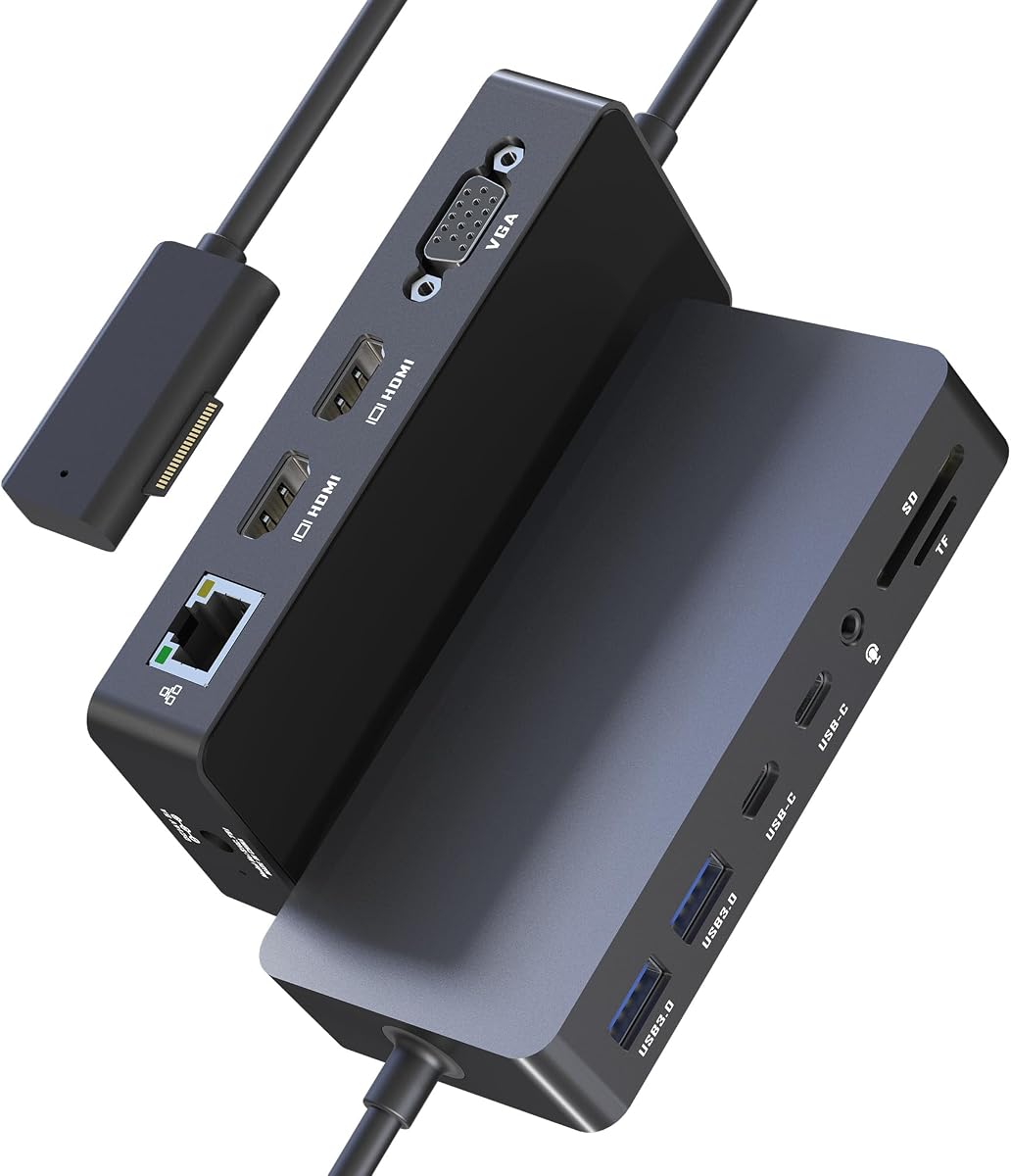
This 12-in-1 docking station is designed for users who need extensive connectivity and triple monitor capabilities on a budget. With a rating of 4.1 stars, it offers a wide array of ports including HDMI and VGA to support various display configurations.
We may earn a commission when you buy through this link, at no additional cost to you.
The dock allows you to connect two 4K HDMI monitors and one VGA display, boosting productivity by extending your workspace. It also includes USB-C and USB-A ports with high-speed data transfer, alongside SD and TF card slots for quick access to camera files.
While the triple display feature is powerful, it requires turning off the Surface screen when using three external monitors. Additionally, the product includes a separate power adapter which adds to the desk clutter compared to bus-powered alternatives.
This station is best suited for creators and students who need multiple screens for multitasking without spending a fortune. It offers broad compatibility across Surface Pro and Laptop models, making it a versatile choice for diverse workflows.
With HDMI and VGA outputs, you can boost your efficiency three times by extending your screen across multiple monitors.
USB 3.0 and USB-C ports allow you to transfer files from external drives in seconds without lag or delays.
We may earn a commission when you buy through this link, at no additional cost to you.
Rated at 4.8 stars, this 12-in-1 docking station is a top choice for mobile professionals and creative designers. It offers robust connectivity with dual 4K HDMI ports and a VGA port to support triple display setups for maximum productivity.
We may earn a commission when you buy through this link, at no additional cost to you.
Designed for creators, the dock supports high-speed data transfer via USB 3.0 and USB-C ports, alongside integrated SD and TF card slots. This allows for rapid offloading of 4K footage and RAW photos directly to your Surface without extra adapters.
The included 72W power supply ensures your device charges while running peripherals simultaneously, eliminating the need for a second charger. However, to use three external monitors, you must turn off the Surface screen, which may limit simultaneous viewing.
If you need a reliable hub for complex workflows like video editing or graphic design, this station provides excellent value. It pairs seamlessly with various Surface models and offers a minimalist design that reduces desk clutter effectively.
USB-C and USB 3.0 ports deliver 5Gbps speeds for rapid file transfers from external SSDs and cameras efficiently.
Works flawlessly with Surface Pro, Laptop, and Go models, ensuring you can use it across your entire device ecosystem.
We may earn a commission when you buy through this link, at no additional cost to you.
This 12-in-1 Surface Dock consolidates all your connectivity needs into a single versatile hub. With a rating of 4.2 stars, it supports dual 4K HDMI and VGA ports to enable triple-screen setups for enhanced multitasking capabilities.
We may earn a commission when you buy through this link, at no additional cost to you.
Equipped with 2 USB-A 3.0 ports and 2 USB-C ports, the dock delivers up to 5Gbps data transfer speeds. It also features SD and TF card slots supporting up to 2TB, allowing photographers and creators to access media files directly without extra gear.
The included 72W DC power port ensures your device stays charged while connected. A reliable 100Mbps Ethernet port guarantees a stable internet connection, which is perfect for video conferences and large file transfers without interruptions.
Ideal for users who want a plug-and-play solution without installing extra drivers, this dock simplifies your workspace. It works effortlessly with Surface Pro, Laptop, and Go models, making it a reliable choice for daily office use and creative projects.
Supports dual 4K HDMI and VGA outputs to allow you to extend or mirror your display across up to three monitors.
The reliable 100Mbps Ethernet port ensures low-latency connections perfect for video conferences and streaming.
We may earn a commission when you buy through this link, at no additional cost to you.
This next-gen Surface Dock 2 instantly turns your Surface into a powerful desktop PC with advanced port configurations. It boasts a solid rating of 4.5 stars and features four USB-C ports and two USB-A ports for extensive connectivity options.
We may earn a commission when you buy through this link, at no additional cost to you.
Supporting dual 4K displays at 60Hz, this dock delivers high-resolution visuals suitable for professional work. It includes a 199W power supply and a longer 80 cm Surface Connect cable, ensuring your device charges while offering extended reach for your setup.
The dock also includes a 3.5mm audio jack and Gigabit Ethernet for stable networking. However, its high price point may not fit every budget, and it is designed specifically for newer Surface models to ensure full compatibility.
For users who demand top-tier performance and premium build quality, this dock is a worthwhile investment. It ensures your peripherals are powered and connected efficiently, making it ideal for hybrid work environments and professional offices.
Enjoy dual 4K monitors at 60Hz for high-resolution, immersive visuals suitable for demanding professional work.
The 199W power supply ensures your device charges while running multiple peripherals simultaneously without slowdowns.
We may earn a commission when you buy through this link, at no additional cost to you.
This Microsoft Surface Dock 2 offers instant desktop transformation by converting your Surface into a full PC setup. With a high rating of 4.8 stars, it provides seamless connectivity and supports dual 4K monitors at 60Hz for immersive visuals.
We may earn a commission when you buy through this link, at no additional cost to you.
The dock includes a 199W power supply and a longer 80 cm Surface Connect cable for extended reach. Equipped with four USB-C ports and two USB-A ports, it ensures you have plenty of options for peripherals and external drives.
While it supports a wide range of devices including Surface Pro and Studio, the premium price point is higher than standard hubs. Proper cable management is also required to keep the desk tidy with the external power supply.
Ideal for users who need a robust connection for multiple screens and devices, this dock is highly reliable. It ensures high-resolution video and fast data transfer, making it perfect for hybrid work and classroom presentations.
Quickly convert your Surface into a desktop PC with next-gen ports on the Surface Dock 2 for a seamless setup.
Equipped with four USB-C and two USB-A ports to ensure you have plenty of options for your peripherals.
We may earn a commission when you buy through this link, at no additional cost to you.
This 12-in-1 docking station transforms your device into a desktop powerhouse with triple display capabilities. It rates at 4.3 stars and features dual 4K HDMI ports and a VGA port to support up to three external monitors for maximum productivity.
We may earn a commission when you buy through this link, at no additional cost to you.
The dock includes 1000Mbps Gigabit Ethernet and 100W DC charging to ensure your device stays charged and connected. USB 3.0 and USB-C ports provide high-speed data transfer, while integrated SD and TF card slots allow for rapid media offloading.
While it offers extensive connectivity, you must connect the dedicated power adapter to ensure your laptop charges while running peripherals. Additionally, users should check for driver compatibility with specific Surface models to avoid potential setup issues.
If you need a high-performance hub for creative professionals or traders, this station is an excellent choice. It bridges the gap between a tablet and a full desktop setup, ensuring you have the screen real estate needed for complex workflows.
With dual 4K HDMI and VGA outputs, you can extend your screen across three monitors for 300% multitasking efficiency.
The 100W DC charging adapter ensures your laptop stays fast-charged while providing rock-solid power to all devices.
We may earn a commission when you buy through this link, at no additional cost to you.
This renewed Microsoft Surface Dock 2 offers high-efficiency expansion for your Surface devices at a competitive price. It boasts a strong rating of 4.7 stars and includes essential ports such as USB-C and USB-A along with Gigabit Ethernet.
We may earn a commission when you buy through this link, at no additional cost to you.
The bundle includes the dock, original 199W power supply, and a USB-C cable for instant setup. It supports dual 4K displays at 60Hz via Surface Connect and delivers high-speed data transfer through its USB-C ports for a seamless workflow.
While it is a renewed product, it has been rigorously tested for durability in various workspaces. However, the warranty is limited to one year and may not offer the same protection as buying new, which could affect long-term peace of mind.
For users looking for a reliable premium hub without the high cost of new gear, this dock is a great option. It ensures your peripherals are powered and connected efficiently, making it suitable for hybrid work environments and home offices.
The dock supports dual 4K display output and 10Gbps data transfer through a single cable for seamless setup.
Rigorously tested for durability in various workspaces, it features integrated thermal management for consistent performance.
We may earn a commission when you buy through this link, at no additional cost to you.
This Surface Dock offers a minimalist design and fast transmission capabilities for your Surface Pro and Laptop devices. With a rating of 4.2 stars, it uses Surface connection technology to keep your desktop tidy while transferring video and audio efficiently.
We may earn a commission when you buy through this link, at no additional cost to you.
The dock includes two Mini DP ports to connect external monitors and four USB 3.0 ports for various peripherals. It also features a Gigabit network card port and a 3.5 audio jack for connecting audio equipment, ensuring comprehensive connectivity for daily use.
While it provides a 90W power supply for stable compatibility, newer models may require higher wattage. Additionally, the use of Mini DP for video means you might need adapters for standard HDMI displays which adds extra cost to your setup.
If you prefer a classic and reliable connection for your existing monitors and peripherals, this dock is a solid choice. It is compatible with a wide range of Surface devices and ensures your daily workflow remains stable and productive.
Uses Surface connection technology to keep your desktop tidy while transferring video audio and data through one cable.
Equipped with 4 USB 3.0 ports and Gigabit Ethernet to ensure you have plenty of options for your daily needs.
We may earn a commission when you buy through this link, at no additional cost to you.
Selecting the right docking station involves evaluating your specific connectivity needs and device compatibility. Below are key factors to consider when shopping for a hub.
The number and type of ports determine what peripherals you can connect simultaneously. Look for hubs that offer a mix of USB-A USB-C HDMI and Ethernet ports based on your needs.
Ensure the dock has enough ports to support your monitors and external drives without needing additional adapters.
Check if the dock supports the resolution and number of monitors you plan to use. Many docks offer dual 4K support while some allow for triple setups using HDMI and VGA.
Verify that the video outputs match your Surface model capabilities to avoid compatibility issues or reduced performance.
A good dock should provide enough power to charge your laptop while running connected devices. Hubs with built-in power adapters offer more stability than bus-powered ones.
Look for wattage ratings like 72W or higher to ensure your Surface stays powered during intense work sessions.
Decide between Thunderbolt 4 or Surface Connect options based on speed and compatibility requirements. Thunderbolt offers higher speeds while Surface Connect ensures seamless integration.
Higher speed connections reduce latency for data transfers and video output which is crucial for professional workflows.
Ensure the dock supports your specific Surface Pro or Laptop model generation. Some hubs work across all models while others are optimized for newer devices.
Always check the manufacturer compatibility list to avoid purchase issues or driver conflicts with your hardware.
Invest in docks with durable materials and reliable internal components for long-term use. High-quality construction prevents overheating and ensures stable performance under heavy loads.
Look for eco-friendly designs or robust metal casings that protect against wear and tear over time.
An Ethernet port is essential for stable and fast internet connections. Docks with Gigabit or 2.5G Ethernet ensure smooth video calls and large downloads.
Choose a dock with a reliable network port to avoid Wi-Fi interruptions during critical work tasks.
Consider hubs with extra features like SD card readers or audio jacks for versatile use. These add-ons enhance workflow efficiency by removing the need for separate accessories.
Features like tactile port indicators or easy plug-and-play setups also contribute to a better user experience.
Begin by connecting the power adapter to the dock before plugging it into your Surface device to ensure stable power delivery. Most docks require an external power source to function correctly and charge your laptop.
Plug the HDMI or DisplayPort cables into the dock first and connect the monitors. Then use the Surface Connect or USB-C cable to link the dock to your device for video and data transfer.
Keep the dock in a well-ventilated area to prevent overheating during extended use. Periodically check all connections for dust and ensure cables are not bent sharply to maintain long-term performance.
The Microsoft Surface Thunderbolt 4 Docking Station is highly recommended for the Surface Pro 11 due to its Thunderbolt 4 support. It ensures fast data transfer and high-resolution video output with minimal latency.
Yes, certain models like the 12-in-1 hubs support triple displays using dual HDMI and a VGA port. Note that you may need to turn off the Surface screen to utilize three external displays.
Most docks require an external power adapter to provide sufficient wattage for charging your laptop. Bus-powered hubs might charge slower or fail to power all connected peripherals simultaneously.
Yes, many docks in this guide support Surface Laptop models alongside Surface Pro and Go devices. Always check the specific compatibility list provided by the manufacturer before purchasing.
Thunderbolt 4 offers higher data speeds and more flexibility for peripherals while Surface Connect is optimized for Microsoft devices. Both provide excellent connectivity depending on your specific ecosystem needs.
Most docks work via plug-and-play without drivers. If you encounter issues, update your Surface firmware via the Microsoft Store or check the manufacturer support page for specific updates.
We have reviewed ten top-rated docking stations that cater to various budgets and workflow requirements. From premium Thunderbolt hubs to budget-friendly options, there is a solution for every Surface Pro user.
Prioritize factors like port variety, display support, and charging capability to find the perfect fit. Ensure the dock aligns with your specific Surface model to avoid compatibility issues.
Remember to check current prices and availability before making your purchase. We hope this guide helps you streamline your setup and boost your productivity with the right dock.