
Digital Calendar 10.1" Touchscreen
4.4Editor score
10.1 inch display
No subscription fees
Meal planning tools
Modern families need reliable ways to stay organized without relying on scattered papers. A digital touchscreen organizer combines calendars, chores, and photos into one smart hub for your home.
We evaluated ten leading models based on screen quality, syncing capabilities, and ease of use. Our list covers everything from budget-friendly options to premium wall-mounted displays.
Each pick highlights unique strengths and potential limitations to help you decide. Note that product features and availability can change, so check current details before purchasing.
4.4Editor score

4.4Editor score

4.6Editor score
As an Amazon Associate we earn from qualifying purchases.
The following table provides a side-by-side comparison of all ten digital touchscreen organizers featured in this guide to help you quickly identify the best fit for your needs.



This 15.6-inch digital calendar stands out as a top choice for families seeking a comprehensive command center. It offers a seamless blend of scheduling tools and entertainment features without requiring monthly payments.
We may earn a commission when you buy through this link, at no additional cost to you.
The real-time sync capabilities ensure that all family members stay updated on calendars from Google, Outlook, and iCloud. The built-in chore chart gamifies daily tasks for children, promoting responsibility and good habits.
While the device offers extensive features, users should note that batteries are not included and flexible mounting requires some hardware setup. These minor considerations are outweighed by the robust functionality provided.
Ideal for busy households, this organizer helps parents coordinate schedules and keeps grandparents connected. Its dual role as a photo frame adds emotional value, making it a practical and thoughtful gift.
Real-time syncing across multiple platforms ensures everyone sees the same schedule instantly.
The interactive chore chart allows parents to assign tasks and children to earn reward points.
We may earn a commission when you buy through this link, at no additional cost to you.
The Skylight Calendar is designed for families who prioritize a sleek aesthetic and robust features. Its HD smart display integrates smoothly into any home layout, serving as a central hub for daily organization.
We may earn a commission when you buy through this link, at no additional cost to you.
Users appreciate the ease of syncing with popular calendars like Google and Outlook, ensuring no events are missed. The meal planning feature reduces daily stress by providing visual weekly menus right on the kitchen counter.
While the device is powerful, some advanced features like Magic Import require a subscription plan. Additionally, the higher price point may be a consideration for budget-conscious shoppers looking for basic functionality.
Despite these factors, the customizable design and ability to stay connected anywhere via app make it a strong premium choice. It effectively balances utility with a beautiful display for family memories.
Displays weekly meal plans to reduce daily questions about dinner and streamline grocery shopping.
Features iconic characters to encourage teamwork through animations and avatars for children.
We may earn a commission when you buy through this link, at no additional cost to you.
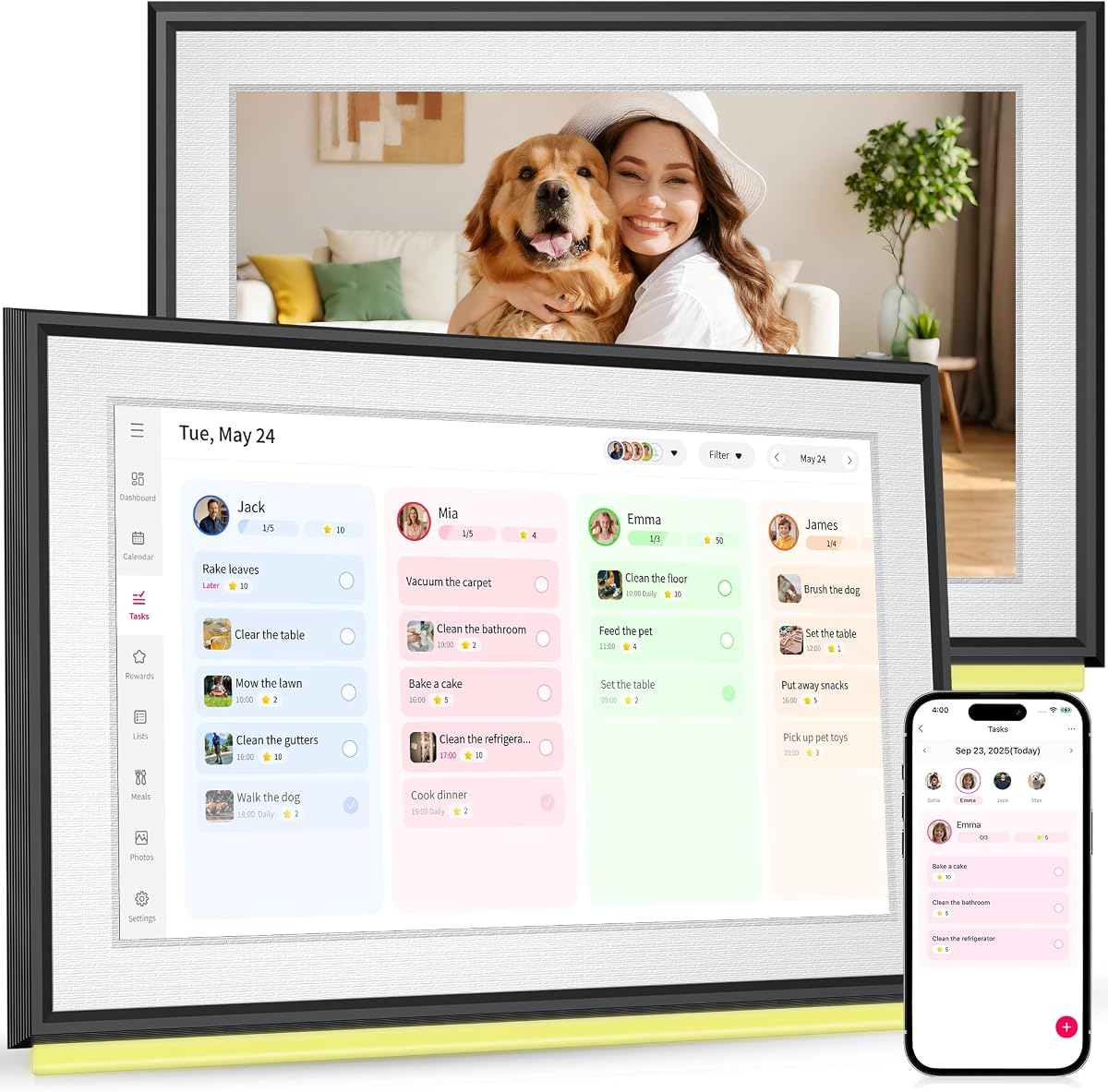
This 10.1-inch digital calendar offers an impressive array of features at a budget-friendly price. It eliminates hidden costs by unlocking all tools including meal plans and chore lists without subscription fees.
We may earn a commission when you buy through this link, at no additional cost to you.
The interactive chore list helps children build responsibility through a rewarding system that tracks progress. Meanwhile, the smart weekly meal manager simplifies dinner planning and automatically generates grocery lists to save time.
The screen size is smaller than premium options, which might limit visibility from a distance. However, the device compensates with essential tools and a straightforward interface that is easy for any family member to use.
Perfect for those seeking value, this organizer is a thoughtful gift for busy moms or grandmas. It consolidates schedules and photos into one device, bringing calm and organization to daily home life.
All planning features are fully unlocked with zero hidden fees or subscription requirements.
The device automatically saves energy and wakes up when you are ready to check plans.
We may earn a commission when you buy through this link, at no additional cost to you.
This 10.1-inch model delivers sharp 1080P resolution for clear viewing of schedules and photos. It serves as a comprehensive family organizer with essential tools for managing meals, tasks, and events.
We may earn a commission when you buy through this link, at no additional cost to you.
Users benefit from AI-powered imports that simplify adding tasks or schedules efficiently. The ability to mount the device on a wall or place it on a desk provides flexibility for different home setups.
While the screen is compact, the HD resolution ensures text and images remain readable. However, those seeking highly customizable widgets might find the options more limited compared to Android-based devices.
Ideal for families wanting a straightforward command center, this device keeps everyone on the same page. It transforms idle time into a photo slideshow, adding a personal touch to your kitchen or office.
AI-powered imports help you manage household running smoothly by reducing manual entry time.
Designed for versatile placement on walls or desks to fit your home setup perfectly.
We may earn a commission when you buy through this link, at no additional cost to you.
This 15.6-inch planner boasts a perfect user rating for its intuitive design and robust features. It functions as a smart chore chart and home hub, eliminating messy paper planners with color-coded tasks.
We may earn a commission when you buy through this link, at no additional cost to you.
The ability to assign responsibilities with color coding makes it easy for everyone to track activities. Built-in weather information adds practical value, ensuring you are prepared for the day alongside your schedule.
While the interface is simple, wall mounting requires specific hardware that may need additional preparation. The companion app is functional but may lack advanced features found in more complex systems.
Ideal for busy families and professionals, this organizer helps stay on track every day. It combines a calendar and photo frame, adding warmth to your home while keeping important details organized and visible.
Easily create tasks and assign responsibilities with color coding to track everyone's activities.
Stay prepared with up-to-date weather information displayed right alongside your daily schedule.
We may earn a commission when you buy through this link, at no additional cost to you.
This 10.1-inch planner offers a sleek solution for keeping family trivial matters streamlined. It combines schedule tracking with recipe storage and reward management in one cohesive screen for home use.
We may earn a commission when you buy through this link, at no additional cost to you.
Remote photo sharing allows distant family members to view daily growth photos instantly, easing long-distance bonds. The color-coded chore system uses scientific parenting tools to cultivate independence in children effectively.
The viewing area is compact compared to larger models, which might require sitting closer to read details. However, the vertical placement support offers flexibility for different home scenarios like kitchens or bedrooms.
Ideal for families seeking connection, this device helps everyone enjoy a warm and orderly home life. It effectively bonds relationships by enabling shared viewing of memories and plans from anywhere.
Smart digital calendar supports effortless photo sharing anytime and anywhere for family bonding.
Professional color classification system helps distinguish plans and chores for different family members.
We may earn a commission when you buy through this link, at no additional cost to you.
This 21.5-inch calendar transforms your wall into a living family display with massive viewing real. Its dual mode allows switching between simple scheduling and a fully customizable Android dashboard.
We may earn a commission when you buy through this link, at no additional cost to you.
Users can download additional apps from Google Play to expand functionality, creating a connected home control. The built-in Google Gemini assistant manages tasks and lights directly from the calendar interface.
The high price point reflects its advanced capabilities, making it a significant investment for smart homes. Additionally, the Android features might be complex for seniors or those preferring simple tools.
Ideal for tech-savvy households, this device offers unparalleled flexibility and visual impact. It turns your wall into a connected command center that fits daily needs and routines perfectly.
Switch easily to Android Mode for a fully customizable dashboard with apps and widgets.
Use the built-in Google Gemini voice assistant to check schedules and control smart home.
We may earn a commission when you buy through this link, at no additional cost to you.
This 15.6-inch model balances large screen benefits with versatile placement options including a stand. It provides a dual mode experience that simplifies scheduling while allowing deep customization via Android apps.
We may earn a commission when you buy through this link, at no additional cost to you.
Smart home widgets allow direct control of lights and cameras from the calendar interface. The anti-glare HD touchscreen ensures comfortable viewing even in bright rooms throughout the day.
While a stand is included, wall mounting might require separate hardware for permanent installation. The cost is higher than basic models, reflecting the advanced app ecosystem and voice integration.
Ideal for families wanting a hub, this device keeps daily life organized and connected. It supports flexible layouts and offers a personalized display that fits any home office or kitchen.
Switch easily between Calendar Mode for simple scheduling and Android Mode for customization.
Comes with a stand allowing flexible placement on desks or countertops without drilling.
We may earn a commission when you buy through this link, at no additional cost to you.
This 10.1-inch calendar offers solid organization tools for families needing a central schedule display. It allows color-coding tasks and planning weekly meals to reduce daily chaos effectively.
We may earn a commission when you buy through this link, at no additional cost to you.
The updated software version introduces enhanced features like specific task management and rewards for chores. Users can share photos directly via the free app, turning the screen into a dynamic memory display.
The device is designed for desktop placement only, so wall mounting is not possible for this model. Initial setup requires checking for system updates to ensure all new features are available.
Ideal for those seeking a command center on a counter, this display simplifies family life. It transforms into a photo frame when idle, showcasing cherished moments and keeping everyone connected.
Version R-1.5.0 includes new features like Tasks, Rewards, Meals, and Photos.
Share photos and videos directly from your phone using the free mobile app.
We may earn a commission when you buy through this link, at no additional cost to you.
This 21.5-inch calendar provides a massive IPS touchscreen for vibrant colors and wide viewing angles. It serves as a command center combining scheduling, meal planning, and digital photo display in one unit.
We may earn a commission when you buy through this link, at no additional cost to you.
Custom themes and font sizes allow users to tailor the interface to their preferences, ensuring readability for all ages. The free app syncs schedules instantly, keeping everyone updated without hidden monthly fees.
While basic features remain free, premium customization options might require additional steps or purchases. The interface is designed to be easy for grandparents to use, making it accessible for multi-generational homes.
Ideal for larger homes needing visibility, this device keeps schedules visible and organized. It includes everything for easy mounting, offering a practical solution for busy households and home offices.
Customizable fonts and themes ensure everyone can use the device with ease.
Download the free app to sync schedules seamlessly with Google Calendar and iCloud.
We may earn a commission when you buy through this link, at no additional cost to you.
Choosing the right digital organizer involves considering screen size, software features, and placement options. This guide breaks down the key factors to help you find a model that fits your family needs.
Screen size determines visibility from across the room, with 10-inch models suiting desks and 15-plus inch models better for walls. Higher resolution ensures text and photos appear sharp, making it easier to read details quickly.
Choose a screen that matches the viewing distance in your home to ensure clarity.
Syncing with popular platforms like Google, iCloud, or Outlook ensures all family members see the same schedule. Real-time updates prevent missed appointments and reduce the need for manual data entry.
Look for models that support multiple platforms to keep everyone on the same page.
Built-in chore charts help children take responsibility for daily tasks. Interactive rewards and color coding make these tools engaging for kids and easy for parents to manage.
Prioritize models with gamified features to encourage positive habits among children.
When not in use, organizers should serve as digital frames to showcase family memories. Storage capacity and upload methods, such as app syncing, affect how easily you can display photos.
Ensure the device supports easy photo uploads to keep your memories visible and active.
Consider whether you want to mount the device on a wall or place it on a desk. Models with included stands or flexible mounting hardware offer more versatility for different home layouts.
Select a model that supports your preferred placement method to maximize convenience.
Some devices require monthly subscriptions for full features, while others offer everything upfront. Checking for hidden fees ensures you get value without recurring costs affecting your budget.
Choose devices with no subscription fees for long-term cost savings.
Simple setup processes help you start organizing quickly without technical difficulties. Intuitive interfaces ensure that all family members, including seniors, can interact with the device easily.
Look for plug-and-play models to minimize setup time and frustration.
Advanced models may offer voice assistants or smart home controls to enhance functionality. Integration allows you to control lights or check weather directly from the organizer.
Consider smart features if you want a connected home experience.
Start by connecting your device to Wi-Fi and syncing your existing calendars. This ensures all upcoming appointments are visible right away and keeps your schedule up to date.
Upload family photos via the companion app to personalize the photo frame mode. This feature transforms the device into a display of memories when you are not planning.
Keep the screen clean with a soft cloth and avoid harsh chemicals. Regularly check for software updates to ensure your device runs smoothly and securely.
Most models in this guide do not require subscriptions for basic features. However, some premium options may offer advanced customization or extra storage for an additional fee. Always check the product details to confirm.
Many organizers come with wall mounting hardware or are designed specifically for wall installation. Desktop models are better suited for placing on counters. Check the product specs for mounting support.
You can upload photos via the manufacturer's companion app. Most apps allow you to select images from your phone to sync directly to the device for display.
Many models feature large screens and customizable fonts that make them senior-friendly. Simple interfaces and voice assistants also help older adults use the device without confusion.
Yes, most digital organizers support syncing with Google, iCloud, and Outlook simultaneously. This ensures all family schedules are consolidated into one view.
The device will still show locally stored data but may not update new events. Reconnecting to Wi-Fi automatically syncs changes back to your calendar.
Yes, when not in use, they slide into photo frame mode to display images. This dual functionality makes them versatile for both organization and decor.
Most products listed offer full features without hidden fees. Some brands may offer optional premium plans for extra storage or special themes.
Our top picks range from budget-friendly 10-inch models to premium 21-inch displays with Android support. Each option offers unique strengths in scheduling, chore management, and photo display.
Prioritize screen size and sync capabilities based on your home layout. If you need a wall command center, choose a larger model with mounting options.
Check current prices and availability to ensure you get the best value. These organizers bring clarity to busy households and make family life more enjoyable.