
Fosmon Fast Charging Station
4.5Editor score
5280mWh rechargeable batteries included
SGS certified safety protection
Smart LED charging indicators
Discover the top 10 Controller Charging Station for Xbox models compared for reliability, battery life, and speed in this comprehensive October 2026 buying
Gaming sessions often get interrupted by dead controllers, making a reliable charging solution essential for any serious Xbox player looking to maintain uninterrupted playtime.
We compared ten top-rated charging stations based on battery capacity, charging speed, compatibility, build quality, and safety features to help you find the perfect dock.
Each pick highlights key strengths and trade-offs so you can choose confidently, though note that availability and deals change frequently so always check current listings.
4.5Editor score

4.6Editor score

4.4Editor score
The following table offers a side by side look at key specifications across all ten models to help you quickly identify which dock fits your specific gaming needs.

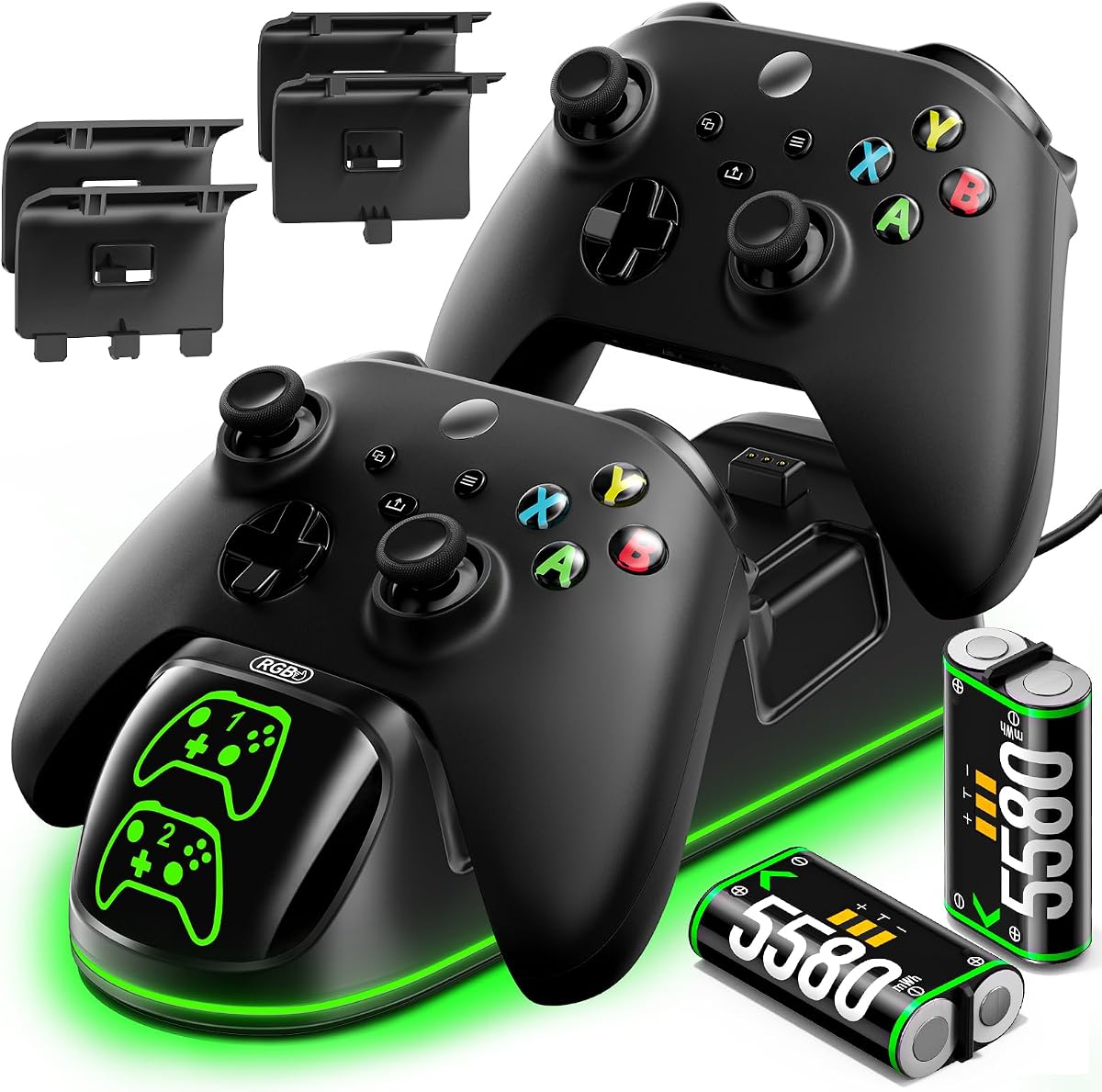


This upgraded station stands out with massive 6200mWh batteries and smart LED indicators, earning a 4.6 rating for reliability and extended gameplay support.
We may earn a commission when you buy through this link, at no additional cost to you.
The unique X shaped LED lights clearly show charging status without glare, while the 2000 plus cycle lifespan saves money compared to disposable AA batteries.
Some users note the batteries sit on the dock bottom which can be slightly tricky during installation, but the safety certification mitigates most concerns.
Ideal for families or avid gamers who need two fully charged controllers ready at all times without frequent battery swaps or interruptions.
The 6200mWh capacity delivers up to 25 hours of play on a single charge ensuring you never run out mid match.
Built in multi protection safeguards against overheating and overcharging allowing safe overnight charging without worry.
We may earn a commission when you buy through this link, at no additional cost to you.
Fosmon delivers reliable performance with SGS certified batteries and a strong warranty, rated 4.5 by users who value safety and long term support.
We may earn a commission when you buy through this link, at no additional cost to you.
The 5280mWh NiMH batteries offer substantial playtime while the intelligent board prevents overcharging, making it a secure choice for daily use.
Its main limitation is incompatibility with the Xbox Elite 2 controller which might disappoint owners of that premium model seeking a dock solution.
Perfect for budget conscious shoppers who want certified safety and decent capacity without spending premium prices on branded accessories.
SGS certification ensures the batteries and charging board meet rigorous international safety standards for peace of mind.
A limited lifetime warranty provides extended support that few competitors offer at this price point.
We may earn a commission when you buy through this link, at no additional cost to you.
Razer combines universal support with a sleek magnetic stand and one handed navigation, rated 4.4 for premium build quality and seamless integration.
We may earn a commission when you buy through this link, at no additional cost to you.
The magnetic system ensures secure docking without cable hassle while the ergonomic design lets you navigate the dashboard even while charging.
Its higher price reflects the premium materials and features which may not justify cost for casual gamers seeking basic charging functionality.
Best suited for enthusiasts who value design cohesion and want a versatile stand that works across generations of Xbox hardware.
Works with almost all Xbox controllers including Series X S and One models excluding Elite 2.
The ergonomic engineering lets you scroll menus and check stats without removing the controller from the dock.
We may earn a commission when you buy through this link, at no additional cost to you.
As an officially licensed accessory this solo stand offers clean design and trusted quality with a 4.6 rating among users prioritizing authenticity.
We may earn a commission when you buy through this link, at no additional cost to you.
It includes a rechargeable battery and USB cable which simplifies setup while the two year warranty ensures reliability over time.
The main trade off is single controller support and lower 1100mAh capacity compared to dual dock options available in this guide.
Ideal for solo gamers or those needing a simple backup charger that matches the official Xbox aesthetic and quality standards.
Microsoft licensing guarantees build standards and fit that align with official Xbox accessories.
We may earn a commission when you buy through this link, at no additional cost to you.
OlVO earns a perfect 5.0 score with fast charging and high capacity batteries making it a top choice for efficiency and reliability.
We may earn a commission when you buy through this link, at no additional cost to you.
The 2.5 hour charge cycle is among the fastest in this lineup ensuring controllers are ready quickly after a gaming session.
Users should note it does not support third party controllers which limits flexibility for those using non Microsoft branded hardware.
Recommended for Xbox One or Series owners who prioritize fast recharge times and want a complete kit with extra covers.
Quick 2.5 hour charge minimizes downtime and keeps your gaming momentum going strong.
We may earn a commission when you buy through this link, at no additional cost to you.
8BitDo brings a premium magnetic dock with official licensing and storage for cables rated 4.6 by users who value clean setup aesthetics.
We may earn a commission when you buy through this link, at no additional cost to you.
The magnetic contacts ensure alignment and the sleek design complements Xbox hardware nicely offering a polished look for your desk.
Note that the battery pack is included but the storage focus may mean fewer accessories compared to all in one battery kits.
Great for organized gamers who want a tidy desk and a reliable magnetic charging solution that blends with their setup.
Magnetic charging ensures consistent contact for reliable charging every time you dock your controller.
We may earn a commission when you buy through this link, at no additional cost to you.
This station stands out with customizable RGB lighting and a 5520mWh capacity, rated 4.6 for those who want style alongside strong performance.
We may earn a commission when you buy through this link, at no additional cost to you.
The USB C cable supports fast charging while the LED toggle lets you adjust the ambiance to match your gaming environment preferences.
The robot helmet aesthetic might not appeal to everyone seeking minimalist designs though it adds a unique flair to the setup.
Best for gamers who enjoy visual customization and want a bold looking dock that matches their gaming room theme.
RGB modes add flair to your setup letting you personalize the dock lights to suit your room.
We may earn a commission when you buy through this link, at no additional cost to you.
Nyko offers a simple drop in dock with an extra USB port, rated 4.2 by users seeking basic functionality and minimal extra cost.
We may earn a commission when you buy through this link, at no additional cost to you.
The green LEDs clearly indicate charge status while the included batteries provide decent 15 hour playtime for regular casual sessions.
Lower capacity and slightly lower user ratings reflect its basic nature compared to higher end models with advanced features.
Suitable for those needing an affordable dual slot solution with an extra port for phones or other devices near the console.
The extra USB port lets you charge other gadgets without using up console ports.
We may earn a commission when you buy through this link, at no additional cost to you.
Controller Gear brings a color matched stand with magnetic charging, rated 4.6 for gamers who want their dock to match their controller precisely.
We may earn a commission when you buy through this link, at no additional cost to you.
The ergonomic design supports one hand navigation while the magnetic system ensures reliable connection every time you dock.
Its single slot design and limited color availability mean it fits specific setups more than general purpose needs for many users.
Ideal for Pulse Red controller owners who want a seamless look and reliable single slot charging near their console.
The exact match color and material create a cohesive look with your Xbox controller.
We may earn a commission when you buy through this link, at no additional cost to you.
XB Gaming combines high capacity with extensive RGB options, rated 4.5 for users who want long battery life and visual customization features.
We may earn a commission when you buy through this link, at no additional cost to you.
The 3000 cycle durability outlasts many competitors while the nine lighting modes let you personalize your setup lighting experience.
Some may find the RGB distracting in dark rooms though the on off switch helps manage visibility when desired.
Best for gamers who want maximum playtime and vibrant lighting to match their gaming vibe without breaking the budget.
The 6200mWh capacity ensures you can game longer without interruptions or frequent charging stops.
We may earn a commission when you buy through this link, at no additional cost to you.
Selecting the right charging station depends on your controller count battery needs and budget so consider these key factors before buying.
Battery capacity measured in milliamp hours determines how long your controller lasts per charge with higher numbers like 6200mWh offering extended playtime.
Look for at least 5000mWh if you play long sessions to avoid frequent recharging interruptions.
Faster charging means less downtime so check the full charge time which can range from two and a half hours to over five hours.
Prioritize models that fully charge batteries in under four hours for quicker turnaround between gaming sessions.
Ensure the dock supports your specific Xbox model since some exclude Elite 2 or third party controllers limiting their usability.
Verify the product description lists compatibility with your controller model before purchasing to avoid fit issues.
Dual slots let you charge two controllers at once which is ideal for multiplayer households while single slots suit solo players.
Choose dual slots if you have friends or family gaming regularly to keep backup controllers always ready.
Safety certifications and protection circuits prevent overcharging overheating and short circuits which extend battery life and protect hardware.
Look for SGS certification or explicit safety protection notes to ensure reliable and safe charging performance.
Sturdy materials and thoughtful designs like magnetic contacts or cable storage improve durability and desk organization over time.
Pick a build that matches your setup aesthetics and offers secure docking to prevent accidental controller drops.
LED indicators show charging status clearly so you know when batteries are full without needing to check manually.
Choose docks with intuitive LEDs like red for charging and green for full to track status easily.
A solid warranty and responsive support help resolve issues quickly and protect your investment against defects.
Prefer brands offering at least a one year warranty with easy access to customer service for peace of mind.
Place your controller on the dock aligning the contacts until the LED indicator turns on confirming charging has started.
Leave the controller on the dock until the indicator shows fully charged or green to maintain battery health and performance.
Keep the station in a cool dry place and avoid exposing batteries to direct sunlight or moisture to extend lifespan.
Most stations support Xbox One and Series models but check for Elite 2 compatibility before buying since many exclude this controller type.
Charge times vary but most models fully charge in under four hours with high speed options reaching full in around two and a half hours.
Yes most docks feature auto cut off protection so it is safe to leave controllers on the dock once fully charged.
Many bundles include rechargeable batteries but always check product listings as some docks require separate battery purchases.
Most models have dim LEDs or toggle switches so you can turn them off if they disturb your sleep while charging.
Most are designed for official Xbox controllers though some third party docks support generic Xbox style controllers with similar contact layouts.
High quality rechargeable batteries typically support 2000 to 3000 recharge cycles before noticeable capacity degradation occurs.
Modern docks include overheating protection that stops charging until the dock cools to safe temperatures preventing damage.
The Upgraded Charger Station Fosmon and Razer options lead our list for overall value safety and premium features.
Prioritize capacity and compatibility first then consider design and RGB features if visual appeal matters to your setup.
Always check current listings for availability and any new model updates before finalizing your purchase decision.