
Learning Resources Code & Go Robot Mouse
4.5Editor score
Screen-free coding basics
Built for young coders
Includes maze grids
This guide compares the top coding toys for kids in 2026 to help parents choose the best educational robot that teaches programming logic effectively.
Coding toys transform screen time into screen coding by introducing children to robotics and algorithmic thinking through hands-on play. These devices encourage creativity and problem-solving skills without relying solely on passive consumption of digital content.
We analyzed ten leading products based on educational value, build quality, and user feedback to create this definitive list. Each selection offers unique features ranging from screen-free coding cards to app-enabled programming environments suitable for various age groups.
Every pick below highlights specific strengths like modular design or voice interaction to match different learning styles. Please note that availability and costs may shift quickly so verify current details before purchasing any item listed here.
4.5Editor score

4.1Editor score

4.6Editor score
This side-by-side comparison highlights key specifications and features across all ten selected coding toys to help you find the perfect match for your child's age and interests.




This robotic reptile stands out as a top choice for introducing kids to coding through tactile interaction. It combines construction play with logic puzzles without needing any screens or tablets to operate effectively.
We may earn a commission when you buy through this link, at no additional cost to you.
The color sensor allows children to program movements using physical cards while the infrared sensor detects gestures. Three modes offer variety from coding sequences to wild camouflage behaviors that keep engagement high over time.
Assembly takes time and might need adult supervision for younger builders which is a minor drawback for quick play sessions. The detailed manual is thorough but some parts are small and could be misplaced during storage or transport.
Parents seeking a screen-free way to teach engineering concepts should consider this kit for children eight years old and up. It offers a unique blend of biology and technology that inspires curiosity about how robots mimic nature.
Using physical action cards allows kids to learn sequencing without staring at a screen or device constantly.
The guide teaches how reptiles move and adapt providing real-world context for robotic design and function.
We may earn a commission when you buy through this link, at no additional cost to you.
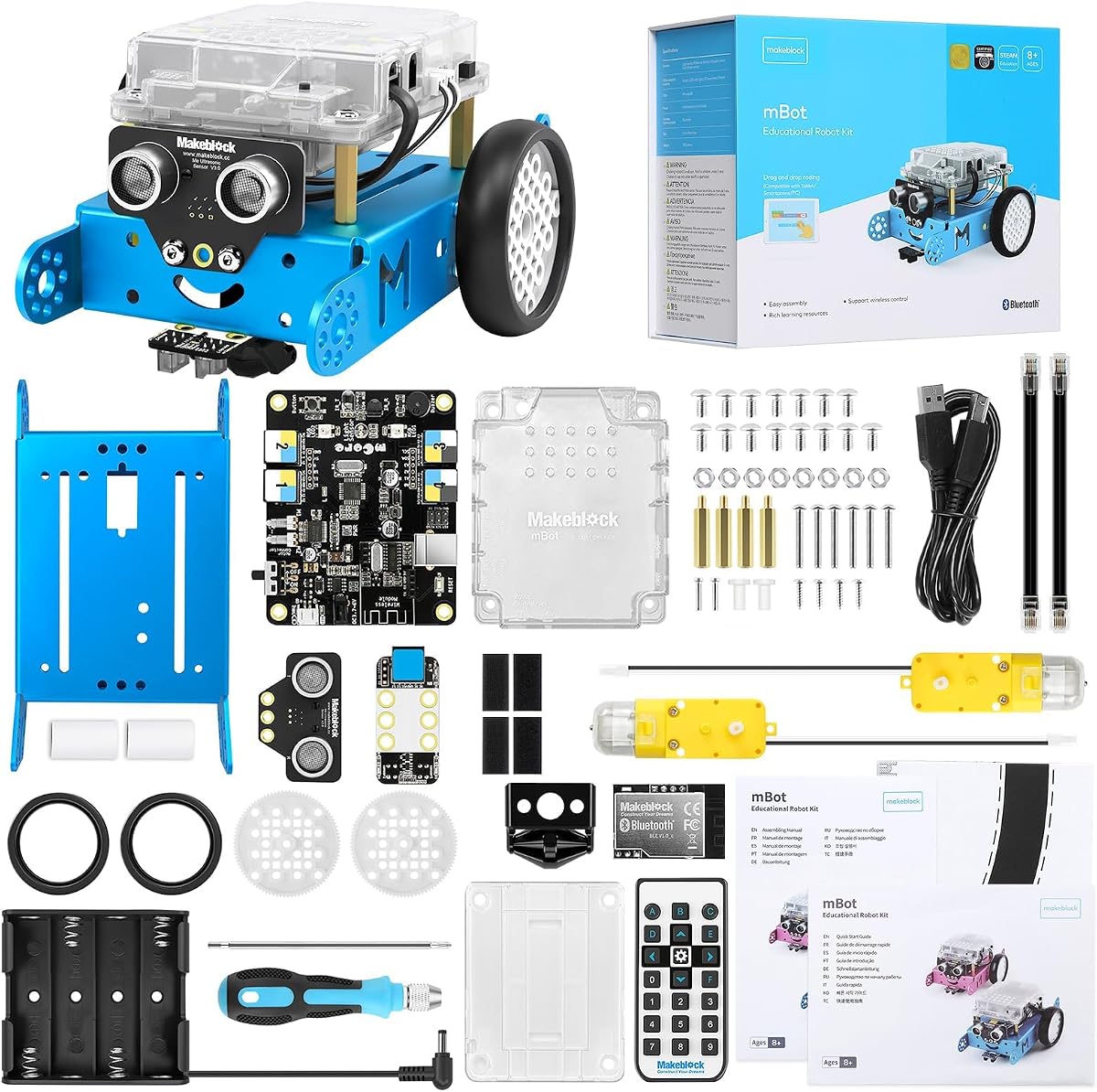
The mBot serves as an excellent entry point for kids ready to move beyond basic button pushing into real logic. It bridges the gap between simple toys and complex robotics kits with flexible software options.
We may earn a commission when you buy through this link, at no additional cost to you.
Building the robot takes minutes but the real value comes from coding it using Scratch or Arduino environments. The metal chassis ensures durability while the open-source nature allows endless expansion with extra modules.
You need to buy batteries separately which can be frustrating when you want immediate play out of the box. The remote controller also requires a specific coin battery that might not be on hand initially.
For families wanting a toy that evolves with their child's coding journey this is a strong recommendation. It balances fun remote control features with serious STEM learning potential effectively.
Kids can start with visual blocks and later switch to text based coding as they become more skilled.
Compatibility with hundreds of modules means the robot can be upgraded for new projects continuously.
We may earn a commission when you buy through this link, at no additional cost to you.
This tiny robot packs significant fun into a package small enough to fit in a pocket or cup. It uses a phone to control but focuses on coding concepts through a dedicated educational interface.
We may earn a commission when you buy through this link, at no additional cost to you.
Kids can drive it using tilt or joystick controls before moving to drag and drop coding blocks. The included cones and pins help set up obstacle courses immediately without needing extra purchases to start.
The small size makes it easy to lose under furniture so supervision is key during active play sessions. Battery life offers about an hour which limits extended usage without recharging periodically.
If space is limited this robot offers a great way to learn coding without a large footprint on the floor. Its versatility in play modes keeps it interesting for both casual fun and structured learning.
Users can play arcade games by driving the ball making coding feel like a video game experience.
Using tilt controls helps kids understand motion physics in a direct and engaging way.
We may earn a commission when you buy through this link, at no additional cost to you.
This mouse set is designed specifically for very young children to grasp sequencing and logic without complex tools. It removes screens entirely so kids focus on physical commands and tangible results instantly.
We may earn a commission when you buy through this link, at no additional cost to you.
The maze grids allow for endless layouts that grow in difficulty as kids learn to solve problems step by step. Teachers find it useful for group activities because it is easy to set up and repeat reliably.
It relies on batteries which adds an ongoing cost but the educational value remains high for early learners. Advanced programmers might find it too simple eventually but it is a perfect starting point for toddlers.
Families looking for a low cost way to introduce coding to a four year old will find this ideal. It builds confidence through simple successes that lead to more complex thinking over time.
Simple arrow cards teach the concept of sequences which is foundational for all programming later on.
Pressing buttons on the mouse provides immediate feedback that reinforces cause and effect understanding clearly.
We may earn a commission when you buy through this link, at no additional cost to you.
This kit prioritizes mechanical engineering by letting kids build a robot that physically throws and kicks objects. The coding aspect is integrated simply so the focus remains on how machines move and work.
We may earn a commission when you buy through this link, at no additional cost to you.
Snap on buttons make programming accessible even for those who do not use complex software yet. The assembly process teaches patience and precision which are essential skills for any engineering discipline or career path.
The build time can be long which might test the patience of impatient children without guidance. It is best suited for dedicated times when a parent can help ensure proper assembly and safety.
For older kids interested in how things work this provides a unique blend of construction and programming. It shifts the focus from just coding to understanding the physical machine executing the code.
Building the robot from parts deepens understanding of structure and function better than pre-assembled toys.
The ability to throw or kick makes the learning process dynamic and physically engaging for kids.
We may earn a commission when you buy through this link, at no additional cost to you.
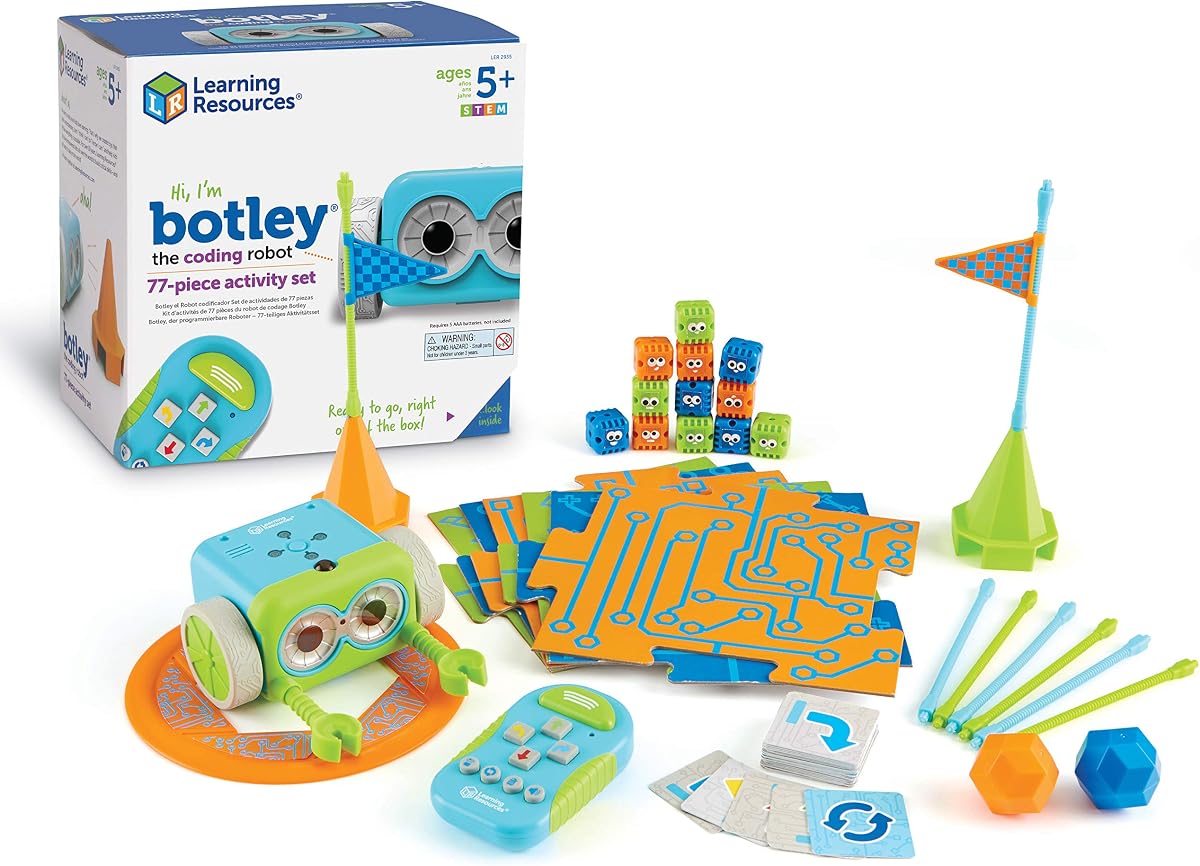
Botley is a robust choice for avoiding screens while still teaching complex coding logic like loops. It detects objects and can even hide features that kids discover through exploration and play over time.
We may earn a commission when you buy through this link, at no additional cost to you.
The detachable arms let kids build accessories that expand what the robot can do beyond simple movement. This encourages creativity in problem solving as they design their own challenges for the machine to solve.
Setup requires a screwdriver and batteries which adds a few steps before play begins. The remote programmer is separate from the robot so you need to manage two units during operation sessions.
If you want a toy that promotes critical thinking without any digital distractions this is a top pick. The object detection adds a layer of intelligence that feels almost magical to young children.
Teaching loops helps children understand repetition which is a core concept in all computer programs.
Detecting objects introduces basic sensor inputs that modern robots use for navigation tasks often.
We may earn a commission when you buy through this link, at no additional cost to you.
This kit stands out because it offers a massive library of lessons that grow with the child skills over years. It supports both screen-free coding with markers and advanced coding with a computer for flexibility.
We may earn a commission when you buy through this link, at no additional cost to you.
The robot follows lines drawn with specific colors making it fun to create art that moves on its own. The durable build means it can withstand active play and classroom environments without breaking easily.
The price is higher than some options but the long-term educational value justifies the investment for many. Markers are included but they can run out so you might need replacements for extended use.
For parents or teachers wanting a structured curriculum this provides a complete solution for learning STEM. It covers many styles so kids can choose how they want to learn at any time.
Drawing codes with markers makes the learning process creative and artistic as well as logical.
Five skill levels mean the toy remains relevant as the child learns more complex programming concepts.
We may earn a commission when you buy through this link, at no additional cost to you.
The upgraded version of Botley adds object sensing which allows for more interactive and dynamic play scenarios. It introduces secret codes and turns that make navigating mazes more challenging and exciting for kids.
We may earn a commission when you buy through this link, at no additional cost to you.
Lights and sounds add a multi-sensory layer that keeps kids engaged longer than simple moving toys. The stackable obstacles let families build custom environments that change every time play starts again.
Because it has more features the setup might be slightly more involved than the original version. You need to ensure batteries are ready and the path is clear for it to detect objects properly.
If you liked the original this update is definitely worth it for the added intelligence and fun. It pushes kids to solve harder problems which builds resilience and deeper coding skills.
Sensing objects allows for reactive play where the robot changes behavior based on what it sees.
Stackable pieces let parents and kids design unique courses that test new coding strategies regularly.
We may earn a commission when you buy through this link, at no additional cost to you.
Dash is a premium robot that is ready to play immediately without any assembly steps required. It responds to voice commands and can sing or dance making it feel like a true friend to kids.
We may earn a commission when you buy through this link, at no additional cost to you.
The range of apps allows for progression from simple blocks to more complex coding challenges. It is used in many schools globally which confirms its reliability and educational quality over time.
The price is higher than basic toys but you get a polished experience with a durable chassis. It does need a tablet for coding which means it is not screen-free like some other options.
For a fun and interactive experience that feels high-tech this robot is hard to beat. It makes learning programming feel like playing with a pet that understands what you say.
Responding to voice commands helps kids understand natural language processing concepts early on.
Unboxing and playing instantly keeps enthusiasm high for children who want immediate results.
We may earn a commission when you buy through this link, at no additional cost to you.
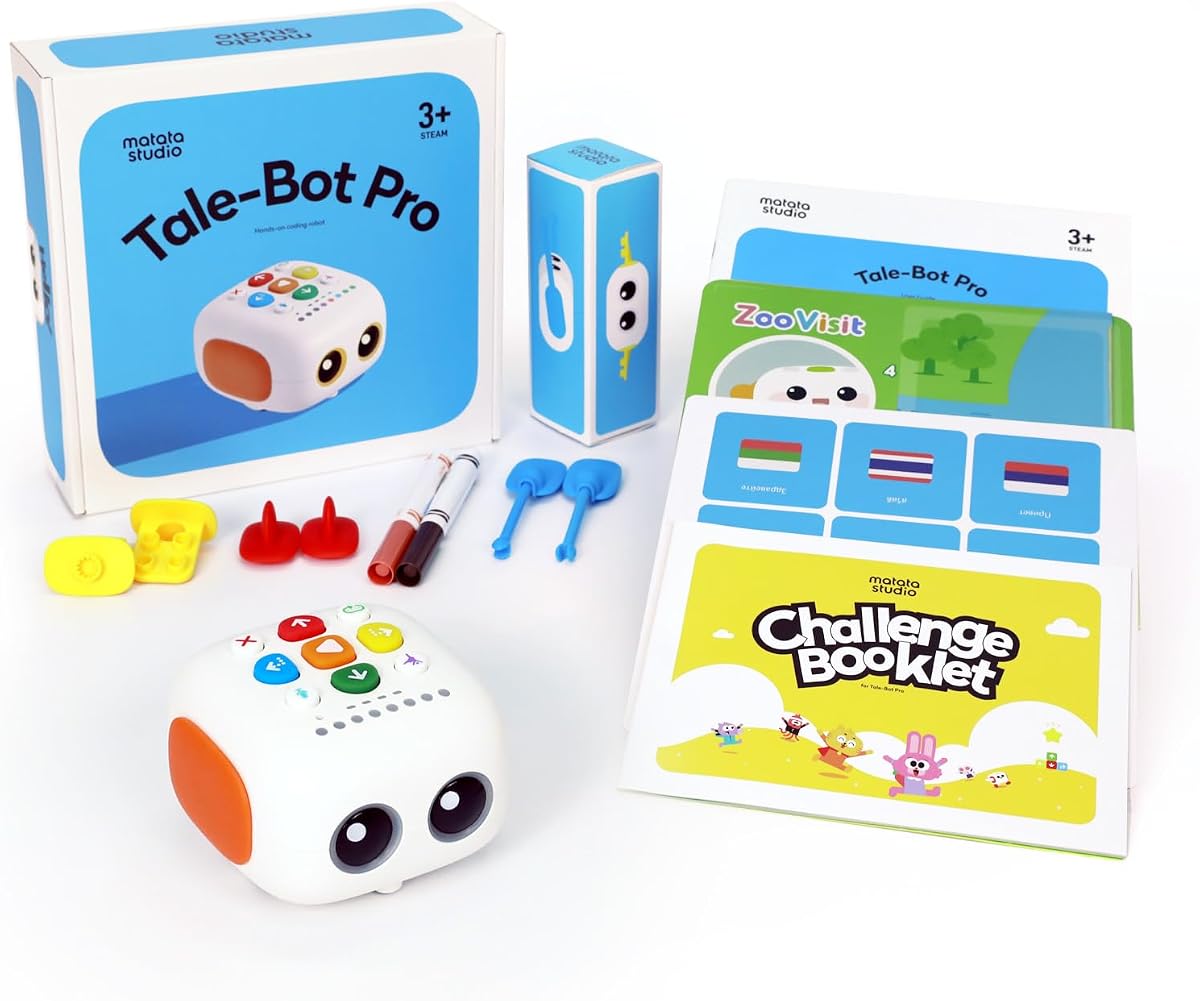
This robot is tailored for the youngest children with simple controls and storytelling features that spark imagination. It uses an interactive map that kids can draw on to create paths for the robot to follow.
We may earn a commission when you buy through this link, at no additional cost to you.
The recording function allows kids to tell stories that the robot then plays back which is unique fun. It supports many languages making it a good option for diverse households or learning environments.
Because it targets toddlers the features are simpler which limits its usefulness as kids grow older. You need a flat surface for the map which might not be available everywhere at home.
For three year olds looking to start learning coding concepts this offers a gentle and engaging introduction. It prioritizes language and creativity alongside logic which suits early development well.
Recording voice commands helps toddlers practice speech and storytelling while learning tech basics.
Supporting ten languages allows families to use the toy in their native language comfortably.
We may earn a commission when you buy through this link, at no additional cost to you.
Selecting the right coding toy requires considering age appropriateness screen requirements and how much guidance the child needs.
Look for toys that match your child's developmental stage to ensure they can use them independently. Toys for toddlers focus on simple buttons while older kids may prefer complex building kits with screens.
Choosing the right age range prevents frustration and ensures the child stays engaged with the learning process.
Decide if you want to limit screen time by choosing physical card or button-based coding robots. App-enabled robots offer more depth and progression but require a tablet or phone to operate effectively.
Screen-free options are great for beginners while app-enabled ones support more advanced learning and logic skills.
Children can be rough with toys so check for sturdy materials like metal frames or thick plastic. A durable robot will survive drops and active play sessions without needing constant repairs or replacements.
Investing in a well-built model ensures the toy lasts through years of exploration and play.
Consider how deep the learning goes from simple sequencing to loops and variables. Some toys offer a wide range of difficulty levels that grow with the child while others remain static.
Toys with progressive challenges keep kids interested longer as they master basic skills and move forward.
Check if the toy comes pre-assembled or requires building from parts. Younger children might prefer a ready-to-play robot while older ones might enjoy the challenge of constructing their own device.
Building the toy itself is a valuable STEM skill but requires patience and adult assistance often.
Most robots run on batteries so consider whether you prefer rechargeable or replaceable types. Some toys need specific batteries that can be hard to find or expensive to replace over time.
Planning for power needs ensures you are not stuck when the toy runs out of energy during play.
Look for toys that allow you to add extra parts or modules to expand their functionality. Kits that work with other systems like Lego offer endless possibilities for custom creations.
Expandable toys provide long-term value as kids can keep adding to their collection and creativity.
Start by reading the instruction manual to understand all the features and coding options available. Setting up the toy with your child helps build a routine where coding becomes a fun and expected activity.
Keep the play area clear of obstacles if the robot uses sensors to avoid collisions or errors. Regularly check the batteries and charging cables to ensure the device is ready for play whenever you are.
Store the parts in a dedicated container to prevent losing small pieces like cards or sensors. Encourage your child to create their own challenges to keep the experience fresh and educational.
Most experts suggest starting with simple button-based toys around age four when children begin understanding sequences. For toddlers under four look for toys focused on storytelling and movement without complex logic.
Coding toys offer tangible feedback and reduce screen time which is beneficial for very young learners. However they should complement rather than replace computer coding as they get older to ensure broad skills.
Many models work offline using physical cards or buttons so internet is not always required. However app-enabled versions usually need a device connected to update software or download new lessons.
Battery life varies widely from an hour to several hours depending on the model and usage. Rechargeable options can be more convenient for frequent play to reduce the need for replacements.
Yes many toys offer visual and tactile feedback that helps children with various needs learn logic. The structured nature of coding helps build focus and routine which can be beneficial for many learners.
Many manufacturers sell replacement parts directly or through authorized retailers for their kits. Check the brand's website for support options to ensure the robot remains usable even if something is lost.
We have highlighted ten excellent toys ranging from simple mice to advanced robots that teach logic. Each option offers a unique approach to learning programming concepts without requiring a background in tech.
Prioritize toys that match your child's age and interest level to ensure they remain engaged and motivated. The best choice is the one that fits your family's routine and educational goals effectively.
Remember to verify current pricing and availability since product details can change quickly on retail sites. Investing in a quality coding toy today can inspire a lifelong passion for technology and engineering.