
Canon MegaTank G3270
4.1Editor score
Low upfront purchase price point
Up to 2 years ink included
Simple wireless print copy scan
Finding a reliable cartridge free printer can transform how you handle daily document needs. These innovative machines use refillable tanks instead of tiny cartridges, offering significant savings and convenience for households and small offices alike.
We evaluated top models based on print speed, ink capacity, connectivity options, and overall value. Our comparison focuses on real-world performance, ease of setup, and long-term cost efficiency to ensure you find the right fit for your specific printing demands.
Each selection below showcases unique strengths tailored to different user priorities. While we highlight key features and ratings, keep in mind that pricing and availability fluctuate frequently, so verify current details before making your final purchase decision today.
4.1Editor score

4.1Editor score

4.3Editor score
As an Amazon Associate we earn from qualifying purchases.
The following table provides a side-by-side overview of the top ten cartridge free printer models, highlighting their key specifications, ratings, and unique features to assist your selection process efficiently.




The HP Smart Tank 5003 stands out as a top choice for households seeking long-term value. With a rating of 4.1 stars, it delivers reliable performance and the promise of up to three years of ink included in the box.
We may earn a commission when you buy through this link, at no additional cost to you.
Its standout feature is the mess-free refill system, which eliminates the frustration of tiny cartridges and spill risks. You simply plug in the ink bottles and let them drain, ensuring a clean and efficient replenishment process every time you need ink.
While the upfront price might seem higher than traditional printers, the savings on replacement ink quickly offset this cost. The AI capabilities add a layer of convenience for smart document handling, making it a future-ready choice for tech-savvy users.
This printer is ideal for families or small offices that print frequently and want to avoid constant cartridge purchases. Its all-in-one functionality covers scanning and copying needs, providing a comprehensive solution for everyday document management tasks.
The included ink lasts up to three years, significantly reducing the cost per page compared to standard cartridge models.
Designed with a spill-proof system, refilling the tanks is straightforward and minimizes the risk of ink stains or mess.
We may earn a commission when you buy through this link, at no additional cost to you.
The Epson EcoTank ET-2803 offers impressive convenience with its voice-activated printing capabilities. Rated at 4.2 stars, it is designed to simplify your workflow by allowing hands-free operation when paired with compatible smart home devices.
We may earn a commission when you buy through this link, at no additional cost to you.
Its Micro Piezo Heat-Free technology ensures sharp text and vibrant colors while using less energy than thermal systems. This eco-friendly approach also contributes to zero cartridge waste, aligning with sustainability goals for environmentally conscious users.
The EcoFit ink bottles make refilling easy and worry-free, reducing the chances of spills or incorrect fills. While the display is basic, the intuitive Smart Panel app compensates by providing a user-friendly interface for managing print tasks efficiently.
Choose this model if you value automation and environmental impact alongside reliable printing. It is well-suited for users who want to reduce physical interaction with their device while maintaining high-quality output for documents and photos.
By eliminating disposable cartridges, this printer helps reduce landfill waste significantly over its lifetime of use.
Support for AirPrint and the Epson Smart Panel app ensures you can print directly from various mobile devices effortlessly.
We may earn a commission when you buy through this link, at no additional cost to you.
As the world's number one selling supertank printer, the Epson EcoTank ET-2903 brings premium features to the table. Its 4.3-star rating reflects user satisfaction with its speed and reliability, making it a strong candidate for busy home offices.
We may earn a commission when you buy through this link, at no additional cost to you.
With print speeds up to 11 pages per minute and auto duplex capabilities, this model handles large batches of documents efficiently. The color display simplifies navigation, allowing you to manage settings and view status updates directly on the machine.
The inclusion of up to three years of ink ensures you won't face interruptions for a long time. While it is priced higher than basic models, the performance and convenience justify the investment for those who prioritize productivity.
This printer is perfect for users who need quick turnaround times and robust reliability. It balances high performance with the cost-saving benefits of tank-based ink systems, offering a superior experience for demanding printing scenarios.
The combination of fast speeds and auto duplex printing minimizes wait times and reduces paper usage significantly.
The color screen provides clear visual feedback and easier control over complex print settings and scanning options.
We may earn a commission when you buy through this link, at no additional cost to you.
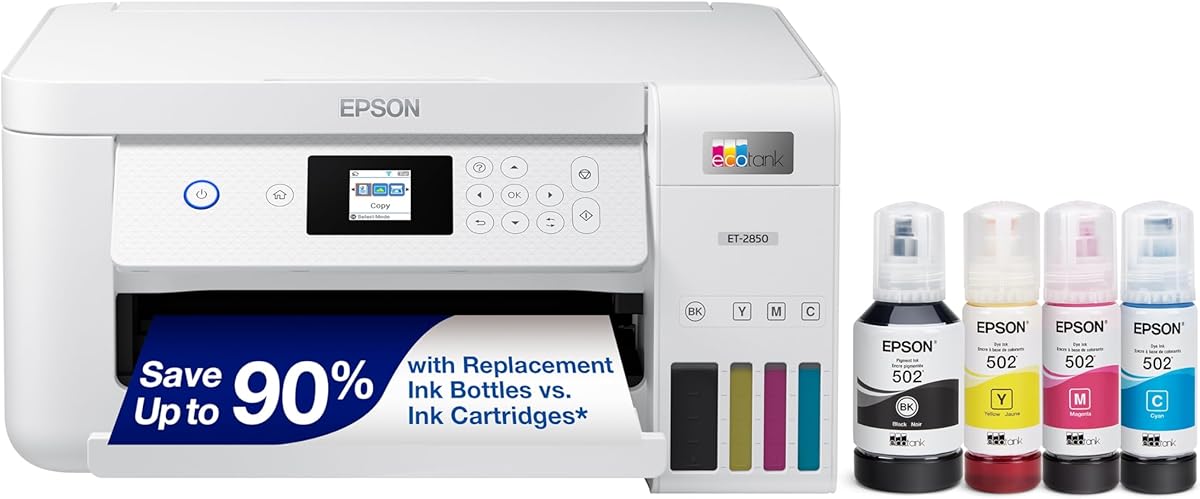
The Epson EcoTank ET-2850 is designed for users who prioritize text quality and document professionalism. With a 4.2-star rating, it uses pigment black ink to produce extremely sharp text that is perfect for reports and contracts.
We may earn a commission when you buy through this link, at no additional cost to you.
Its auto 2-sided printing feature helps save paper and costs, making it a practical choice for high-volume printing needs. The color display allows for easy navigation through menus, enhancing the overall user experience during operation.
You can save up to 90 percent on ink costs compared to traditional cartridges, which adds significant value over time. The inclusion of up to 7500 black pages ensures you can handle large jobs without frequent refills or interruptions.
This model is ideal for small businesses or students who need crisp, professional documents without the ongoing expense of cartridges. Its wireless capabilities also ensure seamless integration into modern digital workflows for convenience.
The pigment black ink ensures that printed text remains sharp and legible, even on lower-quality paper.
Massive page yields and bottle refills drastically reduce the cost per page compared to standard inkjet systems.
We may earn a commission when you buy through this link, at no additional cost to you.
The Epson EcoTank ET-4800 focuses on delivering essential features with high capacity ink tanks. While it has a 3.8-star rating, it remains a solid option for users who need basic all-in-one functionality without complex extras.
We may earn a commission when you buy through this link, at no additional cost to you.
Its Micro Piezo Heat-Free technology ensures that prints are produced efficiently with less energy consumption. The design emphasizes reduced waste by eliminating disposable cartridges, aligning with eco-friendly practices for home or office use.
Wireless connectivity allows you to print from various devices, adding flexibility to your workspace. The built-in scanner and copier make it a versatile tool for digitizing documents without needing additional hardware.
Choose this printer if you want a straightforward, reliable solution for everyday tasks. It balances performance with simplicity, making it a good entry point for those transitioning from cartridge-based systems to tank-based technology.
By using refillable tanks, this model helps reduce the environmental impact associated with disposable ink cartridges.
The wireless setup process is streamlined, allowing you to connect quickly and start printing from your network.
We may earn a commission when you buy through this link, at no additional cost to you.
The Canon MegaTank G3270 is a budget-friendly option that does not compromise on ink capacity. With a 4.1-star rating, it offers significant savings by including up to two years of ink, making it accessible for cost-conscious buyers.
We may earn a commission when you buy through this link, at no additional cost to you.
It supports printing up to 7700 color pages on a single set of inks, which is impressive for its price point. The 1.35-inch LCD provides a simple interface to manage print jobs without needing a smartphone or app.
Wireless connectivity ensures you can print from your mobile device or computer effortlessly. While it only supports single-sided printing, this limitation is often acceptable for users who prioritize upfront savings over advanced duplex features.
This model is perfect for students or small households that need reliable color printing without breaking the bank. It delivers essential features in a compact package, ensuring you get value without unnecessary complexity or high costs.
The low initial cost combined with included ink makes this one of the most accessible options on the market today.
Massive page yields mean fewer purchases of ink bottles, keeping maintenance costs low over the device's lifespan.
We may earn a commission when you buy through this link, at no additional cost to you.
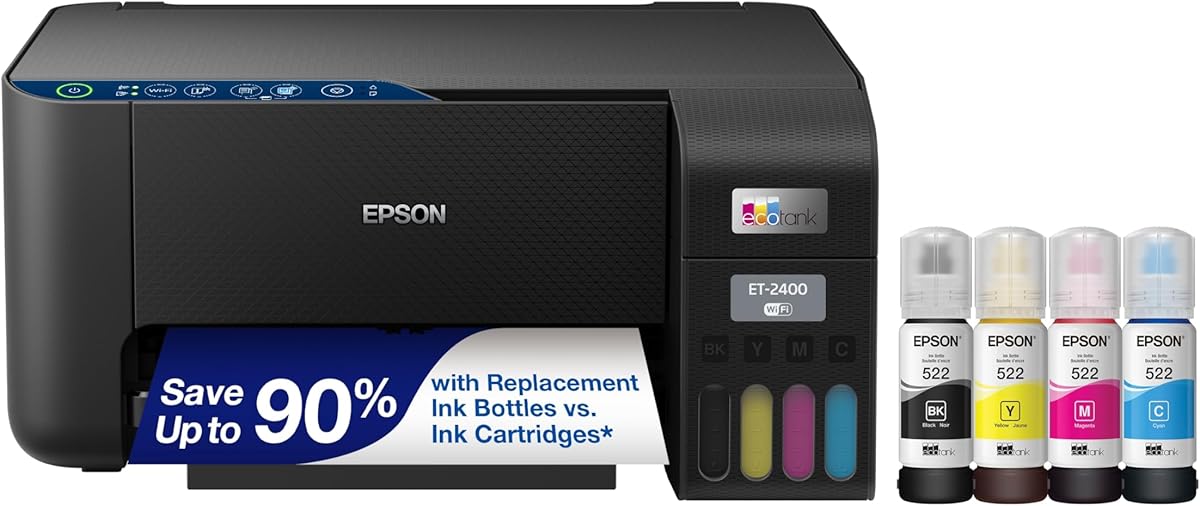
The Epson EcoTank ET-2400 serves as an excellent entry-level model for those new to supertank printers. With a 4.0-star rating, it balances ease of use with solid performance for everyday home printing tasks.
We may earn a commission when you buy through this link, at no additional cost to you.
It includes up to two years of ink in the box, which helps you start printing immediately without extra costs. The refill process is simple and worry-free, thanks to the unique EcoFit bottles that prevent mistakes and spills.
Its Micro Piezo Heat-Free technology ensures that prints are clear and vibrant, suitable for both documents and photos. While it lacks duplex printing, it remains a powerful tool for users who primarily need basic all-in-one functionality.
This printer is ideal for households that print occasionally and want to avoid cartridge frustration. It provides a reliable and eco-friendly alternative to traditional inkjets, making it a great starting point for modern printing needs.
By reducing cartridge waste, this model aligns with sustainable practices for environmentally conscious consumers.
Heat-Free technology ensures energy-efficient printing while maintaining high quality across various paper types.
We may earn a commission when you buy through this link, at no additional cost to you.
The Epson EcoTank ET-2800 is designed to deliver reliable performance with vivid, detailed prints. Rated at 4.0 stars, it is a robust choice for users who value consistent quality and straightforward operation.
We may earn a commission when you buy through this link, at no additional cost to you.
With speeds of up to 10 ISO pages per minute, this printer handles document jobs efficiently without long waits. The Micro Piezo Heat-Free technology ensures that every page comes out sharp, whether it is text or a photo.
Refilling is easy with the exclusive EcoFit ink bottles, and the included ink lasts up to two years. While it does not offer advanced features, its core functionality is dependable, making it a practical tool for daily tasks.
This model suits users who want a no-fuss printer that gets the job done reliably. It combines efficiency with quality, ensuring that your documents look professional and your workflow remains uninterrupted.
The technology ensures that every print job meets high standards for clarity and color accuracy.
Built to last, this printer is engineered to handle regular use with minimal downtime or issues.
We may earn a commission when you buy through this link, at no additional cost to you.
The Epson EcoTank ET-2980 is tailored for mobile users who need to print directly from their smartphones. With a 4.0-star rating, it offers enhanced mobile printing capabilities that streamline the process for on-the-go tasks.
We may earn a commission when you buy through this link, at no additional cost to you.
It comes with up to three years of ink, ensuring that you have plenty of capacity for long-term use. The unique EcoFit bottles make refilling simple, preventing mix-ups and keeping the process stress-free for everyone.
Its wireless connectivity supports AirPrint and other mobile services, making it easy to send jobs from any device. This flexibility is ideal for users who work from various locations within the home or office environment.
Choose this printer if you prioritize mobility and ease of use. It provides a robust platform for wireless printing, ensuring that your documents are ready whenever you need them without the hassle of cables or wires.
Enhanced mobile printing support allows you to manage tasks seamlessly from your smartphone or tablet.
With up to three years of ink included, you can enjoy long periods of uninterrupted printing without extra costs.
We may earn a commission when you buy through this link, at no additional cost to you.
The Epson EcoTank ET-2988 Renewed offers premium features like auto duplex and fast speeds at a reduced price point. With a 3.9-star rating, it is an excellent option for budget-savvy buyers looking for high-end functionality.
We may earn a commission when you buy through this link, at no additional cost to you.
It features a fast 15 PPM speed and auto duplex printing, which are typically found in more expensive models. The color display allows for intuitive navigation, making it easier to manage settings and print jobs efficiently.
Included ink lasts up to three years, ensuring long-term value even for a renewed unit. While buying renewed carries some risk, the savings and feature set make it a compelling choice for those willing to take a calculated risk.
This model is best for users who want top-tier performance without the premium price tag. It delivers impressive speed and efficiency, ensuring that your home office stays productive without the need for frequent replacements.
Renewed units provide access to high-end features at a fraction of the cost of brand-new models.
The combination of auto duplex and high speed ensures that large jobs are completed quickly without hassle.
We may earn a commission when you buy through this link, at no additional cost to you.
Selecting the right cartridge free printer requires understanding several key factors that affect performance and cost. This guide breaks down what to consider to help you make an informed decision tailored to your needs.
Look for models that offer high page yields and multi-year ink inclusion. This reduces the frequency of refills and ensures you save money over the long term.
Higher capacity tanks mean fewer interruptions and lower ongoing costs compared to standard printers.
Consider your typical volume of printing. Faster models with higher pages per minute (PPM) ratings are essential for busy offices or large batches of documents.
For home use, moderate speeds might suffice, but faster output saves time during peak usage periods.
Modern printers should support wireless and mobile printing. Features like AirPrint and voice activation make it easier to print from various devices without physical connections.
Ensure the printer is compatible with your ecosystem to streamline your workflow effectively.
Many users need scanning and copying capabilities. Check if the model includes a flatbed scanner and automatic document feeder for comprehensive document management.
An all-in-one unit saves space and eliminates the need for multiple devices on your desk.
Auto duplex (two-sided) printing is a valuable feature that saves paper and reduces waste. Look for models that offer this automatically to cut costs on consumables.
Manual duplex is an option, but auto duplex is more convenient for frequent users.
A color display can simplify navigation and status checks. Basic LCDs are functional, but color screens offer better visual feedback for complex settings.
Choose a display that matches your comfort level with technology and settings management.
Check warranty terms and brand reputation for durability. Reliable printers should have robust duty cycles and permanent printheads designed to last.
Investing in a brand with strong support ensures longevity and peace of mind.
Cartridge free printers significantly reduce plastic waste. Consider models that align with your sustainability goals by using refillable tanks.
Help reduce landfill waste by choosing systems that avoid disposable cartridges.
Start by setting up the printer according to the manual, ensuring the ink tanks are properly filled using the included bottles. This initial step is crucial for preventing leaks and ensuring smooth operation.
Regularly update the firmware and drivers to maintain performance and connectivity. Keeping the system current helps avoid software glitches and ensures compatibility with new devices.
Perform routine maintenance tasks like cleaning the printhead and running test prints. This prevents clogs and keeps print quality high, extending the lifespan of your device.
Yes, cartridge free printers save money in the long run because they use refillable tanks instead of expensive disposable cartridges. While the upfront cost may be higher, the cost per page is significantly lower.
Most models include enough ink to last between two to three years depending on your usage volume. This can equate to thousands of pages of black or color printing.
Using third-party ink may void the warranty and is not recommended by manufacturers like Epson and HP. Genuine ink ensures optimal quality and reliability for your device.
Many supertank printers produce high-quality photos due to their advanced ink systems. They are suitable for home photo printing, though dedicated photo printers may offer even better results.
Not all models feature auto duplex printing. Higher-end models include this feature for convenience, while budget models may require manual flipping for two-sided prints.
Yes, most modern models offer easy wireless setup via smartphone apps. This allows you to print directly from your phone or computer without complex network configurations.
We hope this guide has helped you identify the right cartridge free printer for your needs. From the HP Smart Tank to various Epson EcoTank models, there is a solution for every budget.
Prioritize features like speed, ink capacity, and connectivity to ensure the printer fits your workflow. Choosing the right model now will save you time and money down the road.
Remember to check current prices and availability before purchasing as offers change frequently. Taking these steps ensures you get the best value for your investment.