
Corded Landline Phone for Seniors
4.2Editor score
Photo dialing buttons
110dB loud ringer
No battery required
This guide compares the best captioned telephone options for seniors and hearing impaired users, highlighting key features like volume control and ease of use.
Captioned telephones provide essential communication support for individuals with hearing loss by displaying real-time text alongside audio calls. These devices bridge the gap between traditional voice communication and modern accessibility needs, ensuring users never miss important conversations with family or medical providers.
We evaluated ten top-rated models based on clarity, ease of use, volume amplification, and additional accessibility features. Our comparison focuses on devices that offer reliable performance, clear displays, and intuitive controls designed specifically for seniors and those with cognitive or physical limitations.
Each selection includes detailed specifications, pros and cons, and expert insights to help you find the right fit. Please note that product availability and pricing may change over time, so always verify current details before making your final purchase decision today.
4.2Editor score

4.3Editor score

5.0Editor score
The following table offers a side-by-side comparison of all ten featured products to help you quickly identify key specifications and unique features that matter most for your specific accessibility requirements and home setup needs.




The Hamilton CapTel 2400iSPNBT stands out as the leading option for those seeking a dedicated captioned telephone experience. With a 4.3 star rating, it delivers reliable performance for hearing impaired users who need to read conversations as they happen.
We may earn a commission when you buy through this link, at no additional cost to you.
Its standout feature is the real-time captioning service that displays incoming call text instantly on a large touchscreen. Users benefit from up to 40dB of amplified sound, ensuring voices are clear even with significant hearing loss. The voicemail function also captions stored messages for complete clarity.
While the device requires high-speed internet and is restricted to US residents, these requirements ensure the captioning service remains accurate and free of charge. The learning curve is minimal thanks to customizable font sizes and tone controls that adapt to individual comfort levels.
This phone is ideal for seniors who want full independence in communication without relying on external devices. The combination of amplified audio and visual text ensures no words are missed during important calls with family or healthcare providers.
Captions appear instantly on the screen allowing users to read while listening for maximum comprehension during every conversation.
Volume can be adjusted up to 40dB gain to match specific hearing needs while maintaining clear audio quality.
We may earn a commission when you buy through this link, at no additional cost to you.
For those prioritizing simplicity and reliability over advanced captioning, this corded landline phone offers exceptional value. It ranks high among budget-friendly options with a 4.2 star rating and features designed for users with memory impairments or low vision.
We may earn a commission when you buy through this link, at no additional cost to you.
The standout feature is the photo dialing system, allowing users to call family by pressing a button with a familiar face. The 110dB ringer ensures incoming calls are never missed, while the hands-free function helps those with limited mobility answer easily without holding a receiver.
Since it operates solely on a standard phone line without batteries or Wi-Fi, it remains functional during power outages. This reliability makes it a practical choice for emergency situations or homes where complex setups might confuse elderly users.
While it lacks built-in captioning, it pairs well with external assistive listening devices. This phone is perfect for seniors who need straightforward dialing and loud alerts rather than full speech-to-text features.
Large buttons display photos of contacts so users can dial without memorizing numbers or using complex menus.
Powered by phone line voltage this device works during power outages ensuring communication remains possible always.
We may earn a commission when you buy through this link, at no additional cost to you.
This top-rated VoIP phone achieves a perfect 5.0 star rating by combining high-end audio with user-friendly visual features. It is designed for seniors with dementia who benefit from familiar visuals to navigate phone calls independently at home or in care facilities.
We may earn a commission when you buy through this link, at no additional cost to you.
The customizable image keys allow families to insert photos into button slots making each contact recognizable at a glance. With sound amplification reaching 110dB, it ensures clear hearing even in noisy environments or for users with profound hearing loss.
Users must ensure they have an active VoIP service since this unit does not connect to standard phone lines. However, the dedicated help key and wall mountable design offer added safety and accessibility often missing in cheaper models.
Ideal for tech-ready households, this phone bridges modern connectivity with senior-friendly design. It is an excellent choice for those needing maximum volume and simplified dialing without the complexity of full captioning systems.
Insert photos into image keys to help users with memory loss identify who they are calling instantly.
Amplified sound up to 110dB ensures conversations are heard clearly even with significant hearing impairment.
We may earn a commission when you buy through this link, at no additional cost to you.
This unique telephone offers a hands-free solution for users with mobility challenges or arthritis by relying entirely on voice commands. While it lacks visual ratings, its function is straightforward: users can answer dial or hang up using only their voice.
We may earn a commission when you buy through this link, at no additional cost to you.
The active listening feature keeps the phone ready at all times without requiring a button press to activate. This seamless interaction is particularly beneficial for individuals who cannot comfortably hold a receiver or manipulate small physical buttons.
Potential drawbacks include a lack of visual confirmation that commands were understood, which might require verbal verification. It is best suited for environments where voice recognition is reliable and users need minimal physical interaction with the device.
For those needing maximum physical accessibility, this phone removes all mechanical barriers to communication. It serves as a specialized tool for users who prioritize voice interaction over traditional keypad or touchscreen interfaces.
All operations are controlled by voice commands making it ideal for users with limited hand mobility.
The device remains ready to receive commands without requiring activation buttons or wake words.
We may earn a commission when you buy through this link, at no additional cost to you.
This big button phone is designed for users with low vision and mobility challenges, offering oversized keys and picture memory slots. With a 4.2 rating, it provides solid performance for those who need straightforward access to contacts without complex setup.
We may earn a commission when you buy through this link, at no additional cost to you.
The adjustable volume reaches up to 40dB helping hearing impaired users hear conversations clearly. Picture buttons allow for quick dialing of favorite contacts ensuring that even users with memory issues can connect with loved ones effortlessly.
Memory protection ensures stored numbers remain safe even if the phone line is temporarily unplugged. Users can mount it on a wall or place it on a desktop, making it adaptable to different living arrangements or care settings.
While it does not include full captioning, it pairs well with hearing aids for improved audio clarity. It is a reliable choice for seniors who value simplicity and visibility over advanced digital features.
Large buttons and picture keys make dialing easy for those with poor vision or arthritis.
Stored contacts are protected even if power or line is interrupted ensuring contacts are never lost.
We may earn a commission when you buy through this link, at no additional cost to you.
The VTech SN5147 offers a flexible hybrid system with a corded base and a cordless handset for mobility. Rated at 4.0 stars, it suits households where users move between rooms but still need reliable access during power outages via the base unit.
We may earn a commission when you buy through this link, at no additional cost to you.
Audio assist boosts volume up to 50dB providing clear hearing for those with moderate hearing loss. Features like photo speed dial and smart call blocking help prevent unwanted calls while keeping important contacts easily accessible on the large display.
The digital answering machine allows remote access and slow playback which helps users review messages comfortably. While it requires battery management for the cordless handset, the convenience of movement within the home often outweighs this minor inconvenience.
This model is ideal for active seniors who value mobility without sacrificing essential accessibility features. It serves as a robust middle ground between fixed landlines and fully digital home phone systems.
Cordless handset allows movement while base works during power outages ensuring constant communication.
Blocks up to 1000 unwanted numbers protecting users from robocalls and scams automatically.
We may earn a commission when you buy through this link, at no additional cost to you.
The Serene Innovations High Definition Amplified Phone focuses primarily on sound quality to aid hearing impaired listeners. With a 3.5 star rating, it is a specialized option for users who prioritize clear audio transmission over additional digital features.
We may earn a commission when you buy through this link, at no additional cost to you.
Its high definition audio technology aims to reduce background noise and enhance voice clarity during calls. This focus on performance makes it suitable for those who find standard telephones too muffled or difficult to understand clearly.
While specific features are not detailed in standard listings, the brand emphasizes reliability and senior-friendly design. Users may need to verify compatibility with hearing aids or other accessories before purchasing to ensure full functionality.
Best for users seeking pure audio improvement without extra complexity this phone serves as a focused tool for communication clarity. It remains a solid choice for those who value sound fidelity above visual or text-based features.
High definition audio technology reduces noise to improve voice clarity for better understanding.
Designed with a focus on consistent performance for daily use without technical complications.
We may earn a commission when you buy through this link, at no additional cost to you.
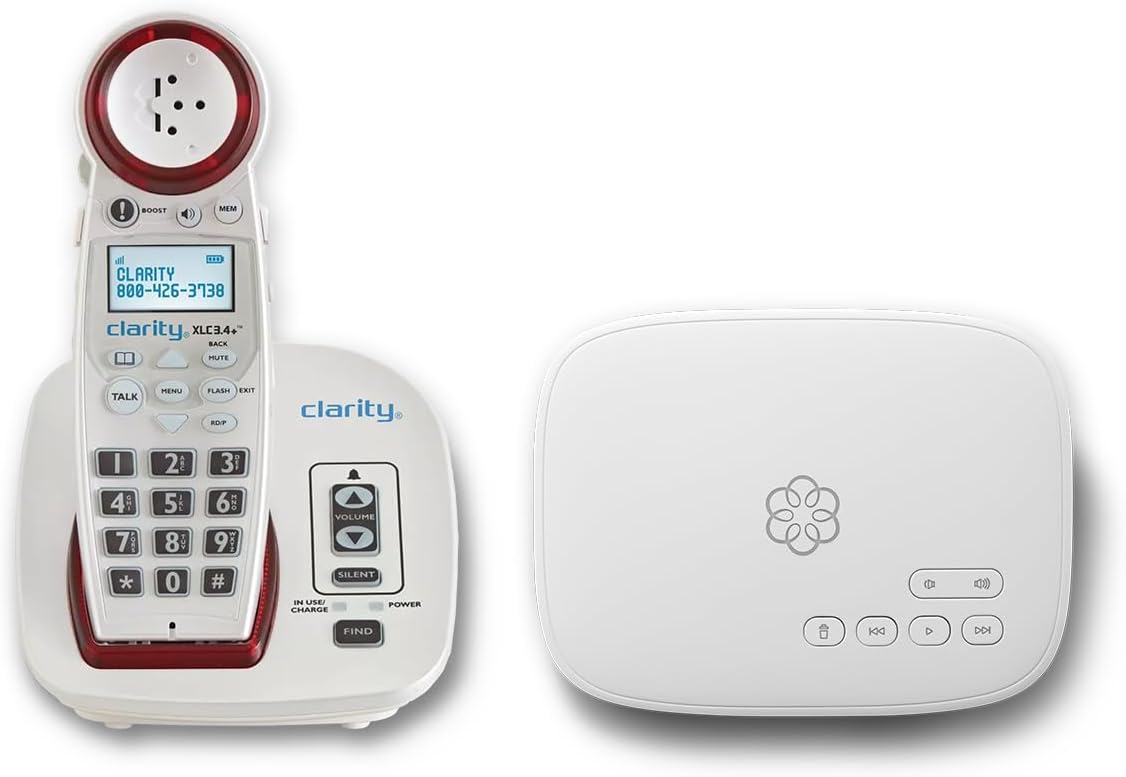
The Ooma Telo service bundle combines voice-over-IP technology with a high-quality handset designed for accessibility. With a 4.5 star rating, this system provides robust support including 24/7 concierge assistance and personalized setup to reduce user stress.
We may earn a commission when you buy through this link, at no additional cost to you.
Key features include visual ringer alerts and adjustable speaker volume for users with hearing difficulties. The 911 system sends text alerts to loved ones when dialed ensuring safety monitoring for families concerned about emergencies.
Users must account for a monthly subscription fee for the service though it includes unlimited domestic calling. The call blocking technology helps prevent scams which is a significant benefit for seniors receiving frequent unwanted contact attempts.
This is best for those ready to transition to digital home phone services needing integrated accessibility features. The comprehensive support and safety alerts make it a strong investment for independent seniors seeking peace of mind.
911 calls send text alerts to registered contacts to help family stay informed during emergencies.
Visual ringer alerts ensure users never miss calls even if sound volume is too low to hear.
We may earn a commission when you buy through this link, at no additional cost to you.
This Voice Dialer Phone enables users to manage calls using voice commands instead of manual dialing. While it holds a 2.1 star rating suggesting mixed user experiences, it offers unique features like talking caller ID and visual alerts for accessibility.
We may earn a commission when you buy through this link, at no additional cost to you.
The system supports up to 17 voice-activated memories allowing quick access to frequently called numbers. Visual LED indicators and adjustable volume options ensure users are notified of incoming calls regardless of their hearing sensitivity.
Setup may require careful programming of voice names which can be challenging for some seniors. The lifetime memory backup ensures contacts are not lost if power fails but users should verify voice command compatibility with their accent.
It serves as a specialized tool for those with severe dexterity issues who struggle with physical keypads. For users comfortable with voice interaction it provides a distinct alternative to traditional dialing methods.
Store up to 17 contacts via voice commands for quick hands-free dialing when needed.
LED ring indicator flashes brightly to alert users of incoming calls when sound is missed.
We may earn a commission when you buy through this link, at no additional cost to you.
This corded landline phone offers a cost-effective solution with features tailored to seniors with memory or vision issues. Rated at 4.2 stars, it balances affordability with practical functions like photo memory keys and extra-loud ringtones.
We may earn a commission when you buy through this link, at no additional cost to you.
The nine photo memory keys allow quick dialing without memorizing numbers ensuring family connection remains simple. With ringtones reaching over 110dB and visual LED alerts users are never left wondering if a call has arrived.
Programming takes just four steps making setup accessible for non-technical users. The lack of complex features ensures the phone remains easy to operate daily without overwhelming users with unnecessary options or settings.
Ideal for budget-conscious households this phone delivers essential reliability for daily communication. It is a practical choice for those who need clear sound and simple dialing without the cost of digital voice systems.
Program contacts in four steps ensuring family numbers are ready to use without technical help.
LED call flash alerts ensure users miss no calls even in noisy rooms or low volume settings.
We may earn a commission when you buy through this link, at no additional cost to you.
Selecting the right captioned telephone involves evaluating several key factors that match your specific hearing and mobility needs.
Ensure the device supports real-time captioning services like CapTel which transcribe calls instantly on the screen. Check if your internet provider offers compatible services as some regions have different availability.
Verify that the service is free or included with the device to avoid unexpected costs during extended use.
Look for phones offering at least 40dB of amplification if you have moderate hearing loss or 110dB for significant impairment. Adjustable volume settings ensure comfort without distortion during long conversations.
Check if speakerphone volume is also amplified to ensure clear audio during hands-free calls.
A large high-contrast screen is essential for reading captions clearly without eye strain. Touchscreen models may offer easier navigation but physical buttons provide reliability if touch sensitivity is an issue.
Ensure the text size is adjustable so users can comfortably read captions at their preferred level.
Consider whether you need a corded landline that works during power outages or a cordless system requiring charging. VoIP models need internet connectivity which may be unavailable during outages or rural areas.
Choose a model that ensures constant availability based on your home's power and internet stability.
Photo dialing buttons simplify access for users with memory issues by displaying contact images instead of numbers. Ensure stored memory is protected from loss when unplugging the device or resetting settings.
One-touch speed dial reduces the steps needed to call emergency contacts or frequent family members.
Check if the phone is hearing aid compatible (HAC) to prevent interference with assistive devices. Proper coupling between the handset and hearing aid ensures clear audio without feedback or static.
Models with telecoil support work best for hearing aids that use T-mode for direct audio connection.
Visual ringer lights or flashing indicators are critical for users who cannot hear standard phone rings. Some models include vibration or vibration alerts for extra reassurance that calls are incoming.
Emergency features like dedicated help keys or SOS buttons ensure quick access to assistance when needed urgently.
Select a phone that can be configured in minimal steps without complex menus or programming. User-friendly guides or included support services help families set up the device without technical frustration.
Consider models with simple cleaning surfaces to ensure hygiene and longevity in high-use household settings.
Connect the device to a high-speed internet connection if using a captioned telephone like CapTel or verify it is plugged into a standard phone jack for analog models. Ensure all cables are secure to avoid dropouts during important conversations.
Adjust the volume settings to match your hearing needs by using the dedicated volume buttons on the handset or base unit. Test the captions by making a short call to confirm text appears clearly and matches the audio.
Keep the screen clean with a soft dry cloth to maintain visibility and prevent scratches. Store the phone in a dry location away from direct sunlight or moisture to ensure long-term functionality and device life.
Many captioned telephone services are funded by government programs such as TRS and are free for eligible US residents with hearing loss. However, the physical device itself typically has a purchase price though some programs may offer discounts or subsidies.
Most dedicated captioned phones require a landline or internet connection rather than cellular service. Some modern VoIP models work over Wi-Fi but traditional cellular networks do not support the real-time captioning protocols used by these devices.
A stable high-speed internet connection is generally recommended to ensure real-time captions appear without delay. Dial-up or very slow connections may cause text to lag which reduces the effectiveness of the captioning service during conversations.
Yes, most captioned telephones allow users to adjust font size and contrast settings to match their vision needs. This customization ensures that text remains readable for users with varying levels of eyesight or visual fatigue.
Corded landline models will work during outages if the phone line is active but internet-dependent captioned phones require power and internet. Consider having a backup battery or cordless model with battery power if outages are frequent in your area.
Registration usually involves providing proof of hearing loss to a government-approved provider or the phone manufacturer. Once verified, you will receive a certification number that activates free captioning services for your device across the US.
Most captioned phones do not include recording features due to privacy regulations and technical constraints. If recording is necessary, you may need to use a separate recording device connected to the phone line or consult with your service provider.
If the service is temporarily unavailable you can often switch to assisted captioning where a live operator helps facilitate communication. Most providers have backup systems to ensure users can still make and receive calls with help when needed.
Selecting the ideal captioned telephone depends on balancing audio quality visual clarity and ease of setup for your unique situation. Models like the Hamilton CapTel offer advanced features for full captioning while budget options provide essential accessibility for simpler needs.
Prioritize volume amplification and clear displays to ensure you can communicate confidently with family and healthcare providers. Safety features like visual alerts and photo dialing are equally important for maintaining independence and avoiding isolation.
Remember to verify current pricing and availability before purchasing as these factors can change frequently over time. With the right device you can stay connected and informed without missing a word of important conversations.