
ASRock DeskMini X300 2.5G Series
4.2Editor score
Ultra compact 1.92L size
Supports Ryzen 2000 to 5000
Triple display output capable
This guide compares the top ten barebone pcs with amd to help you find the right mini pc for gaming, office, or server needs.
Barebone PCs with AMD processors offer a versatile foundation for building custom mini desktops tailored to your specific computing requirements without unnecessary preinstalled components.
We evaluated ten leading models based on processor architecture, expansion capabilities, cooling efficiency, and connectivity options to determine which ones deliver the best value and performance.
Each pick highlights unique strengths and trade-offs so you can match a device to your workflow while keeping in mind that pricing and stock fluctuate regularly across retailers.
4.2Editor score

4.0Editor score

3.1Editor score
The following table provides a side by side look at key specifications and features for all ten models to help you compare them quickly before making a decision.





The AOOSTAR MACO stands out as a powerful mini desktop built around the Ryzen 7 PRO 8845HS offering eight cores and sixteen threads for demanding multitasking workloads.
We may earn a commission when you buy through this link, at no additional cost to you.
Its standout feature is the OCuLink port which enables direct external GPU connections with significantly less latency than USB4 or Thunderbolt solutions for hardcore gaming scenarios.
While you must supply your own RAM SSD and operating system the machine comes with Windows 11 Pro keys on request and includes essential mounting screws plus an HDMI cable.
This model is ideal for users who want a compact high performance workstation or gaming rig that can grow with their needs through extensive storage and memory upgrades.
The OCuLink port allows you to connect an external GPU with minimal performance loss preserving maximum frame rates for AAA gaming titles and heavy graphics workloads.
Crafted from 100 percent recycled aluminum this chassis is both sleek and durable while reducing carbon emissions by 75 percent compared to conventional materials.
We may earn a commission when you buy through this link, at no additional cost to you.
The AOOSTAR GEM12+ delivers exceptional value with the same Ryzen 7 PRO 8845HS CPU and Radeon 780M graphics in a compact form factor designed for gaming and work.
We may earn a commission when you buy through this link, at no additional cost to you.
Its vapor chamber cooling system ensures stable performance under prolonged high loads by efficiently transferring heat to the heatsink and lowering overall operating temperatures.
Users can choose between Silent Balanced or Performance BIOS modes to tailor power consumption and acoustic noise depending on whether they need quiet office use or raw speed.
This device is perfect for home offices or living room setups where space is limited but performance and multi monitor support are essential requirements for daily productivity.
Adjustable BIOS modes let you choose between Silent Balanced and Performance settings to match the system power usage to your immediate workload needs.
The vapor chamber provides more effective heat dissipation than traditional pipes ensuring the machine stays cool even during extended gaming or rendering sessions.
We may earn a commission when you buy through this link, at no additional cost to you.
The AOOSTAR GEM12+ PRO adds premium security and customization features to the already powerful GEM12+ including built-in fingerprint recognition for quick password-free system access.
We may earn a commission when you buy through this link, at no additional cost to you.
Its fully customizable built-in display lets you monitor real-time CPU GPU and RAM data while setting personalized background images to personalize your desktop experience effectively.
Like other models in this series it supports OCuLink for external GPUs and offers quad 4K display output which is ideal for creative professionals needing multiple screen real estate.
Buyers seeking enterprise-grade security plus top tier performance in a small footprint will appreciate the added fingerprint sensor and detailed system monitoring capabilities included here.
Built-in fingerprint recognition simplifies login without complicated passwords enabling quicker and safer access to your device for both home and business use cases.
Advanced VAT power-saving architecture cuts power consumption by 5 to 20 percent over ordinary mini computers helping reduce electricity bills and heat generation.
We may earn a commission when you buy through this link, at no additional cost to you.
The ASRock DeskMeet X300 is a versatile barebone kit that supports a wide range of AMD AM4 Ryzen processors allowing users to pick and choose their ideal CPU tier.
We may earn a commission when you buy through this link, at no additional cost to you.
Unlike most mini PC kits it includes a 500W 80 plus Bronze power supply which simplifies the build process and ensures enough headroom for high TDP processor upgrades.
Its 8 liter case offers more internal room than ultra-compact designs enabling better airflow and support for full size CPU coolers up to 54 millimeters in height.
Users who want a traditional desktop build experience in a smaller footprint will find this model appealing especially since it supports PCIe expansion for add-on cards.
Supporting Ryzen 5000 4000 3000 and 2000 series CPUs gives buyers flexibility to choose cost-effective or high performance options based on current stock availability.
The 500W PSU is included in the package saving buyers the need to source a compatible power supply separately and reducing total cost of ownership significantly.
We may earn a commission when you buy through this link, at no additional cost to you.
The MINISFORUM X1 Lite features the Ryzen 7 255 processor which offers strong multi-threaded performance and is paired with Radeon 780M graphics for smooth multimedia experiences.
We may earn a commission when you buy through this link, at no additional cost to you.
It includes a full-blood USB4 port capable of 40Gbps transfer speeds and 100W power delivery making it convenient for docking stations and fast data transfer needs.
For users who want to add dedicated graphics later the unit supports OCuLink though an adapter plate is required and one M.2 slot must be reserved for the connection.
A 3-year limited warranty and 24-hour professional service support add to the appeal for buyers who want reliable after-sales service alongside a capable barebone unit.
Built-in Wi-Fi 6e and Bluetooth 5.2 ensure stable wireless connections for large file transfers online gaming and video conferencing without wired ethernet cables.
The CPU fan uses PCM phase-change material while the bottom fan cools memory and SSD ensuring smooth lag-free system performance under sustained high loads.
We may earn a commission when you buy through this link, at no additional cost to you.
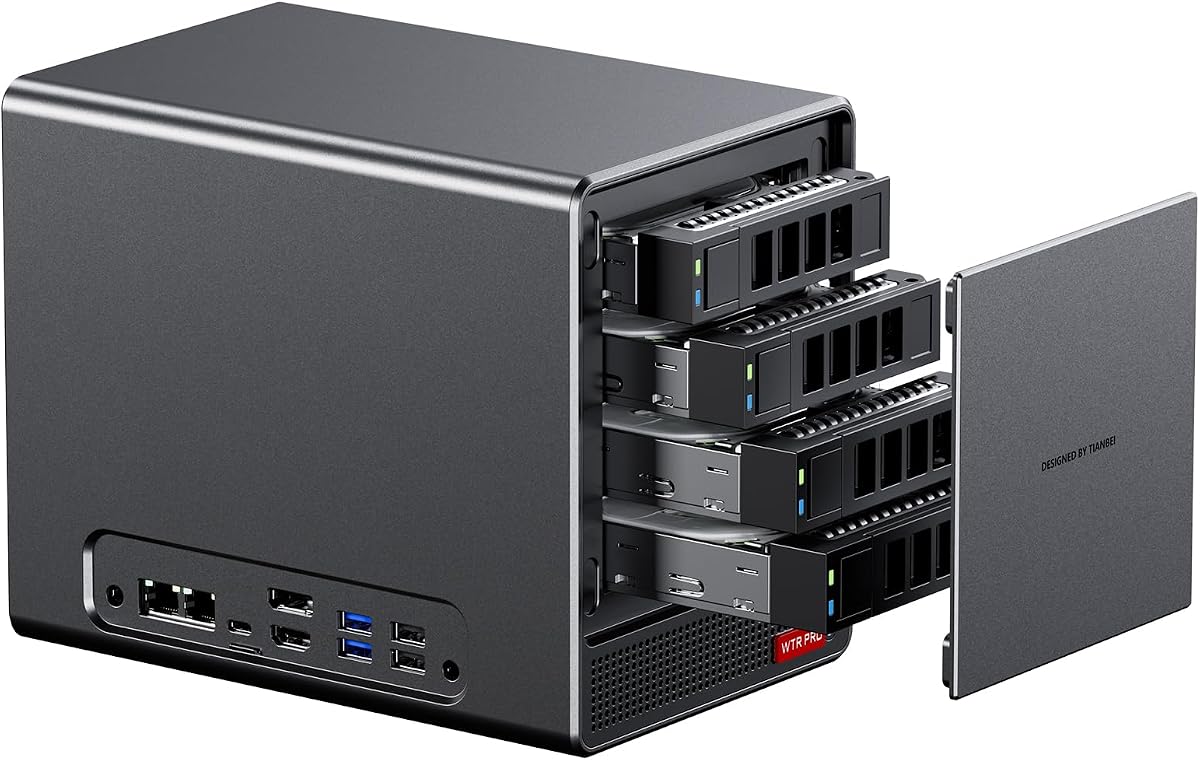
The AOOSTAR WTR PRO is designed specifically for users who need a compact network attached storage device supporting up to four 3.5 SATA drives and two M.2 NVMe slots.
We may earn a commission when you buy through this link, at no additional cost to you.
Its low power consumption ranging from 15 watts to 25 watts makes it suitable for 24-7 operation as a soft router home server or file storage appliance without high electricity costs.
Through-the-wall construction combined with a large 12 centimeter fan ensures silent operation while efficiently dissipating heat to keep internal components stable during continuous runs.
This model is ideal for small offices or tech enthusiasts looking to build a DIY NAS or virtualization host using OpenWrt or Ubuntu on a reliable AMD powered chassis.
Dual 2.5G LAN ports support redundant networking or link aggregation for faster file transfers and more stable connections for server or routing applications.
Energy saving design keeps power usage between 15 and 25 watts allowing the unit to run continuously with minimal heat generation and electricity bills.
We may earn a commission when you buy through this link, at no additional cost to you.
The ASRock DeskMini X300 measures just 1.92 liters making it one of the most compact barebone kits available for building space-saving desktops in tight offices or living rooms.
We may earn a commission when you buy through this link, at no additional cost to you.
It supports AMD AM4 Ryzen processors up to 65 watts and offers triple display capability via HDMI DisplayPort and D-Sub so you can connect multiple monitors without extra docks.
Storage flexibility is strong thanks to two M.2 slots and two 2.5 inch drive bays supporting RAID configurations for improved data redundancy or faster read write performance.
Buyers looking for the smallest possible footprint while retaining essential ports and expansion options will appreciate this model versatility and efficiency in a tiny chassis.
The 1.92L volume allows this barebone kit to fit almost anywhere and is ideal for users who need a complete desktop in minimal desk or shelf space.
Supporting HDMI DisplayPort and D-Sub outputs simultaneously lets you connect three monitors for productivity without needing additional display adapters or docks.
We may earn a commission when you buy through this link, at no additional cost to you.
The ASUS ExpertCenter PN54 positions itself as a next generation mini PC built around Ryzen AI 300 Series processors with dedicated NPUs for accelerated AI workloads and tasks.
We may earn a commission when you buy through this link, at no additional cost to you.
Its ultra thin 0.6 liter chassis uses a toolless design that allows for effortless customization and quick access to internal components for upgrades or maintenance without screws.
Connectivity is future-proof with Wi-Fi 7 and Bluetooth 5.4 plus six USB ports and dual 2.5G LANs catering to users who need the fastest available wireless and wired standards.
This model suits early adopters and enterprise buyers who prioritize cutting edge AI performance and connectivity standards over immediate price sensitivity in a small form PC.
The XDNA2 NPU delivers up to 50 TOPS of AI performance making it significantly faster than prior generations for dynamic computing and machine learning workloads.
The toolless design allows for quick access and easy component upgrades without hassle making maintenance and customization straightforward for users and IT staff.
We may earn a commission when you buy through this link, at no additional cost to you.
The AOOSTAR WTR PRO NAS offers an expanded 4 plus 2 bay design supporting up to 96TB of storage via four SATA drives and two M.2 NVMe slots for maximum data capacity.
We may earn a commission when you buy through this link, at no additional cost to you.
It supports virtualization technologies like VT-X and VT-D making it suitable for home labs or small office environments where multiple operating systems need to run on one machine.
Triple 4K display output allows users to connect multiple monitors for multitasking which is helpful when managing file servers or media streaming services from a single workstation.
Users focused on storage density and low power operation will find this chassis offers a balance of expandability and reliability for continuous operation as a dedicated file server.
The 4 plus 2 bay design supports up to 96TB of storage allowing massive file libraries to be stored locally on a single compact chassis device.
Support for VT-X and VT-D virtualization lets users run multiple systems on one host ideal for home labs or small office server tasks.
We may earn a commission when you buy through this link, at no additional cost to you.
The ASUS PN54-S1 houses Ryzen 700 Series processors in a sleek 34mm thin chassis that prioritizes portability and eco-conscious durability without sacrificing reliable 24-7 operation.
We may earn a commission when you buy through this link, at no additional cost to you.
Tool-free design allows quick access and easy component upgrades without hassle which is a practical benefit for users who need to swap memory or storage frequently.
Wi-Fi 7 and Bluetooth 5.4 connectivity ensures compatibility with the latest wireless standards and the dual 2.5G LANs provide ample wired bandwidth for network heavy tasks.
This model appeals to buyers who need a thin reliable mini PC for enterprise agents or light DIY builds where physical footprint and connectivity standards are critical factors.
Housed in a sleek 34mm chassis the unit combines compact form with eco-conscious durability and long-term reliability for users with limited desk space.
Tool-free design allows quick access and easy component upgrades without hassle making maintenance and customization straightforward for users and IT staff.
We may earn a commission when you buy through this link, at no additional cost to you.
Selecting the right barebone PC requires balancing processor power expansion needs and cooling capabilities based on your specific use case.
Modern AMD Ryzen processors offer Zen 4 or Zen 3 architectures with varying core counts that directly influence multitasking performance and application speed for workloads.
Look for at least 8 cores if you plan to run virtual machines render video or game heavily as more threads reduce bottlenecks during sustained usage.
The Radeon 780M and 740M iGPUs provide strong integrated graphics performance for casual gaming and multimedia without needing a dedicated GPU inside the chassis.
If you plan to add an external GPU verify the unit supports OCuLink or USB4 to avoid performance losses and ensure sufficient bandwidth for high frame rates.
Check how many SO-DIMM slots and M.2 slots the chassis provides since barebone kits usually exclude RAM and SSDs and you will need to buy them separately.
Prioritize models with dual channel DDR5 support and PCIe 4.0 slots to future proof your system and achieve faster data transfer speeds for storage and memory.
Efficient cooling is critical in mini PCs to prevent thermal throttling during long sessions so look for designs with vapor chambers or large through-wall fans.
Better cooling ensures stable performance under load and extends hardware life especially if you plan to run the system continuously as a server or workstation.
Evaluate the number and type of ports including USB4 HDMI DisplayPort and Ethernet because these determine how many peripherals and monitors you can connect directly.
Models with dual 2.5G LANs or OCuLink support offer greater flexibility for networking and external graphics which can be essential for specific professional use cases.
Lower TDP units often mean less heat and electricity usage which is beneficial for 24-7 operation in a server or always-on desktop environment.
Check if the kit includes a power supply or requires a separate purchase since this can significantly affect total cost of ownership and setup complexity.
Recycled aluminum or metal chassises provide better durability and heat dissipation compared to plastic and also contribute to eco-friendly manufacturing standards.
Toolless designs make maintenance easier and reduce the risk of damage when installing new components which is a convenience for frequent upgrades.
A longer warranty period such as 3 years indicates manufacturer confidence and provides peace of mind for costly electronics investments in mini PCs.
Check if customer support offers 24-hour service or clear instructions for firmware updates especially if you plan to use custom operating systems or virtualization.
Before powering on install compatible DDR4 or DDR5 SO-DIMM modules and M.2 NVMe drives according to the chassis manual to ensure stable boot and operation.
Apply fresh thermal paste if reusing a cooler and keep vents clear of dust to maintain optimal cooling efficiency and prevent thermal throttling over time.
Update BIOS settings to match your intended use case such as switching to Performance mode for gaming or Silent mode for quiet office workloads.
Yes most barebone PCs come with clear manuals and toolless designs that make installing RAM and SSDs straightforward. You just need basic screwdrivers and careful handling of components.
Most barebone kits do not include an operating system by default. You will need to purchase and install Windows Linux or another OS yourself after setting up storage.
Some models like the ASRock DeskMeet support AM4 socket CPUs so you can upgrade later. Others have soldered CPUs so check compatibility before purchasing if future upgrades matter.
OCuLink is a high bandwidth port designed for connecting external GPUs with less latency than USB4. It is ideal for users who want desktop-class gaming performance on a mini PC.
Yes models with Radeon 780M graphics handle casual and AAA gaming well. For higher settings connect an external GPU via OCuLink to boost performance beyond integrated limits.
Open the chassis panel usually with a screwdriver or latch then insert M.2 drives or SO-DIMM modules into the slots. Secure screws and close the panel before powering on.
Yes most support Ubuntu or OpenWrt for server roles. Check Linux compatibility notes especially for SATA power management settings if you plan to run a NAS.
Warranties range from 12 to 36 months depending on the brand. ASUS and MINISFORUM often include longer coverage while third party sellers may offer different support terms.
We highlighted ten standout barebone PCs with AMD processors offering options for gaming NAS storage and professional workloads across various price points.
Prioritize CPU performance cooling and expansion capabilities if you need long term reliability especially for continuous use cases or demanding creative workflows.
Check current pricing and availability before buying as deals and stock change regularly to ensure you get the best value for your specific needs and budget.