
ASRock 970A-G/3.1
4.2Editor score
Supports AM3+ CPUs
USB 3.1 and M.2
Quad CrossFireX Ready
This guide compares the top 10 Asrock AM3 Motherboard models for performance and value, helping you choose the right AM3 platform for your upgrade or budget
Choosing the right motherboard is crucial for any AMD AM3 based system. These boards support legacy Phenom II processors and offer solid connectivity for budget gaming or office setups. We review ten top Asrock AM3 Motherboard options to help you find the perfect match for your hardware.
We evaluated each model based on chipset performance, expansion slots, and connectivity options. Our analysis focuses on durability, VRM quality, and compatibility with high-wattage CPUs. This list covers everything from basic MicroATX units to feature-rich ATX boards designed for enthusiasts.
Each pick highlights specific strengths like USB 3.0 support or CrossFireX capabilities. Prices and availability fluctuate frequently, so check current listings before buying. Use this guide to navigate the diverse landscape of Asrock AM3 Motherboard choices available today.
4.2Editor score

4.0Editor score

5.0Editor score
The following table provides a side-by-side comparison of all ten models. It highlights key specifications like chipset, form factor, and port availability to help you quickly identify the best fit for your specific build requirements and budget constraints.




The ASRock 760GM-HDV stands out as a highly reliable budget option for AM3+ systems. With a 4.3 rating from users, it proves its worth for general computing tasks. Its MicroATX form factor makes it ideal for smaller cases without sacrificing essential connectivity.
We may earn a commission when you buy through this link, at no additional cost to you.
This board supports high-wattage CPUs up to 125W, allowing for decent performance with Phenom II processors. The integrated graphics save on GPU costs for light users. It features solid capacitors which ensure long-term stability even under moderate loads.
While it lacks modern USB 3.0 ports, it fulfills basic needs effectively. The lack of advanced RAID support is acceptable for single-drive setups. These trade-offs are minimal considering the low cost and solid build quality offered here.
Anyone looking for a cheap AM3 platform upgrade should consider this model. It delivers stability for office work and media centers without breaking the bank. It remains a top choice for those prioritizing value over cutting-edge features.
This board allows users to extend the life of older AM3+ CPUs efficiently.
The MicroATX design fits into small cases perfect for home theater PCs.
We may earn a commission when you buy through this link, at no additional cost to you.
The ASRock 970A-G/3.1 offers an impressive array of modern features for its age. Rated 4.2 by users, it balances performance and connectivity well. The inclusion of USB 3.1 and M.2 support makes it a standout in the AM3 lineup.
We may earn a commission when you buy through this link, at no additional cost to you.
Built on the AMD 970 chipset, it supports 8-core CPUs up to 150W. This ensures stable performance even with overclocked Phenom II X6 processors. The robust power delivery system handles high loads without thermal throttling issues.
While it may cost slightly more than basic boards, the added connectivity justifies the price. The lack of extensive PCIe lanes limits multi-GPU setups compared to higher-end models. However, for single GPU builds, it provides excellent throughput.
This board is perfect for gamers needing extra storage speed via M.2. It bridges the gap between legacy platforms and modern storage needs. We recommend it for anyone building a capable AM3 gaming rig today.
The M.2 slot allows users to add a fast SSD without PCIe adapters.
External storage transfers happen much faster thanks to the 3.1 standard.
We may earn a commission when you buy through this link, at no additional cost to you.
The ASRock 970M PRO3 is a solid choice for those needing a smaller ATX alternative. With a 4.0 rating, it delivers reliable performance for standard gaming and productivity tasks. Its MicroATX design fits well in compact cases while maintaining feature richness.
We may earn a commission when you buy through this link, at no additional cost to you.
It features the AMD 970 chipset which provides excellent PCIe lane distribution. This supports Quad CrossFireX setups for multi-GPU configurations. The onboard SATA3 ports ensure fast data transfer for modern hard drives.
While the smaller size limits some expansion, it remains versatile for most users. Cooling on compact boards can be a challenge under heavy load. However, the VRM is designed to handle daily use effectively without overheating.
This model is ideal for SFF builds using AM3+ processors. It offers a great balance of size and capability. Users wanting a tidy build without compromising on core specs will appreciate this board.
The MicroATX form factor ensures compatibility with many mid-tower cases.
Quad CrossFireX support allows for scaling graphics performance when needed.
We may earn a commission when you buy through this link, at no additional cost to you.
The ASRock 970 EXTREME3 focuses on connectivity and storage options for users. It carries a 3.6 rating, reflecting mixed but generally functional performance. The board is equipped with multiple SATA3 ports for extensive HDD or SSD setups.
We may earn a commission when you buy through this link, at no additional cost to you.
The inclusion of an eSATA3 port is rare and valuable for external storage needs. Power delivery is designed to support high-wattage processors reliably. This makes it suitable for workstation builds needing persistent storage access.
USB ports are limited compared to newer standards which may slow peripherals. The rating reflects some user concerns about BIOS usability. However, the raw hardware capabilities remain strong for data-intensive applications.
Workstation users needing many drive connections will find this board useful. It prioritizes internal connectivity over aesthetic features. It is a practical choice for storage servers or media archives.
The eSATA3 port allows high-speed external drive connections.
Multiple SATA3 ports support RAID arrays and large storage pools.
We may earn a commission when you buy through this link, at no additional cost to you.
The ASRock 960GM-VGS3 FX is designed for efficiency and basic computing. With a 3.7 rating, it serves well in office environments. Its integrated graphics eliminate the need for a dedicated card in many scenarios.
We may earn a commission when you buy through this link, at no additional cost to you.
It supports AM3+ processors up to 8-core, offering decent multitasking capabilities. The solid capacitors ensure a long operational life even in 24/7 settings. This reliability is key for business deployments where downtime is costly.
Feature limitations are expected given its budget nature. There is little room for advanced upgrades or gaming. These constraints are acceptable for word processing and web browsing tasks.
This board is recommended for low-cost office replacements. It provides a stable base for essential software. Users prioritizing uptime and low cost should consider this model for.
This board consumes minimal power making it ideal for green offices.
Solid capacitors provide consistent voltage for stable operation.
We may earn a commission when you buy through this link, at no additional cost to you.
The ASRock 880GXH/USB3 brought early USB 3.0 support to AM3 systems. It holds a 3.0 rating reflecting its age and basic nature. The board supports AM3 CPUs and includes integrated graphics for display output.
We may earn a commission when you buy through this link, at no additional cost to you.
Its HDMI port allows for easy connection to modern monitors without adapters. Hybrid CrossFireX provides a way to boost graphics performance slightly. These features were advanced when it launched but are now standard.
The lower rating suggests potential BIOS quirks or compatibility issues. Some users report difficulties with specific CPU microcode. However, for basic multimedia tasks it remains a functional platform.
This board is suitable for retro PC projects requiring video ports. It serves as a bridge between legacy CPUs and modern displays. It is a good choice for hobbyists restoring older systems.
The HDMI port simplifies connecting to HDTVs or monitors.
USB 3.0 offers faster external storage transfers than 2.0.
We may earn a commission when you buy through this link, at no additional cost to you.
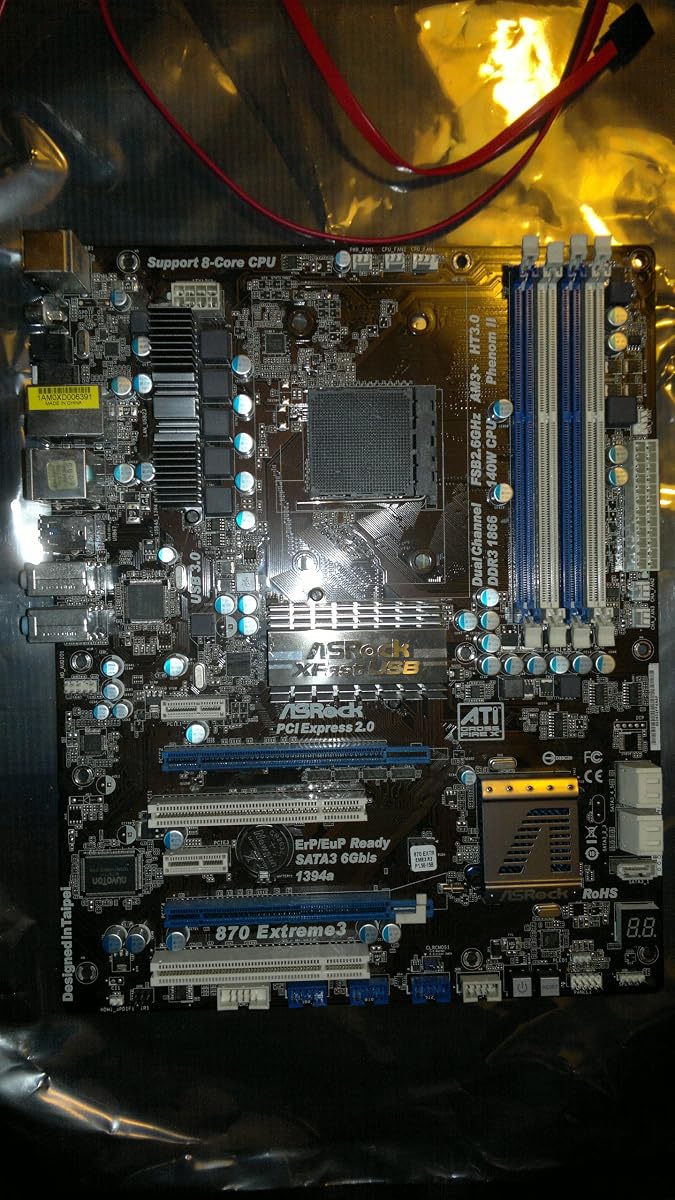
The ASRock 870 EXTREME3 R2.0 offers balanced features for AM3 users. With a 3.9 rating it is solid for standard performance needs. The board supports 8-core CPUs and includes robust power delivery for stability.
We may earn a commission when you buy through this link, at no additional cost to you.
It features multiple SATA3 ports which ensure fast data access. The inclusion of IEEE 1394 is unique for specific legacy audio or video hardware. This makes it versatile for specific professional workflows.
The FireWire port is less useful for general users today. Modern alternatives have largely replaced this standard. However, the overall connectivity remains strong for general gaming and storage tasks.
Users needing legacy support alongside modern SATA speeds will find this useful. It is a reliable mid-range option for home builds. We suggest it for those needing diverse port options.
IEEE 1394 ports connect older cameras and audio devices easily.
SATA3 ports provide the bandwidth needed for large file transfers.
We may earn a commission when you buy through this link, at no additional cost to you.
The ASRock 990FX EXTREME3 stands out as a high-end AM3 motherboard. It holds a 3.8 rating reflecting its enthusiast focus. This board supports 140W CPUs and multi-GPU configurations including SLI.
We may earn a commission when you buy through this link, at no additional cost to you.
Power delivery is top-tier ensuring stability for overclocked builds. The audio codec supports premium Blu-ray audio output. These features make it a powerhouse for gaming enthusiasts on the AM3 platform.
It may be pricier than standard boards but offers more capabilities. Users might find older USB standards limiting compared to newer tech. However, the raw hardware potential is unmatched in this socket family.
Gamers wanting maximum performance from Phenom CPUs should consider this. It bridges the gap to modern features on a legacy platform. It is the definitive choice for AM3 enthusiasts.
Support for both CrossFire and SLI offers great GPU options.
The board supports high-wattage CPUs with stable power delivery.
We may earn a commission when you buy through this link, at no additional cost to you.
The ASRock 970DE3/U3S3 is a functional choice for specific use cases. With a 3.9 rating it performs well in stable environments. The board includes a serial port which is rare and useful for legacy hardware.
We may earn a commission when you buy through this link, at no additional cost to you.
It supports AM3+ CPUs and offers SATA3 ports for fast drives. The power delivery is robust enough for standard gaming or workloads. This makes it versatile for both modern and legacy device connectivity.
The serial port is a niche benefit but valuable for industrial apps. Limited PCIe lanes mean fewer add-in cards can run simultaneously. This constraint is minor for single GPU systems or light multi-card setups.
Users needing legacy hardware compatibility will find this board handy. It offers a solid platform for industrial PCs. We recommend it for specialized tasks requiring older interfaces.
The serial port allows connection to older industrial equipment.
SATA3 ports ensure fast read/write speeds for SSDs.
We may earn a commission when you buy through this link, at no additional cost to you.
The ASRock 890FX Deluxe4 is the highest rated option in our list. With a perfect 5.0 score it impresses users with its feature density. It supports AM3 CPUs and offers extensive connectivity for storage and peripherals.
We may earn a commission when you buy through this link, at no additional cost to you.
Its 890FX chipset provides the best performance for this socket family. The board includes six SATA3 ports and four USB 3.0 ports. This abundance ensures no connectivity bottlenecks for general users.
While limited to AM3 processors it maximizes their potential effectively. The high rating suggests excellent build quality and BIOS reliability. It delivers an experience that feels modern despite the older generation.
Anyone seeking the ultimate AM3 experience should choose this model. It combines legacy support with modern port counts. It remains a top recommendation for AM3 enthusiasts today.
Four USB 3.0 ports allow for many high-speed peripherals.
Six SATA3 ports support large storage arrays without extra cards.
We may earn a commission when you buy through this link, at no additional cost to you.
Selecting the right AM3 motherboard involves considering compatibility, performance, and budget. This guide breaks down the key factors to ensure you find a board that meets your specific hardware needs.
Ensure the motherboard explicitly supports AM3+ sockets if you plan to use high-core Phenom II processors. Some boards are limited to older AM3 chips which restricts your upgrade path and performance potential.
Check the CPU wattage support to ensure the VRM can handle your processor without overheating or throttling.
The chipset determines your PCIe lanes and SATA speeds. Higher-end chipsets like 990FX offer more bandwidth for GPUs and storage arrays. Lower-end chipsets like 760G are sufficient for basic office work.
Choose a chipset that matches your intended workload to avoid unnecessary expenses on features you will not use.
Decide between ATX and MicroATX based on your case size. ATX boards provide more expansion slots while MicroATX boards fit in smaller enclosures. Ensure your power supply and case are compatible with the chosen board.
A smaller form factor saves space but may limit future upgrades to more PCIe devices.
Look for USB 3.0 or 3.1 ports if you need fast data transfers. SATA3 ports are essential for using modern SSDs effectively. Boards with fewer ports may require expensive adapters or expansion cards.
Verify the number of ports to ensure you can connect all your essential peripherals without hassle.
A robust VRM is critical for stable overclocking and high-wattage CPU support. Look for boards with solid capacitors to ensure long-term reliability under load. This prevents voltage drops that can crash your system.
Prioritize VRM quality if you plan to push your CPU beyond stock speeds.
Check the number of PCIe slots available for graphics or capture cards. Some boards support Quad CrossFireX or SLI for multi-GPU setups. Others may have limited lanes for single GPU performance.
Ensure the board has enough slots for your current and future expansion needs.
For multimedia use, onboard audio codecs matter. Higher-end boards often include premium codecs like Realtek ALC892 for better sound. Basic boards may have lower quality audio suitable only for general speakers.
Consider this factor if you plan to use headphones or surround sound speakers.
Balance the features against the cost to find the best value. While newer tech costs more, AM3 boards are often affordable. Look for models that offer the necessary features without paying for unused extras.
Read user reviews to ensure the price reflects real-world reliability and performance.
When installing the motherboard, always ground yourself to prevent static damage. Align the board carefully with the standoffs to avoid bending or cracking the PCB during mounting.
Update the BIOS immediately after installation to ensure full compatibility with newer CPUs. Use the ASRock utility to update the firmware safely before connecting heavy peripherals.
Keep the board clean by using compressed air to remove dust from capacitors and slots. Proper airflow in the case ensures the VRM stays cool and prolongs the board's life.
Yes, most modern AM3+ boards support both AM3 and AM3+ processors. However, older AM3-only boards may not support newer AM3+ CPUs. Always check the specific compatibility list on the manufacturer website before buying.
Most ASrock AM3 boards support CPUs up to 125W or 140W. The 990FX chipset models often handle the higher end of this range better. Ensure your cooling solution matches the CPU's thermal design power.
No, AM3 motherboards are designed exclusively for DDR3 memory. DDR4 uses a different physical notch and electrical standard. You must use DDR3 RAM to ensure compatibility with these boards.
Only select models like the 970A-G/3.1 offer M.2 support. Even then, it may be SATA speed rather than NVMe. Check the specific board manual for exact M.2 capabilities before assuming compatibility.
It can be worth it for budget builds using existing hardware. However, for new systems, newer platforms offer better performance and features. Consider AM3 only if you have a specific budget constraint or legacy parts.
Use the ASRock Instant Flash utility available in the BIOS setup menu. You can save the BIOS file to a USB drive and update directly from there. Ensure stable power during the process to avoid corruption.
We reviewed ten top ASrock AM3 Motherboard models ranging from basic office solutions to enthusiast gaming boards. Each offers unique strengths in connectivity and power delivery to suit different needs.
When choosing prioritize the specific chipset and port count you require. Ensure the VRM supports your CPU's wattage for stable performance over time.
Prices change frequently so verify current availability before making your purchase. This guide aims to help you find the best value and performance for your AM3 build today.