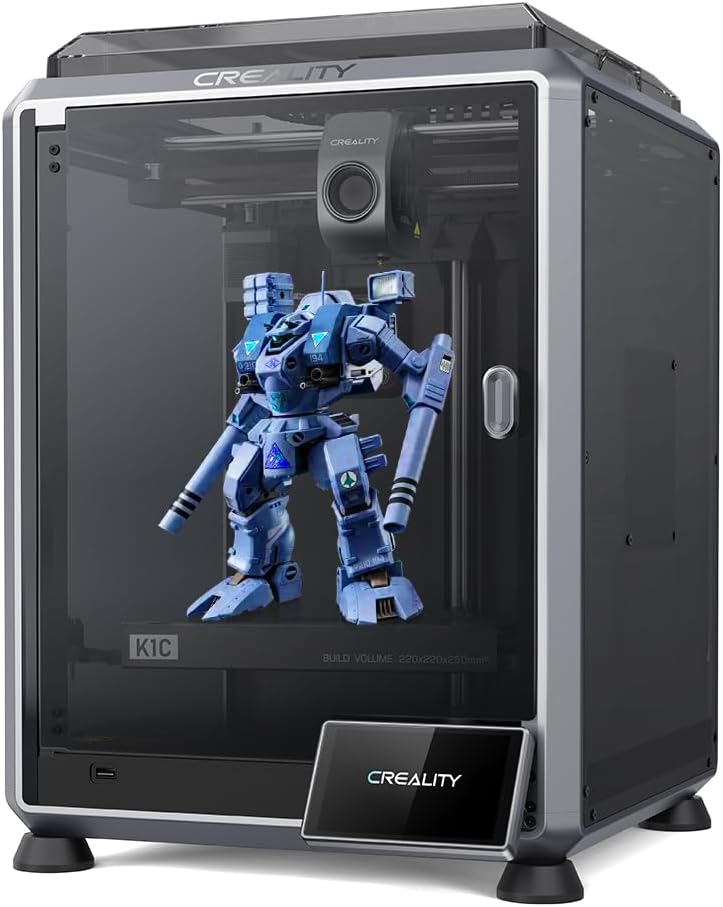
Creality K1C
4.3Editor score
Direct Extruder Support
Fast Calibration
AI Monitoring
Discover the top 3D printers for high temperature filaments compared by experts. Find the best machines for ABS, PC, and Nylon with heated chambers and
Selecting the right machine for engineering materials requires careful consideration of chamber temperature and extruder durability. High temperature filaments like polycarbonate and carbon fiber demand robust hardware to ensure successful prints.
We evaluated ten leading models based on their ability to maintain stable heat, prevent warping, and handle abrasive materials. Each product offers unique features designed to meet the rigorous demands of professional and hobbyist engineers.
Every pick highlights specific capabilities such as active heating, multi-extruder systems, and speed. Prices and availability may change, so verify current details before purchasing to ensure you get the best value for your project needs.
4.3Editor score

4.7Editor score

4.4Editor score
This side-by-side comparison highlights the critical specifications of each printer to help you decide which model fits your workflow and material requirements best.



The Bambu Lab P2S Combo stands out as a top choice for engineers seeking reliability and speed. With a highly rated 4.7 score, it delivers consistent results across various materials. The active airflow system manages heat retention perfectly for high temperature needs.
We may earn a commission when you buy through this link, at no additional cost to you.
Its Adaptive Airflow System balances cooling and heat retention to keep overhangs crisp while maintaining a 50C chamber for engineering materials. This ensures that parts made from ABS or ASA do not warp during the printing process. The PMSM Servo Extruder provides precision for complex geometries.
While the printer itself is powerful, multi-color capabilities require the AMS 2 Pro add-on which adds to the initial investment. However, the drying feature in the AMS helps maintain filament quality which is crucial for high performance prints. Users may need to budget for the full combo.
This machine is ideal for professionals who need consistent results without constant tinkering. The fast setup and calibration mean you spend more time printing. We recommend it for workshops requiring high throughput and reliable engineering-grade part production.
This system automatically balances cooling and heat retention to ensure crisp overhangs and stable printing conditions for advanced materials.
The multi-material system includes built-in filament drying which keeps spools ready and reduces printing issues caused by moisture.
We may earn a commission when you buy through this link, at no additional cost to you.
The Creality K1C offers an accessible entry point for printing high temperature and abrasive materials. Rated 4.3 it focuses on speed and durability. The direct extruder is specifically enhanced to grip filament tightly without slackening which prevents jams.
We may earn a commission when you buy through this link, at no additional cost to you.
It supports printing up to 300C which is sufficient for many engineering filaments. The upgraded cooling structure includes a hotend fan to avoid heat creep and an auxiliary fan to minimize stringing. This makes it versatile for various material types without clogging.
The main trade-off is the smaller build volume compared to larger industrial models. Also it lacks a fully sealed heated chamber so very large parts might warp in open environments. But for small to medium functional parts it is efficient.
Buyers looking for a fast plug and play solution will appreciate the auto calibration. It saves time on manual leveling. This model is best for hobbyists and small teams who need speed and durability on a budget.
This extruder features a bolster spring and ball plunger that grip filament tightly to prevent clogs during high temperature printing.
The observant AI camera detects spaghetti failure and debris allowing you to monitor prints remotely without constant supervision.
We may earn a commission when you buy through this link, at no additional cost to you.
The Bambu Lab P1S provides a fully enclosed environment that supports high temperature filaments like ABS and ASA. Its 4.5 rating reflects reliability for most engineering needs. The automatic bed leveling ensures high-quality prints from the start.
We may earn a commission when you buy through this link, at no additional cost to you.
Its enclosed design improves performance for advanced filaments by trapping heat around the part. While it does not have active heating active the enclosure helps maintain consistency. The high speed of 500mm/s allows for rapid prototyping without sacrificing detail.
Users must note that multi-color printing requires a separate AMS connection which adds cost. The build volume is standard so large projects might need to be split. However the speed and enclosure make it a solid all-rounder.
This printer is great for teams needing speed and ease of use. It simplifies the workflow with user-friendly design. We suggest it for those prioritizing efficiency and consistent results in an enclosed setting.
The fully enclosed body improves print performance for advanced filaments by maintaining a stable thermal environment.
With 500mm/s speed and 20000mm/s acceleration this printer lets you focus on creating instead of waiting for prints.
We may earn a commission when you buy through this link, at no additional cost to you.
The Bambu Lab A1 is designed for beginners but handles precision well. With a 4.7 rating it offers high speed accuracy and full auto calibration. It makes high temperature printing accessible through reliable flow control.
We may earn a commission when you buy through this link, at no additional cost to you.
Its active flow rate compensation ensures smooth prints by adjusting extrusion based on readings. This helps when dealing with materials that require precise flow. The quick swap nozzle makes maintenance easy which is great for daily use.
The lack of a heated chamber means it is less suited for very high temperature materials like Polycarbonate. Open frame printing can lead to warping if drafts exist. But for standard engineering filaments it performs impressively.
This printer suits those who want easy entry into 3D printing. The simple interface reduces the learning curve. We recommend it for users who value automation and quiet operation in home environments.
The A1 takes care of all calibration processes automatically ensuring optimal performance for every print without manual steps.
Active motor noise canceling provides a quiet environment allowing you to focus on work while the printer runs.
We may earn a commission when you buy through this link, at no additional cost to you.
The FLASHFORGE AD5X features a high temperature nozzle capable of 300C. This allows for a wide range of filaments. The 4.4 rating highlights its reliability for versatile printing tasks. Large build volume helps with bigger prototypes.
We may earn a commission when you buy through this link, at no additional cost to you.
Its IFS technology enables printing with multiple colors or materials simultaneously. This is useful for complex functional parts. The high speed of 600mm/s ensures rapid results. Auto leveling reduces setup time significantly.
The open frame means you may need additional enclosure for best results with warping prone materials. Also the multi-color system requires some setup to manage filaments. However the raw speed and nozzle temp are impressive.
This model is suitable for those needing multi-color capabilities and high temp performance. The speed helps in rapid prototyping. We suggest it for makers who want versatility without compromising on speed.
The 300C nozzle allows you to work with high-performance filaments like ABS PETG and Nylon easily.
Independent Filament System enables vibrant multi-colored 3D models with up to four different colors simultaneously.
We may earn a commission when you buy through this link, at no additional cost to you.
The FLASHFORGE Creator 5 Pro is a powerhouse for industrial applications. With an active 65C chamber it handles engineering-grade materials with ease. The 4.4 rating reflects its robust construction and high throughput capabilities.
We may earn a commission when you buy through this link, at no additional cost to you.
Active chamber heating ensures consistent interlayer adhesion which prevents warping on parts like ABS. The HEPA13 filtration captures particles keeping the workspace safe. Independent extruders avoid cross-contamination during color changes.
Setup is more complex due to the 4-extruder system but it reduces waste by purging less. The rigid frame minimizes vibration at high speeds. However it requires more space than standard desktop units.
This printer is best for professional environments needing high volume and safety. The active heating is key for large parts. We recommend it for shops requiring consistent engineering part production and clean air.
Maintains a stable temperature up to 65C to ensure consistent interlayer adhesion and minimize warping.
Four independent toolheads switch colors instantly without purging filament through a single nozzle.
We may earn a commission when you buy through this link, at no additional cost to you.
The Anycubic Kobra S1 Max offers a massive 350mm build volume for large-scale projects. With a 350C hotend it supports advanced materials like PC and Nylon. The 65C heated chamber ensures parts do not warp during long prints.
We may earn a commission when you buy through this link, at no additional cost to you.
Its CoreXY system maintains precision even at high speeds. Vibration compensation reduces ringing on surfaces. AI monitoring detects foreign objects in real time which helps prevent failed prints. This makes it reliable for long jobs.
The durable extrusion system uses a hardened steel nozzle which handles abrasive filaments well. However the unit is large and may require dedicated space. The cost is higher due to the industrial features.
This model suits those needing large parts and high temperature performance. The heated chamber is critical for success. We suggest it for workshops creating large prototypes or functional parts regularly.
Equipped with a 350C hotend to handle advanced materials like ABS ASA PC and PA easily.
The 65C heated chamber maintains stability for engineering filaments to ensure successful prints.
We may earn a commission when you buy through this link, at no additional cost to you.
The Flashforge AD5X is designed for color versatility and speed. It uses IFS for direct printing of multiple colors. With a 300C hotend it is capable of engineering materials. The CoreXY motion ensures stability at high speeds.
We may earn a commission when you buy through this link, at no additional cost to you.
Wi-Fi connectivity allows monitoring from anywhere via the app. This saves time when waiting for prints. Auto leveling and PEI plate ensure first-layer adhesion. The vibration compensation maintains quality at 600mm/s.
The open design means you may need to add enclosure for high temp filaments to avoid warping. The multi-color system is great for artistic parts. Setup is straightforward for most users.
This printer is best for makers needing multi-color capability. It is great for small functional prototypes. We recommend it for those who value speed and remote monitoring features.
Auto-swap PLA PETG TPU and metal-fill filaments for vibrant gradients without manual intervention.
Monitor prints from anywhere and HD Camera ready for real-time streaming and shareable timelapses.
We may earn a commission when you buy through this link, at no additional cost to you.
The Snapmaker U1 offers a unique 4-toolhead system for multi-color printing. It swaps toolheads in just 5 seconds which reduces waste. This is ideal for complex projects requiring different materials. The 4.5 rating highlights reliability.
We may earn a commission when you buy through this link, at no additional cost to you.
It combines rigid and flexible materials in one print. The automatic tool changer reduces tool change time from minutes to seconds. This minimizes wasted material. The CoreXY system enables speeds up to 500mm/s.
The build volume is generous at 270x270x270mm. Auto calibration ensures precision. However the price reflects its advanced tool-changing tech. It may require time to learn the workflow.
This model is perfect for professionals needing mixed material prints. It is great for detailed prototypes. We suggest it for those who value speed and reduced waste over single-head printers.
The automatic tool changer reduces tool change time from around 2 minutes to just 5 seconds.
Combines rigid and flexible materials water-soluble supports and engineering materials in a single print.
We may earn a commission when you buy through this link, at no additional cost to you.
The FLASHFORGE Creator 5 Pro 4-Toolhead variant minimizes waste significantly. It switches nozzles without flushing filament. This is crucial for reducing costs. With active heating to 65C it ensures quality for advanced filaments.
We may earn a commission when you buy through this link, at no additional cost to you.
Dual HEPA 13 filtration traps ultrafine particles. The CoreXY structure delivers high speeds with stability. Dynamic flow calibration helps maintain first layers. Remote control via Flash Studio allows easy monitoring.
The 4-toolhead system allows for true multi-material printing. It is ideal for industrial production. The setup is complex due to multiple toolheads. But it offers better efficiency for heavy users.
This printer suits industrial environments needing efficiency and waste reduction. It is great for high volume. We recommend it for businesses focused on sustainable and fast production cycles.
The 7-second FlashSwap changer switches nozzles without flushing filament eliminating massive purge waste.
Fully enclosed frame features an active heated chamber up to 65C to prevent warping.
We may earn a commission when you buy through this link, at no additional cost to you.
Choosing the right printer requires evaluating chamber heat, extruder type, and automation features. These factors determine success with materials like ABS, Nylon, and Carbon Fiber.
A heated chamber is crucial for preventing warping in high temperature filaments. Look for models that support at least 50C to 65C internal heat.
Stable chamber temperatures ensure consistent layer adhesion and reduce defects.
Ensure the hotend can reach 300C or higher for engineering materials. Standard nozzles may not melt advanced filaments fully.
Higher max nozzle temps expand the range of printable plastics.
Abrasive filaments like carbon fiber wear down nozzles quickly. Choose printers with hardened steel or ruby nozzles and direct extruders.
Robust extruders prevent clogs and ensure long-lasting performance.
Select a build volume that fits your project needs. Larger models support bigger prototypes but may cost more.
Ensure the bed size matches your typical part dimensions.
Auto leveling and calibration save time and reduce human error. Features like flow compensation help maintain accuracy.
Automation is key for consistent results over long print runs.
Look for HEPA filtration to capture fumes and particles. Safety sensors detect run-out or debris.
Good filtration protects your health and improves air quality.
High-speed printers like 600mm/s reduce production time. But ensure quality is maintained at these speeds.
Balancing speed and precision is important for final parts.
Wi-Fi and app support allow remote monitoring. This helps you manage long jobs without constant checking.
Modern interfaces make it easier to control the printing process.
Always dry your filament before printing to prevent bubbles and clogs. Moisture in high temp filaments can ruin prints. Use a dryer unit or oven if needed.
Regularly clean the nozzle and bed to remove residue. A heated chamber requires periodic dust removal to maintain efficiency. Use a soft cloth for the enclosure.
Check firmware updates to keep software stable. New releases often improve temperature control and calibration. Keep your system secure by connecting only to trusted Wi-Fi.
Filaments like Polycarbonate, ABS, Nylon, and Carbon Fiber require high temperatures. These materials need hotends reaching 300C and heated chambers.
While not mandatory it helps prevent warping for advanced materials. Some printers use passive heat but active systems are better for large parts.
Yes but results may vary due to drafts. Use tape on the bed and enclose the printer manually if it is open frame.
Clean nozzles regularly and use hardened steel tips for abrasive materials. Ensure filament is dry to prevent internal clogs during printing.
Nylon prints better at slower speeds like 30 to 50mm/s to ensure bonding. High speed may cause poor layer adhesion and defects.
A heated bed is essential for high temp filaments. Use PEI sheets or glass with adhesive to ensure first layer stays put.
Nylon and PVA need drying for 4 to 8 hours. PLA usually needs less time. Check manufacturer guidelines for best results.
Yes, enclosed models reduce dust and fume escape. They also maintain consistent temperatures which helps part quality.
We explored ten top models ranging from budget to industrial. Each offers unique strengths like speed or automation.
Prioritize chamber heat and nozzle material to match your specific engineering needs for reliable results.
Prices may vary so always check current offers before buying to get the best value for your budget.