
ASRock Steel Legend SL-850G
4.5Editor score
850W continuous power
Native 12V-2×6 connector
135mm fluid dynamic bearing fan
This guide compares the top 10 fully modular power supplies for gaming PCs, evaluating efficiency, ATX 3.1 compliance, cable management, and reliability for
Choosing the right power supply is critical for any gaming PC build. A fully modular unit offers the best cable management, reducing clutter and improving airflow. This ensures your system runs cooler and looks professional inside the case.
We compared ten top-rated models based on efficiency ratings, ATX 3.1 compliance, and build quality. Each unit supports modern GPUs with native 12V-2×6 connectors. We prioritized reliability and silence to help you build a stable gaming rig.
Each pick highlights specific strengths like warranty length, fan technology, or voltage stability. Prices change frequently, so verify current deals before buying. Our goal is to help you find the perfect power solution for your specific gaming needs.
4.5Editor score

4.7Editor score

4.8Editor score
This comparison table provides a quick overview of key specifications across all ten selected power supplies. Look at wattage, efficiency ratings, and connector types to find the best match for your specific hardware requirements.
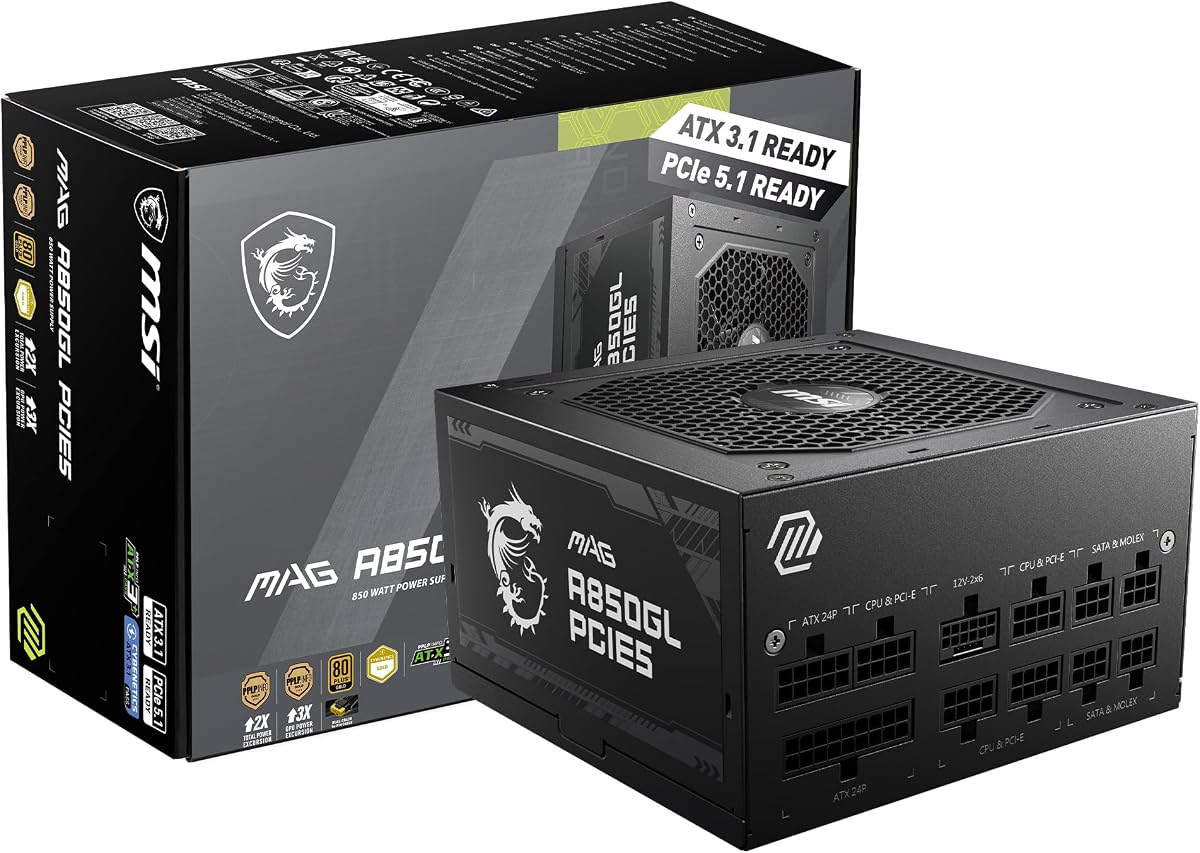


The MSI MAG A850GL PCIE5 stands out as a top choice for modern gaming builds. It offers 850W of power with full ATX 3.1 compliance and a native 12V-2×6 connector. This ensures compatibility with the latest graphics cards without adapters.
We may earn a commission when you buy through this link, at no additional cost to you.
Its efficiency rating is 80+ Gold, meaning it wastes less electricity and generates less heat. The modular design allows you to use only necessary cables, improving airflow. The compact form factor is ideal for mid-tower and smaller cases.
Some users might find the fan slightly noisy under sustained full load. The cable length might be tight for larger cases with complex routing. However, these are minor issues compared to the overall performance and value.
This unit is perfect for gamers wanting future-proof power without overspending. It handles transient spikes well and supports PCIe 5.1 GPUs. We recommend it for most mid-range to high-end gaming systems.
This power supply meets the latest Intel ATX 3.1 standard. It supports PCIe 5.1 and handles power excursions up to 200% of rated load.
The included dual-color cable connects directly to new GPUs. This eliminates the need for risky adapter cables and reduces clutter.
We may earn a commission when you buy through this link, at no additional cost to you.
The CORSAIR RM850e (2025) delivers reliable power at a competitive price. It is ATX 3.1 certified and supports PCIe 5.1 GPUs natively. The design focuses on efficiency and silence for everyday gaming use.
We may earn a commission when you buy through this link, at no additional cost to you.
Its fan uses a rifle bearing for quiet operation even under load. Capacitors rated at 105C ensure steady electrical performance over time. Modern standby support allows for faster wake times from sleep.
It lacks advanced software features like iCUE monitoring. The cables are functional but not the sleekest on the market. These trade-offs are acceptable for a unit focused on core reliability.
Buy this if you want a solid, quiet PSU without extra features. It is great for standard gaming rigs needing 850W. The price makes it an accessible entry to ATX 3.1 power.
A 120mm rifle bearing fan reduces noise. The fan curve is calculated to stay quiet during low and medium loads.
This unit supports modern standby for faster system wake times. It also ensures better efficiency during low-load idle states.
We may earn a commission when you buy through this link, at no additional cost to you.
The CORSAIR RM850x focuses on efficiency and premium build quality. It holds a Cybenetics Gold rating for up to 91% efficiency. The fully modular design includes embossed cables for easier routing.
We may earn a commission when you buy through this link, at no additional cost to you.
The native 12V-2×6 connector ensures direct GPU connection. This prevents adapter issues and improves power delivery stability. Noise levels are kept low even during gaming sessions.
It costs a bit more than the RM850e. The cables are durable but may be stiff for some builds. However, the efficiency gains justify the extra cost over time.
Choose this for a balance of performance and silence. It suits builders who value clean aesthetics and efficiency. The build quality supports long-term use.
The embossed cables are flexible and low-profile. This makes cable management much easier in tight spaces.
We may earn a commission when you buy through this link, at no additional cost to you.
The CORSAIR RM1000x provides ample power for top-tier systems. It handles 1000W continuously with strong transient power handling. This ensures stability even when GPUs spike in power usage.
We may earn a commission when you buy through this link, at no additional cost to you.
The unit supports multiple GPUs if needed for work or gaming. It comes with a native 12V-2×6 connector for the latest cards. Cable management is simplified with full modularity.
Most gamers will not need this much power. It runs slightly less efficient at low loads. But for extreme setups, it offers peace of mind and headroom.
Get this if you plan a multi-GPU build or future upgrades. It is a robust choice for power-hungry rigs. The build quality matches the high output capacity.
This unit resists transient power spikes effectively. It protects components from voltage drops during heavy load changes.
We may earn a commission when you buy through this link, at no additional cost to you.
The Thermaltake GF1 is designed for quiet operation during light tasks. The Zero RPM fan mode stops the fan entirely when not needed. This creates a silent experience for web browsing or idle states.
We may earn a commission when you buy through this link, at no additional cost to you.
It has a large 140mm fluid bearing fan for efficient cooling. The single 12V rail ensures stable power distribution. The 80 Plus Gold rating meets standard efficiency needs.
Under heavy gaming loads, the fan noise becomes noticeable. It lacks the latest ATX 3.1 native connector support. These issues are minor for budget-focused builds without top GPUs.
Buy this if silent idle is your priority. It offers good value for standard 850W needs. Just ensure your GPU does not require native ATX 3.1 cables.
The fan stops completely at low loads. This ensures total silence during non-gaming tasks.
We may earn a commission when you buy through this link, at no additional cost to you.
The be quiet! Pure Power 13 M excels in efficiency and silence. It achieves Cybenetics Platinum certification for very high efficiency. The fan uses semi-passive cooling to stay off during light loads.
We may earn a commission when you buy through this link, at no additional cost to you.
It supports massive transient loads up to double rated power. This ensures safe operation during GPU spikes. The native 12V-2×6 connector fits next-gen GPUs perfectly.
The price is higher than many rivals. There is limited aesthetic variation available. But the acoustic performance is unmatched for quiet builds.
Choose this for a silent PC that handles high loads. It is ideal for noise-sensitive environments. The efficiency saves power over the long term.
The fan stops until needed. This ensures silence during low-load usage.
We may earn a commission when you buy through this link, at no additional cost to you.
The ASRock Steel Legend SL-850G offers high value for its price. It meets ATX 3.1 and Cybenetics Platinum standards affordably. The dual-color cable simplifies identifying the 12V-2×6 connector.
We may earn a commission when you buy through this link, at no additional cost to you.
Japanese capacitors ensure stable performance and longevity. The 135mm fan runs quietly under most loads. The iCool fan control keeps noise low during lighter tasks.
It is not as powerful as 1000W models. Some buyers might prefer a more recognized brand. Yet the warranty and specs are very competitive.
Buy this for a budget build needing future proofing. It supports high-end GPUs with native connectors. A great option for value-conscious gamers.
The cable has two colors for easy insertion. This confirms correct status on the GPU.
We may earn a commission when you buy through this link, at no additional cost to you.
The ASUS ROG Strix 1000W Platinum is a top tier choice. It uses GaN MOSFETs for higher efficiency and better heat dissipation. The GPU-First voltage stabilizer delivers clean power directly to the graphics card.
We may earn a commission when you buy through this link, at no additional cost to you.
Its 80 Plus Platinum rating ensures very low waste. Dual ball bearings make the fan last longer than average. The design keeps noise low even under stress.
The price is high for most casual builds. It requires a large case for proper cooling. Yet it offers unmatched performance for enthusiasts.
Choose this for a high-end gaming rig. It supports future GPUs and heavy loads. The build quality justifies the premium cost.
GaN MOSFETs improve efficiency by up to 30%. This reduces heat and improves internal layout.
Patented voltage stabilizer enhances GPU delivery. This ensures smoother gameplay under load.
We may earn a commission when you buy through this link, at no additional cost to you.
The ASUS TUF Gaming 1000W Gold focuses on ruggedness. Components pass military-grade certification for extreme conditions. The PCB coating protects against dust and moisture for longer life.
We may earn a commission when you buy through this link, at no additional cost to you.
It handles 1000W with stable voltage regulation. The axial-tech fan provides effective cooling. It supports PCIe Gen 5.0 with bundled cables.
The fan can be noisy under heavy load. It is less efficient than Platinum options. But it stands up to tough environments well.
Buy this for reliable power in challenging environments. It suits builders who value longevity over noise. A solid choice for durable gaming systems.
Capacitors and chokes meet strict tests. This ensures stability in extreme conditions.
We may earn a commission when you buy through this link, at no additional cost to you.
The CORSAIR HX1500i is a beast for power needs. It delivers 1500W with full ATX 3.1 and PCIe 5.1 support. iCUE software lets you monitor settings and adjust protection on the fly.
We may earn a commission when you buy through this link, at no additional cost to you.
The 140mm FDB fan is quiet at low loads. Zero RPM mode ensures silence during light use. It resists transient spikes with high capacity.
The price is very high. It needs a large case for proper cooling. Most users will not need this much power.
Choose this for extreme workstation builds. It handles multiple high-end components easily. A top choice for those needing maximum power.
Custom fan curves and settings are adjustable. This allows monitoring and protection on the fly.
We may earn a commission when you buy through this link, at no additional cost to you.
Selecting the right power supply involves understanding wattage, efficiency, and connector types. This guide helps you make an informed decision for your specific build.
Determine your system's total power draw. Sum the CPU and GPU TDPs plus overhead. A 850W unit suits most gaming PCs with one high-end GPU.
Choose higher wattage for future upgrades or multiple GPUs. Ensure the PSU has enough headroom for stability.
Efficiency ratings like 80+ Gold or Platinum matter for long-term savings. Higher efficiency means less wasted electricity and less heat. Look for units that are efficient at common loads.
Select higher efficiency for 24/7 usage or power-sensitive needs. This reduces costs over the lifespan of the unit.
ATX 3.1 ensures compatibility with modern GPUs like RTX 4090. It requires native 12V-2×6 connectors. Always verify this feature for new builds.
Prioritize ATX 3.1 compliance for future-proofing. This avoids using risky adapters with high-power cards.
Fully modular PSUs allow you to use only needed cables. This improves airflow and reduces clutter. Non-modular units have all cables fixed.
Always choose fully modular for better cable management. It makes building easier and cleaning simpler.
Fan type affects noise and lifespan. Fluid Dynamic Bearing or Rifle Bearing fans last longer and run quieter. Zero RPM mode stops the fan during idle.
Opt for Zero RPM if silence is a priority. This helps keep the room quiet during casual use.
Modern PSUs include protections like OVP and OCP. These shield components from voltage issues. Ensure your unit has comprehensive safety features.
Look for multiple protection layers for component safety. This protects your expensive hardware from electrical faults.
A long warranty indicates manufacturer confidence. Ten years is standard for quality units. Check terms for claim processes and support options.
Choose units with at least 7-year warranty. This ensures long-term coverage for unexpected failures.
Check case clearance before buying. Most standard PSUs fit ATX cases. Some compact models are needed for small form factors.
Verify dimensions match your case size. This prevents fit issues during installation.
Connect only the cables you need to your system. Do not use adapters unless necessary. This maintains airflow and reduces strain on connectors.
Place your PC in a well-ventilated area. Keep the PSU intake clear of dust. Dust buildup can lead to overheating and fan noise.
Check connections periodically for security. Ensure all modular cables are fully seated. Proper seating ensures reliable power delivery.
Fully modular units allow you to plug in only the cables you need. This reduces clutter and improves airflow inside the case. Better airflow helps lower component temperatures.
Yes, ATX 3.1 is recommended for new high-end GPUs. It provides a native 12V-2×6 connector. This avoids using adapters that can be risky.
For most gaming PCs, 850W is sufficient. If you have multiple GPUs or plan upgrades, choose 1000W or more. Always check your GPU's specific power needs.
Gold or Platinum PSUs offer better efficiency. This means less wasted power and heat. They are worth it for 24/7 systems or high-load gaming.
Ensure your case has good airflow. Do not block the PSU intake. Clean dust regularly to maintain proper cooling performance.
This is the new standard connector for modern GPUs. It replaces the older 12VHPWR with improved safety. Most ATX 3.1 PSUs include this cable.
We reviewed ten top power supplies ranging from budget to premium options. Each unit offers unique strengths in efficiency and features. Choose one that matches your build goals.
Prioritize ATX 3.1 compliance and modular design. These features ensure compatibility with future hardware. Efficiency ratings help lower long-term operating costs.
Always check current prices before buying. Deals change often and may shift the value proposition. Use our comparisons to find the best fit today.