
Geemarc Ampli550 Big Button Landline Telephone
4.1Editor score
55dB TrueSound amplification
Talking caller ID keys
Extra loud 95dB ringer
This guide compares the best captioned telephones for hearing impaired users, evaluating features like real-time captions, amplified sound, and accessibility
Captioned telephones for hearing impaired users provide a vital bridge to clear communication by displaying real-time text of spoken conversations. These devices combine traditional phone functionality with advanced captioning technology to ensure no words are missed during important calls with family or emergency services.
To compile this list, we evaluated products based on caption accuracy, audio amplification capabilities, user interface simplicity, and compatibility with hearing aids. We analyzed customer feedback, technical specifications, and service requirements to identify models that deliver reliable performance for diverse hearing loss needs.
Each selection below highlights unique strengths such as touchscreen controls, amplified ringer alerts, or cordless mobility. While pricing and availability may shift, these models represent the current top options for seniors and adults seeking enhanced phone accessibility through captioning and sound support features.
4.1Editor score

4.3Editor score

4.0Editor score
The following table compares key technical specifications across all ten models to help you quickly identify the device that best matches your hearing needs, accessibility preferences, and home telephone setup requirements.




This captioned telephone delivers reliable real-time text during calls, transforming voice conversations into readable captions on a large touchscreen. With a 4.3 rating, it stands out for combining high amplification and flexible caption modes for users who need clarity.
We may earn a commission when you buy through this link, at no additional cost to you.
The device offers up to 40dB amplified gain and customizable caption sizes. You can choose between fully automated captioning or assisted captions with live operator support. Additionally, the built-in answering machine displays voicemail captions, ensuring you never miss important recorded messages.
A trade-off is that the phone requires a high-speed internet connection and is only available to US residents with hearing loss who complete registration. These requirements ensure service quality but may limit flexibility for users without broadband access at home.
If you seek the most comprehensive captioning experience with audio support, this model is the top choice. It is ideal for seniors or anyone needing clear conversation clarity through both visual captions and amplified sound for every call.
Combining real-time captions with volume control up to 40dB ensures users can hear and read conversations simultaneously for maximum confidence.
Switch between auto captions and assisted captions depending on call complexity, with live operator support available for challenging conversations.
We may earn a commission when you buy through this link, at no additional cost to you.
The Ampli550 provides robust audio amplification without needing internet service, making it a practical budget option for hard-of-hearing individuals. It offers TrueSound amplification up to 55dB and extra-large buttons for simple dialing and reading.
We may earn a commission when you buy through this link, at no additional cost to you.
Key features include a 95dB ringer with a flashing strobe, talking keys that announce numbers, and a backlit LCD display. The phone is hearing aid compatible with support for various jacks and offers one-touch memory dial for frequently called numbers.
While it lacks captioning capabilities, its primary focus is on loud audio and user-friendly controls. Users who rely on hearing aids or need strong visual and audio alerts will find this model effective without extra service subscriptions.
For those needing a reliable amplified landline phone without captioning costs, this is an excellent value pick. It is best suited for users whose main challenge is hearing ringers and speaker volume rather than speech content.
The 95dB ringer ensures you never miss an incoming call, even in noisy environments or when hearing sensitivity is reduced.
Talking keys and extra-large buttons allow users with low vision to dial confidently without needing to read small text on the display.
We may earn a commission when you buy through this link, at no additional cost to you.
The Clarity AltoPlus is TIA-4953 certified for mild to severe hearing loss, offering up to 53dB amplification with ergonomic controls designed for users with arthritis. It features talking Caller ID and a large backlit screen for clear navigation.
We may earn a commission when you buy through this link, at no additional cost to you.
Unique features include outgoing speech amplification of 15dB to make your voice louder for callers, and a 100dB ringer with visual indicators. The phone supports various accessories like neckloops and headsets through dedicated jacks for personalized hearing aid integration.
The main limitation is the absence of real-time captioning, which some users may expect. However, for those prioritizing certified audio amplification and outgoing voice boost, this model provides premium sound quality and accessibility standards.
If you require certified amplification for severe hearing loss and need to speak louder during calls, this is the best premium choice. It is particularly well-suited for users with arthritis who need tone and volume controls that are easy to manage.
TIA-4953 certification ensures the device meets strict testing criteria for amplification suitable across mild to severe hearing loss stages.
Outgoing speech amplification helps users hear their own voice better and ensures callers hear them clearly during two-way conversations.
We may earn a commission when you buy through this link, at no additional cost to you.
The Captel MDL 200 is a straightforward corded telephone designed for the hearing impaired with support for captioning services. Its design focuses on essential functions such as large buttons and basic dialing for users who prefer simplicity.
We may earn a commission when you buy through this link, at no additional cost to you.
This model provides a no-frills option for accessing captioned telephone services without advanced touchscreen features or complex settings. It is suitable for users who require the primary benefit of real-time text during calls without additional bells and whistles.
Users may find the feature set minimal compared to newer models with amplification or visual alerts. However, the simplicity makes it less intimidating for seniors who need a reliable tool to maintain telephone access with captioning support.
Consider this model if you want a basic captioned phone without advanced controls or higher cost. It works best for users with existing setups who need an affordable replacement or a dedicated phone for captioning service use.
This phone removes complex features to provide a clear dialing experience with captioning support for straightforward daily calls.
We may earn a commission when you buy through this link, at no additional cost to you.
The Serene Innovations SI-CL-65 HD offers a cordless option with HD audio support and talking caller ID, giving users mobility while keeping key accessibility features. It is designed to work with captioning services to ensure clear conversations.
We may earn a commission when you buy through this link, at no additional cost to you.
This model is suitable for seniors who want the freedom to walk around while using the phone. The talking caller ID feature helps identify who is calling before answering, which is vital for those who rely on audio cues.
While details about amplification levels are limited, the focus on HD audio and cordless design makes it stand out. Users should verify service compatibility to ensure seamless integration with captioning features during active calls.
If mobility is a priority alongside captioning support, this cordless model is a strong contender. It is ideal for users who need a modern phone that supports captioning services without sacrificing convenience or sound quality.
The cordless design allows users to stay connected throughout the home while still accessing captioning services for clarity during conversations.
We may earn a commission when you buy through this link, at no additional cost to you.
The VTech SN5147 is a hybrid system featuring a corded base that works during power outages and a cordless handset for mobility. It includes 50dB audio assist and oversized buttons for easier reading and dialing.
We may earn a commission when you buy through this link, at no additional cost to you.
This phone offers practical features such as a visual ring indicator, call blocker, and photo speed dial for calling loved ones instantly. The answering machine allows remote access and slow playback for clearer message understanding.
While it lacks real-time captioning, its strong audio assist and visual alerts serve many hard-of-hearing users effectively. Users who need a backup power solution and simple photo dialing will appreciate the thoughtful senior-focused design.
Choose this if you need a hybrid phone with strong audio amplification and visual alerts. It is best for seniors who value reliability during power outages and want simple photo-based dialing options for family calls.
The corded base ensures calls work even during power outages, providing essential communication reliability for seniors without backup generators.
Photo speed dial slots let you call contacts by pressing a picture, making it easier for users with memory or vision challenges.
We may earn a commission when you buy through this link, at no additional cost to you.
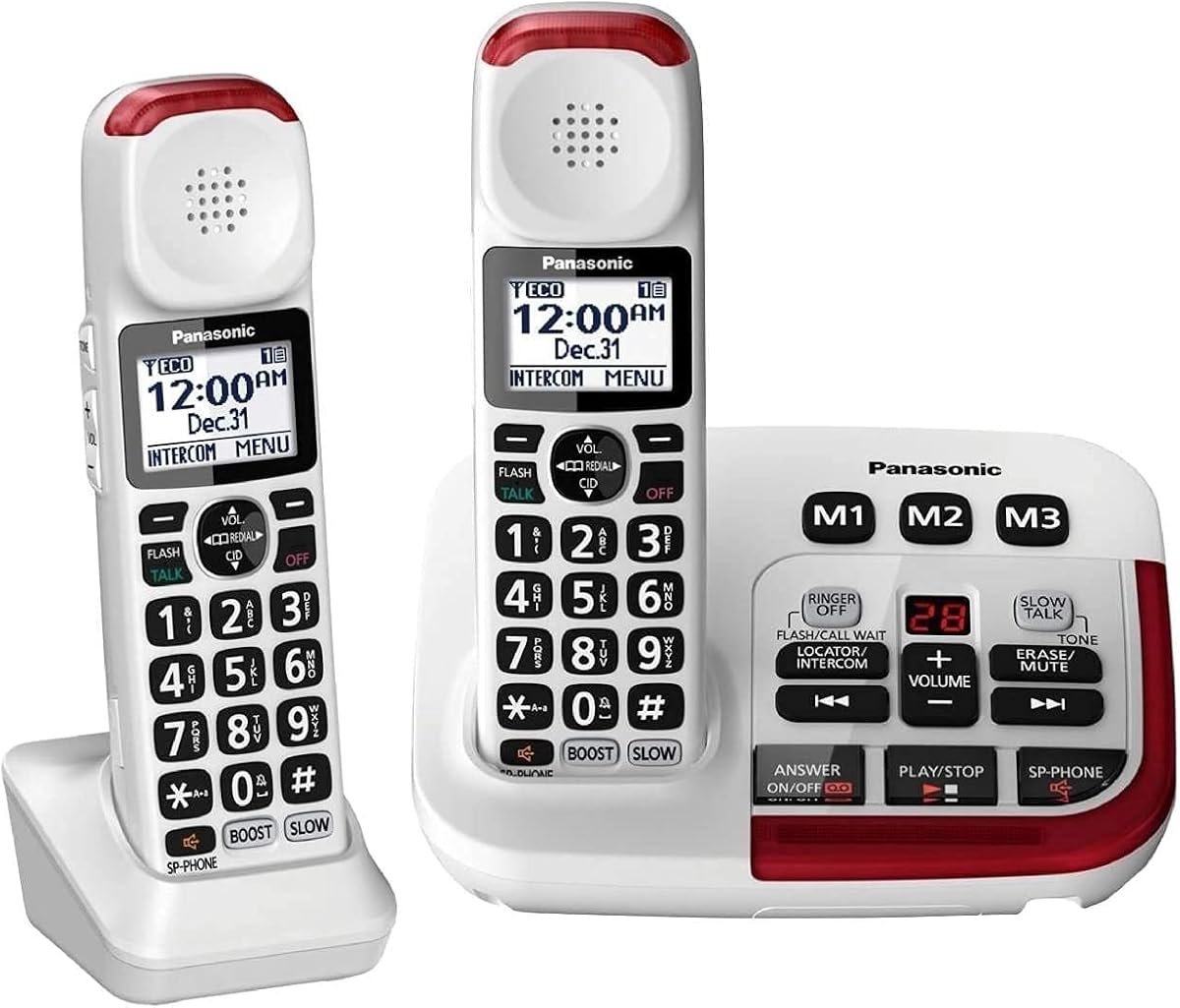
The Panasonic KX-TGM420W system features a volume booster up to 40dB and a unique slow talk function that reduces speech speed for clearer understanding. It includes a large backlit LCD display and noise reduction for calls in noisy environments.
We may earn a commission when you buy through this link, at no additional cost to you.
Key strengths include expandability to six handsets, power backup, and talking Caller ID. The slow talk feature is particularly helpful for users who struggle to process fast-paced speech during conversations with family or caregivers.
While it lacks captioning, the combination of volume boost and slow talk offers significant accessibility for speech clarity. Users needing multiple handsets for different rooms will find the system flexible and reliable.
This system is best for households requiring multiple handsets and speech processing features like slow talk. It is ideal for seniors who need to hear calls clearly and understand spoken words without reading text captions.
Real-time slow talk function adjusts speech speed to help users understand conversations more easily without needing external assistance.
We may earn a commission when you buy through this link, at no additional cost to you.
The SWISSVOICE Big Button Phone offers large photo memory buttons that let users dial by pressing a contact image, which is helpful for those with low vision or memory issues. It includes a corded base and a cordless handset with an answering machine.
We may earn a commission when you buy through this link, at no additional cost to you.
This model focuses on visual accessibility and loud alerts with a 90dB adjustable ringer. The two-handset setup ensures flexibility around the home. It is hearing aid compatible and features a built-in call block to reduce unwanted interruptions.
Users should note that this phone does not support captioning services, relying instead on audio and visual cues. While the photo dialing is unique, its overall rating suggests mixed experiences with call quality or customer support.
Consider this model if you want photo dialing and multiple handsets at a reasonable price. It is best for elderly users who need visual contact recognition and loud audio alerts without captioning requirements.
Photo memory buttons allow users to dial family members by picture, reducing confusion and effort for those with memory challenges.
We may earn a commission when you buy through this link, at no additional cost to you.
This version of the Panasonic KX-TGM420W comes with two handsets for greater home coverage. It features volume boost up to 40dB, noise reduction, and slow talk function for clearer understanding of speech during active calls.
We may earn a commission when you buy through this link, at no additional cost to you.
The system offers expandability up to six handsets, allowing users to place units throughout the house. Talking Caller ID and power backup ensure convenience and reliability. The bright LED visual ringers help you spot calls in low light.
While the extra handset adds cost, it is useful for multi-room setups. The lack of captioning means it serves users who prioritize volume and speech clarity over text-based support for conversations.
Choose this if you need multiple handsets for family members and want strong audio features. It is best for households where everyone needs reliable amplified calling without relying on captioning services.
Two handsets allow flexible placement across rooms, ensuring calls are always reachable regardless of where you are in the home.
We may earn a commission when you buy through this link, at no additional cost to you.
This landline phone offers an extra loud 100dB ringer and LED flash alerts for users who rely on visual cues. It includes photo speed dial and 80dB receiver gain for mild to moderate hearing loss with hands-free speakerphone use.
We may earn a commission when you buy through this link, at no additional cost to you.
The phone features large buttons and memory slots that store contact photos for easy dialing. It is hearing aid compatible and built for stability on a desk. Visual ring indicators ensure you never miss a call even in noisy settings.
Limitations include lack of captioning and reduced suitability for profound hearing loss. Users needing text support may need other options, but for loud alerts and visual contact memory, this phone serves practical senior needs well.
If you need loud ringers and visual call indicators on a budget, this is a solid choice. It is best for seniors who prefer picture-based dialing and require strong audio alerts for incoming calls.
The LED flash alert activates on incoming calls so users can see notifications even if the ringer volume is lowered.
We may earn a commission when you buy through this link, at no additional cost to you.
Choosing a captioned telephone involves evaluating captioning services, audio amplification, interface design, and connectivity requirements to match your hearing loss level and daily communication habits.
Most captioned phones require internet connectivity and registration for FCC-certified services. Check if your home has high-speed Wi-Fi and ensure you qualify for the service in your region before purchasing.
Ensure your internet setup supports the service and that registration steps are manageable for your technical skill level.
Look for models offering 40dB to 53dB amplification for moderate to severe hearing loss. Higher gain ensures voices are louder without distortion during calls.
Match amplification levels with your hearing loss severity to avoid under- or over-amplification.
Phones with 90dB to 100dB ringers and LED flashing lights ensure you never miss calls in noisy environments. These visual cues are vital for hearing-impaired users.
Prioritize models with both loud and visual alerts to stay connected at all times.
Large buttons, backlit displays, and photo memory dial simplify dialing for those with low vision or dexterity challenges. Touchscreens can offer more control if supported.
Choose displays and buttons with high contrast for easier visibility.
Verify the device supports TIA-603 standards or includes jacks for neckloops and headsets. Compatibility ensures smooth integration with your existing hearing aids.
Check jack types like 2.5mm or 3.5mm for accessories.
Corded phones ensure reliability during power outages, while cordless models provide mobility. Hybrid systems offer both benefits depending on your usage needs.
Evaluate if you need backup power capability for calls during outages.
Features like outgoing speech amplification and slow talk help users understand conversations better. These tools support two-way clarity beyond just receiving calls.
Look for phones with these extra accessibility functions for comprehensive support.
Begin by connecting the phone to your internet or telephone line and powering it on. Follow the on-screen prompts to register your account and verify your hearing loss status for access to captioning services.
To customize settings, use the menu to adjust volume, caption size, and ring tone. For visual alerts, enable LED flash options and test the ringer to ensure it matches your environment.
Clean the device regularly with a soft, dry cloth to prevent dust from obscuring buttons or screens. Store the phone in a stable, accessible location and check for firmware updates periodically to maintain performance.
Most captioned telephones work with standard telephone lines and require high-speed internet for captioning services. Ensure your line supports the service requirements before purchasing to avoid connectivity issues.
Captioned phones are best for mild to severe hearing loss; those with profound loss may need specialized assistive devices. Check device specifications to confirm it matches your hearing needs.
Captioning displays text of spoken words during calls, while amplification increases sound volume. Using both features ensures you can see and hear conversations clearly.
Registration typically requires proof of hearing loss submitted online or by phone. Follow the manufacturer's steps to activate the service and start using captions.
Most require internet for captioning services, but some models offer amplified calling without captions. Check if your chosen model supports offline amplified use.
Many models include built-in call blocking features to prevent robocalls. Use these settings to reduce unwanted interruptions and improve call clarity.
This guide presents ten top-rated captioned telephones that balance advanced captioning features with audio amplification and accessible design. Whether you need real-time captions, loud visual alerts, or photo dialing, these models offer reliable solutions for staying connected.
Prioritize features like internet connectivity for captions, amplification levels matching your hearing loss, and visual alerts to ensure you never miss a call. Consider whether cordless mobility or corded reliability better fits your home setup.
Before purchasing, confirm service availability, registration requirements, and current pricing. Regularly update your device settings to maintain performance and accessibility for daily communication needs.