
xTool F2 Ultra 60W MOPA & 40W Diode
4.2Editor score
Dual MOPA and diode lasers
Color engraving on metals
AI-powered precision cameras
Finding the right tool for precision cutting and engraving requires careful consideration of power, safety, and workflow efficiency. A 60W laser engraver offers a sweet spot between hobbyist needs and professional demands. It delivers sufficient power for thicker materials while maintaining speed for detailed work on various surfaces like wood, acrylic, and metal coatings.
We evaluated ten leading models based on their laser source types, safety certifications, software compatibility, and overall build quality. Our analysis focuses on real-world performance metrics such as cutting speed, engraving accuracy, and ease of integration into existing production environments. Each product was scrutinized for its ability to handle diverse materials without compromising on safety or operational consistency.
Each pick highlights unique strengths whether you need batch processing capabilities, color metal marking, or a fully enclosed workspace. The following reviews provide deep insights into how these machines perform under different conditions. Please note that specifications and availability can change, so verify current details before making your final purchase decision to ensure you get the best value.
4.2Editor score

4.8Editor score

5.0Editor score
As an Amazon Associate we earn from qualifying purchases.
The following table provides a side-by-side comparison of all ten reviewed 60W laser engraver models. It highlights key specifications including laser type, working area, safety features, and software compatibility to help you quickly identify the best fit for your specific project needs and budget constraints.




The Creality Falcon2 Pro is a robust 60W laser engraver designed for serious makers and growing businesses. It features a fully enclosed Class 1 design that ensures safety while maintaining high performance. The dual laser system allows for precise positioning and high-speed cutting simultaneously.
We may earn a commission when you buy through this link, at no additional cost to you.
Its adjustable power levels ranging from 60W to 22W provide versatility for different materials without changing machines. The built-in HD camera streamlines workflow by enabling accurate material positioning and live preview before engraving. This reduces setup time significantly for batch production tasks.
While the price is higher than hobbyist models, the integrated safety features and production-ready performance justify the investment. The enclosure minimizes smoke and noise creating a cleaner workspace. Air assist and exhaust management ensure cleaner cuts and less burn marks on sensitive materials.
This machine is ideal for small businesses needing reliable throughput for signs and personalized gifts. It supports wood acrylic leather and coated metals with ease. If you value safety precision and efficiency in a single unit this is a top recommendation for professional use.
The fully enclosed Class 1 design minimizes laser exposure and improves smoke containment with emergency stop monitoring.
A 60W laser handles heavy duty tasks while a 1.6W laser enables precise positioning and fine engraving details.
We may earn a commission when you buy through this link, at no additional cost to you.
The Creality Falcon2 Pro Desktop variant offers a powerful 60W output optimized for batch processing tasks. Its integrated enclosure provides safety and smoke containment which is crucial for indoor workshops. The machine supports engraving speeds exceeding 500mm/s for high efficiency.
We may earn a commission when you buy through this link, at no additional cost to you.
A built-in camera with intelligent focus allows users to preview designs and align materials without manual measurement. This feature significantly improves success rates for complex projects. The design includes multiple safety protections like flame detectors and emergency stop buttons.
While the speed is impressive, users may need time to familiarize themselves with the native software interface. The machine is mostly assembled out of the box requiring minimal setup time. Cleaning is simplified by a debris drawer design that keeps the workspace tidy.
This model suits sole traders and professional players needing reliable mass production capabilities. It handles wood acrylic and other materials with speed. Consider this if you prioritize throughput and safety features in a desktop unit.
Achieve engraving speeds over 500mm/s to reduce processing time for batch orders efficiently.
Intelligent camera focus eliminates manual measurement needs for accurate design placement.
We may earn a commission when you buy through this link, at no additional cost to you.
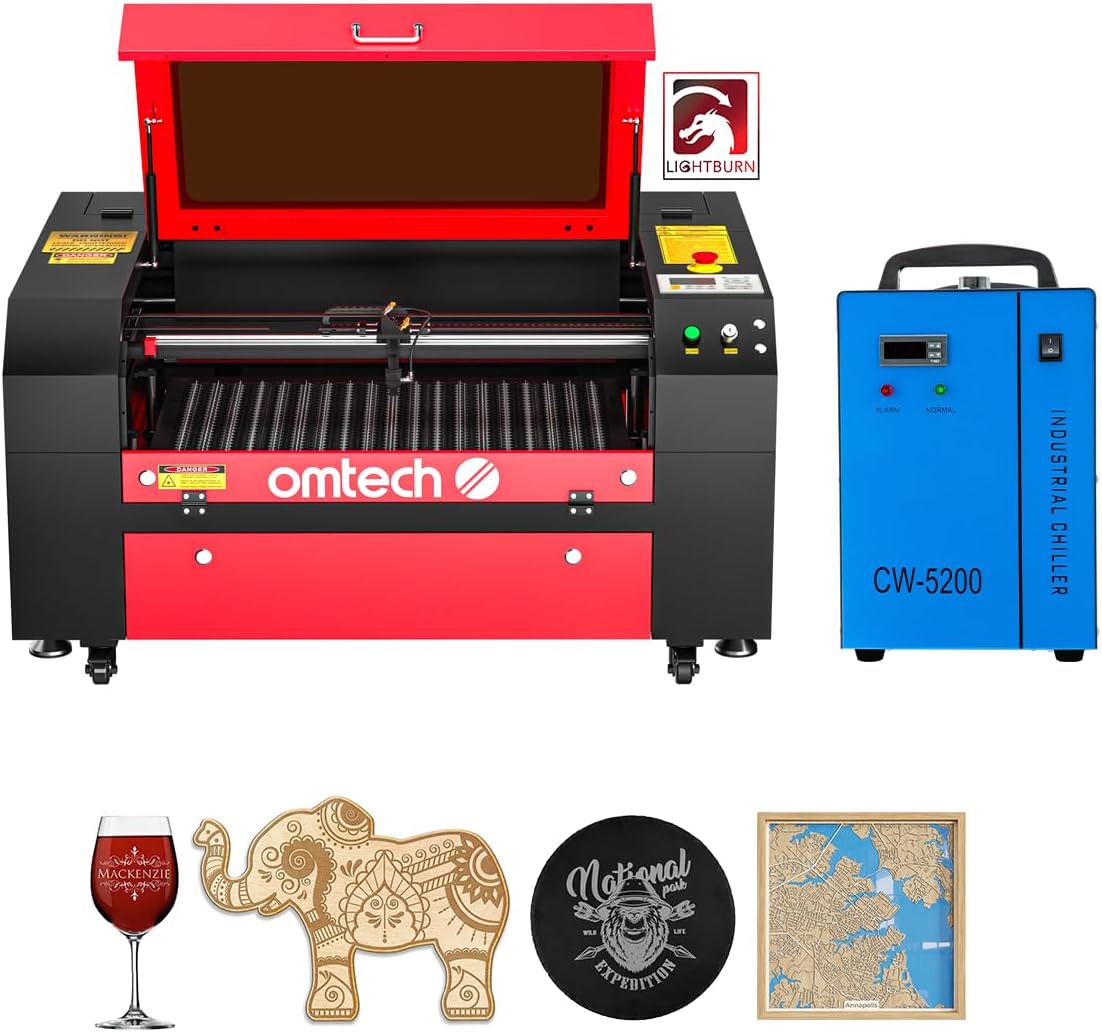
The OMTech Maker 60W CO2 laser engraver is designed for handling large items with ease. It comes bundled with LightBurn software and a water chiller to ensure consistent performance. The work area measures 20×28 inches accommodating most project sizes comfortably.
We may earn a commission when you buy through this link, at no additional cost to you.
Autofocus capabilities eliminate manual adjustments saving time during setup. The pass-through doors allow for longer items to be processed without moving the machine. This is ideal for custom signs and large decorative pieces made from wood or acrylic.
However it is limited to non-metal materials except for coated metals. Users must ensure proper ventilation due to the CO2 laser source. The aluminum blade beds and honeycomb options provide versatile support for various material types.
This machine is perfect for businesses focusing on large scale engraving. It balances cost with performance for non-metal applications. Consider this if your primary materials are acrylic wood or glass.
The 20×28 inch bed supports large projects with four-way pass-through doors for long materials.
Comes with water chiller and LightBurn software to start working immediately without extra costs.
We may earn a commission when you buy through this link, at no additional cost to you.
This version of the Falcon2 Pro prioritizes safety with a certified Class 1 enclosure. It includes an integrated auto-stop function for added security. The built-in camera visualizes operations making it easier for beginners to navigate workflows.
We may earn a commission when you buy through this link, at no additional cost to you.
It can cut through 20mm wood in a single pass saving time compared to standard machines. The exhaust system filters smoke effectively reducing the need for protective glasses. Free design software is included for easier integration.
Setup is simplified as the machine arrives pre-assembled for quick usage. Lifetime technical support and a 12-month warranty offer peace of mind. However some users may face connectivity challenges with the camera module.
Ideal for small businesses seeking high performance with beginner friendly features. It handles wood acrylic and leather well. Verify camera connectivity before purchase to ensure smooth operation.
Class 1 safety prioritizes users of all levels with fire-resistant enclosure and auto-stop functions.
High resolution camera allows visualized procedures and batch operations for improved efficiency.
We may earn a commission when you buy through this link, at no additional cost to you.
The xTool F2 Ultra stands out with its dual laser system combining a 60W MOPA fiber and 40W diode. This allows it to master all materials including metals wood and acrylic with vibrant color engraving. It offers industrial grade productivity speeds up to 15000mm/s.
We may earn a commission when you buy through this link, at no additional cost to you.
Dual AI cameras increase positioning accuracy to 0.2mm boosting precision significantly. The machine supports over 100 consistent colors on metals via pre-set files. This reduces testing time and simplifies the creative process.
While it is a premium investment the versatility and speed justify the cost for serious professionals. The conveyor belt enables automated batch processing for high volume orders. Maintenance and operational complexity are higher than desktop units.
This is the top choice for those needing all-metal capability on a desktop. It excels at 3D deep engraving and color marking. Consider this for high-end professional studios requiring maximum flexibility.
Delivers over 100 vibrant colors on metals with precise calibration and pre-set files.
Operating up to 15000mm/s reduces production time significantly for complex tasks.
We may earn a commission when you buy through this link, at no additional cost to you.
The Monport 60W Fiber Laser is a mini marking machine optimized for precision metal etching. It features a customized galvanometer system allowing speeds up to 10000mm/s with high accuracy. The laser source has a lifespan of 100000 hours.
We may earn a commission when you buy through this link, at no additional cost to you.
It supports all metals including gold silver and stainless steel easily. The working area is optimized to 150x150mm to avoid distortion. Users can operate it with LightBurn or provided free software.
While the area is small it suits detailed work like jewelry or industrial parts. The compact size makes it easy to integrate into limited spaces. Ensure you understand metal marking limits before purchasing.
This is ideal for businesses focusing on small high-precision metal parts. It provides reliable performance for marking tasks. Consider this if you need a dedicated metal marking solution.
Achieves 0.01mm carving accuracy with customized reflectors for detailed metal work.
Laser source lifespan reaches up to 100000 hours for reduced maintenance costs.
We may earn a commission when you buy through this link, at no additional cost to you.
VEVOR offers a 60W CO2 engraver with a spacious 24×16 inch work area. It supports non-metal materials like wood acrylic and glass with clean burr-free edges. The pass-through design accommodates longer items for flexible workflows.
We may earn a commission when you buy through this link, at no additional cost to you.
It connects via USB and works with Windows macOS and Linux systems. Compatible software includes LightBurn and RDWorks. Manual focusing is simple with the control panel and scale for accuracy.
While it lacks an enclosure, air assist clears dust and smoke effectively. The pull-out waste tray simplifies cleanup for regular use. This unit balances price with performance for small studios.
This machine is great for hobbyists and small businesses needing space. It handles leather and wooden decor well. Ensure you have proper ventilation for open-air operation.
The 24×16 inch work bed with pass-through doors handles large projects easily.
Fully compatible with LightBurn RDWorks and CorelDRAW for broad design support.
We may earn a commission when you buy through this link, at no additional cost to you.
This OMTech model features a 28×20 inch work area ideal for commercial projects. The autolift motorized workbed adjusts height easily at the touch of a button. It includes LightBurn and water chiller for consistent performance.
We may earn a commission when you buy through this link, at no additional cost to you.
It can engrave as deep as 0.4 inch on nonmetallic materials. The high-performance DC tube delivers 60W power with extended lifespan. Pass-through doors allow for handling longer items without interruption.
The bundle simplifies setup and provides professional tools out of the box. Users save time on software installation and cooling setup. It is built for frequent use in professional environments.
This unit suits businesses needing reliable large-scale cutting and engraving. It handles wood glass and acrylic efficiently. Verify your space before purchase due to its size and weight.
Motorized workbed adjusts up and down with a button for easy height setup.
Includes chiller and software to start working immediately without extra purchases.
We may earn a commission when you buy through this link, at no additional cost to you.
The Aliencell X1 Lite achieves photo-quality engraving with high frequency pulses. It features a massive 26×21 inch bed for large scale projects. The intelligent auto-focus locks onto material instantly for precision.
We may earn a commission when you buy through this link, at no additional cost to you.
Aliencell Space software simulates engraving to reduce waste and guesswork. It shows exact depth and contrast before processing. This is ideal for businesses working on batches with tight quality requirements.
It is SGS certified and fully enclosed Class 1 for safety. Local shipping and warranty support add value for buyers. However learning the simulation software requires time investment.
This machine is best for detailed artistic work and small businesses. It handles fabric wood and leather well. Choose this if precision and material safety are priorities.
High frequency 20kHz ensures smooth gradients and dense laser pulses for rich detail.
Space software visualizes designs before cutting to reduce material waste and errors.
We may earn a commission when you buy through this link, at no additional cost to you.
Cloudray offers a 60W JPT MOPA fiber laser for metal fabrication. It supports color marking and deep engraving with high resolution. The portable design makes it easier to move between workstations.
We may earn a commission when you buy through this link, at no additional cost to you.
It comes with two F-theta lenses for different precision areas. A manual lift column allows height adjustment for larger pieces. The system reaches 10000mm/s speeds for efficient marking tasks.
Safety is maintained with Class 2 standards and provided safety goggles. It is ideal for rings and metal rods needing intricate text. Verification of local regulations is necessary before use.
This model suits specialized shops needing metal customization. It handles stainless steel and aluminum easily. Consider this for professional metal marking applications.
Achieves 100+ color markings on metals with precise calibration for visual impact.
Reaches engraving depth of 0.5mm with consistent marking resolution.
We may earn a commission when you buy through this link, at no additional cost to you.
Choosing the right 60W laser engraver involves evaluating laser type, safety, and software to match your needs. This section outlines key factors to help you make an informed decision.
CO2 lasers are best for non-metals like wood and acrylic. Fiber lasers excel at metal marking. Diode lasers offer a balance for beginners. MOPA lasers provide versatile color options on metals. Understand which materials you will use most often.
Choose CO2 for organic materials and Fiber for metals to ensure optimal performance.
Look for Class 1 enclosed units that minimize exposure and contain smoke. Safety features like emergency stops and flame detectors prevent accidents. Proper ventilation is necessary for open models. Always follow manufacturer safety guidelines.
Prioritize enclosed designs to protect users and manage fumes effectively.
Ensure the engraver supports LightBurn or professional tools you already use. Native software should offer intuitive controls. Compatibility with design files streamlines workflow. Open systems provide better long-term support. Check for updates regularly.
Verify software compatibility to avoid workflow disruptions during production.
A larger bed accommodates bigger projects without repositioning. Compact units save space but limit size. Measure your workspace before buying. Consider pass-through doors for long items. Balance area with machine footprint.
Select a bed size that fits your typical project dimensions.
Integrated cameras improve accuracy by allowing visual alignment. Auto-focus saves setup time. This feature is vital for batch production. Look for dual systems if precision is critical. Test camera features before committing.
Camera systems reduce errors and speed up setup significantly.
CO2 lasers need tube replacements while fiber units require less maintenance. Check availability of spare parts. Regular cleaning ensures consistent results. Dust and smoke filtration are essential. Plan for routine checks.
Choose models with accessible parts for ease of upkeep.
Higher priced units often offer better reliability and safety. Check warranty terms for the laser source and electronics. Customer support availability is crucial for troubleshooting. Factor in software costs when budgeting. Read reviews for reliability.
Look for comprehensive warranties to protect your investment.
Faster machines increase output but may cost more. Balance speed with accuracy for your needs. Batch processing requires rapid cycle times. Verify advertised speeds in reviews. Consider throughput requirements.
Prioritize speed if volume is your main priority.
Before starting, prepare your workspace by ensuring adequate ventilation and safety barriers. Place the machine on a stable surface to prevent vibration. Connect all power and cooling systems correctly. Verify that safety interlocks function before turning it on.
For operation, install the recommended software and connect the machine via USB. Adjust the focus according to your material thickness using the provided guidelines. Test on scrap material first to calibrate settings. Use protective eyewear during any open testing.
After use, clean the bed and lenses with approved materials. Empty debris trays to prevent fire hazards. Store the machine in a dry environment. Perform regular maintenance checks on fans and tubes. Keep a log of usage and cleaning schedules.
Most standard CO2 or diode 60W models cannot cut metal but can mark coated metals. Fiber or MOPA lasers are required for cutting metals. Always check the specs for metal compatibility before buying to avoid limitations.
Yes, Class 1 devices are fully enclosed to prevent laser exposure and contain fumes. They are ideal for indoor use without extra shielding. This standard protects users from direct beam contact effectively.
LightBurn is the industry standard for most models. Native software like Creality Design Space or Aliencell Space is also included. Verify compatibility with your workflow to ensure smooth operation.
CO2 tubes typically last 3500 hours. Fiber sources can reach 100000 hours. Proper cooling and usage extend lifespan. Regular cleaning prevents damage to the optics.
Yes, CO2 and diode models require ventilation to manage smoke. Class 1 units contain smoke but external exhaust helps. Ensure your workspace meets local safety standards.
Some bundles include LightBurn licenses. Others require separate purchase. Check the product details to know if you need to buy it separately.
The top picks like the Falcon2 Pro and xTool F2 Ultra offer excellent balance of safety and performance. These models stand out for their enclosed design and advanced features.
Consider what materials you process most and prioritize speed or safety accordingly. A Class 1 unit is recommended for professional environments to ensure compliance.
Always check current availability and warranty details before purchasing. Prices and stock change often so verify specs to make the right choice for your needs.