
YCA1030 Dusk to Dawn Sensor
4.4Editor score
Hardwired photocell design
IP65 weatherproof rating
Standard residential fit
This comprehensive guide compares the top ten light sensors for home security systems available in October 2026 to help you protect your property efficiently.
Securing your home requires reliable technology that can detect activity and respond accordingly. Light sensors play a crucial role in modern security setups by triggering lights when motion is detected or when ambient conditions change. Choosing the right device ensures your property remains visible and monitored at all times.
We have analyzed ten leading products to provide you with a detailed comparison of features, connectivity options, and reliability. Each entry in this list offers unique capabilities ranging from wireless motion detection to hardwired photocell solutions. Our goal is to help you find the perfect fit for your specific security needs.
Every product reviewed here includes specific details about installation requirements, battery life, and smart home compatibility. Prices and availability can fluctuate frequently so please verify the current offers before making your final purchase decision. We aim to give you a clear view of what each sensor delivers in real-world scenarios.
4.4Editor score

4.4Editor score

4.6Editor score
The following table provides a side-by-side comparison of all ten products reviewed in this guide. It highlights key specifications and connectivity options to help you quickly identify which sensor matches your home security requirements.


The Zigbee Motion Sensor stands out as a versatile tool for smart home enthusiasts who value local control. It combines a standard PIR motion detector with an ambient light sensor to create more intelligent automation routines. This dual capability allows you to trigger actions only when specific lighting conditions are met. The product is designed to work with Home Assistant and SmartThings platforms for robust connectivity.
We may earn a commission when you buy through this link, at no additional cost to you.
Its ability to differentiate between dark and lit environments makes it ideal for energy-efficient lighting setups. You can configure it to turn on lights only when someone enters a dark room. The sensor offers three adjustable sensitivity levels to minimize false triggers from pets or heat sources. The 360-degree adjustable mount ensures you can aim the detection zone exactly where needed.
While the requirement for a Zigbee hub adds a step to setup, it ensures a stable mesh network connection. The battery life is impressive with a CR2450 cell providing over a year of use. Low battery alerts keep you informed before the device stops working. However users without a hub might need to invest in one before installation.
This sensor is perfect for users who prioritize privacy and local automation over cloud dependency. It works seamlessly in environments where Wi-Fi congestion is a concern. The detailed light detection helps refine your smart home rules significantly. For anyone building a sophisticated security system with Home Assistant this device is a top contender.
The integrated light sensor allows you to create rules that consider ambient light levels. This means lights only turn on when it is actually dark outside saving energy.
With Zigbee 3.0 support the device connects reliably to your hub with a range of up to 26 feet. This ensures consistent performance across various home layouts.
We may earn a commission when you buy through this link, at no additional cost to you.
The TP-Link Tapo Motion Sensor offers a compelling balance of performance and battery efficiency. It uses a Sub-1G wireless protocol which extends its range and battery life significantly compared to standard Wi-Fi devices. This makes it an excellent choice for large homes where signal strength might vary. The device pairs with the Tapo Hub to enable smart actions even during network outages.
We may earn a commission when you buy through this link, at no additional cost to you.
Users can expect up to two years of battery life on a single CR2450 cell under normal usage conditions. This long lifespan reduces the maintenance effort required to keep your security system active. The sensor features a 120-degree detection angle and adjustable sensitivity settings to fit different rooms. Real-time notifications ensure you are alerted immediately when motion is detected.
While the sensor depends on the Tapo Hub it provides a cohesive ecosystem experience for those invested in the brand. The Smart Action feature allows you to automate lights or other devices without relying on complex scripts. Installation is straightforward with included adhesive or magnetic mounting options. It is a reliable low-maintenance option for indoor security monitoring.
This sensor is ideal for users who want a set-and-forget solution with minimal battery changes. Its robust wireless connection ensures it stays online even if your Wi-Fi struggles. The ability to run automations offline adds a layer of reliability for security tasks. For budget-conscious buyers needing long life this is a strong option.
The Sub-1G protocol is designed specifically to minimize power consumption while maintaining connectivity. This technology is why the battery lasts up to two years in typical scenarios.
Even when the internet is down the sensor can trigger local automations through the hub. This ensures your lights or alarms still respond to motion instantly.
We may earn a commission when you buy through this link, at no additional cost to you.
The Akamatis Litos v3 uses mmWave radar technology to detect human presence even when the person is not moving. This addresses a common limitation in traditional PIR sensors that might miss a stationary intruder or someone sitting quietly. It includes an integrated light sensor to help automate lighting based on ambient conditions. The device is designed specifically for Home Assistant users who want high-tech local control.
We may earn a commission when you buy through this link, at no additional cost to you.
The radar can detect objects up to 20 feet indoors providing reliable coverage for rooms where people might sit still. The front panel is designed to let light pass through naturally for accurate ambient readings without interference. It comes pre-flashed with ESPHome firmware so you do not need technical skills to install it. Connectivity is handled directly via your 2.4 GHz Wi-Fi network.
While this sensor is powerful it does require a familiarity with Home Assistant for optimal setup. It is not a plug-and-play solution for general consumers without technical knowledge. However for those with the right setup it offers unparalleled accuracy for presence detection. The combination of light and radar data allows for very sophisticated automation rules in your home.
This product is best suited for tech enthusiasts who want to push the boundaries of home security. It eliminates the blind spots that motion sensors usually have when someone stops moving. The integrated light sensor adds further value to your automation ecosystem. If you have Home Assistant this is a premium choice for precision monitoring.
Unlike PIR sensors mmWave radar detects movement through minute changes in space. This allows it to know a human is present even if they are sitting still.
The light sensor is matched to the human eye spectrum for precise ambient light readings. This ensures your automations trigger at the right time of day.
We may earn a commission when you buy through this link, at no additional cost to you.
The Philips Hue Secure Smart Contact Sensor is designed specifically for monitoring doors and windows inside your home. It connects to the Hue Bridge to enable instant alerts when a contact is opened. This allows you to know immediately if an entry point is breached or if a cabinet is opened. The sensor also provides tamper detection to ensure it remains secure and active.
We may earn a commission when you buy through this link, at no additional cost to you.
When armed the contact sensor sends real-time alerts to your mobile device so you can react quickly. You can see exactly what time a sensor triggered and if anyone tried to tamper with it. The setup is easy with an adhesive backing that sticks to almost any smooth surface. It works well with other Hue devices to automate lights when a door opens.
While this sensor is part of the Hue ecosystem it offers peace of mind for indoor security. It is not an outdoor sensor but works perfectly for hallways front doors and living rooms. The battery life is robust and the connection is stable through the Zigbee mesh. It is a great addition for those already using Philips Hue for lighting control.
This sensor is a reliable way to secure your entry points without installing a complex alarm system. The integration with the Hue app makes monitoring and control very simple. For users who want to track indoor access this device provides the right level of detail. It is a premium choice for smart home security integration.
Get push notifications instantly when a door or window is opened. This allows you to monitor your home from anywhere with your phone.
The sensor detects if someone tries to remove it from its mounting surface. This ensures your security system remains intact and active at all times.
We may earn a commission when you buy through this link, at no additional cost to you.
The Philips Hue Outdoor Motion Sensor is built to withstand outdoor elements while providing reliable detection. It features an IP44 rating that protects it from rain and dust in most weather conditions. The sensor can control indoor and outdoor Hue lights to illuminate paths or driveways when motion is detected. It also includes an automatic dusk to dawn mode for consistent lighting at night.
We may earn a commission when you buy through this link, at no additional cost to you.
With a 160-degree detection area this sensor covers large spaces like patios or front yards easily. It works with Alexa Google Assistant and Apple HomeKit to fit into various smart home setups. The sensor requires the Hue Bridge to operate but this ensures a stable and secure connection. You can mount it on a flat wall or post for optimal coverage.
While this sensor is part of the Hue ecosystem it offers a seamless experience for outdoor lighting control. The battery-powered design makes it easy to install without running wires to your home. It is a reliable choice for deterring intruders by lighting up when they approach. The integration with other Hue lights adds convenience and security to your exterior.
This sensor is ideal for homeowners who want a unified lighting and security system outside. The weatherproof build ensures it lasts through the seasons without failure. The ability to trigger lights automatically enhances safety and curb appeal. For a comprehensive outdoor security solution this is a top recommendation.
Designed specifically for outdoor use this sensor withstands rain and dust. You can install it on walls or posts without worrying about the elements.
Set the sensor to detect motion only after dark. This ensures your lights turn on when they are needed most for security.
We may earn a commission when you buy through this link, at no additional cost to you.
The YCA1030 Dusk to Dawn Sensor is a reliable hardwired solution for controlling outdoor lights. It uses a photocell to detect ambient light levels and turns lights on at dusk and off at dawn. This sensor is UL listed and suitable for both residential and commercial fixtures. It features an IP65 rating to protect against weather elements like rain and dust.
We may earn a commission when you buy through this link, at no additional cost to you.
Because it is hardwired you never need to worry about replacing batteries or recharging. The time delay feature prevents lights from turning off due to car headlights or lightning. It fits standard outlet boxes and post lamp poles easily. The design is simple and effective for anyone looking for basic automatic light control without smart features.
While it does not offer remote control or app connectivity it provides consistent operation. The sensor ensures your lights are on when it is dark regardless of your schedule. Installation requires basic electrical knowledge to replace an old sensor or install a new one. It is a cost-effective way to automate porch or yard lighting.
This sensor is perfect for those who want a simple no-fuss solution for outdoor lighting. It eliminates the need for manual switching and ensures your property is lit at night. The durable build and UL certification make it safe for long-term use. For budget-friendly automatic control this is a solid choice.
Being hardwired means the sensor runs on your home's electrical power. You do not need to change batteries ever for continuous operation.
The built-in photocell ensures lights activate at the exact moment the sun sets. This provides consistent lighting security during nighttime hours.
We may earn a commission when you buy through this link, at no additional cost to you.
The 2-Pack Dusk to Dawn Sensor provides a cost-effective solution for multiple outdoor lighting zones. These photocell switches automatically turn lights on at dusk and off at dawn to simplify maintenance. They are UL listed and water-resistant to handle outdoor conditions reliably. The sensors support multiple voltage levels making them versatile for various electrical systems.
We may earn a commission when you buy through this link, at no additional cost to you.
A swivel mount allows you to angle the sensor to the exact position needed for accuracy. This prevents false triggers from street lights or car headlights. The delay feature ensures the lights stay on during minor light fluctuations. You can install these on wall packs or post lamps easily with standard screws and washers.
This set is ideal for covering multiple entry points or a large property area. Buying two sensors at once often saves money compared to purchasing separately. The durable build ensures they last through rain and snow without degradation. It is a practical choice for homeowners who want consistent lighting without smart features.
Use these sensors to automate lights across your yard or driveway effortlessly. The value of a two-pack makes it easy to cover more ground. They are robust and easy to install for basic electrical setups. For simple automatic lighting control across multiple zones this is a great option.
Getting two sensors allows you to automate lights on different sides of your home. This improves security by eliminating dark corners around your property.
The swivel base lets you angle the photocell away from street lights. This ensures the sensor responds only to the true sky light levels.
We may earn a commission when you buy through this link, at no additional cost to you.
The Ring Motion Detector offers a simple and effective way to monitor indoor spaces for security. It connects via Amazon Sidewalk to send instant intruder alerts without a base station. This allows for flexible placement throughout your home. The device features a pet-friendly mode that ignores motion from animals under 50 lbs to reduce false alarms.
We may earn a commission when you buy through this link, at no additional cost to you.
You can set up the sensor easily using the Ring app to integrate it with your existing Ring setup. It covers a 90-degree room with a range of up to 9.1 meters. The alerts are instant so you know when motion is detected in real time. This makes it a valuable tool for monitoring rooms or hallways.
While it requires Amazon Sidewalk to be enabled it simplifies the hardware requirements significantly. There is no need for extra hubs or complex wiring. The battery life is good and the design is compact. It is a solid choice for those already using Ring products for home monitoring and security.
This detector is best for users who want a streamlined setup with minimal hardware. It integrates well with other Ring devices to create a cohesive security system. The pet-friendly mode is a key feature for households with pets. For basic indoor monitoring this is a reliable and user-friendly option.
Ignore movement from smaller pets to stop unnecessary alerts. This feature ensures you only get notified when a human intruder is detected.
Use Amazon Sidewalk to connect the sensor without a dedicated hub. This simplifies installation and extends coverage throughout your home.
We may earn a commission when you buy through this link, at no additional cost to you.
The YoLink Indoor Motion Sensor uses LoRa technology to provide an extreme long range of over 2,000 feet. This makes it ideal for large properties or multi-story homes where signal penetration is difficult. It does not connect to your Wi-Fi which reduces network congestion and security risks. The sensor pairs with the YoLink Hub for reliable and robust control.
We may earn a commission when you buy through this link, at no additional cost to you.
You can set up device-to-device links to trigger sirens or lights directly. This means your automations work even if the internet is down. The installation is easy with a built-in magnet or adhesive for quick placement. Notifications can be sent via push SMS or email to keep you informed of activity.
While it requires a hub the benefits of long range and offline automation are significant. The sensor is designed to protect your home even when power or internet is lost. The battery life is long and the alerts are customizable. It is a robust choice for large homes that need reliable wireless connectivity.
Use this sensor to cover large indoor spaces without worrying about signal loss. The ability to pair directly with other devices adds redundancy to your system. It is a practical solution for those needing range over standard protocols. For expansive indoor monitoring this is a top performer.
LoRa technology penetrates walls better than standard Wi-Fi. This ensures the sensor stays connected even in basements or far from the hub.
Device-to-device pairing lets sensors trigger alarms locally. This keeps your security active even when the internet goes down.
We may earn a commission when you buy through this link, at no additional cost to you.
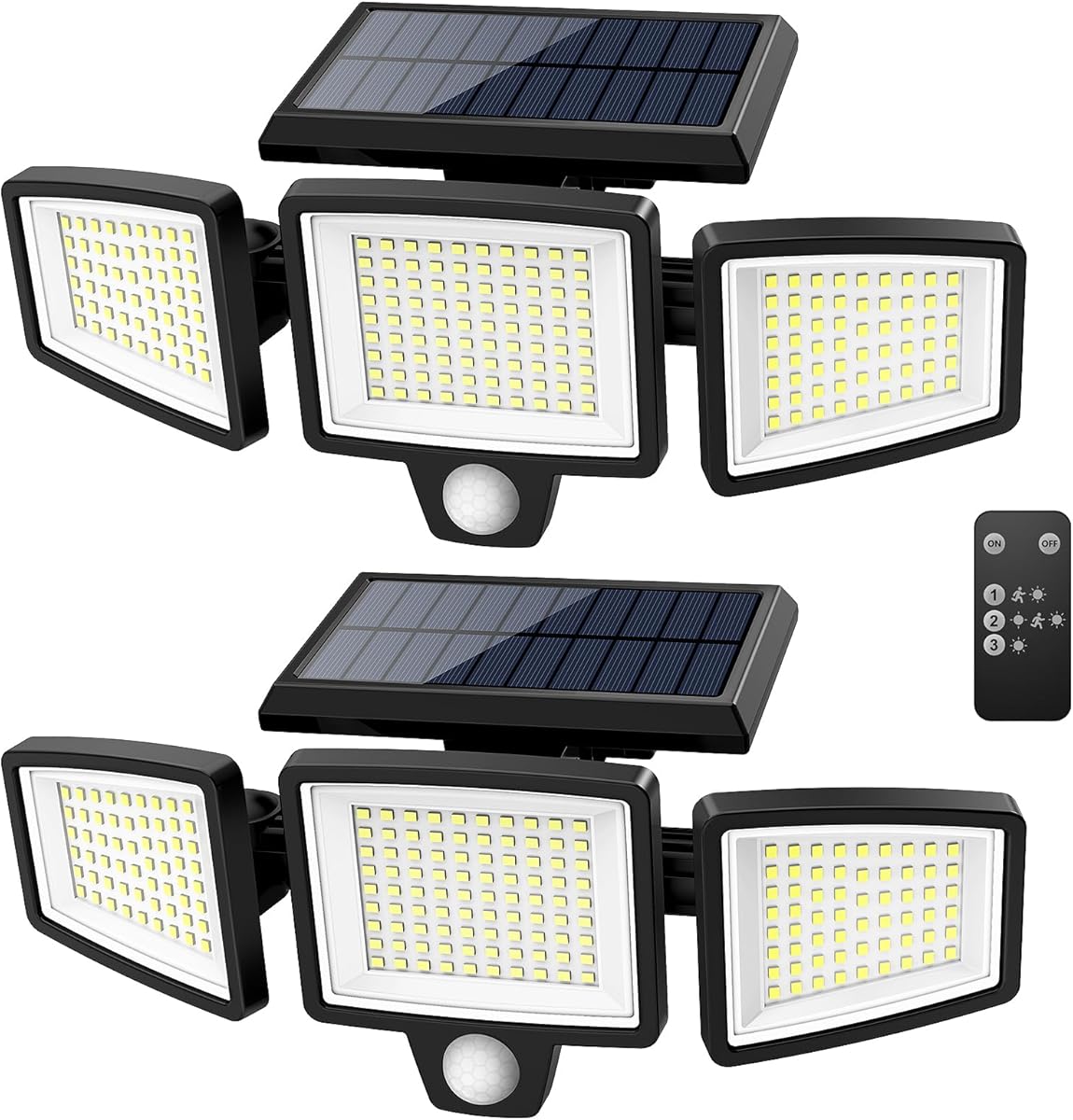
The Tuffenough Solar Outdoor Lights combine a motion sensor with high-brightness LEDs for a complete solution. Each light has three adjustable heads to cover wide angles of up to 270 degrees. It runs on solar power to eliminate the need for wiring. The IP65 rating ensures it works well in rain and heavy weather conditions.
We may earn a commission when you buy through this link, at no additional cost to you.
You can control the light modes with a remote to choose between sensor dim or continuous bright modes. The lights produce up to 2500 lumens of brightness to illuminate large areas. The battery stores energy during the day for use at night. Installation is simple with screws and no need for adapters or wires.
This product is ideal for areas where running electrical wires is difficult or expensive. The bright LEDs deter intruders effectively when motion is detected. Ensure you install them facing direct sunlight for optimal charging. It is a cost-effective way to secure your property with reliable lighting.
Use these lights to secure driveways and backyards without electrical work. The solar design makes them easy to move if your needs change. They provide bright light exactly when it is needed. For a comprehensive lighting and security combo this is a great value.
The 210 LEDs provide strong illumination to deter intruders. This ensures your yard is well lit whenever movement is detected at night.
With solar panels you do not need to worry about electrical wiring. This makes installation flexible and easy for any outdoor spot.
We may earn a commission when you buy through this link, at no additional cost to you.
Selecting the right light sensor involves considering connectivity power and environment. This guide breaks down the key factors to ensure you pick a device that fits your home needs.
Connectivity determines how your sensor communicates with your home network. Zigbee and Z-Wave devices require a hub but offer better range and battery life than Wi-Fi. LoRa devices provide exceptional range for large properties. Wi-Fi sensors connect directly to your router but consume more power.
Choose a protocol that matches your existing smart home ecosystem. If you use Home Assistant or SmartThings look for compatible Zigbee options. For large homes consider LoRa or Sub-1G for better signal penetration through walls.
Most sensors are battery powered which simplifies installation. Look for models with long battery life to reduce maintenance. Hardwired options provide continuous power but require electrical work. Solar powered lights combine detection with illumination for a self-contained solution.
Battery life is crucial for reliability. A sensor that dies in a month will leave gaps in your security. Opt for models with low power consumption or rechargeable options for long-term use.
The range and angle determine how much area the sensor covers. A wider angle like 120 degrees covers more of a room. The range should match the size of the space you are monitoring. Ensure the sensor can reach the farthest corner of the room.
Avoid sensors with a narrow field of view for large areas. A 90-degree sensor might leave blind spots. Adjustability in the mount helps you direct the detection zone precisely.
Outdoor sensors must be weatherproof to survive rain and dust. Look for an IP rating of at least IP44 or IP65. Indoor sensors do not need this level of protection but can still benefit from durability. Verify the weather rating before placing a device outside.
A sensor that fails in the rain will compromise your security. Always check the manufacturer's environmental specifications. IP65 is ideal for harsh conditions.
Integration allows the sensor to trigger other devices like lights or alarms. Check if the sensor works with your hub or app. Compatibility with Alexa Google Home or Apple HomeKit adds convenience. Local automation features protect your privacy.
If you use a specific ecosystem like Hue or Tapo choose a sensor that integrates natively. This ensures stable control without relying on third-party bridges.
PIR sensors detect heat signatures and motion while mmWave detects movement via radar. PIR is common and affordable but can miss stationary people. mmWave is more advanced and detects presence even without movement. Choose based on your need for precision.
If you need to detect someone sitting still in a room mmWave is superior. PIR works well for high-traffic areas where movement is constant.
Adjustable sensitivity helps prevent false alarms from pets or heat. Pet-friendly filters are essential for households with animals. Some sensors allow you to set detection zones to avoid irrelevant areas. Look for models with these settings to reduce noise.
High sensitivity is great for security but can cause false alerts. Balance sensitivity to detect humans while ignoring small pets or swaying curtains.
Ease of installation affects your setup time and effort. Adhesive or magnetic mounts are easiest for temporary or rental use. Screw mounting is more secure for permanent outdoor setups. Ensure the device comes with all necessary hardware.
A sensor that is easy to install is more likely to be placed correctly. Check for adjustable mounts to aim the sensor precisely.
Start by placing the sensor in a location with a clear view of the area you want to monitor. Avoid direct sunlight or heat sources that might cause false alarms. Mount it at the recommended height for optimal coverage.
Test the device to ensure it connects to your hub and responds to motion. Adjust the sensitivity settings to balance security and false alerts. Set up automation rules to trigger lights or notifications when motion is detected.
Regularly check the battery levels and replace them before they run out. Clean the lens periodically to remove dust or debris that might affect detection. Keep the firmware updated to ensure you have the latest features and security patches.
Most smart light sensors require a hub like Zigbee or a dedicated app hub to function. This improves range and battery life. Some models connect directly via Wi-Fi or Amazon Sidewalk but hubs are standard for advanced features.
Yes if you choose a sensor with a high weatherproof rating like IP44 or IP65. Outdoor sensors are designed to withstand rain and dust. Always verify the IP rating before installing a device outside.
Battery life varies but many modern sensors last one to two years on a single cell. The actual duration depends on how often motion is detected. Look for low-power protocols to maximize battery life.
Many sensors have pet-friendly modes to ignore animals under a certain weight. Without this mode pets might trigger false alarms. Check the product specs for pet detection settings.
PIR sensors detect heat changes while mmWave uses radar to detect movement. PIR is common but may miss stationary people. mmWave is more advanced and detects presence even when standing still.
Yes automation is a core feature for most light sensors. You can set rules to turn on lights when motion is detected. This adds convenience and security to your smart home setup.
Basic motion detection does not require a subscription. Some brands offer enhanced monitoring services for a fee. Check the product details to see what is included in the free plan.
Adjust the sensitivity and enable pet-friendly modes if available. Ensure the sensor is not facing heat sources or direct sunlight. Use zones or filters to limit detection to specific areas.
We reviewed ten top options ranging from wireless smart sensors to hardwired photocells. The Zigbee Motion Sensor leads with dual detection capabilities. The Akamatis model offers advanced mmWave tech for precise presence tracking.
Prioritize connectivity and power based on your home's size and existing setup. Ensure you choose a model that supports the platforms you already use. Consider battery life and weather resistance for long-term reliability.
Remember that prices and availability may change over time. Check current offers before purchasing to ensure you get the best deal. A good light sensor enhances your home's security and automation efficiency.