
Eaton Tripp Lite BC450 450VA Small UPS 255W Battery Backup Surge Protector
4.2Editor score
450VA compact design
8 wide-spaced outlets
Replaceable internal battery
Discover the top battery backup for small office setups. We compare leading UPS models on runtime, surge protection, and reliability for 2026.
Running a small office requires reliable power to keep operations smooth and data safe. A quality battery backup ensures your critical devices stay online during outages or surges without interruption.
We evaluated ten top-rated UPS units based on output capacity, outlet count, runtime performance, and user feedback. Our goal is to help you find the right protection for your workspace.
Each pick below highlights key strengths and ideal use cases to guide your decision. Keep in mind that product availability and pricing may change frequently across retailers.
4.2Editor score

4.5Editor score
4.9Editor score
This table provides a side-by-side look at the top ten battery backup units for small offices. Compare specs like voltage, outlet count, and key features to find your perfect match.


The CyberPower CP1500PFCLCD stands out as a top choice for small offices needing reliable power protection. With a strong 4.5 rating from users, it delivers consistent performance for computers and network gear.
We may earn a commission when you buy through this link, at no additional cost to you.
Its PFC Sinewave output ensures compatibility with modern active PFC power supplies, reducing risk of damage. The multifunction color LCD gives clear real-time status on battery health and load levels.
While it is pricier than basic models, the 12 outlets and USB ports add significant convenience. The trade-off in cost is justified by the robust warranty and equipment protection included.
Office managers handling multiple workstations will appreciate its capacity. It is an ideal pick for those who prioritize stability and comprehensive surge protection above all else.
This model provides a pure sine wave output that matches grid power quality perfectly.
With twelve outlets and two USB ports, you can plug in routers phones and devices easily.
We may earn a commission when you buy through this link, at no additional cost to you.
This CyberPower unit offers excellent value for small offices needing ample power without overspending. It holds a 4.5 rating and supports up to 900 watts of continuous load efficiently.
We may earn a commission when you buy through this link, at no additional cost to you.
The simulated sine wave design works well for most standard office electronics. Its intelligent LCD shows detailed battery status helping you avoid unexpected downtime during critical tasks.
Although it lacks network coax protection, the 12 outlets cover most desk setups. The main trade-off is a slightly less pure wave form compared to premium models but savings are significant.
Budget conscious buyers will find this a practical solution. It balances cost with enough capacity to keep PCs and routers running smoothly during outages.
The LCD panel provides immediate alerts to potential power issues before they affect gear.
All outlets provide surge protection to shield devices from spikes even if not on battery.
We may earn a commission when you buy through this link, at no additional cost to you.
The EC850LCD model introduces smart energy-saving features ideal for offices mindful of power usage. Rated at 4.4 stars, it combines reliability with an ECO mode that cuts waste.
We may earn a commission when you buy through this link, at no additional cost to you.
When connected devices enter sleep mode the UPS reduces power to peripherals automatically. This feature lowers bills without compromising backup readiness for essential systems like computers.
While its wattage is moderate compared to higher VA models, it fits well for standard setups. The trade-off is less power for high draw equipment but efficiency is the clear focus.
Environmentalists and cost savers will appreciate this design. It ensures your office gear stays protected while actively working to reduce energy consumption over time.
ECO outlets turn off peripherals when the main PC sleeps saving energy automatically.
All twelve outlets receive surge protection keeping all connected hardware safe daily.
We may earn a commission when you buy through this link, at no additional cost to you.
The ST900U is designed for offices where desk space is tight. It holds a 4.5 rating and offers a slim profile that fits discreetly under desks or on shelves.
We may earn a commission when you buy through this link, at no additional cost to you.
Its GreenPower high efficiency design reduces power consumption during normal operation. The widely spaced outlets mean bulky adapters do not block neighbors improving usability.
The trade-off is a simulated sine wave output which is fine for most gear but not for sensitive active PFC units. Still, it remains a strong choice for general use.
Small teams needing a space saver will find it helpful. It delivers solid protection for home office computers and routers without cluttering the workspace.
Its thin shape allows placement in tight spots without taking up room.
The GreenPower technology lowers energy draw helping save on electricity bills.
We may earn a commission when you buy through this link, at no additional cost to you.
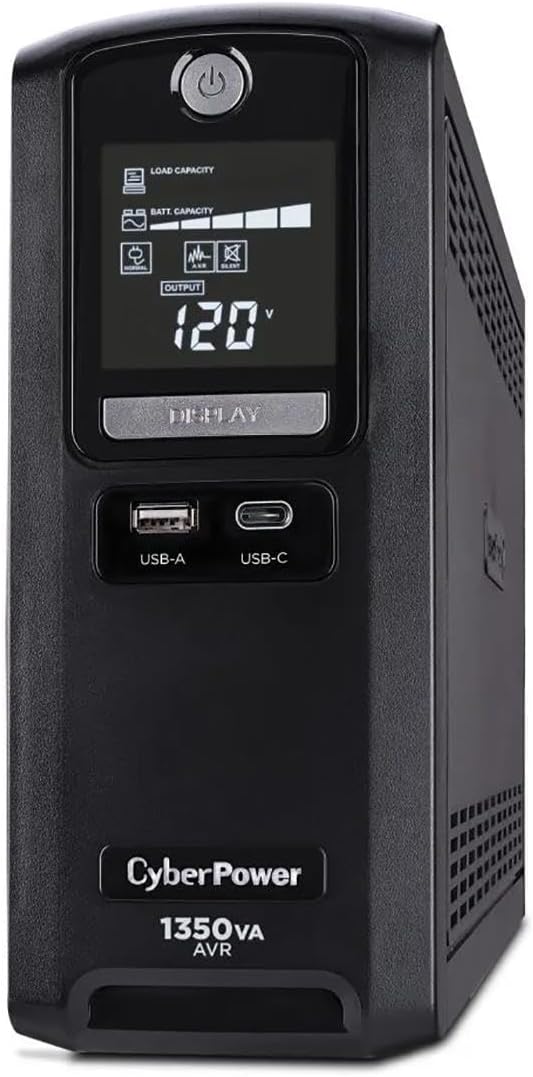
This model boasts an impressive 4.9 rating for exceptional reliability in small office settings. It offers a high 1350VA capacity ensuring long runtimes even at moderate loads.
We may earn a commission when you buy through this link, at no additional cost to you.
Beyond power outlets it includes network and coaxial line protection for modems and cable boxes. This shields your internet connection from surges that could disrupt remote work or streaming.
The trade-off is a slightly larger unit size which requires more floor or shelf space. Still, the extended runtime at half load provides ample time to save work safely.
Users valuing uptime and connection stability should choose this. It is a robust investment for offices dependent on constant internet access and sensitive electronics.
Network and coax outlets stop surges from damaging modems and routers during storms.
At half load this unit keeps devices running for ten minutes to shut down safely.
We may earn a commission when you buy through this link, at no additional cost to you.
The AVRG900LCD provides a smart balance of features and reliability for small office needs. It holds a 4.6 rating and includes an intelligent LCD for easy status monitoring at a glance.
We may earn a commission when you buy through this link, at no additional cost to you.
Automatic Voltage Regulation corrects low or high voltage without using battery power. This preserves battery health and extends cycle life while maintaining device safety effectively.
Lack of USB charging ports is a minor trade-off compared to other units. However, the data line protection adds value for offices relying on phone or internet lines daily.
If you want a feature rich unit without extra bulk, this is ideal. It keeps PCs and networking gear running while actively managing incoming power quality.
AVR fixes minor voltage swings without switching to battery keeping energy use low.
PowerPanel software helps manage settings and monitor your system from your PC.
We may earn a commission when you buy through this link, at no additional cost to you.
The BC450 offers a cost effective entry point for small offices needing basic protection. With a 4.2 rating it provides essential backup for routers PCs and small displays.
We may earn a commission when you buy through this link, at no additional cost to you.
Its compact design fits easily on shelves or desks. The 8 wide spaced outlets accommodate bulky power bricks so you can plug in everything you need at once.
The trade-off is lower capacity compared to bigger units. It handles light loads best but might not support heavy gaming PCs or servers for long periods.
For tight spaces and tight budgets, this is a great fit. It is simple to use and ensures your core devices stay safe during sudden power interruptions.
This UPS remains silent during normal operation reducing noise in shared office spaces.
Internal battery is replaceable so you extend unit life without buying new hardware.
We may earn a commission when you buy through this link, at no additional cost to you.
The BC350R is a basic reliable unit for offices with minimal power needs. It rates 4.5 stars and provides essential backup for routers or small terminals only.
We may earn a commission when you buy through this link, at no additional cost to you.
Setup is simple plug it in and connect devices. The wall mount compatibility allows you to save desk space entirely by placing it out of the way safely.
It is the lowest capacity model here so it suits light loads like modems. The trade-off is no advanced monitoring but it gets the job done at a low cost.
For retail kiosks or small routers this unit works well. It keeps critical network points alive briefly during power issues to prevent disconnections.
Bottom slots let you install the unit on walls freeing up precious desk space.
Power restores automatically once grid power returns without needing manual reset.
We may earn a commission when you buy through this link, at no additional cost to you.
APC is a well known name in power protection and the BE600M1 reflects that reliability. With a 4.5 rating it keeps routers and computers running during short outages.
We may earn a commission when you buy through this link, at no additional cost to you.
It includes a dedicated USB port to keep your phone charged while the power is out. This feature ensures communication lines stay open even when main electricity fails unexpectedly.
Fewer outlets are a trade-off compared to competitors. The battery replacement is simple however which helps reduce long term costs when the unit ages.
For users wanting brand trust and simplicity this fits well. It is ideal for home offices needing a small dependable unit for PCs and networking gear.
The USB port stays active during outages to charge phones when grid is down.
APC makes battery replacement straightforward so you can replace the cell alone.
We may earn a commission when you buy through this link, at no additional cost to you.
The ST425 rounds out our list with a reliable standby option for basic office gear. It holds a 4.4 rating and offers surge protection for all connected devices efficiently.
We may earn a commission when you buy through this link, at no additional cost to you.
LED status lights give quick visual cues on power and fault conditions. This helps you spot issues like overloads or low battery without digging through menus.
The trade-off is limited runtime due to lower capacity. It works best for routers and small PCs where you just need a few minutes to save files.
If you need an affordable solution without complex features, this is good. It keeps essential office tech safe from surges and brief power cuts effectively.
LED lights show power and fault states clearly at a glance without noise.
GreenPower design ensures the unit draws minimal energy while on standby.
We may earn a commission when you buy through this link, at no additional cost to you.
Selecting the right battery backup involves balancing power needs, runtime, and features. This guide breaks down key factors to consider for small office environments.
VA or Volt Amps indicate the total power the unit can deliver. Choose a model with enough capacity to cover your computers routers and other devices. Check wattage ratings too to ensure safe limits are not exceeded.
Match VA to your total device load. For small offices 900VA to 1500VA usually covers desktops and peripherals comfortably.
Active PFC power supplies need pure sine wave output. Simulated or stepped sine wave may work for standard devices but risks damage to sensitive gear. Consider your power supply types before buying.
Opt for PFC Sinewave units if you have modern workstations. It ensures maximum compatibility and safety.
Runtime varies by load. Higher loads reduce backup time. Look for units that promise at least 10 minutes at half load for safe shutdowns. This buffer is vital for saving data during outages.
Check runtime graphs if available. Ensure it fits your expected usage and device count.
Count your devices and select a UPS with enough outlets. Look for wide spacing to fit large adapters. Some units offer battery backed outlets while others are surge only.
Balance battery backed outlets with surge only ones to save energy. Ensure you have enough for your entire desk setup.
Surges can travel through internet or phone lines. Units with network or coax protection shield your modem and router. This keeps your connection safe even if power is lost.
Prioritize models with coaxial or Ethernet ports if you rely on internet access daily for business.
LCD displays show battery health and load. Simple LED models are cheaper but give less info. A good interface helps you manage power settings and monitor status efficiently.
Choose a display type that fits your technical comfort. Clear status alerts prevent surprises during blackouts.
Efficient UPS models draw less power when idle. Features like ECO mode reduce waste by cutting power to peripherals. This lowers energy bills and extends battery life.
Look for Energy Star certification or GreenPower claims. Savings add up over time.
Warranties vary by brand. Connected Equipment guarantees protect your gear from surge damage. Check battery replacement policies and support availability before purchase.
Prioritize units with generous coverage. Peace of mind matters when relying on hardware for critical work.
Plug the UPS into a grounded wall outlet before connecting devices. Turn it on and let the battery charge fully for the first time to ensure maximum performance during outages.
Keep the unit in a cool dry place to extend battery life. Avoid placing it near vents or direct sunlight which can degrade internal components over time.
Test the system every six months by unplugging it briefly. This ensures batteries remain healthy and devices stay running. Replace the battery when runtimes drop noticeably.
Runtime depends on the load and model. Most units give 5 to 15 minutes at half load. This is enough to save work and shut down safely.
If your PC has an Active PFC power supply, yes. Pure sine wave avoids damage. Standard PCs often work with simulated wave, but check your manual first.
Most UPS units allow battery replacement using a cartridge. Follow the manufacturer guide to ensure safety. This keeps the unit working without buying a new system.
Count your devices including monitors routers and phones. Aim for at least 8 outlets with some battery backed. Wider spacing helps fit large adapters comfortably.
AVR adjusts low or high voltage without using battery. It protects devices from fluctuations and extends battery cycle life. This saves energy during normal operation.
Surge protection alone does not help during power loss. A battery backup keeps devices running. For full safety choose a UPS with both battery and surge features.
Test every six months by unplugging the unit. This confirms battery health. If it fails to run devices, replace the battery immediately to avoid downtime.
A good UPS guards against surges including those from lightning. However, direct strikes can overwhelm protection. Consider a whole building surge suppressor for extra safety.
We reviewed ten top models ranging from compact budget units to high capacity options. The CyberPower CP1500PFCLCD leads for power and features while the Tripp Lite BC450 offers great value.
Prioritize wattage and outlet count based on your gear. Ensure you have enough battery time to shut down safely. Data line protection is a bonus for network heavy setups.
Prices change often so check current listings before buying. Use our comparison and review details to find the model that fits your office needs best today.