
Anti Slip Laptop Rubber Feet Pad Replacement for MacBook
4.4Editor score
Strong self-adhesive backing
Fits MacBook and Dell
15 pieces included
Laptop rubber feet are essential for stability and cooling. When they wear out, your device can slide or overheat. Finding the right replacement ensures safe use.
We compared ten top replacement kits based on material quality and compatibility. Each option fits specific models while offering strong adhesion and grip for everyday use.
Every pick includes key specs and user feedback to help you choose. Prices and availability change often, so verify details before purchasing to ensure the correct fit.
4.4Editor score

4.4Editor score

4.5Editor score
As an Amazon Associate we earn from qualifying purchases.
This side-by-side comparison lists all ten products with their key specs and links. Review each entry to find the exact fit for your laptop model.


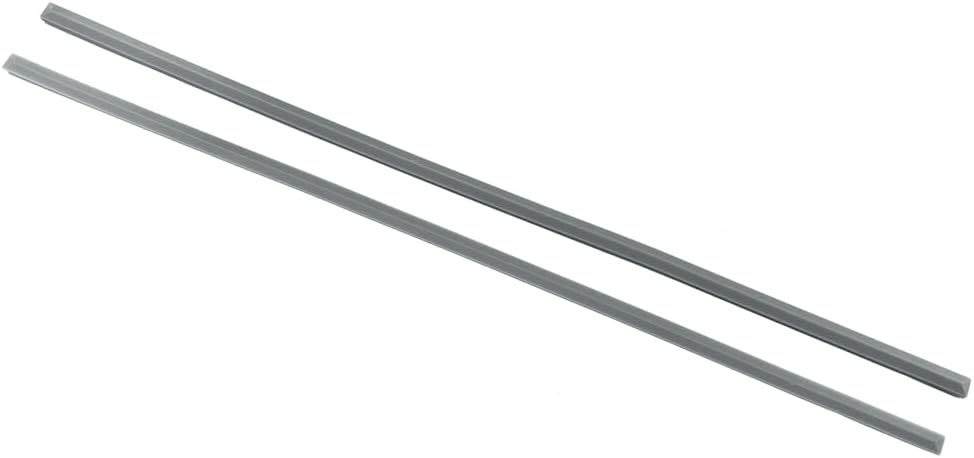


This kit is a top pick for Surface Book owners with worn feet. It offers a precise fit and strong grip using high quality silicone. The rating reflects reliable performance across many users.
We may earn a commission when you buy through this link, at no additional cost to you.
The strips measure 30 cm in length and 0.5 cm wide. They come as a pair and include adhesive for easy installation. This design helps stabilize your device and improve cooling.
One trade-off is verifying your model number beforehand. Ensure compatibility with your specific Surface Book generation. Once installed, the strips hold firm and resist wear well.
Buy this if you need a reliable replacement for Surface Book 1 to 3. It restores stability and protects your surface. The strong adhesive ensures long lasting use.
The dimensions match the original rubber feet closely for a seamless look.
Silicone provides excellent grip on desks and reduces laptop movement during typing.
We may earn a commission when you buy through this link, at no additional cost to you.
This pack offers eight pads for universal use across laptops and more. The premium foam and adhesive create a strong bond. It earns a top rating for versatility and quality.
We may earn a commission when you buy through this link, at no additional cost to you.
The strips are made of high quality rubber foam. They stick well to glass wood and other surfaces. You can use them for laptops speakers or even furniture stops.
Since these are universal, measuring your old feet helps. Cut the pads to size if needed for a perfect fit. The adhesive is strong but removable if you change your mind.
Choose this if you need flexibility beyond one laptop model. It provides reliable grip and protection. The guarantee ensures satisfaction with your purchase.
Use these pads for laptops keyboards or any appliance needing anti-slip support.
The tenacious adhesive keeps items in place without slipping on smooth surfaces.
We may earn a commission when you buy through this link, at no additional cost to you.
This kit includes fifteen round rubber feet for various laptops. The self-adhesive backing makes installation simple. It is a budget friendly choice with a strong rating.
We may earn a commission when you buy through this link, at no additional cost to you.
The pads are slightly taller than original ones. This raises your laptop for better airflow and cooling. They stick well to the bottom case and prevent sliding.
Round pads might not match strip style feet on some models. Check your device shape before buying. Despite this the grip and cooling benefits are clear.
Buy this if you want an affordable fix for lost feet. It works for MacBooks and other brands. The extra pads let you keep spares.
The taller pads raise the laptop allowing air to flow underneath for improved cooling.
These feet fit MacBooks and other laptops making them a great general solution.
We may earn a commission when you buy through this link, at no additional cost to you.
This set restores stability to HP 15-DY series laptops. It includes thick and thin strips to match original specs. The rubber material offers good durability.
We may earn a commission when you buy through this link, at no additional cost to you.
One thick one thin pad provides flexibility. They grip well and protect your surface from scratches. The adhesive is strong and easy to apply.
Confirm your current foot thickness before ordering. Use the thick one for original height or thin for low profile. The kit restores proper lift and cooling.
Choose this for HP 15-DY and similar models. It is a reliable fix for worn feet. The material resists wear and tear over time.
Get both thick and thin pads to match your laptop original height preference.
The rubber pads prevent your laptop from scratching desks or tables.
We may earn a commission when you buy through this link, at no additional cost to you.
These strips work for HP 15-EF and related models. They come with pre-applied adhesive for quick install. The kit includes thick and thin options.
We may earn a commission when you buy through this link, at no additional cost to you.
Just peel the liner and press on the case. The rubber grips well and lifts the laptop for cooling. It replaces worn feet perfectly.
Ensure your model is on the list before buying. Check your existing feet height. The adhesive stays firm and resists peeling.
Buy this for HP 15-EF and similar laptops. It offers a quick repair without extra tools. The rubber is durable and long lasting.
Pre-applied adhesive means you can replace feet in minutes without extra glue.
The slight elevation creates air space for better cooling and performance.
We may earn a commission when you buy through this link, at no additional cost to you.
This kit restores feet to HP Envy x360 models. The strips are black and match the case color. Adhesive is included for simple installation.
We may earn a commission when you buy through this link, at no additional cost to you.
They measure 31.5 cm long and 0.6 cm wide. The rubber grips well on flat surfaces. They help lift the laptop for better cooling.
Clean old glue before applying for best results. Ensure your model matches the list. The adhesive is strong and lasts well.
Choose this for Envy x360 repairs. It brings back stability and protects surfaces. The rubber is durable and new.
Black strips blend seamlessly with your laptop case for a clean look.
The strips keep your laptop steady on desks preventing unwanted sliding.
We may earn a commission when you buy through this link, at no additional cost to you.
These grey strips suit Envy X360 laptops. They match the case color well. The adhesive is strong and easy to apply.
We may earn a commission when you buy through this link, at no additional cost to you.
They measure 31.5 cm long. They grip well on desks and prevent sliding. The lift improves airflow for better cooling.
Check your model on the list before buying. Clean the surface before install. The rubber is brand new and durable.
Buy this for Envy X360 models. It provides stability and surface protection. The grey color fits seamlessly.
Grey strips blend well with the laptop case for a polished appearance.
Replace worn feet to return your laptop to its original stability and cooling.
We may earn a commission when you buy through this link, at no additional cost to you.
These strips fit Surface Laptop Studio 14.4 inch. They are grey and offer nonskid grip. The quality is brand new and high.
We may earn a commission when you buy through this link, at no additional cost to you.
The strips measure 29.9 cm long. They come as a pair and stick well. They help stabilize your device on surfaces.
Check the pictures before buying to ensure fit. The adhesive is strong but clean old residue first. The rubber resists wear.
Choose this for Surface Laptop Studio repairs. It brings back grip and stability. The grey color matches the laptop.
Designed for Surface Laptop Studio 14.4 to ensure a precise fit.
The textured surface prevents your laptop from sliding on smooth desks.
We may earn a commission when you buy through this link, at no additional cost to you.
This kit works for HP Elitebook X360 G3. The strips are 260mm long. They stick well and prevent sliding.
We may earn a commission when you buy through this link, at no additional cost to you.
Clean old glue before install for best results. The rubber is non-slip and durable. The adhesive helps them stay in place.
Verify your model is G3 before buying. The fit is close to original feet. They lift the laptop for cooling.
Buy this for Elitebook G3 repairs. It restores stability and protects surfaces. The rubber is reliable and new.
The strips match the Elitebook X360 G3 foot slots for a proper fit.
The rubber material resists wear and provides long lasting grip on desks.
We may earn a commission when you buy through this link, at no additional cost to you.
This kit includes rubber feet and adhesive strips. It works for many laptops and notebooks. The extra adhesive helps with reattachment.
We may earn a commission when you buy through this link, at no additional cost to you.
Use the sets to replace lost feet. The adhesive ensures they stay in place. They grip well on flat surfaces.
Check sizes before use for best fit. They may need trimming for some laptops. The rubber is durable and new.
Buy this for general laptop repair. It provides versatile feet and extra glue. Good for older models.
Includes adhesive strips for secure reattachment to your laptop case.
Fits many notebook models making it a flexible repair option.
We may earn a commission when you buy through this link, at no additional cost to you.
Choosing the right replacement requires attention to model fit material and size. Here are key factors to consider.
Check your laptop model and measure the existing foot slots. Ensure the kit lists your exact model number. This prevents poor fit and ensures proper adhesion and function.
Always verify compatibility before buying to save time and money.
Look for durable rubber or silicone that resists wear and heat. High quality materials provide long lasting grip and prevent scratching your surfaces.
Choose rubber over foam for better durability and heat resistance.
Strong self-adhesive backing is essential to keep feet in place. Ensure the kit includes pre-applied adhesive or separate strips. This ensures easy install and secure fit.
Strong adhesive prevents feet from peeling over time.
Measure the thickness of your original feet. Some kits offer thick and thin options to match different needs. Proper height improves cooling and stability.
Match the thickness to ensure proper lift and airflow.
Select strips that match your laptop case color. Black or grey often fit best. This keeps your device looking polished after repair.
Choose colors that blend seamlessly with your device.
Kits typically include two or more strips. Ensure the count matches your needs. Some provide spares for future use.
Pick packages with enough pieces for your laptop and spares.
Read reviews to confirm the product works for your model. High ratings suggest reliability and ease of install. Look for feedback on adhesive strength.
Reviews help confirm real-world fit and performance.
Check if the seller offers returns or guarantees. This helps if the fit is wrong. A money-back policy reduces risk.
Prefer sellers with clear return options for peace of mind.
Start by removing old feet and cleaning residue with a soft cloth and mild cleaner. Ensure the surface is dry before applying new strips.
Peel the liner from the adhesive side and press firmly onto the bottom case. Hold for a few seconds to bond well before flipping the laptop.
Avoid harsh cleaners on the strips and check them periodically for wear. Replace if they loosen or lose grip.
Measure your old feet with a ruler. Check the product listing for length width and thickness. Match these to your laptop. This ensures proper fit.
Yes if the size fits. Cut them to size if needed. Universal strips work for many models. Check adhesive strength for security.
Self-adhesive rubber with strong backing is best. Some kits include separate strips. Ensure it is designed for plastic or metal surfaces.
Yes. Slight elevation creates airflow under the laptop. This helps heat escape. It improves cooling especially during heavy use.
Replace them if they peel or lose grip. Every few years is common depending on use. Check them if your laptop slides.
Reuse is possible if adhesive is intact. Clean and reapply carefully. Often new feet are more reliable.
Clean the surface of oil and old glue. Let it dry. Press firmly for a minute. Use stronger adhesive strips if needed.
Yes. Rubber protects wood from scratches. Ensure the adhesive is not too strong to avoid damage on removal.
The top picks offer reliable fit and grip for various laptops. Model-specific kits like those for HP and Surface ensure accuracy.
Prioritize material quality and adhesive strength for long-term use. Measure your feet to get the right thickness.
Prices and availability change often so check current listings before buying. Verify compatibility for a smooth repair.