
TP-Link Ethernet Splitter 1 to 2
4.6Editor score
Compact lightweight size
USB power included
Cable included box
This expert guide compares the top 10 Internet Splitter options available in October 2026, evaluating speed, compatibility, and build quality to help you
Choosing the right Internet Splitter can significantly improve your network connectivity without expensive wiring upgrades. These devices allow multiple gadgets to share a single Ethernet connection, ensuring stable access for work or entertainment.
We evaluated ten top-rated models based on speed capacity, port counts, build materials, and ease of setup. Each option was scrutinized for real-world performance, compatibility with various cable types, and reliability under load.
Every selection highlights specific strengths like gigabit throughput, compact designs, or multi-port expansion. Please note that availability and pricing may vary, so verify current stock before purchasing your preferred network expansion device.
4.6Editor score

4.7Editor score

4.5Editor score
The following table provides a side-by-side overview of each model’s key specifications, ratings, and primary use cases to help you quickly identify the best fit for your specific networking needs.



This LIEZHUA Gigabit Ethernet Splitter offers a straightforward solution for expanding a single network port into two active connections. With a strong 4.3 rating, it delivers reliable performance for users needing quick connectivity without extensive wiring changes.
We may earn a commission when you buy through this link, at no additional cost to you.
Its ability to support simultaneous data transfer at speeds up to 1000Mbps makes it ideal for home or office setups where multiple devices need stable access. The built-in LED indicators simplify troubleshooting by showing which port is active at any time.
While it requires a separate USB power source which can be a minor inconvenience in tight spaces, the aluminum alloy casing ensures durability and effective heat dissipation. This trade-off is acceptable given the stability and speed it provides.
Buyers seeking an affordable way to connect two wired devices to one network line will find this splitter highly practical. It works seamlessly with various Ethernet cable types, making it a versatile choice for different environments.
Connect two devices simultaneously while maintaining high-speed data transfer without interference or signal loss.
Works with Cat 5 through Cat 8 cables ensuring it fits seamlessly into existing network infrastructures.
We may earn a commission when you buy through this link, at no additional cost to you.
The TP-Link TL-SG105 stands out as a premium unmanaged switch offering five gigabit ports in a fanless metal enclosure. With an impressive 4.7 rating, it provides superior reliability and performance for users needing extensive wired connectivity.
We may earn a commission when you buy through this link, at no additional cost to you.
Its advanced energy-efficient technology reduces power consumption while maintaining fast data speeds. The shielded ports ensure high-quality transmission with minimal interference, making it perfect for streaming or large file transfers.
Though larger and pricier than simple splitters, its build quality and port count justify the investment. The three-year warranty further ensures long-term peace of mind for professional or home office setups.
This model is best suited for users who need to connect multiple wired devices reliably without configuring complex settings. It delivers consistent performance and robust handling of network traffic efficiently.
Prioritize video and voice data with port-based QoS to ensure smooth media playback.
Metal casing with wall mounting options provides longevity and stability in any environment.
We may earn a commission when you buy through this link, at no additional cost to you.
This TP-Link model offers an affordable and effective way to expand a single Ethernet port into two. Rated highly for its balance of performance and cost, it suits users needing quick connectivity without major upgrades.
We may earn a commission when you buy through this link, at no additional cost to you.
The inclusion of a Cat5e Ethernet cable and USB power cable means everything is ready right out of the box. Its compact aluminum alloy design fits easily behind TVs or in laptop bags for travel.
Users should note that bandwidth is shared between the two connected devices, which is acceptable for general browsing but may impact high-speed tasks. Still, it offers stable transmission without signal crosstalk.
Ideal for budget-conscious buyers wanting reliable dual-device access, this splitter simplifies network expansion efficiently. It combines essential features with portability, making it a top choice for homes or small offices.
Setup requires no drivers or configuration just connect the cables and power to start.
Comes with a Cat5e cable reducing extra costs and getting you connected immediately.
We may earn a commission when you buy through this link, at no additional cost to you.
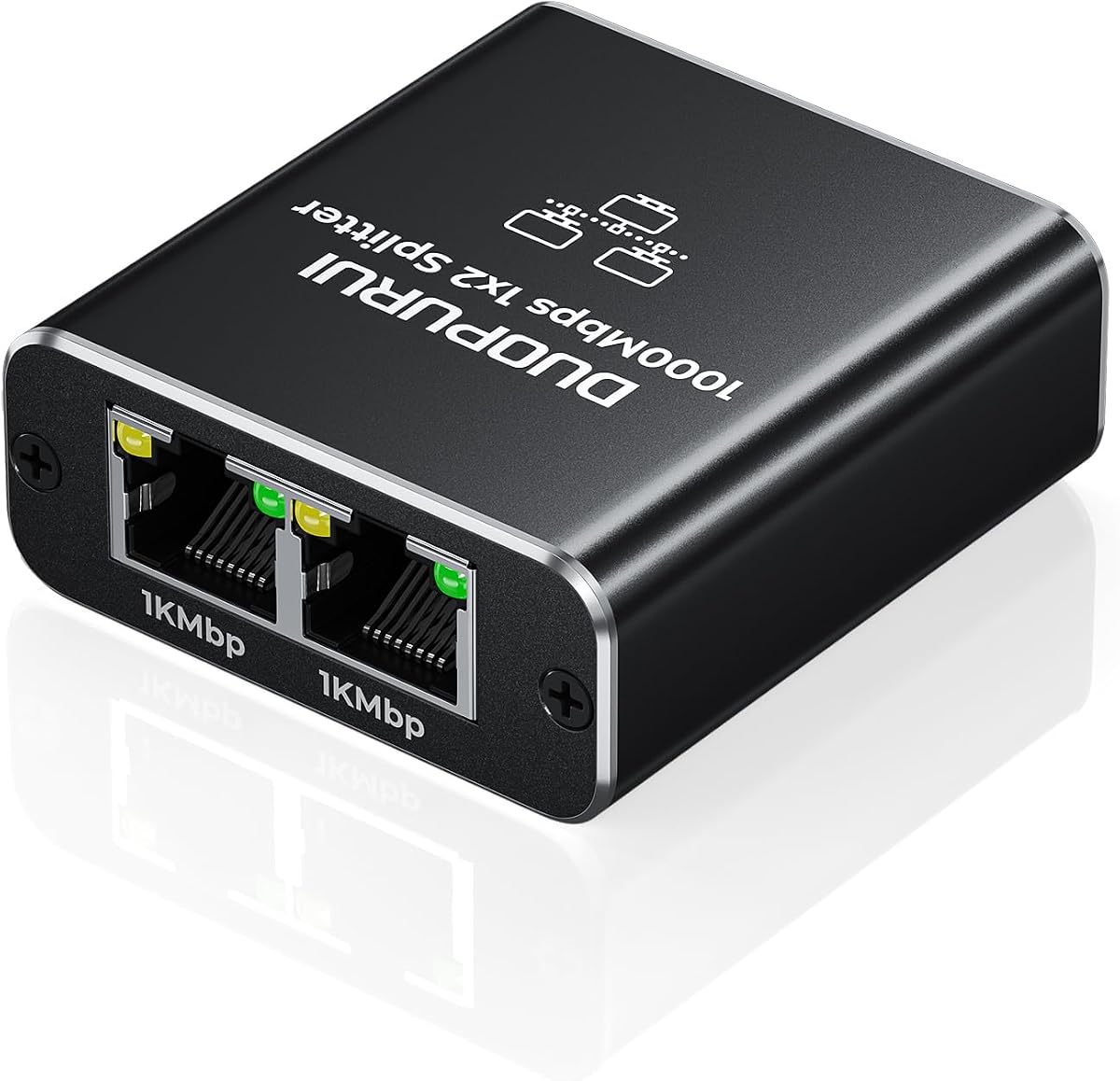
The DUOPURUI Ethernet Splitter delivers strong performance for users needing two active ports from one connection. With a 4.4 rating, it balances speed and durability effectively for home or office use.
We may earn a commission when you buy through this link, at no additional cost to you.
Its high-speed transmission supports 4K streaming and gaming without significant drops. The rugged alloy shell protects against physical damage and ensures efficient heat dissipation during extended use.
While the need for an external power adapter might limit portability slightly, the reliable signal stability makes it worthwhile. It adapts well to various cable types and device configurations seamlessly.
Buyers looking for a robust and straightforward network expansion tool will appreciate this model's consistency. It handles multiple tasks smoothly without complicated setup, offering dependable connectivity every time.
Supports 4K HD video and large transfers without lag with adaptive matching.
High-quality alloy casing ensures longevity and protection against daily wear.
We may earn a commission when you buy through this link, at no additional cost to you.
This LIEZHUA splitter expands one port into four, ideal for setups needing multiple wired connections. With a 4.4 rating, it provides fast and stable networking for streaming and file transfers efficiently.
We may earn a commission when you buy through this link, at no additional cost to you.
The included Cat6 cable simplifies setup, allowing immediate use without extra purchases. Its compact design makes it easy to carry for travel or reposition around the home or office.
While bandwidth is shared among devices, it remains sufficient for most daily tasks like browsing and video calls. The lightweight build ensures flexibility without sacrificing signal stability.
Users requiring multiple simultaneous connections in a portable package will find this model highly useful. It combines essential features and affordability, making network expansion accessible and efficient.
Connect up to four devices at once to maximize network utility without extra hardware.
Lightweight build fits easily in bags for creating connections on the go.
We may earn a commission when you buy through this link, at no additional cost to you.
This model offers a simple way to expand one Ethernet line into four active connections. With a solid 4.4 rating, it delivers reliable high-speed performance for various networking needs.
We may earn a commission when you buy through this link, at no additional cost to you.
The USB-C power cable ensures stable operation, and the plug-and-play design eliminates the need for drivers. Compatible with multiple cable types, it integrates easily into existing setups.
Bandwidth sharing among ports can affect individual device speeds but remains suitable for general use. The design prioritizes convenience, making it ideal for quick temporary or permanent expansions.
Buyers seeking an uncomplicated four-port solution without configuration hassles will find this effective. It balances functionality and ease of use, ensuring smooth network connectivity for all devices.
Includes USB-C cable for stable power delivery ensuring consistent operation.
Connect cables and power to start using immediately with no software needed.
We may earn a commission when you buy through this link, at no additional cost to you.
This adapter expands one port into two while including a Cat6 Ethernet cable for immediate setup. Rated well for convenience, it supports fast data transmission across various device types.
We may earn a commission when you buy through this link, at no additional cost to you.
The nickel-plated jacks ensure stable connections, and LED lights clarify active ports quickly. Its lightweight design makes it easy to place in tight spaces without taking up much room.
Plastic casing offers less ruggedness than metal but keeps costs low. For most home uses, this trade-off is acceptable given the included cable and reliable signal stability.
Users needing a quick dual-port fix with included accessories will find this model helpful. It simplifies network expansion with practical features, ensuring smooth connectivity for all devices.
Includes a Cat6 cable in the box to get you connected right away.
Clear LED lights show which ports are active for easy troubleshooting.
We may earn a commission when you buy through this link, at no additional cost to you.
This mini splitter enables three devices to share one Ethernet line, perfect for limited port scenarios. With a 4.5 rating, it delivers stable connectivity for gaming and streaming efficiently.
We may earn a commission when you buy through this link, at no additional cost to you.
The aluminum body ensures durability, and its compact size fits easily in laptop bags. LED indicators help track active connections, while USB-C power supports reliable operation.
Bandwidth is shared, so individual speeds may vary under heavy loads. However, for standard daily use, it provides sufficient performance and excellent portability across different settings.
Buyers needing a portable three-port solution for travel or tight spaces will find this ideal. It combines compact design with robust materials, ensuring dependable connectivity wherever needed.
Lightweight compact size fits in any travel bag for flexible network access.
High-quality aluminum housing provides durability and better heat dissipation.
We may earn a commission when you buy through this link, at no additional cost to you.
This Dockteck model expands one port into three, ideal for setups with limited connections. Rated highly for stability, it supports fast data transfers across multiple devices seamlessly.
We may earn a commission when you buy through this link, at no additional cost to you.
Its aluminum construction ensures heat dissipation and long-lasting use. The included USB cable simplifies setup, allowing immediate connectivity without drivers or complex configuration steps.
Bandwidth sharing is noted for multiple computers, but it remains effective for general tasks. The lightweight build makes it easy to move around for different network needs.
Users wanting reliable three-port access in a compact form will find this practical. It balances durability and performance, ensuring efficient network expansion for home or office setups.
Supports LAN cables up to 100 meters for flexible placement options.
Aluminum metal material ensures stability and efficient heat management.
We may earn a commission when you buy through this link, at no additional cost to you.
This UGREEN model offers premium build quality with aluminum alloy housing and gold-plated pins. With a 4.5 rating, it provides stable high-speed transmission without signal crosstalk.
We may earn a commission when you buy through this link, at no additional cost to you.
The compact design fits easily into any network setup while ensuring efficient heat dissipation. Its space grey finish adds a stylish touch to any desk or entertainment center.
Though limited to two ports, the reliability and performance make it ideal for critical devices. The included USB cable simplifies power connection for hassle-free operation.
Buyers valuing build quality and reliable performance will find this model excellent. It combines style with function, ensuring fast and stable connectivity for essential wired devices.
Gold-plated cores ensure reliable data transfer and prevent signal loss.
Sleek modern design blends well with various device aesthetics.
We may earn a commission when you buy through this link, at no additional cost to you.
Selecting the right Internet Splitter involves evaluating several technical factors to ensure compatibility and performance with your existing network setup.
Determine how many devices you need to connect simultaneously to decide if a two-port or multi-port model is necessary. More ports offer flexibility but may share bandwidth across all outputs.
Choose a model with enough ports to meet your current needs without excess capacity that complicates your setup.
Look for splitters supporting Gigabit speeds (1000Mbps) to ensure fast data transfer for streaming and large files. Shared bandwidth means total speed is divided among connected devices.
Ensure the splitter matches your internet plan speed to avoid bottlenecks that slow down performance.
Metal casings like aluminum alloy offer better heat dissipation and physical protection than plastic models. This is crucial for devices running continuously in busy environments.
Select durable materials to extend the device lifespan and maintain stable operation over time.
Many splitters need external USB power for stability so check if adapters are included or sold separately. Lack of power can lead to unreliable connections or device failure.
Confirm the power source is accessible near your setup to avoid messy cable management.
Ensure the splitter supports your existing Ethernet cable types (Cat5e to Cat8) to avoid replacement costs. Mismatched cables can reduce speed or cause connectivity issues.
Choose universal compatibility models that work with current and future cable standards.
Compact designs are ideal for travel or tight spaces behind TVs or desks. Heavier units might suit stationary office setups better than portable needs.
Consider the physical footprint to ensure it fits comfortably within your available space.
Look for models requiring no software or drivers to simplify setup and reduce errors. Plug-and-play devices save time and technical hassle for average users.
Prioritize ease of use for quick installation without complex configuration steps.
LED indicators, warranty periods, and included cables add value to the purchase. These extras help with troubleshooting and ensure better support for the device.
Check for useful add-ons that enhance reliability and long-term usability.
To set up your Internet Splitter, plug one end of an Ethernet cable into your router and the other into the splitter’s input port. Connect your devices to the splitter’s output ports using additional cables.
Ensure the splitter is connected to a stable power source via the included USB cable for optimal performance. Avoid placing the device in humid or overly warm areas to maintain reliability.
Regularly check connections for loose cables or dust buildup on ports to prevent signal issues. Cleaning gently with compressed air will extend the device’s working life.
Yes, most Internet Splitters share the total available bandwidth among connected devices. If you connect two devices, each might get roughly half the speed unless the splitter supports independent gigabit lines.
Most modern Internet Splitters support Cat5e through Cat8 cables but verify compatibility before purchasing. Using mismatched cables can reduce performance or cause connection failures.
Not exactly. Splitters divide one port into multiple devices sharing bandwidth, while switches manage traffic independently. Switches often offer better performance but cost more.
Most Internet Splitters require a standard USB power adapter to function reliably. Check the packaging to see if one is included or if you need to buy it separately.
Typically splitters support between two to four devices depending on the model. Always check the maximum port count before buying to match your connectivity needs.
Yes, splitters can expand wired ports on routers for devices needing stable connections. This setup is ideal for gaming consoles or smart TVs that perform better wired.
The top picks highlight diverse options ranging from compact dual-port models to robust multi-port solutions. Each offers reliable performance tailored to different networking requirements and budgets.
Prioritize build quality, speed, and port count based on your specific usage needs. A well-chosen splitter ensures stable and efficient connectivity for all your devices.
Before purchasing, check current availability and ensure compatibility with your existing cables and devices. Investing in the right model simplifies network expansion for long-term satisfaction.