
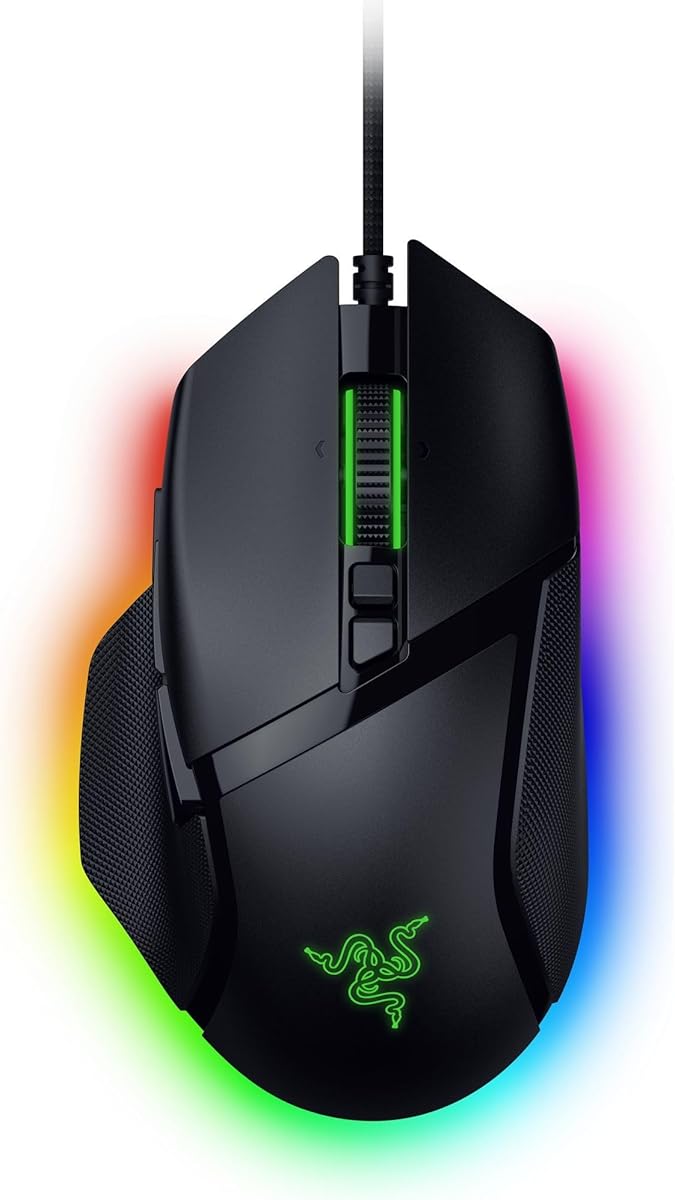
Razer Basilisk V3 Customizable RGB Wired Ergonomic Gaming Mouse, Black
4.6Editor score
FOCUS Plus 26K DPI Optical Sensor
11 Programmable Buttons
11 Chroma RGB Lighting Zones
Discover the best analog gaming mice for precision and speed. We compare top models from Logitech, Razer, and Corsair to find your perfect gaming mouse.
Finding the right analog gaming mouse is essential for competitive play. These devices offer precise tracking and customizable controls that enhance your performance across various game genres.
Our team evaluated ten top models based on sensor accuracy, build quality, and ergonomics. We considered user feedback and technical specifications to create this comprehensive list.
Each pick highlights unique features suited for different play styles. Note that availability and features may change over time, so check current listings before purchasing.
4.6Editor score

4.6Editor score
4.5Editor score
This side-by-side comparison helps you quickly identify key differences between the top models available today. Review the specs and features to find the right fit for your setup.


The Logitech G502 Hero stands out as a top choice for gamers seeking precision and versatility. With its HERO sensor delivering up to 25600 DPI and zero smoothing, it ensures accurate tracking across various surfaces.
We may earn a commission when you buy through this link, at no additional cost to you.
Its 11 programmable buttons provide extensive control options for complex in-game actions. The dual mode hyper fast scroll wheel adds further utility, allowing smooth free spin scrolling or tactile cycling.
Adjustable weights let you tailor the balance to your preference, enhancing comfort during long sessions. While some may find the weight slightly higher, the stability it offers is a significant benefit.
Overall, this mouse is an excellent investment for anyone serious about performance. Whether you are playing FPS or MOBA games, its features and reliability make it a standout option.
The HERO sensor tracks movements at the sub micron micron level for unparalleled accuracy.
With 11 buttons and LIGHTSYNC technology you can adapt the mouse to your exact needs.
We may earn a commission when you buy through this link, at no additional cost to you.
The Razer Basilisk V3 Customizable offers premium features at an accessible price point. Its iconic ergonomic design supports your hand comfortably while buttons are positioned for easy access.
We may earn a commission when you buy through this link, at no additional cost to you.
Equipped with the FOCUS Plus 26K DPI optical sensor, it delivers zero smoothing and pixel precise accuracy. The HyperScroll tilt wheel allows you to switch between free spin and tactile modes effortlessly.
With 11 programmable buttons you can assign macros and secondary functions for enhanced gameplay. The 11 Chroma RGB zones add visual flair and react dynamically with supported games.
This model is ideal for gamers looking for high performance without breaking the bank. Its combination of comfort, control, and affordability makes it a strong contender in the budget category.
Optical mouse switches provide crisp execution at 0.2ms actuation speed with minimal misclicks.
16.8 million colors and countless lighting effects enhance your gaming setup visuals.
We may earn a commission when you buy through this link, at no additional cost to you.
The Razer Basilisk V3 35K is engineered for gamers who demand the best in tracking technology. Its Focus Pro 35K optical sensor offers intelligent functions and 1 DPI step adjustments for granular control.
We may earn a commission when you buy through this link, at no additional cost to you.
A standout feature is the Configurable HyperScroll tilt wheel, which can auto switch modes based on scroll speed. This adaptability improves both navigation speed and precision during gameplay.
With 13 customizable controls you have ample room to assign commands and macros. The optical switches boast a 90 million click lifecycle and zero double clicking issues for lasting reliability.
Despite its premium price, the performance and features justify the investment. If you need a mouse that excels on various surfaces and offers ultimate customization, this is the top choice.
Best in class tracking supports glass surfaces and enables precise aim adjustments.
The woven cable reduces drag for smoother swipes and tighter control.
We may earn a commission when you buy through this link, at no additional cost to you.
The Logitech G403 Hero combines comfort with performance in a lightweight package. Its shape is designed for easy grip and control, making it suitable for long gaming sessions.
We may earn a commission when you buy through this link, at no additional cost to you.
The HERO 16K sensor ensures 1:1 tracking with zero smoothing and acceleration. You can adjust DPI settings on the fly to switch between five sensitivity levels as needed.
Light Sync RGB responds to game action and audio, creating an immersive lighting experience. A 10 gram removable weight allows for minor customization to suit your balance preference.
This mouse is ideal for gamers seeking a balanced option without extra bulk. While it has fewer buttons, its core features deliver solid performance for most game genres.
Up to 8X faster than standard wired mice with spring button tensioning.
Rubber grips and lightweight construction enhance comfort during extended use.
We may earn a commission when you buy through this link, at no additional cost to you.
The Logitech G203 is a classic choice for entry level gamers. It offers an 8000 DPI optical sensor with zero filtering and smoothing for improved control over standard mice.
We may earn a commission when you buy through this link, at no additional cost to you.
With six buttons you can assign commands and controls to simplify gameplay. The LIGHTSYNC RGB lets you customize colors and sync with other gear for a cohesive look.
Mechanical primary buttons use metal springs for reliable performance and crisp clicks. You can cycle through up to five DPI settings using the middle button for quick adjustments.
For those starting out or needing a simple yet effective tool this mouse delivers value. Its reliability and ease of use make it a popular choice for casual and competitive play.
Gaming grade optical sensor ensures you gain control and precision over standard mice.
Sync lighting effects to screen color or flash to the beat for immersion.
We may earn a commission when you buy through this link, at no additional cost to you.
The Logitech G MX518 brings back a beloved design with modern performance. It features the exclusive HERO 25K sensor capable of capturing up to 17000 frames per second.
We may earn a commission when you buy through this link, at no additional cost to you.
Its 32 Bit arm processor ensures a 1ms report rate and onboard memory for up to five profiles. This lets you take settings anywhere without needing extra software or login.
Eight programmable buttons let you map commands and macros for complex actions. You can cycle through DPI settings on the fly or use defaults out of the box.
Ideal for fans of the original MX518 who want updated specs this mouse is solid. Its blend of nostalgia and current tech makes it a unique and practical option.
Saved settings work on any PC without software or login requirements.
Achieves 400+ IPS across the entire DPI range with zero smoothing.
We may earn a commission when you buy through this link, at no additional cost to you.
The Corsair Scimitar RGB Elite is built for MMO and MOBA players who need many buttons. With 17 programmable buttons it is ideal for executing complex macros and frequent actions.
We may earn a commission when you buy through this link, at no additional cost to you.
Its patented Key Slider system lets you reposition the 12 side buttons to fit your grip. This customization ensures comfort and prevents accidental presses during intense gameplay.
Equipped with a custom PixArt PMW3391 sensor it offers highly accurate tracking with 1 DPI steps. Omron switches rated for 50 million clicks ensure durability over time.
While its shape may take adjustment it provides unmatched utility for specific genres. If you play MMOs regularly this mouse will streamline your key binds and improve performance.
Reposition side buttons comfortably to fit your grip and avoid accidental presses.
Adjustable in 1 DPI resolution steps for highly accurate and customizable tracking.
We may earn a commission when you buy through this link, at no additional cost to you.
This variant of the Basilisk V3 brings top tier sensor tech with intelligent functions. The Focus Pro 35K sensor tracks on a wider variety of surfaces including glass with ease.
We may earn a commission when you buy through this link, at no additional cost to you.
Its Smart Reel mode auto switches between tactile and free spin based on scroll speed. This intelligence enhances both fast scrolling and precise control without manual changes.
13 customizable controls allow endless combinations of commands and macros. The Gen 3 optical switches offer zero debounce delay and a 90 million click lifecycle for speed.
If you seek the most advanced features available this model delivers. Its optimization for accuracy and reliability makes it a powerful tool for competitive gaming.
Best in class tracking performance supported on a wider variety of surfaces including glass.
Blistering 0.2ms actuation with no debounce delay for rapid execution.
We may earn a commission when you buy through this link, at no additional cost to you.
The Corsair NIGHTSWORD RGB stands out for its unique weight tuning system. Software automatically detects the center of gravity allowing adjustments between 119g and 141g.
We may earn a commission when you buy through this link, at no additional cost to you.
Two sets of weights and six mounting locations offer 120 different configurations. This precision lets you fine tune balance to perfectly fit your grip style.
Its custom PixArt PMW3391 native 18000 DPI sensor gives total sensitivity customization. The contoured shape and high performance rubber grips inspired by pro sports enhance comfort.
Ideal for gamers who want exact balance control this mouse offers unmatched tuning. While setup may take time the comfort and accuracy gains are worth the effort.
CORSAIR exclusive software detects center of gravity for real time weight adjustment.
Professional comfort with high performance rubber grips inspired by pro sports equipment.
We may earn a commission when you buy through this link, at no additional cost to you.
The Corsair M65 RGB Ultra is designed for FPS players demanding speed and durability. Its iconic aluminum frame makes for lasting durability with a familiar and trusted shape.
We may earn a commission when you buy through this link, at no additional cost to you.
The MARKSMAN sensor features a native 26000 DPI and 650 IPS tracking to capture every movement. Optical switches deliver hyper-fast responses and stand up to years of use.
CORSAIR AXON Hyper Processing transmits movements up to 8X faster with a native 8000Hz polling rate. Sensor Fusion Control enables ultra-low lift-off for accurate tracking during repositioning.
If you play FPS games this mouse offers the speed and accuracy needed. Its robust construction and advanced processing make it a strong tool for competitive shooters.
Registers and transmits movements and clicks up to 8X faster than conventional mice.
Sensor fusion combines gyro and accelerometer for ultra-low lift-off distance.
We may earn a commission when you buy through this link, at no additional cost to you.
Selecting the right analog gaming mouse depends on your needs and play style. Here are the key factors to consider before making a decision.
Look for mice with high DPI sensors that offer zero smoothing or acceleration. This ensures your movements translate directly to the game without delay or inaccuracy.
Prioritize optical sensors with high IPS ratings to maintain tracking even during fast swipes.
Consider how many buttons you need for your favorite games. MMO players may benefit from extra side buttons while FPS gamers often prefer minimal layouts.
Ensure buttons are positioned comfortably and can be programmed to suit your workflow.
Choose a shape that fits your hand size and grip style to prevent strain. A good ergonomic design supports your hand during long gaming sessions.
Test the feel and weight distribution to ensure it feels natural in your hand.
Adjustable weight systems let you customize the mouse balance to your preference. This can improve control and reduce fatigue over time.
Check if the mouse allows you to add or remove weights easily for tuning.
Higher polling rates mean the mouse reports its position more frequently to the computer. This reduces latency and improves responsiveness in fast-paced games.
Look for mice with at least 1000Hz polling rate for smooth performance.
Durable materials like aluminum frames and quality switches ensure the mouse lasts. Check ratings for switch lifespan to gauge longevity.
Braided cables and sturdy construction protect against wear and tear from daily use.
Good software allows you to program buttons and adjust settings easily. It also enables RGB customization and profile management for different games.
Ensure the software is intuitive and offers enough customization options for your needs.
A flexible cable reduces drag during movement making gameplay smoother. Some models feature braided or lightweight Speedflex cables for this purpose.
Check cable length and flexibility to ensure it suits your desk setup.
Clean your mouse regularly with a microfiber cloth to remove dust and oils. This keeps the sensors and buttons functioning smoothly over time.
Use high-quality mousepads to ensure consistent tracking and prevent sensor interference. Avoid rough surfaces that might scratch the mouse feet.
Keep your software updated to access the latest features and bug fixes. Proper maintenance extends the life of your device and maintains performance.
Analog gaming mice typically refer to devices with precision sensors offering high DPI and customizable controls. They are designed for gaming rather than basic productivity tasks.
Use a soft microfiber cloth to wipe the surface regularly. For deeper cleaning remove debris from crevices using compressed air or a small brush.
It depends on your play style but most gamers prefer 800 to 3200 DPI. Adjust settings to match your comfort and the screen resolution you use.
Weight affects balance and control preferences. Heavier mice can offer stability for some gamers while lighter ones help with fast flicks.
Use the manufacturer software to assign commands macros or key binds. This process varies by brand but generally involves mapping actions to buttons.
RGB is not essential for performance but it enhances aesthetics and immersion. Choose based on your preference for visual customization and setup style.
Modern wireless mice have improved but wired models offer consistent latency and no battery concerns. Consider your priority for convenience versus performance when deciding.
We highlighted ten top models including the Logitech G502 Hero and Razer Basilisk series. Each option offers unique features tailored to different needs and budgets.
Focus on sensor accuracy ergonomics and button layout when deciding. These factors will most affect your comfort and performance during gameplay.
Remember to check current availability and features before buying. This ensures you get the latest version that matches your specific requirements.