
VIVO Pneumatic Arm Quad
4.5Editor score
Fits up to 49 inch screens
Pneumatic height adjustment system
Heavy duty cast aluminum build
Finding the right 4 monitor mount with adjustable arms can transform your workspace into a highly efficient command center. Whether you are a trader, developer, or content creator, having four screens at eye level reduces strain and boosts productivity significantly throughout your workday.
We evaluated ten top-rated models based on build quality, adjustability, weight capacity, and ease of installation. Each product was analyzed for its ability to support various screen sizes while maintaining stability and offering smooth movement for optimal viewing angles in any environment.
Every pick below highlights key features, pros, cons, and ideal use cases to guide your decision. Prices and availability change frequently, so please verify the latest details on the product pages before finalizing your purchase to ensure you get the best value.
4.5Editor score

4.5Editor score

4.5Editor score
As an Amazon Associate we earn from qualifying purchases.
The following comparison table provides a side-by-side look at the key specifications and features of each model to help you quickly identify which mount suits your specific desk and monitor requirements best.



The WALI Stacked 4 Monitor Mount stands out as a top choice for users needing a reliable quad setup. With a solid 4.5 rating from numerous customers, it delivers on stability and ease of use for standard office displays.
We may earn a commission when you buy through this link, at no additional cost to you.
Its fully adjustable arms allow you to tilt, swivel, and rotate each screen independently. This flexibility ensures you can find the perfect viewing angle for coding, gaming, or meetings without straining your neck or back during extended work sessions.
While it supports up to 22 lbs per arm, it is best suited for screens up to 27 inches. Larger ultrawide displays might exceed its capacity, so verifying your monitor weight before purchase is essential to avoid potential instability issues.
This mount is ideal for professionals seeking a clutter-free workspace without breaking the bank. Its integrated cable management system keeps wires tucked away neatly. We recommend it for most standard office setups requiring four screens at eye level.
By elevating monitors off the desk surface, this mount creates valuable space for keyboards and notebooks.
Built-in channels ensure wires stay hidden along the arms, reducing visual clutter significantly.
We may earn a commission when you buy through this link, at no additional cost to you.
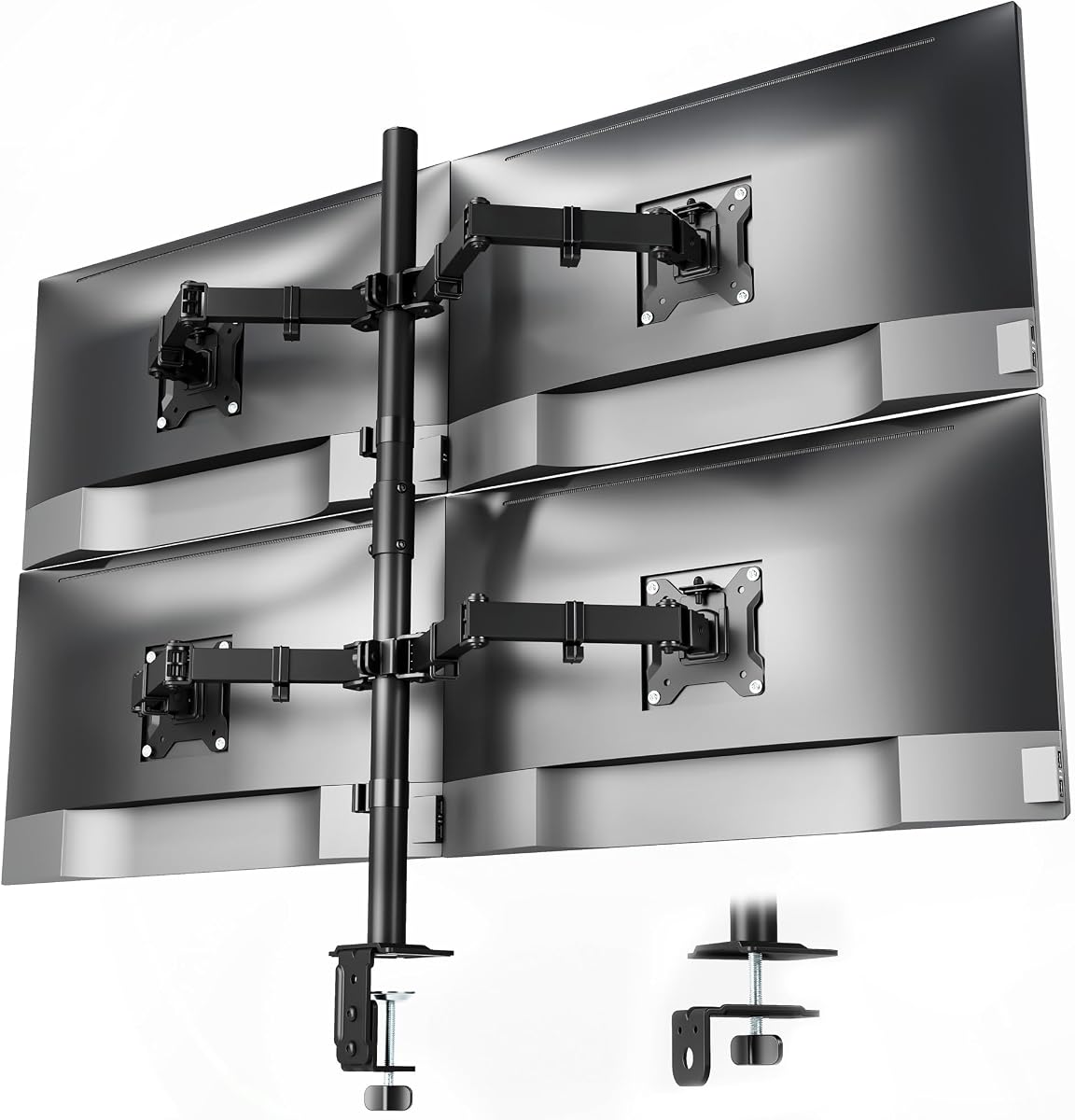
The VIVO Pneumatic Arm Quad is designed for serious users needing to support massive screens like 49-inch ultrawides. Its heavy-duty construction ensures that even the heaviest monitors remain stable and level throughout the day.
We may earn a commission when you buy through this link, at no additional cost to you.
A standout feature is the powerful pneumatic arms which counterbalance the weight of your monitors. This allows you to find the ideal screen height at the touch of a hand without struggling with tight mechanical screws or levers.
The high-capacity tilt joints accommodate heavier screens without sagging over time. However, the premium pricing reflects this advanced engineering, making it a significant investment compared to standard spring-loaded alternatives found in other models.
This mount is perfect for trading desks or creative stations where screen size and stability are non-negotiable. If you need to lift four large displays easily without effort, the pneumatic system offers unmatched convenience and premium build quality.
Accommodates up to 49-inch screens ensuring even the largest displays are supported securely.
Pneumatic springs allow smooth height transitions without manual screw tightening or loosening.
We may earn a commission when you buy through this link, at no additional cost to you.
For those seeking an affordable solution, the MOUNT PRO 4 Monitor Mount offers impressive value. It supports screens up to 32 inches and provides the necessary flexibility to maintain a clean and organized desk layout effectively.
We may earn a commission when you buy through this link, at no additional cost to you.
Its extra tall pole is practical for users who alternate between sitting and standing positions. This flexibility ensures that your viewing height can be adjusted flexibly to match your posture requirements throughout the entire workday.
While the weight capacity is lower than premium options, it remains sufficient for most standard monitors. The straightforward design makes assembly easy, and labeled parts ensure you can set it up quickly without frustration or confusion.
We recommend this option for budget-conscious buyers who still want ergonomic benefits. It provides a solid foundation for a quad setup without the high cost. Verify your monitor weight before purchase to ensure it stays within limits.
The tall pole accommodates both sitting and standing desk configurations effortlessly.
Keeps monitors off the surface to maximize usable desk area for other tools.
We may earn a commission when you buy through this link, at no additional cost to you.
The PUTORSEN Quad Monitor Mount features a unique hybrid layout capable of holding a large ultrawide on top with smaller screens below. This design caters specifically to complex multitasking setups requiring diverse screen sizes simultaneously.
We may earn a commission when you buy through this link, at no additional cost to you.
Its advanced 3-section arm design helps distribute weight evenly to hold monitors steady and level. This prevents sagging at the joints which is a common issue with cheaper mounts under heavy load or extended use periods.
One notable trade-off is the complexity of setup compared to simpler models. However, the ability to remove segments for a tighter setup near the wall offers valuable customization for users with limited desk space depth options.
This mount is ideal for traders or editors needing a mix of wide and standard screens. The gas spring support ensures stability while the flexible extension allows you to tailor the arm reach to your specific room configuration effectively.
Supports a large ultrawide on top with smaller screens below for maximum utility.
3-section arms prevent sagging by spreading the load across the structure evenly.
We may earn a commission when you buy through this link, at no additional cost to you.
The monTEK Quad Monitor Stand offers wide compatibility with displays ranging from 17 to 32 inches. It supports 22 lbs per arm which covers most modern flat and curved monitors comfortably without sagging issues.
We may earn a commission when you buy through this link, at no additional cost to you.
Built with high-grade materials and an advanced joint design, this mount keeps your display securely in place. The complete range of motion allows you to find your perfect view minimizing neck strain while maintaining a modern aesthetic.
One potential trade-off is the assembly process which might feel slightly basic compared to premium brands. However, clear instructions and quick-release VESA plates make setup manageable within 20 minutes typically for most users easily.
We recommend this stand for anyone wanting reliable support and clean wire management. Its cable organizers help enhance comfort during work. It is a solid middle ground between price and performance for most users needing a quad setup.
Advanced joints ensure screens remain level without sagging even with frequent adjustments.
Integrated organizers keep wires tidy and out of sight enhancing overall desk aesthetics.
We may earn a commission when you buy through this link, at no additional cost to you.
The MOUNTUP Quad Monitor Stand is designed for most computer monitors up to 32 inches with reliable support. Its solid base supports four monitor arms helping you save table space significantly while maintaining structural integrity over time.
We may earn a commission when you buy through this link, at no additional cost to you.
You can freely adjust height along the center pole tilt and swivel to find the right viewing angle. The quick-release VESA plate simplifies attachment making it less than 20 minutes from opening the box to using the monitor.
A key benefit is the 3-year support which adds confidence to your purchase. However, the weight limit is lower than some competitors which may exclude heavier displays or accessories like webcam mounts from being used safely.
This stand is a strong choice for home offices needing reliable support and good service. Cable clips keep wires protected for a cleaner look. We suggest it for standard users prioritizing flexibility and ease of use.
Quick-release plates and clear instructions streamline assembly to under 20 minutes.
One solid base supports four arms freeing up significant surface area for other tasks.
We may earn a commission when you buy through this link, at no additional cost to you.
This VIVO model utilizes dual pneumatic arms on the sides to balance the weight of four monitors efficiently. The result is smooth transitions when moving screens without needing to loosen tension screws constantly during use.
We may earn a commission when you buy through this link, at no additional cost to you.
Constructed with a sturdy combination of steel and aluminum, it secures screens weighing up to 17.6 lbs each. Tension can be increased for heavier monitors or decreased for lighter monitors to achieve more flexibility as needed.
The setup is designed to be painless with step-by-step instructions provided to ensure you win back valuable desk space quickly. One consideration is that the pneumatic feature adds to the cost compared to standard spring mounts on the market.
Ideal for users wanting premium movement without paying for top-tier ultrawide support, this mount balances features well. The heavy-duty C-clamp provides a solid hold for most desk thicknesses up to 3.25 inches reliably and securely.
Dual springs allow smooth transitions without manual screw adjustments during screen repositioning.
Combination of steel and aluminum ensures durability and stability throughout daily usage.
We may earn a commission when you buy through this link, at no additional cost to you.
The Pholiten Quad Monitor Arm features a unique sandwiched design that occupies very little space on the desktop. It lifts monitors from the surface allowing body to work comfortably without fixed positions harming your posture during long hours.
We may earn a commission when you buy through this link, at no additional cost to you.
Advanced gas spring technology provides smooth and effortless monitor positioning with superior weight support. The arm can be adjusted forward and backward while each screen can tilt swing and rotate for vertical or horizontal viewing options easily.
One trade-off is the unique installation which may require more careful desk edge checks than standard clamps. However, the included instructions and hardware make the process manageable. Ensure your desk has enough depth for the sandwich mount.
We recommend this mount for those prioritizing minimal desk clutter and smooth arm movement. Its ability to adjust height and position according to your needs makes it great for varied work routines. Verify desk edge specs before buying.
Sandwiched design keeps the base small freeing up desk surface area efficiently.
Gas springs allow easy adjustment of each screen with minimal physical effort.
We may earn a commission when you buy through this link, at no additional cost to you.
This WALI mount fits most flat panel monitors up to 32 inches and supports up to 22 lbs per arm. It boasts a high rating of 4.6 reflecting customer satisfaction with its durability and practical features for office setups.
We may earn a commission when you buy through this link, at no additional cost to you.
The two-stage locking system adapts to C-clamp and Grommet Base options providing flexibility for different desk types. Built-in cable management guides wires along the arms to keep cords out of sight and out of the way for a tidy workspace.
One minor consideration is that the clamp size is fixed meaning you must check desk thickness carefully. But for those compatible desks, the double efficiency design helps boost productivity by freeing up valuable space on the desktop surface.
We suggest this model for those who want broad compatibility and solid support. It is a great choice for opening up desk space for a keyboard or docking station while maintaining a clutter-free and organized workstation environment.
Two-stage system allows C-clamp or Grommet installation on most desk types.
Integrated guides hide wires along arms ensuring a clean organized look.
We may earn a commission when you buy through this link, at no additional cost to you.
The VIVO Quad Monitor Stand is built to support four monitors from 13 to 32 inches with a sturdy design. It allows for both portrait and landscape orientations giving you flexibility in how you arrange your workspace effectively.
We may earn a commission when you buy through this link, at no additional cost to you.
The longer upper bracket allows your top monitor to angle downward and easily align with the lower monitor. This helps with viewing consistency when sharing screens or reviewing content across multiple displays simultaneously without strain.
While the tilt range is limited to plus or minus 15 degrees, the swivel and rotation options still provide good flexibility. Desk padding is included to protect your surface from scratches which shows care for user equipment during installation.
This mount is great for team projects or security monitoring where four screens are needed on a budget. Cable clips give your setup an organized appearance. We suggest it for standard office tasks where basic adjustability suffices.
Longer upper bracket helps align top monitor with lower monitors for consistent viewing.
Included padding prevents scratches on your desk during clamping and setup.
We may earn a commission when you buy through this link, at no additional cost to you.
Selecting the right quad monitor mount requires careful consideration of your desk setup, monitor dimensions, and budget. Here are key factors to evaluate to ensure you choose a model that offers stability and ergonomic benefits.
Check that your monitors match the mount supported VESA pattern such as 75x75mm or 100x100mm. This standard dictates the screw hole spacing on the back of screens and is crucial for secure attachment without damaging the device.
Ensure your screens have these mounting holes before purchasing to avoid the need for adapters or returns.
Verify the maximum weight each arm can hold. Monitors vary significantly in weight especially with ultrawides or large bezels. Exceeding the capacity can lead to sagging instability or even failure of the mount over time.
Choose a model with a higher weight limit than your lightest monitor to ensure long-term stability and safety.
Look for mounts that offer tilt swivel and rotation options. These features allow you to optimize viewing angles and switch between landscape and portrait modes. Greater adjustability helps prevent neck strain during extended use sessions.
Prioritize models with smooth movement mechanisms to make daily repositioning effortless and efficient.
Confirm the mount accommodates your desk thickness. Most use C-clamps or grommet holes which have specific range requirements. Installing on a desk outside this range can result in a loose fit or damage to the surface.
Measure your desk depth before buying to ensure the clamp will secure properly and safely without wobbling.
Sturdy materials like steel or cast aluminum enhance durability and stability. Cheaper plastic components may not withstand daily adjustments or heavy loads leading to premature wear or sagging over time.
Opt for metal builds to ensure your investment lasts longer and supports screens securely throughout the workday.
Integrated cable clips or channels keep wires organized and hidden. This reduces visual clutter and prevents cables from getting tangled when moving monitors which enhances both safety and aesthetics.
Choose a model with good cable routing to maintain a clean and professional looking workspace effectively.
Look for models with clear instructions and pre-labeled parts. Easy assembly saves time and reduces frustration especially if you are not comfortable with tools or complex hardware setups at home.
Models with quick-release plates and standard hardware are generally faster to set up for immediate use.
Check for warranty coverage or customer support options. A solid warranty protects your investment against defects and gives peace of mind if issues arise during installation or regular usage periods.
Brands with responsive support teams make troubleshooting easier and add value to your purchase significantly.
Start by attaching the mount securely to your desk using the provided C-clamp or grommet base. Ensure it is tightened firmly to prevent wobbling and then attach the arms and monitors to the VESA plates securely.
Adjust each arm to your preferred viewing height and angle. Use tilt swivel and rotation functions to align screens for optimal ergonomics and reduce strain on your neck back and eyes during daily work routines.
Periodically check the tension knobs and screws to ensure they remain tight. Dust and clean the arms with a soft cloth to prevent buildup. This maintenance ensures smooth movement and extends the life of the mount significantly.
Yes most mounts support curved screens as long as they meet the VESA weight and size requirements. Always verify the curvature radius if possible to ensure compatibility.
Most C-clamps work with desks up to 3 to 4 inches thick but check the specific model specs. Grommet mounts may have different hole size requirements.
Assembly typically requires basic tools like a screwdriver which may be included. Some models offer tool-free assembly for simpler setup and installation steps.
Ensure you do not exceed the weight limit per arm and check tension knobs regularly. Higher build quality helps reduce the risk of sagging over time.
Standard mounts often support up to 32 inches so check specific models for ultrawide compatibility. Premium mounts usually have higher weight and size limits.
Most quad mounts are fixed to four arms. You would need to purchase a separate stand or larger system for additional screen support needs.
Most mounts include both C-clamp and grommet options. You can use the clamp if there is no hole. Verify your desk thickness before buying to ensure compatibility.
Use a soft dry cloth to dust the arms and joints. Avoid harsh chemicals that could damage the finish. Regular cleaning keeps moving parts functioning smoothly.
Selecting a 4 monitor mount with adjustable arms can transform your workspace into a highly efficient command center. Whether you choose the versatile WALI model or the premium VIVO pneumatic option each pick offers unique benefits to match your specific needs and preferences.
Consider your monitor sizes desk thickness and budget carefully before making a decision. Prioritizing stability adjustability and cable management will ensure your setup remains comfortable and organized for years of daily use and productivity.
Prices and availability change frequently so please check current product pages for the latest deals before finalizing your purchase. This guide aims to help you find the best ergonomic quad mount that fits your workspace perfectly.