
BOYI GMK67 Barebones Keyboard Kit
4.5Editor score
Tri-mode wireless connectivity
Hot-swappable switches
Gasket mounted design
Explore the top barebones keyboards of October 2026. We compare customization, connectivity, build quality, and features to help you find the perfect DIY kit.
Barebones keyboards offer enthusiasts the freedom to build a custom typing experience from the ground up. These kits provide the essential frame, PCB, and case without switches or keycaps, allowing you to choose every component that defines sound and feel.
We evaluated ten leading barebones kits based on build quality, customization options, connectivity features, and user ratings. Each product was assessed for gasket mounting, hot-swap support, software compatibility, and overall value to ensure a reliable recommendation for builders.
Each pick below highlights specific strengths like wireless modes, RGB lighting, or premium materials. Remember that availability and pricing change frequently, so verify current details before purchasing to ensure you get the best deal available today.
4.5Editor score

4.6Editor score

4.4Editor score
This table provides a side-by-side view of the top ten barebones keyboard kits available. Compare layout sizes, connectivity options, mounting styles, and unique features to find the model that fits your workflow and aesthetic preferences.


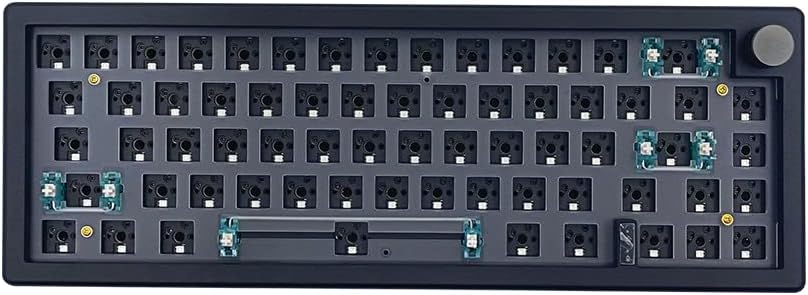


The BOYI GMK67 stands out as a top contender for budget-conscious builders seeking a fully featured DIY experience. With a high rating of 4.5 stars, it delivers solid performance through its VIA programmability and triple-mode connectivity options.
We may earn a commission when you buy through this link, at no additional cost to you.
Its gasket-mounted design ensures a satisfying typing feel while minimizing unwanted vibrations. The inclusion of a multifunction knob adds premium utility for media control, and the 4000mAh battery supports extended wireless use without frequent recharging.
While it lacks an OLED screen and uses a plastic case, these trade-offs are acceptable given the price. The hot-swap PCB supports both 3-pin and 5-pin switches, making it flexible for various customization preferences without requiring soldering skills.
This kit is ideal for first-time DIYers or gamers needing reliable wireless performance. It balances essential features with affordability, offering a refined entry into custom mechanical keyboards that performs well for both work and play.
Connect via Bluetooth 5.0, 2.4GHz, or Type-C wired for seamless switching between devices.
Use the rotary knob for volume or custom actions, and remap keys easily with VIA software.
We may earn a commission when you buy through this link, at no additional cost to you.
The GMK104 Barebones Kit earns the Editor's Choice award for its impressive array of modern features. It combines a full-size layout with a smart display and knob, offering a premium experience that appeals to power users needing maximum functionality.
We may earn a commission when you buy through this link, at no additional cost to you.
Its VIA programmable nature allows for complex macros and lighting customization. The gasket-mounted structure and hot-swap PCB ensure a high-quality typing experience, while the tri-mode wireless supports multitasking across multiple devices effortlessly.
Although it carries a higher price and occupies more desk space, the added utility justifies the cost for many. The smart display enhances interactivity, and the metal knob provides precise control that elevates daily productivity and media usage.
Buyers seeking a complete all-in-one solution will appreciate its versatility. It supports both Windows and Mac, ensuring broad compatibility, and delivers a robust platform for those who want a fully customizable, feature-packed keyboard system.
Customize the screen with real-time image updates and use buttons for backlight and media control.
Utilize VIA to remap all 104 keys, create macros, and adjust RGB lighting effects easily.
We may earn a commission when you buy through this link, at no additional cost to you.
The M87 Kit Black focuses on delivering a quiet and functional experience for office or shared spaces. With a 4.2 rating, it provides essential features like gasket mounting and hot-swap PCBs without the cost of wireless components.
We may earn a commission when you buy through this link, at no additional cost to you.
Its sound absorption foam and silicon bottom pad work together to reduce noise significantly. This makes it a strong choice for users who prioritize acoustics over advanced connectivity, while still offering 18 preset lighting modes for visual appeal.
While it lacks wireless connectivity and advanced software, the price reflects these limitations. The NKRO support ensures smooth gaming performance, and the detachable USB-C cable adds portability for those who switch setups frequently.
Ideal for budget builders prioritizing silence, this kit simplifies the DIY process. It offers a clean, functional base that performs reliably for typing and gaming, making it an accessible entry point into mechanical customization.
High-quality silencing pads absorb clatter for a whisper-quiet typing experience without losing responsiveness.
The detachable USB-C cable makes it easy to transport and customize for different work environments.
We may earn a commission when you buy through this link, at no additional cost to you.
The GMK104 White Kit earns the highest rating among all options at 4.8 stars, signaling exceptional satisfaction. It mirrors the feature set of its black counterpart but presents a clean aesthetic suitable for modern workspace setups.
We may earn a commission when you buy through this link, at no additional cost to you.
With a smart display and metal knob, users can interact with the keyboard in real-time. The gasket-mounted structure ensures a comfortable typing feel, while the hot-swap PCB allows for easy switch upgrades to personalize sound and actuation.
While the price is higher, the build quality and design justify the investment for many buyers. The tri-mode connection enables seamless switching between devices, making it highly functional for professionals managing multiple systems efficiently.
This model is perfect for those who value both looks and utility. Its full-size layout supports productivity tasks, and the customization potential through VIA software ensures it meets specific workflow demands over the long term.
The white finish offers a sleek look that complements modern monitors and office environments effectively.
Customize screen images and use multimedia buttons for precise control over backlight and device settings.
We may earn a commission when you buy through this link, at no additional cost to you.
The M87 Kit White offers a budget-friendly way to enjoy silent typing and customization. While it has a lower rating than the black version, it provides similar acoustic benefits and layout features for those seeking a specific aesthetic.
We may earn a commission when you buy through this link, at no additional cost to you.
Its sound absorption foam ensures reduced noise during typing sessions. The gasket-mounted design and hot-swap PCB allow for upgrades over time, making it a versatile base for experimentation without requiring soldering skills or high investment.
Users should note the lack of wireless connectivity, which keeps costs down. However, the detachable USB-C cable and compact design make it portable, and the RGB modes add visual flair to an otherwise standard wired setup.
Best for budget-conscious buyers needing a clean look, this kit simplifies the DIY process. It delivers a quiet, functional base that works well for office use, offering essential features at an accessible price point.
The white color scheme helps create a uniform and bright look on most desk configurations.
Silencing pads absorb keystroke sound, reducing distractions in shared or quiet work environments.
We may earn a commission when you buy through this link, at no additional cost to you.
The BOYI GMK67 Black Kit provides a compact, functional build for those valuing desk space. With a 4.3 rating, it balances affordability with useful features like triple-mode connectivity and gasket mounting for enhanced typing feel.
We may earn a commission when you buy through this link, at no additional cost to you.
The VIA programmability allows full control over macros and key mappings. Its hot-swap PCB supports both 3-pin and 5-pin switches, giving flexibility for customization. The multifunction knob adds utility for volume control and media functions.
While it uses plastic and lacks an OLED screen, these trade-offs suit a budget build. The 65% layout saves space without sacrificing arrow keys, making it practical for users needing a smaller footprint alongside robust features.
Ideal for travelers or minimalists, this kit delivers reliable wireless performance. Its 4000mAh battery ensures longevity, and the customizable nature allows you to define the look and sound that best fits your preferences.
The 65% layout saves desk space while retaining essential navigation keys for efficient use.
The 4000mAh capacity supports extended wireless use, reducing the need for frequent charging.
We may earn a commission when you buy through this link, at no additional cost to you.
The GMK87 Keyboard stands out for its interactive TFT LCD screen and premium design features. While it has a lower average rating, it offers robust functionality with triple-mode connectivity and a versatile 80% layout that balances size and utility.
We may earn a commission when you buy through this link, at no additional cost to you.
The smart display allows real-time updates of time and images, while the metal knob provides precise volume control. Hot-swap PCBs support easy switch changes, and VIA software enables full customization of macros and lighting effects.
Users may find the setup complex compared to simpler kits. The 3000mAh battery supports wireless use, and the gasket mount enhances comfort. However, its mixed ratings suggest checking specific use-case reviews before committing.
Best for tech enthusiasts seeking visual feedback, this kit delivers unique interactivity. It supports various devices and offers a platform for creativity, though it requires patience to unlock its full potential.
The TFT screen offers real-time updates that make the keyboard feel more interactive and connected.
Switch between Bluetooth, 2.4GHz, and Type-C modes to adapt to different device environments easily.
We may earn a commission when you buy through this link, at no additional cost to you.
The Glorious GMMK PRO sets a high standard for build quality with its CNC-machined aluminum frame. It delivers a substantial, durable feel that rivals custom boards, earning a 4.4 rating for users seeking a premium foundation.
We may earn a commission when you buy through this link, at no additional cost to you.
Its 5-pin hotswap support allows easy switch changes without soldering. The modular design lets you swap plates, knobs, and frames, and included foam can be adjusted to tune acoustics for a personalized sound profile.
While pricey and lacking wireless features, the solid construction justifies the cost for many. The aluminum plate ensures consistent typing feel, and the high scratch-resistant surface maintains its aesthetic appeal over time effectively.
Ideal for enthusiasts valuing durability and customization, this kit is a long-term investment. It provides a reliable base for high-end components, ensuring your final build meets professional standards for both looks and function.
CNC-machined aluminum offers unmatched durability and a solid typing feel compared to plastic alternatives.
Adjustable foam and plate options let you fine-tune the sound to match your specific preferences.
We may earn a commission when you buy through this link, at no additional cost to you.
The GMK108 Kit offers a full-size layout with modern wireless features for maximum functionality. With a 4.1 rating, it balances productivity needs with customization options, making it suitable for users who rely on a numpad regularly.
We may earn a commission when you buy through this link, at no additional cost to you.
Its tri-mode connection allows switching between devices, while the gasket-mounted design improves comfort. The VIA software enables full macro customization, and the hot-swap PCB ensures easy switch upgrades for varied typing experiences.
Although it requires significant desk space, the utility of 108 keys is unmatched. The 4000mAh battery supports extended use, and the RGB backlighting provides visual appeal. This model prioritizes function without sacrificing modern features.
Best for office professionals or heavy data entry users, this kit delivers a complete wireless experience. It supports both Windows and Mac, ensuring broad compatibility for diverse workflows and environments.
The full 108-key layout includes all function keys and a numpad for efficient data entry tasks.
Connect via Bluetooth or 2.4GHz for a clean setup without compromising on performance or speed.
We may earn a commission when you buy through this link, at no additional cost to you.
The GMMK 3 Barebones focuses on modularity and acoustic control with a unique building-block design. While it has the lowest rating among options, it offers a specialized approach for users prioritizing sound and feel customization.
We may earn a commission when you buy through this link, at no additional cost to you.
Its modular gasket system allows adjustments to typing feel, and two layers of foam reduce resonance. The 5-pin hotswap support makes switch changes easy, and the aluminum plate adds stability to the 75% layout.
Users seeking standard features may find it lacking compared to competitors. However, the ability to tailor every aspect makes it unique. It is best suited for hobbyists willing to experiment extensively with internal components.
Ideal for DIY enthusiasts, this kit provides a base for creative builds. It emphasizes control over acoustic profile and feel, offering a distinct path for those who want to customize beyond standard layouts.
The modular gasket system allows users to swap blocks to change firmness and feel easily.
Two layers of dense foam absorb resonance, creating a clean and satisfying typing profile.
We may earn a commission when you buy through this link, at no additional cost to you.
Choosing the right barebones keyboard depends on your specific needs for layout, connectivity, and customization. This guide breaks down key factors to help you make an informed decision for your unique setup.
Layouts range from compact 65% to full-size 108 keys. Consider your desk space and whether you need a numpad or arrow keys for work and gaming.
Choose a size that balances functionality with available desk real estate.
Look for tri-mode options like Bluetooth, 2.4GHz, and USB-C for flexibility. Wired-only kits are simpler but limit device switching options.
Prioritize wireless if you use multiple devices frequently.
Gasket mounting provides a softer feel and isolates vibration better than tray mounts. This affects typing comfort and acoustic output significantly.
Select gasket mounting for a premium tactile experience.
Hot-swap PCBs allow changing switches without soldering. Ensure compatibility with 3-pin or 5-pin mechanical switches based on your preference.
Hot-swap support is essential for future-proofing your keyboard.
VIA or QMK support enables deep customization of macros and lighting. Proprietary software can be limited compared to open-source alternatives.
Choose software that allows full key remapping and layer creation.
Materials like aluminum or polycarbonate affect durability and weight. Premium cases often reduce wobble and provide a more stable typing platform.
Invest in higher-quality materials for long-term satisfaction.
Look for rotary knobs, displays, or RGB lighting to enhance utility. These features add interactivity but may increase cost or complexity.
Decide which features match your daily workflow needs.
Wireless kits should offer at least 4000mAh for extended use between charges. Check if the keyboard supports charging while in use.
A large battery reduces interruptions during long sessions.
Start by installing your preferred mechanical switches into the hot-swap sockets, ensuring they are aligned correctly. Then, place your keycaps securely on the switch stems according to your layout preference.
Connect the keyboard via USB-C for initial setup or pair it with your device using Bluetooth. Use the provided software to configure key mappings and adjust lighting settings to your liking.
Keep the keyboard clean by using compressed air to remove dust between switches. Periodically check cables for wear and ensure the battery is charged properly to maintain performance over time.
A barebones keyboard kit includes the case, PCB, and plate but omits switches and keycaps. This allows you to choose your own components to customize the typing experience fully. It is ideal for users who want control over sound and feel without building from scratch.
Most modern barebones kits support hot-swap switches, meaning no soldering is required. You simply plug the switches into the sockets. However, always verify PCB compatibility with 3-pin or 5-pin switches before purchasing components.
Yes, most kits support both Windows and Mac systems. Ensure you check the software compatibility and key legends if you use specific Mac shortcuts. Many models allow you to switch layouts easily via software settings.
Gasket mounting uses foam or rubber to cushion the plate, reducing vibrations and providing a softer typing feel. It minimizes hollow sounds and enhances comfort during long typing sessions. This style is preferred for a premium user experience.
VIA software allows you to remap keys, create macros, and adjust lighting effects without flashing firmware. It is open-source and works across devices, making customization easier and more consistent than proprietary tools.
Most hot-swap PCBs support both types. If your PCB lists 5-pin support, you can use either. 3-pin switches have two prongs while 5-pin have five for stability. Check your PCB specs to ensure compatibility before buying.
Yes, hot-swap boards let you remove and install new switches easily. This means you can change the sound or feel of your keyboard without replacing the entire board. Just ensure the new switches match the socket type.
Yes, wireless kits with Bluetooth or 2.4GHz connections offer stable performance similar to wired ones. Ensure you choose a kit with good battery life and reliable latency specs to maintain smooth gaming or typing.
We reviewed ten top barebones keyboards ranging from budget-friendly 65% kits to premium full-size options. The GMK104 stands out for features, while the BOYI GMK67 offers excellent value for smaller setups.
Prioritize layout size, connectivity, and mounting style to match your workflow. Choosing a kit with hot-swap and gasket mounting ensures flexibility and comfort for long-term use.
Prices and stock change frequently, so verify current availability before purchasing. With the right build, a barebones keyboard can transform your workspace with personalized sound and performance.