
Ducky OK-M
4.4Editor score
Gasket-mount design
Five-layer acoustic dampening
Triple connectivity mode
This expert guide compares the top 10 best Ducky Keyboard models available in October 2026, reviewing their features, connectivity, and build quality.
Ducky keyboards are renowned for their superior build quality and exceptional typing experience. Whether you are a gamer or a professional typist, finding the right mechanical keyboard can transform your daily workflow.
We compared ten diverse models based on switch types, connectivity options, and build materials. Our analysis focuses on real-world performance, customization capabilities, and overall value for money in the current market.
Each selection highlights unique strengths to help you find the perfect fit for your setup. Please note that prices and availability may change frequently, so verify current details before making a purchase.
4.4Editor score

4.7Editor score

3.8Editor score
The following table provides a side-by-side comparison of all ten Ducky keyboards. Each entry highlights key specifications to help you quickly identify the model that best suits your needs.


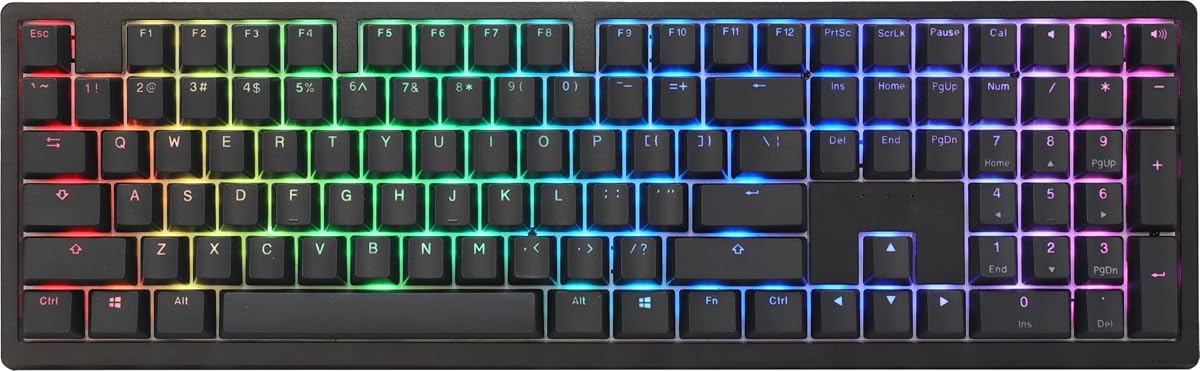


The Ducky OK-M offers a premium mechanical experience at an accessible price point. With a 4.4 rating, users appreciate its balanced build quality and quiet operation.
We may earn a commission when you buy through this link, at no additional cost to you.
Its gasket-mount design and five-layer acoustic dampening significantly reduce noise. The triple connectivity options ensure you can easily switch between multiple devices.
While VIA support is a strong feature for customization, the lack of dedicated software may deter some users. The unique Baby Switch option adds character but limits switch variety.
This keyboard is ideal for budget-conscious gamers and typists who want a reliable wireless setup without compromising on core mechanical features.
The five-layer dampening system minimizes echo and ping, creating a satisfying thock sound.
Support for USB-C, Bluetooth, and 2.4GHz wireless ensures compatibility with various devices.
We may earn a commission when you buy through this link, at no additional cost to you.
The Ducky Origin stands out with its vintage aesthetic and robust construction. It holds a 4.6 rating, reflecting strong user satisfaction with its typing feel.
We may earn a commission when you buy through this link, at no additional cost to you.
Hotswap sockets on stabilizer keys allow for easy maintenance and upgrades. The slim bezel design provides a modern look while maintaining a compact footprint.
However, the lack of wireless connectivity limits its use in cluttered setups. The standard layout may not appeal to those seeking ultra-compact form factors.
Buyers looking for a reliable, wired mechanical keyboard with a touch of nostalgia will find this model offers excellent value.
Yellow Kailh sockets on stabilizers make replacing or lubing them much easier.
OEM profile Double Shot PBT keycaps resist wear and shine over time.
We may earn a commission when you buy through this link, at no additional cost to you.
The Ducky Origin Black features Cherry MX Blue switches for those who prefer audible feedback. It maintains the same solid build quality as other Origin models.
We may earn a commission when you buy through this link, at no additional cost to you.
The tactile switches provide clear confirmation of every keystroke. Hotswap sockets allow for easy customization if you change your mind about switch preference later.
The clicky nature of the switches might disturb others in shared spaces. Users needing silence should opt for a linear or tactile variant instead.
This keyboard suits typists who enjoy a distinct sound profile and need a durable, wired solution for daily tasks.
Cherry MX Blue switches offer a distinct bump and audible click.
Double Shot PBT keycaps ensure legends remain visible over long-term use.
We may earn a commission when you buy through this link, at no additional cost to you.
The Ducky Zero 6108 delivers a compact wireless experience with tri-mode connectivity. It has a 4.1 rating, indicating solid performance for its size class.
We may earn a commission when you buy through this link, at no additional cost to you.
The Cherry MX2A Red switches provide a smooth, low-force action ideal for rapid gaming. Full N-key rollover ensures every input is registered during intense sessions.
The 60% layout removes function keys, which can be challenging for beginners. Battery life is decent but may require frequent charging for heavy wireless users.
This model is perfect for gamers prioritizing desk space and wireless flexibility without sacrificing core mechanical responsiveness.
MX2A Red switches ensure consistent keystrokes with minimal finger fatigue.
Switch between USB, 2.4GHz, and Bluetooth to fit different usage needs.
We may earn a commission when you buy through this link, at no additional cost to you.
The Ducky Origin Vintage combines a retro look with modern mechanical performance. Its 4.5 rating highlights user appreciation for its unique style and reliability.
We may earn a commission when you buy through this link, at no additional cost to you.
It includes a bonus enter key in a random color, adding a playful element. The slim bezel keeps the design elegant and focused on typing ergonomics.
The lack of wireless connectivity means it relies on a wired connection. The clicky switches are satisfying but may not suit quiet office environments.
This is a great choice for enthusiasts who value aesthetics and want a sturdy, wired keyboard for home setups.
The retro design brings a nostalgic charm to modern mechanical setups.
OEM PBT keycaps provide a textured feel and resist shine.
We may earn a commission when you buy through this link, at no additional cost to you.
The Ducky One 2 Pro Mini offers a clean white design with a compact form factor. With a 4.6 rating, it is popular among users seeking style and quality.
We may earn a commission when you buy through this link, at no additional cost to you.
The PBT keycaps ensure a durable surface that feels comfortable during long sessions. The RGB lighting adds customization to the minimalist white chassis.
The Mini layout requires adapting to modified key combinations for certain functions. Limited color availability might restrict customization desires for some users.
Ideal for desk aesthetics enthusiasts, this keyboard delivers a premium look with the reliability expected from the One 2 series.
The white edition looks sharp against light or dark desk backgrounds.
True PBT keycaps provide a tactile surface that resists wear.
We may earn a commission when you buy through this link, at no additional cost to you.
The Ducky One X Wireless features advanced inductive switches for superior control. It holds a 3.8 rating, reflecting both its high-end features and learning curve.
We may earn a commission when you buy through this link, at no additional cost to you.
Rapid Trigger technology allows for instant key resets, perfect for competitive gaming. The seven-layer dampening delivers a luxurious, muted typing feel.
The software is web-based, requiring an internet connection for initial setup. The premium price may be hard to justify for casual users.
This keyboard is designed for competitive gamers who want the latest technology and a high-end typing experience.
Instant key reset upon release offers unmatched speed in fast-paced games.
Floating PCB design absorbs vibration for a softer, more flexible feel.
We may earn a commission when you buy through this link, at no additional cost to you.
The Ducky One 3 Matcha is celebrated for its premium build and typing experience. With a 4.7 rating, it is arguably the best balanced keyboard in this list.
We may earn a commission when you buy through this link, at no additional cost to you.
The QUACK Mechanics design ensures exceptional acoustics and smoothness. The Matcha color scheme adds a refreshing pop of color to any setup.
The Cherry MX Blue switches are clicky, which might not suit all environments. The price is higher than standard models due to its refined features.
This keyboard is the top recommendation for users seeking a high-quality, stylish, and versatile mechanical keyboard.
Dual-layer dampeners create a rich, consistent sound signature.
V2 stabilizers are pre-lubed for smooth spacebar performance.
We may earn a commission when you buy through this link, at no additional cost to you.
The Ducky One 3 TKL offers a versatile Tenkeyless layout with premium features. It has a 4.3 rating, appreciated by users needing space-saving designs.
We may earn a commission when you buy through this link, at no additional cost to you.
It shares the same high-quality build as the full-size Matcha version. The MX Brown switches provide a tactile bump without excessive noise.
Removing the numpad limits use for numeric-heavy tasks. The build quality justifies the cost for most users but not everyone.
This is an excellent pick for those wanting a premium typing experience in a space-efficient package.
The TKL design keeps essential keys while freeing up mouse space.
Same damping and PCB as the full-size model ensure consistent quality.
We may earn a commission when you buy through this link, at no additional cost to you.
The Ducky One 2 provides a reliable compact option with a focus on utility. Its 4.3 rating confirms its consistent performance and build quality.
We may earn a commission when you buy through this link, at no additional cost to you.
Included extra keycaps allow for some personalization right out of the box. The linear Red switches are ideal for gaming due to their smooth actuation.
The design is slightly older compared to the One 3 series. The included accessories add value but do not outweigh the newer features.
This keyboard is a great entry point for users wanting a compact, functional setup with reliable performance.
Ten extra PBT keycaps allow for unique color combinations.
Dual-layer PCB ensures electrical stability and durability.
We may earn a commission when you buy through this link, at no additional cost to you.
Selecting the right Ducky keyboard involves considering layout, switches, and connectivity to match your workflow. Understanding these factors ensures you get the best value for your investment.
Layout determines the physical size and key count of the keyboard. Options range from full-size with a numpad to compact TKL or 60% versions.
Choose a layout that balances your need for function keys with desk space constraints.
Switches define the tactile and auditory feedback of each keystroke. Common types include linear for gaming and tactile for typing.
Select switches that match your preference for noise and feel.
Connectivity determines how you connect the keyboard to your device. Wired offers reliability while wireless offers convenience.
Choose based on whether you prioritize mobility or zero-latency input.
Build quality refers to the materials used for the case and keycaps. High-quality materials like PBT and aluminum ensure longevity.
Prioritize models with durable keycaps and solid mounting systems.
Customization features include hot-swap sockets and RGB lighting. Hot-swap allows changing switches without soldering.
Look for keyboards that support these features for long-term versatility.
Ergonomics involve features like adjustable feet or gasket mounts for comfort. A comfortable keyboard reduces strain during long sessions.
Prioritize keyboards with adjustable height or flexible mounting designs.
Software support allows key remapping and macro programming. Ducky often supports VIA or proprietary software for these tasks.
Check if the model offers robust software tools for your needs.
Price varies significantly based on features and materials. Entry-level models offer basics while premium models offer advanced features.
Set a budget that matches the features most important to you.
Regularly clean your keyboard with compressed air to remove dust and debris. Use a soft brush to gently clean around the switches.
Avoid spills and liquids by keeping beverages away from your workspace. If a spill occurs, unplug immediately and dry thoroughly.
Periodically check cables and connections for wear. Ensure the cable is secured to prevent accidental tugging and damage.
The Ducky Zero 6108 or One X Wireless are excellent for gaming due to low latency and responsive switches. Linear switches like Cherry MX Red work best for rapid key presses.
Many modern Ducky models like the One 3 and OK-M feature hot-swap sockets. However, some older models may require soldering for switch changes.
Yes, wireless models such as the OK-M and One X support Bluetooth connectivity. Wired models rely solely on USB connections for input.
Ducky typically uses PBT (polybutylene terephthalate) keycaps for durability. PBT resists wear and shine better than standard ABS plastic.
Ducky uses web-based software like VIA for configuration. This software is free and accessible directly through your web browser.
Use compressed air to blow out dust and a damp cloth to wipe the case. Remove keycaps if necessary for deep cleaning with mild soap.
Tactile switches like Cherry MX Brown provide clear feedback for typing. They strike a balance between noise and physical confirmation.
Ducky provides a limited warranty for manufacturing defects. Always check the specific terms at the time of purchase with your retailer.
The Ducky OK-M, One 3 Matcha, and One X Wireless represent the top choices for budget, balance, and premium features respectively. Each offers distinct advantages depending on your needs.
Prioritize features like switch type and layout that directly impact your daily workflow. Investing in a quality keyboard can significantly improve your productivity and comfort.
Prices and availability can shift quickly, so verify current details before purchasing. We hope this guide helps you find the perfect Ducky keyboard for your setup.