
ASRock J4125M Motherboard
3.4Editor score
Integrated Quad Core Processor
Affordable Entry Level Price
Basic Expansion and Connectivity
This guide compares the top low power motherboards for NAS and home servers, evaluating efficiency features connectivity and stability for 2026 builds.
Finding the right low power motherboard is essential for efficient NAS and home server builds. These boards minimize energy consumption while delivering reliable performance for 24/7 operations without generating excessive heat.
We compared ten top models based on processor efficiency, network capabilities, storage expansion options, and overall build quality. Each selection offers unique advantages for budget conscious users and professional network appliance builders alike.
Each pick highlights key specifications and real world strengths to help you choose the best fit. Prices and availability change frequently, so verify current details before purchasing to ensure you get the best value for your project.
3.4Editor score

4.5Editor score

4.1Editor score
The following table provides a side by side comparison of all ten selected low power motherboards. Review key specifications including CPU type, form factor, network ports, and storage options to quickly identify the model that fits your specific build requirements.





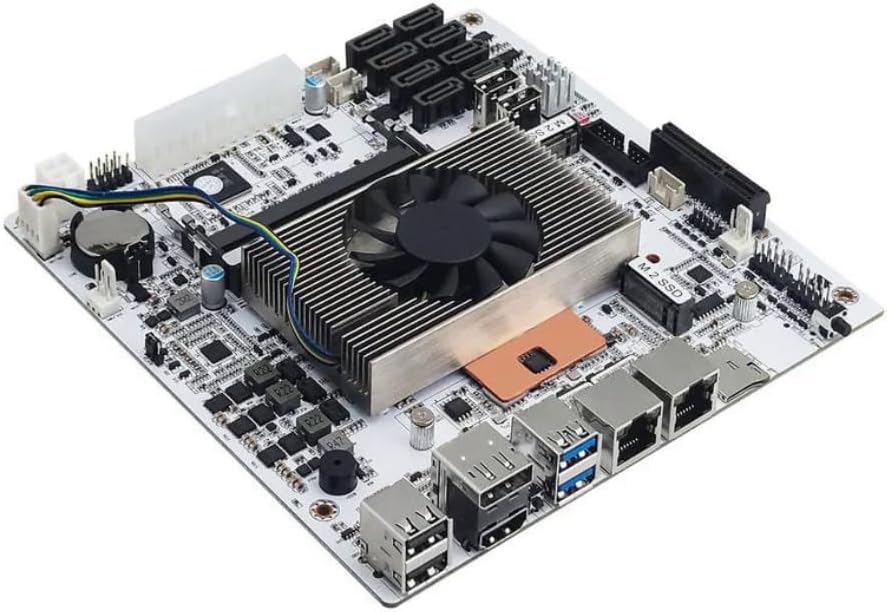
This industrial grade board stands out as the top pick for low power builds requiring serious networking and storage. With a Celeron N5105 processor and four 2.5GbE ports, it delivers exceptional performance for firewalls or media servers. Its compact Mini-ITX design fits easily into small cases while supporting up to thirty two gigabytes of RAM.
We may earn a commission when you buy through this link, at no additional cost to you.
The standout feature is its extensive connectivity. Six SATA ports and two M.2 NVMe slots provide ample room for expanding your storage array without needing extra PCIe cards. The four 2.5GbE Ethernet ports allow for link aggregation or separate VLANs for secure network segmentation. Dual video outputs support dual 4K monitors for management tasks.
One trade-off is the power requirement. The board needs both a 24PIN and a 4PIN power connector to function, which might complicate setups with limited PSU cables. Additionally, the first boot can take several minutes to read memory information, requiring patience from users unfamiliar with industrial boards.
If you need a reliable platform for a home lab or small business NAS that balances power draw with performance, this is the ideal choice. Its industrial build quality ensures stability for 24/7 operation. We highly recommend it for anyone prioritizing network speed and storage flexibility.
The four 2.5GbE ports enable high speed data transfer and network segmentation without external NICs.
Six SATA and two M.2 slots offer flexible storage expansion for large media libraries or data backups.
We may earn a commission when you buy through this link, at no additional cost to you.
For users on a tight budget, this ASRock board offers a functional entry point into low power computing. It features an integrated J4125 quad core processor that handles basic NAS tasks efficiently. While it lacks high end features, it provides solid reliability for light workloads and simple home automation projects.
We may earn a commission when you buy through this link, at no additional cost to you.
The simplicity of this board is its strength. It requires no separate CPU purchase and works with standard DDR4 memory modules. The Micro-ATX form factor fits most mid tower cases, making it versatile for various chassis options. It includes essential ports for connecting drives and peripherals without unnecessary complexity.
However, its limitations are apparent in modern networking. The board lacks multi-gigabit Ethernet and has only one M.2 Key E slot for WiFi. PCIe 2.0 slots limit expansion card speeds compared to newer standards. This makes it less suitable for high bandwidth applications or heavy multitasking.
Choose this board if cost is your primary concern and you need a basic server for file sharing or light media streaming. It delivers value for money without compromising core functionality. For most budget builds, it remains a practical and dependable option.
Priced competitively, this board is perfect for budget constrained users building entry level home servers.
The J4125 processor offers enough power for typical home server tasks while keeping power consumption low.
We may earn a commission when you buy through this link, at no additional cost to you.
This industrial Mini-ITX board combines compact size with powerful low power specs. Featuring an 8th gen U-series quad core processor with eight threads, it handles virtualization and heavy NAS workloads efficiently. The eight SATA ports eliminate the need for expanders, making it ideal for large drive arrays.
We may earn a commission when you buy through this link, at no additional cost to you.
Key strengths include its robust connectivity and build quality. The high density moisture resistant PCB ensures longevity in varying environments. Dual 2.5GbE LAN ports allow for fast network speeds and redundancy. The board supports VT-x and VT-d for smooth virtual machine operations essential for homelabs.
Trade-offs include a known sleep mode bug that may affect power management in some configurations. Like other high density boards, it requires specific power connectors which limits PSU compatibility. First boot times can be slow as the system initializes memory details for the OS.
If you need a premium server solution that supports virtualization and massive storage in a tiny chassis, this board excels. It is built for stability and performance in 24/7 environments. We recommend it for advanced users willing to manage its specific requirements.
Full support for VT-x and VT-d allows seamless operation of virtual machines for homelab enthusiasts.
Eight native and extended SATA ports provide extensive drive connectivity without external PCIe expansion cards.
We may earn a commission when you buy through this link, at no additional cost to you.
This older model serves as a basic solution for minimal computing needs. With an integrated J1800 processor, it offers very low power consumption suitable for simple network appliances. Its Micro-ATX form factor fits standard cases and provides essential connectivity for basic drive setups.
We may earn a commission when you buy through this link, at no additional cost to you.
The board supports DDR3 memory which is widely available and cheap. Two SATA ports suffice for light storage projects. The Gigabit Ethernet ensures stable network connection for file sharing. It includes multiple USB ports for peripherals making it versatile for simple automation tasks.
Limitations arise from its older architecture. DDR3 RAM is slower than modern standards and storage expansion is capped at two drives. Lack of NVMe support means no ultra fast boot options. This makes it less future proof compared to newer alternatives.
It works well for very specific low cost projects where performance is not a priority. If you need a basic controller for simple home tasks this board delivers reliability. However, for modern storage needs consider newer options with better expansion capabilities.
The efficient design keeps power usage extremely low perfect for always on devices.
Offers essential ports and slots for simple server builds without unnecessary complexity.
We may earn a commission when you buy through this link, at no additional cost to you.
This board is designed for standard desktop use with low power Ryzen APUs. It supports a wide range of Ryzen processors allowing flexibility for budget builds. The PCIe 4.0 support enables fast NVMe drives and modern graphics cards for versatile workstation setups.
We may earn a commission when you buy through this link, at no additional cost to you.
It features two M.2 slots for fast storage and four DDR4 slots for memory expansion. The VRM design provides steady power delivery ensuring stability under load. Q-Flash allows easy BIOS updates without a CPU making maintenance simple for users.
While efficient with an APU the board lacks native low power features like integrated NICs or specialized NAS connectors. It requires a separate CPU and standard Gigabit LAN. This makes it less optimized for 24/7 server roles compared to specialized boards.
If you need a versatile motherboard for a small home server or workstation using Ryzen hardware this is a solid choice. It balances price and features well. For dedicated NAS builds consider specialized boards with integrated processors for better efficiency.
Supports latest Ryzen 5000 series processors ensuring compatibility with future upgrades.
Dual M.2 slots provide high speed storage options essential for quick system responsiveness.
We may earn a commission when you buy through this link, at no additional cost to you.
The PRO B550M-P offers strong performance potential for power efficient Ryzen builds. Its Core Boost technology ensures stable power delivery for efficient CPUs. The board supports high speed memory overclocking which can improve overall system throughput significantly for multitasking.
We may earn a commission when you buy through this link, at no additional cost to you.
It includes two M.2 slots with one supporting Gen4 speeds for ultra fast storage. Passive and AI cooling features help maintain stable temperatures during operation. The Micro-ATX layout provides standard connectivity options including USB 5Gbps and high definition audio.
Like other AM4 boards it requires a separate CPU purchase. While efficient with a G-series APU it lacks specialized NAS connectivity like multiple Ethernet ports. This limits its use as a dedicated appliance without adding extra hardware components.
Choose this board if you want a flexible platform for a home server using Ryzen hardware. It balances cost and performance effectively. For users prioritizing pure storage expansion or network speed specialized NAS boards may be a better fit.
Frozr AI cooling adjusts fan settings automatically to maintain optimal temperatures efficiently.
Supports DDR4 overclocking up to 4400+ MT/s for improved data transfer speeds.
We may earn a commission when you buy through this link, at no additional cost to you.
This board is designed for entry level NAS builds requiring minimal hardware complexity. It comes with an integrated quad core processor eliminating the need for a separate CPU purchase. The Micro-ATX form factor ensures compatibility with standard cases making assembly straightforward.
We may earn a commission when you buy through this link, at no additional cost to you.
It supports DDR4 memory and offers basic PCIe slots for limited expansion. The M.2 Key E slot allows adding wireless connectivity if needed. Power delivery is stable ensuring reliable operation for simple file server tasks without requiring high performance cooling solutions.
Limitations include older PCIe standards and lack of multi-gigabit networking. Storage expansion is basic with limited slots compared to newer industrial boards. This makes it less ideal for power users needing high throughput or extensive drive arrays.
If you need a cost effective platform for light server use this board delivers solid value. It keeps energy consumption low while providing necessary functionality. For advanced network appliances consider boards with more specialized connectivity options.
The integrated CPU design reduces build complexity saving time and money for simple projects.
Low power design ensures the system runs quietly and economically during long term use.
We may earn a commission when you buy through this link, at no additional cost to you.
This AM4 board offers reliable performance for budget conscious builders. It supports a wide range of Ryzen processors ensuring future proofing. The three video outputs provide maximum monitor compatibility for office or home setups without needing adapters.
We may earn a commission when you buy through this link, at no additional cost to you.
The 6-phase power design ensures steady delivery for supported CPUs. Full Spike Protection guards ports against electrical surges increasing system longevity. Memory support reaches high speeds enabling responsive performance even with standard DDR4 modules.
While versatile the board has only one M.2 slot limiting storage expansion options. As an AM4 platform it lacks native low power processors requiring a separate CPU purchase. This increases total cost and power draw compared to integrated solutions.
Choose this board for general home server use where flexibility and reliability matter. Its protection features make it suitable for long term operation. For specialized NAS needs with integrated CPUs consider other options with more direct connectivity features.
Full Spike Protection on ports prevents electrical damage keeping hardware safe during unexpected surges.
Three video outputs ensure compatibility with various monitor setups for multi-screen management.
We may earn a commission when you buy through this link, at no additional cost to you.
This Mini-ITX board is perfect for compact builds requiring wireless connectivity. It supports AMD Ryzen processors offering good performance potential in a tiny footprint. The integrated Intel WiFi and Bluetooth eliminate the need for extra expansion cards in small cases.
We may earn a commission when you buy through this link, at no additional cost to you.
Its optimized VRM heatsink and digital PWM ensure stable power delivery even in cramped environments. The board includes three display interfaces providing flexibility for connected monitors. Q-Flash Plus allows BIOS updates without a CPU simplifying maintenance tasks.
However it lacks native low power processors requiring a separate CPU purchase. The LAN is standard Gigabit which is slower than multi-gigabit options found on industrial boards. This limits high throughput network applications without extra hardware.
If you need a small form factor server with wireless capabilities this board is a strong choice. It offers excellent value for compact home labs. For high speed wired networks consider boards with dedicated multi-gigabit controllers.
Built-in WiFi and Bluetooth save space and simplify cabling in compact Mini-ITX cases.
Digital PWM and DrMOS ensure reliable power delivery even in small chassis environments.
We may earn a commission when you buy through this link, at no additional cost to you.
This board excels in high capacity storage scenarios with eight SATA ports natively. Powered by a Core i5 8265U processor it delivers strong performance for virtualization and heavy data tasks. Dual 2.5GbE LAN ensures fast network throughput essential for media streaming or backups.
We may earn a commission when you buy through this link, at no additional cost to you.
The Mini-ITX design fits small cases while supporting up to 64GB of RAM. It includes NVMe slots for fast boot drives and a PCIe x4 slot for expansion. The processor supports VT-x and VT-d for smooth VM operation in professional setups.
One limitation is the lack of sleep mode support which affects energy management options. Power setup requires specific 24PIN and 4PIN connectors which limits PSU choices. This makes initial setup slightly complex compared to standard desktop boards.
Choose this board if you need a compact high power storage server with virtualization capabilities. It balances capacity and performance well. For continuous 24/7 operations this industrial grade option provides the reliability you need for demanding workloads.
Eight native SATA ports enable massive storage arrays without needing external expansion cards or hubs.
Full support for VT-x and VT-d allows for seamless virtual machine management and data isolation.
We may earn a commission when you buy through this link, at no additional cost to you.
Selecting the right low power motherboard depends on your specific use case such as NAS, firewall, or general home server needs. This guide outlines key factors to help you make an informed decision.
Look for integrated low power CPUs like Intel Celeron or Core U-series if you want an all-in-one solution. Dedicated boards with Ryzen support offer flexibility but may require more power depending on the CPU choice. Ensure the TDP matches your power supply capabilities.
Prioritize processors with low TDP ratings to minimize heat generation and electricity usage over time.
Choose between Mini-ITX and Micro-ATX based on your case size. Mini-ITX is ideal for compact builds while Micro-ATX offers more expansion slots. Verify case dimensions before purchasing to ensure a proper fit without clearance issues.
Always check chassis specifications to avoid compatibility problems during assembly.
For NAS or firewall builds prioritize boards with multiple Ethernet ports or multi-gigabit support. Integrated 2.5GbE ports reduce the need for extra PCIe cards and simplify cabling. Standard Gigabit LAN is sufficient for basic file sharing.
Multiple LAN ports enable link aggregation and network segmentation for better performance and security.
Evaluate SATA port counts and M.2 slot availability. NAS builds often require six or more SATA ports to support large drive arrays. M.2 slots provide fast boot options without using PCIe lanes. Consider expansion cards if native ports are limited.
Ensure the board supports the number of drives you plan to install for long term scalability.
Check DDR generation and maximum supported RAM capacity. DDR4 is standard for modern boards. Virtualization tasks require ample memory so aim for boards supporting at least 32GB. Faster RAM speeds improve overall system responsiveness.
Select a board with enough DIMM slots to upgrade memory later as your storage needs grow.
Industrial boards often require both 24PIN and 4PIN power connectors. Verify your PSU has the necessary cables to avoid boot failures. Some boards may need specific 12V inputs which limits adapter compatibility.
Always check power requirements before building to ensure your power supply can support the board.
For homelabs ensure the board supports virtualization features like VT-x or AMD-V. This is crucial for running multiple VMs efficiently. BIOS options for legacy or UEFI modes can impact OS compatibility.
Confirm compatibility with your chosen operating system to avoid installation issues.
Look for industrial grade PCBs with moisture resistance for 24/7 operation. Full Spike Protection or similar features guard ports against electrical surges. Quality chokes and capacitors improve stability and lifespan under load.
Durable components ensure the board remains reliable over years of continuous use in server environments.
Install the motherboard carefully to avoid static damage using anti-static precautions. Connect all power and data cables securely to prevent boot failures or data loss during operation.
Regularly update the BIOS using tools like Q-Flash to ensure compatibility with new CPUs and OS updates. Keeping firmware current improves stability and adds support for newer memory speeds.
Monitor temperatures through BIOS or software tools to ensure cooling remains adequate. Clean dust from heatsinks and fans periodically to maintain efficient airflow and prevent overheating.
NAS motherboards often include integrated low power processors and multiple Ethernet ports to support server tasks efficiently. Regular boards may need separate CPUs and add-on cards for similar functionality. NAS boards prioritize connectivity over graphics performance.
Most low power motherboards support both Windows and Linux operating systems without issues. Industrial boards may require specific drivers for network or storage features. Always check compatibility lists before purchasing to ensure full functionality.
While possible low power boards are not designed for gaming due to limited graphics and CPU power. They work well for media servers or home office setups. High-end gaming requires boards with robust VRMs and high performance processors.
Industrial boards often have additional components like multiple Ethernet controllers or PCIe slots needing more stable power delivery. The extra 4PIN ensures enough power reaches the CPU and ports. Standard ATX PSUs typically support this dual connector setup.
Yes they are designed to run continuously with lower heat generation and power consumption. Components are often rated for longer lifespans compared to standard desktop boards. This makes them ideal for home servers that never shut down.
Check your motherboard manual for supported DDR types and speeds. Most modern boards use DDR4 but some older models require DDR3. Ensure the RAM capacity does not exceed the board's maximum limit to avoid recognition issues.
We highlighted ten top motherboards for energy efficient builds ranging from industrial NAS boards to compact Mini-ITX options. Each model offers unique strengths for specific needs like virtualization storage expansion or budget constraints.
Prioritize features that match your workload such as network ports or storage slots. Consider power connectors and case compatibility early to avoid installation problems later. A well chosen board ensures stability and efficiency for years of use.
Prices and stock fluctuate frequently so always check current deals before purchasing. Verify all specifications on manufacturer sites for the latest compatibility details. With the right choice your low power build will run efficiently and reliably.