
NVD RTX PRO 6000 Blackwell
4.3Editor score
96GB DDR7 Memory
Enterprise Grade Cooling
Advanced Ray Tracing
This guide compares the best GPU for Davinci Resolve based on performance, memory, and features to help you choose the right card for your editing workflow.
Choosing the right GPU for Davinci Resolve is critical for smooth playback and efficient rendering. Modern editing demands powerful hardware to handle 4K and 8K timelines without lag or dropped frames during color grading.
We analyzed ten top graphics cards focusing on architecture, memory capacity, and software compatibility. This list covers professional workstations and enthusiast gaming GPUs that excel in creative software acceleration tasks today.
Each pick highlights unique strengths like AI acceleration or ray tracing for visual effects. Prices fluctuate frequently so check current listings before purchasing to ensure you get the best value for your budget.
4.3Editor score
4.9Editor score

4.7Editor score
The following table provides a side by side view of key specifications for each graphics card. This helps you quickly identify memory size, architecture generation, and cooling solutions across the entire list.




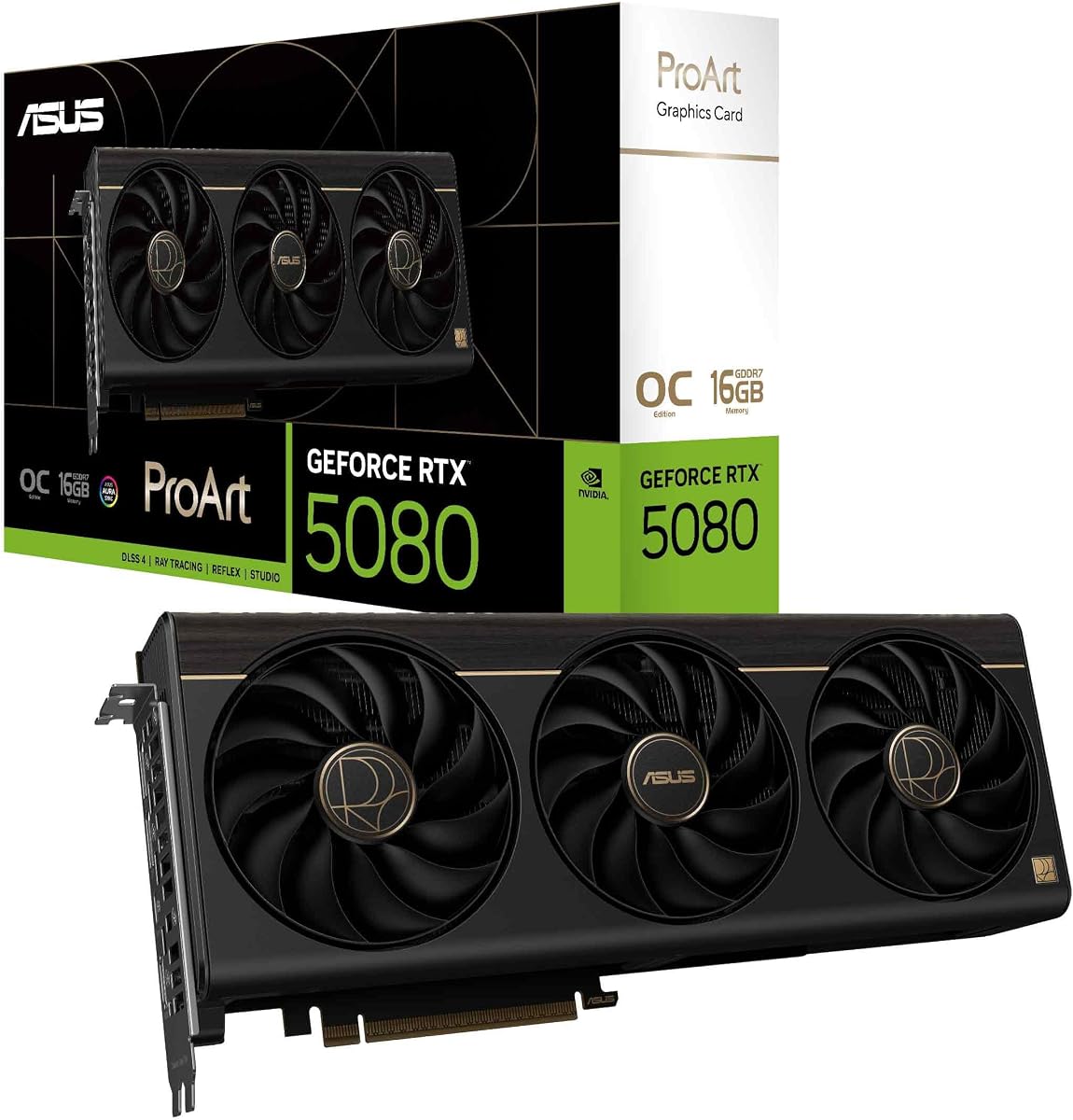
The ASUS ProArt RTX 5080 stands out as the top choice for serious video editors. It combines cutting edge Blackwell architecture with a design optimized for creative professionals who need reliability.
We may earn a commission when you buy through this link, at no additional cost to you.
Its standout feature is the integrated USB Type C port which enhances workflow versatility. The MaxContact heatsink and vapor chamber ensure sustained performance even during long rendering sessions without throttling.
While the price is higher than standard gaming cards the build quality justifies the cost. The minimalist design with brown wood laminate trim adds a unique aesthetic touch to your workstation setup.
This GPU is ideal for users who want top tier performance and premium aesthetics. If you work on complex color grades and effects this card delivers the power needed to finish projects quickly.
The phase change GPU thermal pad ensures optimal temperatures under heavy loads compared to traditional paste solutions.
With 1858 AI TOPS it accelerates neural filters and noise reduction features within Davinci Resolve significantly.
We may earn a commission when you buy through this link, at no additional cost to you.
The NVIDIA RTX PRO 6000 Blackwell is designed for enterprise level production environments. It offers an unmatched 96GB of GPU memory which is critical for working with massive datasets and multi camera 8K footage.
We may earn a commission when you buy through this link, at no additional cost to you.
Its double flow through cooling design optimizes airflow to sustain peak performance under heavy power loads. The support for MIG allows you to divide resources for multiple users or workloads securely on one card.
The main trade off is the cost and the OEM packaging which may require additional setup effort. It is not suited for casual users but is essential for facilities handling global scale video production.
If you run a high end post production facility this GPU is the ultimate tool. It ensures smooth playback of complex timelines and accelerates AI driven tasks with its fifth generation tensor cores.
With 96GB memory you can load entire project caches in VRAM preventing slowdowns from system RAM access.
PCIe Gen 5 support provides double the bandwidth of Gen 4 ensuring fast data transfer for large assets.
We may earn a commission when you buy through this link, at no additional cost to you.
The ASUS Dual RTX 5060 Ti brings the latest Blackwell architecture to a more accessible price point. It features 16GB of GDDR7 memory which is a sweet spot for 4K editing without overspending on high end cards.
We may earn a commission when you buy through this link, at no additional cost to you.
The dual BIOS feature lets you toggle between quiet and performance profiles giving you control over noise levels. The 0dB technology stops fans completely when the system is idle or under light loads for silence.
Trade offs include lower raw compute power compared to the 5080 but it handles most editing tasks well. It is perfect for freelancers or beginners who need a capable card without breaking the bank.
This card is highly recommended for small studios or individual creators on a budget. It balances cost and performance effectively ensuring your Davinci Resolve workflows remain smooth and responsive during standard projects.
Switch between BIOS profiles to prioritize silence during editing or speed during rendering as needed.
The 2.5 slot design maximizes compatibility allowing it to fit in smaller computer cases easily.
We may earn a commission when you buy through this link, at no additional cost to you.
The GIGABYTE RTX 5080 offers a powerful combination of architecture and cooling technology. It features the WINDFORCE cooling system which helps maintain high boost clocks during long rendering tasks without thermal throttling.
We may earn a commission when you buy through this link, at no additional cost to you.
With PCIe 5.0 support it is ready for future motherboard upgrades and faster data transfer speeds. The 16GB GDDR7 memory ensures that you can work with multiple high resolution clips simultaneously in your timeline.
This card leans more towards a gaming aesthetic but performs exceptionally well for creative work. It is a solid choice for users who want top tier performance without the premium cost of ProArt or workstation models.
Ideal for enthusiasts who need raw power for both editing and 3D work. It handles GPU accelerated effects smoothly and provides the headroom necessary for expanding your workflow in the future.
WINDFORCE cooling uses multiple fans to dissipate heat efficiently keeping temperatures low under load.
GDDR7 memory offers higher bandwidth than previous generations speeding up data processing significantly.
We may earn a commission when you buy through this link, at no additional cost to you.
The ASUS TUF Gaming RTX 5080 is built to last with military grade components and protective PCB coating. This design focus ensures the card can withstand the demands of a production environment over years of use.
We may earn a commission when you buy through this link, at no additional cost to you.
It uses phase change thermal pads which outlast traditional paste to ensure optimal thermal performance over time. The three Axial tech fans are optimized for airflow to keep the core cool during heavy rendering.
While it is a large card it offers great reliability for professional use cases. The robust construction makes it a safe bet for users who prioritize longevity and stability in their hardware setup.
Best for creators who need a card that can run reliably without failure. It handles the stress of long editing sessions well and provides consistent performance for your Davinci Resolve projects.
Dual ball fan bearings last up to twice as long as sleeve bearing designs for extended life.
Large fin arrays and phase change pads ensure heat is dissipated efficiently to prevent throttling.
We may earn a commission when you buy through this link, at no additional cost to you.
The NVIDIA Titan RTX remains a strong contender for prosumers needing large VRAM capacity. Its 24GB of GDDR6 memory allows for heavy 3D rendering and complex timelines that might strain standard consumer cards.
We may earn a commission when you buy through this link, at no additional cost to you.
Built on Turing architecture it brings a balance of rasterization and ray tracing performance. It is particularly effective for users who mix video editing with 3D modeling or complex GPU compute tasks.
However it is an older model compared to the Blackwell options and consumes more power. It is a good option if you find a reliable used unit but new purchases might favor the latest generation.
Suitable for studios that rely on legacy software support and high memory needs. It delivers robust performance for color grading and effects rendering making it a versatile tool for diverse workflows.
24GB VRAM handles large textures and frame buffers without resorting to system memory.
Tensor cores enable faster AI driven denoising and upscaling tasks within creative apps.
We may earn a commission when you buy through this link, at no additional cost to you.
The PNY Quadro RTX 4000 brings professional certification to an affordable workstation card. It features RTX technology that accelerates rendering and shading for immersive workflows in creative software.
We may earn a commission when you buy through this link, at no additional cost to you.
Its compact design fits easily into many workstation cases while providing robust performance for standard editing tasks. The ISV testing ensures it is stable and certified for professional applications like Davinci Resolve.
The main limitation is the 8GB memory which may not be enough for heavy 8K workloads. It is best suited for 1080p or 4K editing where stability and professional features are more important than raw power.
Ideal for professional editors who need certified drivers and stability. It offers a solid entry point into the Quadro lineup with reliable performance for daily production work.
ISV certification guarantees stable performance with professional creative software and drivers.
RT cores accelerate ray tracing to allow real time preview of lighting and shadows.
We may earn a commission when you buy through this link, at no additional cost to you.
The ASRock Radeon AI PRO R9700 offers a massive 32GB of memory which is rare in this class. It is designed for AI development and content creation providing ample bandwidth for complex workloads.
We may earn a commission when you buy through this link, at no additional cost to you.
Its blower style cooling is ideal for multi GPU workstation configurations where heat density is a concern. RDNA 4 architecture brings significant AI acceleration and visual computing features to AMD users.
While the blower fan can be loud in single card setups it ensures reliability in tight server racks. Check driver compatibility for your specific software to ensure full utilization of all features.
Best for users building multi GPU rigs or needing high memory without enterprise costs. It supports 8K editing and heavy rendering making it a powerful alternative to NVIDIA options.
256 bit bus with 32GB RAM ensures fast data flow for large video files.
Designed for multi GPU workstation and server configurations for scalability.
We may earn a commission when you buy through this link, at no additional cost to you.
The ASRock Arc Pro B60 provides a solid entry point for Intel based workstations. Its 24GB memory supports AI inference and 3D rendering with dedicated media transcoders for AV1 support.
We may earn a commission when you buy through this link, at no additional cost to you.
Twin Media Transcoders allow dual encode engines to export videos quickly in high resolution formats. It supports up to four 8K displays which is useful for multi monitor editing setups.
Driver maturity is improving but may require careful selection for optimal stability with Resolve. The 0dB silent fan feature helps keep noise levels down during idle or light editing tasks.
Good for users building an Intel based workstation with multiple displays. It is a capable card for encoding and rendering tasks with the advantage of modern media engine support.
Dual encode engines speed up export times for AV1 H.264 and HEVC formats.
Four DisplayPort 2.1 outputs enable expansive multi monitor workflows for editing.
We may earn a commission when you buy through this link, at no additional cost to you.
The GIGABYTE Radeon RX 9070 XT offers excellent value for users needing high clock speeds. Its 16GB GDDR6 memory handles modern editing requirements well with support for the latest PCIe 5.0 interface.
We may earn a commission when you buy through this link, at no additional cost to you.
It features WINDFORCE cooling with Hawk Fans to maintain stable boost clocks during long sessions. This card is a strong alternative for those who prefer AMD GPUs and need a powerful budget option.
While it lacks specific NVENC hardware it compensates with raw rasterization power. The RGB lighting adds a visual touch but the core focus is on performance and thermal efficiency.
Recommended for gamers transitioning into video editing or budget conscious professionals. It handles 4K timelines effectively and offers a good balance of features and price for your setup.
Server grade thermal conductive gel ensures heat moves efficiently to the heatsink.
PCIe 5.0 support doubles bandwidth over previous generations for faster data transfer.
We may earn a commission when you buy through this link, at no additional cost to you.
Selecting the right GPU requires understanding your specific workflow needs and budget constraints.
VRAM is critical for high resolution timelines and complex effects. Aim for at least 16GB to handle 4K smoothly and 32GB or more for 8K work.
Always choose a card with more memory than your baseline needs to future proof your system.
Newer architectures offer better efficiency and AI features. Look for Blackwell or RDNA 4 to leverage the latest acceleration technologies.
Modern architectures provide better support for current software updates and encoding formats.
Ensure the GPU drivers are optimized for Davinci Resolve. NVIDIA cards generally offer broader support while AMD cards are improving rapidly.
Check software requirements for specific features like neural engines to avoid compatibility issues.
Rendering generates significant heat so effective cooling is necessary for sustained performance. Look for vapor chambers or multiple fans to prevent thermal throttling.
Good cooling ensures the card stays fast and reliable during long editing sessions.
High performance cards draw more power and may need specialized connectors. Verify your power supply has enough wattage and the correct PCIe connectors before buying.
Adequate power ensures stable performance and prevents system crashes under load.
Workstations often have limited space so check the card length and slot count. Ensure your case has enough clearance for the GPU to fit properly.
Compact cards are essential if you are building in a small form factor chassis.
Determine how much of your budget goes to the GPU versus other components. Balance high end performance with cost efficiency for your specific project types.
Avoid overspending on features you will not use and focus on core performance metrics.
Consider upcoming software features and timeline resolutions. Investing in newer interfaces like PCIe 5.0 helps the card stay relevant longer.
Plan for future needs by selecting a card that grows with your editing demands.
Keep your graphics drivers updated to the latest stable version for optimal compatibility. Visit the manufacturer website to download the professional drivers for workstation cards.
Clean dust from vents regularly to prevent overheating. Use compressed air to blow out dust every few months to maintain cooling efficiency.
Monitor temperatures during heavy rendering to ensure the card stays within safe limits. Adjust fan curves if needed to balance noise and cooling performance.
For 4K editing aim for at least 16GB of VRAM to handle timelines smoothly. If you work with 8K or heavy effects consider 32GB or more for better performance and stability.
AMD GPUs are becoming excellent choices for Resolve especially with RDNA 4 architecture. They offer strong performance and support for OpenCL but check specific feature compatibility first.
NVIDIA often has broader support for specific features like neural filters and noise reduction. AMD is catching up and offers great value but test your specific workflow for best results.
Workstation GPUs offer certified drivers and stability for professional environments. Gaming GPUs often work well and provide better value for individual creators who need performance.
Effective cooling prevents the card from slowing down under heavy loads. Cards with better cooling sustain higher clock speeds for longer rendering times without overheating.
PCIe 5.0 offers higher bandwidth for faster data transfer between CPU and GPU. While not strictly necessary yet it helps future proof your system against new high speed assets.
High end cards require at least 850W with proper PCIe connectors. Check the specific wattage recommendation for your card model to ensure stable power delivery.
Davinci Resolve can utilize multiple GPUs for rendering and effects. Ensure your power supply and motherboard support multi GPU setups for best results.
The ASUS ProArt RTX 5080 leads the list with its blend of performance and professional design. It suits creators who want reliability and top tier features for complex projects.
Prioritize memory capacity and architecture to match your workflow needs. A balance of VRAM and cooling ensures smooth playback and efficient rendering times.
Prices change often so verify current listings before finalizing your purchase. Select the card that fits your specific editing requirements for the best results.